
Rademacher 36500512
Rademacher 36500512 Built-in Timer Instruction Manual
Awoṣe: 36500512
Ọrọ Iṣaaju
This manual provides detailed instructions for the installation, operation, and maintenance of your Rademacher 36500512 Built-in Timer. Please read this manual thoroughly before installation and use to ensure safe and efficient operation of the device. Keep this manual for future reference.
Ọja Awọn ẹya ara ẹrọ
The Rademacher 36500512 Built-in Timer offers advanced functionality for automated control of electrical devices. Key features include:
- Daily and Weekly Programming: Set specific on/off times for each day of the week.
- Daylight-Dependent Program (Astro Function): Automatically adjusts switching times based on sunrise and sunset.
- Dawn/Dusk Sensor Compatibility: Connect an external sensor for enhanced light-dependent control.
- Àyípadà Àkókò Ìgbà Ẹ̀ẹ̀rùn/Ìgbà Òtútù Àìfọwọ́sowọ́pọ̀: The timer automatically adjusts for daylight saving time.
- Batiri Afẹyinti: Retains settings and time during power outages.
Awọn Itọsọna Aabo pataki
IKILO: Electrical installation should only be performed by a qualified electrician in accordance with local wiring regulations and standards. Failure to follow these instructions may result in electric shock, fire, or serious injury.
- Always disconnect power at the main circuit breaker before installing or servicing the device.
- Ma ṣe fi sori ẹrọ ni tutu tabi damp awọn ipo.
- Rii daju pe gbogbo awọn asopọ wa ni aabo ati idabobo daradara.
- Má ṣe kọjá ìwọ̀n ẹrù tó pọ̀ jùlọ ti aago náà.
- Pa ẹrọ kuro lati awọn ọmọde.
Package Awọn akoonu
Jọwọ ṣayẹwo pe gbogbo awọn nkan wa ninu package:
- Rademacher 36500512 Built-in Timer Unit
- Ilana itọnisọna
- Mounting Screws (if applicable)
Fifi sori ẹrọ ati Eto Ibẹrẹ
The Rademacher 36500512 is designed for flush-mounted installation. It is recommended that installation be carried out by a qualified electrician.
1. Iṣagbesori Aago
- Ge asopọ agbara: Before starting, ensure the main power supply to the installation area is switched off at the circuit breaker.
- Ṣetan Apoti Odi: The timer is designed to fit into a standard flush-mounted wall box.
- Asopọmọra: Connect the electrical wires to the terminals on the back of the timer according to the wiring diagram provided in the separate wiring instructions (not part of this manual). Ensure correct phase, neutral, and load connections.
- Ṣe aabo Ẹka naa: Carefully place the timer into the wall box and secure it using the provided mounting screws.
- So Igbimo Iwaju: Snap the front panel with the display and buttons onto the mounted unit.

Aworan 1: Iwaju view of the Rademacher 36500512 Built-in Timer with its unlit display and control buttons. This shows the overall aesthetic and button layout before power-up.
2. Initial Power-Up and Basic Settings
- Pada Agbara pada: Once installation is complete and secure, restore power at the main circuit breaker.
- Lilo akọkọ: The display will illuminate. You may need to set the current time and date.
- Eto Aago ati Ọjọ: Lo awọn M (Menu) button to navigate and the Soke / Isalẹ arrows to adjust values. Confirm with OK. Refer to the "Operating Instructions" section for detailed navigation.
Awọn ilana Iṣiṣẹ
The Rademacher 36500512 timer is controlled via its integrated display and buttons. Familiarize yourself with the controls:
- Bọtini M: Accesses the main menu and navigates through options.
- Awọn itọka oke/isalẹ: Adjust values, scroll through menu items, or manually control the connected device (e.g., blinds).
- Bọtini O dara: Jẹrisi awọn yiyan ati fi eto pamọ.
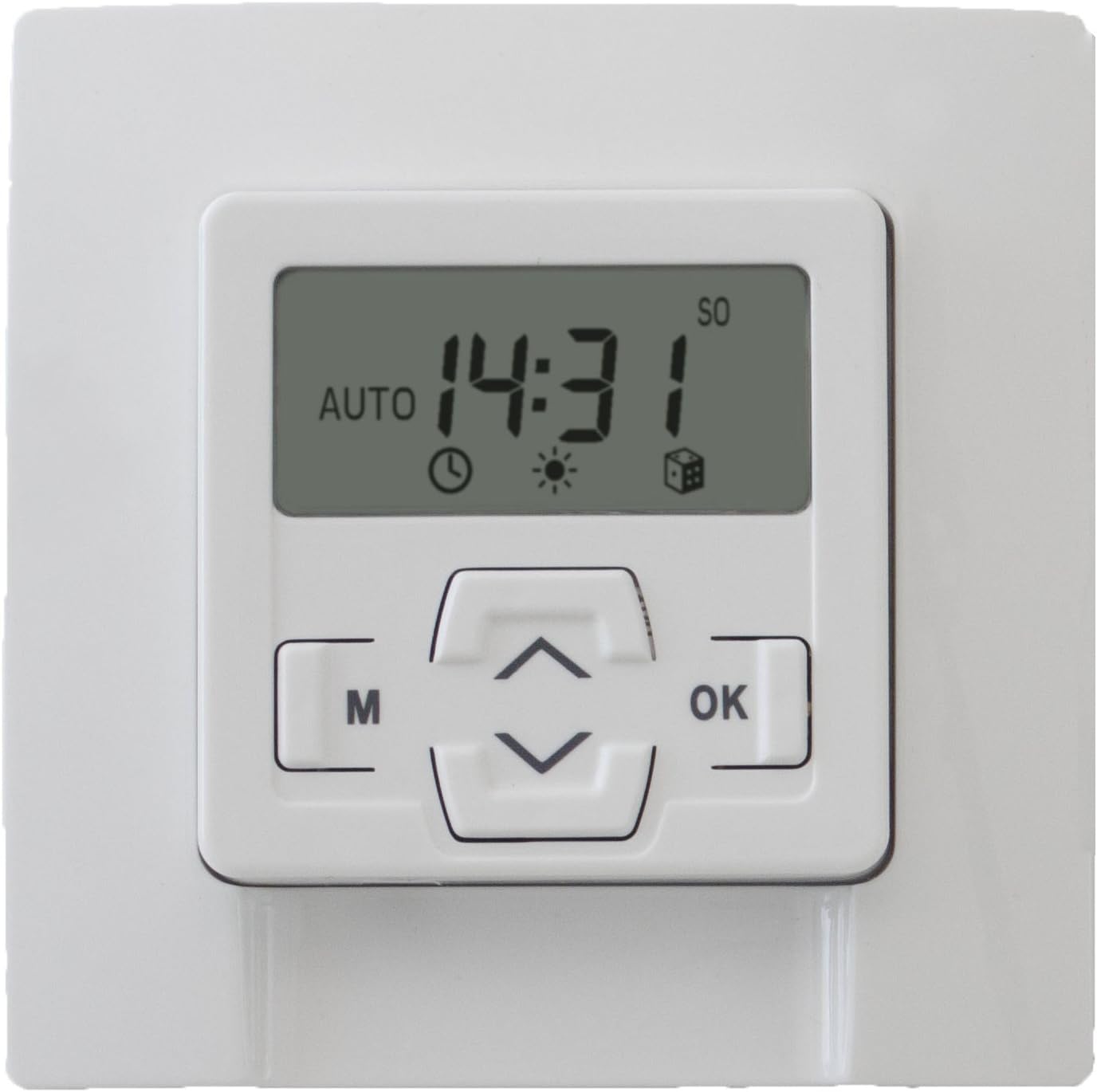
Aworan 2: Iwaju view of the Rademacher 36500512 Built-in Timer with its display illuminated, showing the current time (14:31) and indicating 'AUTO' mode, along with various status icons.
1. Eto Lọwọlọwọ Time ati Ọjọ
- Tẹ M lati tẹ akojọ aṣayan akọkọ sii.
- Navigate using Soke / Isalẹ arrows to find "Time/Date" or similar option. Press OK.
- Adjust hours, minutes, day, month, and year using Soke / Isalẹ arrows and confirm each with OK.
- Exit the menu by pressing M repeatedly or waiting for timeout.
2. Programming Daily/Weekly Schedules
- Tẹ M lati tẹ akojọ aṣayan akọkọ sii.
- Select "Program" or "Schedule" and press OK.
- Choose between "Daily Program" or "Weekly Program".
- For each desired switching time (e.g., open, close), set the specific time and day(s) of the week. Use Soke / Isalẹ lati ṣatunṣe ati OK lati jẹrisi.
- Save all settings before exiting the programming menu.
3. Astro Function (Daylight-Dependent Control)
The Astro function automatically adjusts switching times based on sunrise and sunset, which are calculated based on your geographical location (if configured) or a default setting. This provides a natural control rhythm.
- Access the main menu with M.
- Select "Astro" or "Daylight Program" and press OK.
- Activate the function and configure any offset times (e.g., close 15 minutes after sunset) if available.
- Ensure your location settings are accurate for optimal performance.
4. Yiyọ Afowoyi
You can temporarily override the programmed schedule at any time:
- Tẹ awọn Up or Isalẹ arrow buttons to manually activate or deactivate the connected device.
- The timer will return to its programmed schedule after the manual action is completed or after a set period, depending on the specific model's configuration.
Itoju
The Rademacher 36500512 Built-in Timer requires minimal maintenance.
- Ninu: Wipe the surface of the timer with a soft, dry cloth. Do not use abrasive cleaners or solvents.
- Batiri Afẹyinti: The internal backup battery ensures settings are retained during power outages. This battery is typically long-lasting and not user-replaceable. If the timer consistently loses settings after power interruptions, professional service may be required.
Laasigbotitusita
| Isoro | Owun to le Fa | Ojutu |
|---|---|---|
| Ifihan aago naa ṣofo. | Ko si ipese agbara. | Check circuit breaker and wiring connections. Ensure power is restored. |
| Timer does not switch at programmed times. | Incorrect programming; Manual override active; Astro function interfering. | Review programmed schedules. Deactivate manual override. Check Astro settings. Ensure the timer is in automatic mode. |
| Time/Date is incorrect after power outage. | Backup battery depleted or faulty. | Reset time and date. If issue persists, contact customer support for service. |
| Awọn bọtini ko dahun. | Àṣìṣe ìgbà díẹ̀ lórí kọ̀ǹpútà; Ìbàjẹ́ ara. | Try cycling power to the unit (turn off at breaker, wait 30 seconds, turn on). If issue persists, contact customer support. |
Awọn pato
| Brand | Rademacher |
| Nọmba awoṣe | 36500512 |
| Voltage | 230 Volts |
| Ohun elo | Ṣiṣu |
| Awọn iwọn Ọja (L x W x H) | 4.8 x 8 x 8 cm |
| Iwọn Nkan | 159 g |
| Àwọ̀ | Ultra-white |
Atilẹyin ọja ati Onibara Support
Your Rademacher 36500512 Built-in Timer is covered by a manufacturer's warranty. Please refer to the warranty card included with your purchase for specific terms and conditions.
For technical assistance, troubleshooting not covered in this manual, or warranty claims, please contact Rademacher customer support through their official webaaye tabi alagbata ti o ti ra ọja naa.
Ask a question about this manual
Ask about setup, troubleshooting, compatibility, parts, safety, or missing instructions. Manuals+ will review the question and use this page’s manual context to help answer it.