
Ọrọ Iṣaaju
This manual provides instructions for the Vivanco RR 220 remote control, designed for compatibility with Samsung Smart TVs. Please read this manual thoroughly before using the device to ensure proper operation and to understand its features.
Package Awọn akoonu
- Vivanco RR 220 Remote Control
- Ilana Olumulo yii
Akiyesi: Ko si awọn batiri ati pe o gbọdọ ra lọtọ.
Ṣeto
1. Fifi sori batiri
- Wa yara batiri ni ẹhin isakoṣo latọna jijin.
- Gbe ideri batiri si isalẹ tabi tẹ latch ki o gbe soke lati ṣii.
- Insert two (2) AAA batteries, ensuring the positive (+) and negative (-) terminals align with the markings inside the compartment.
- Rọpo ideri batiri naa, ki o rii daju pe o tẹ ni aabo si ipo rẹ.
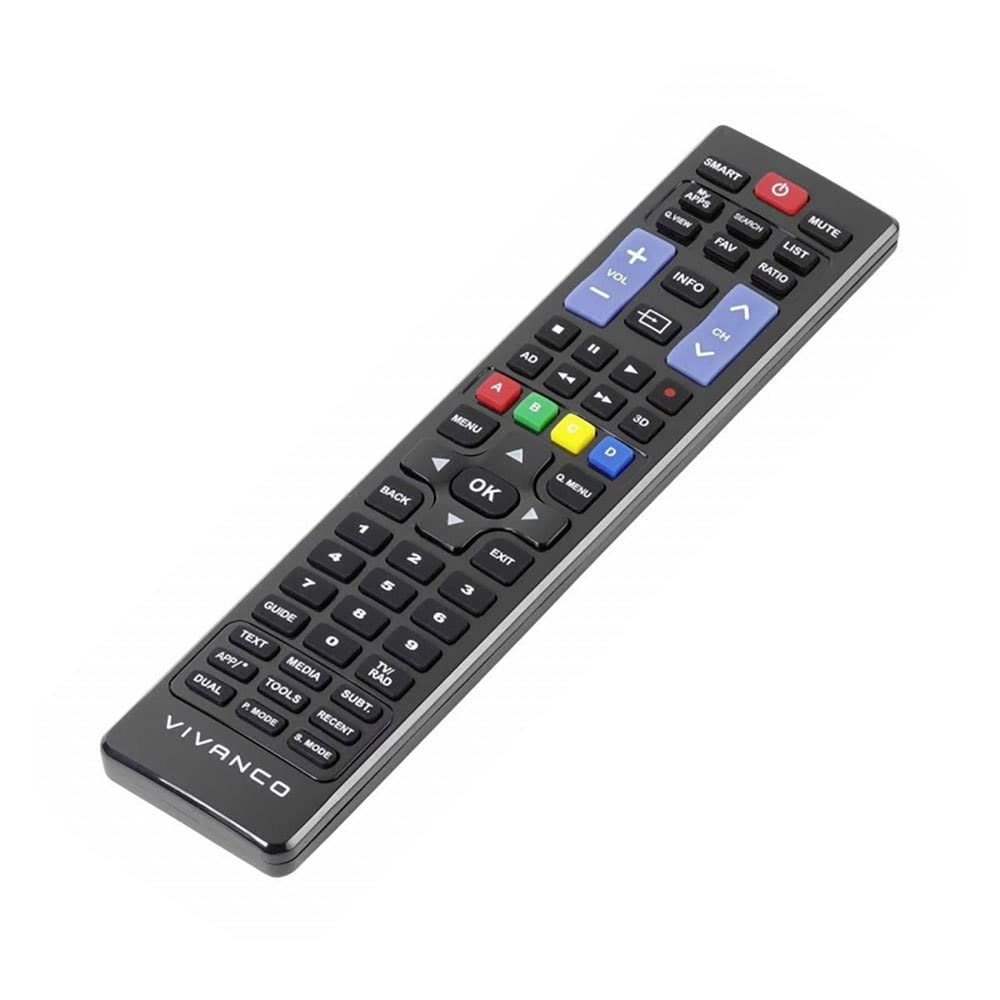
Aworan 1: Vivanco RR 220 remote control. This image displays the front of the remote control, highlighting its 57 buttons and ergonomic design. The battery compartment is located on the reverse side.
2. Lilo akọkọ
The Vivanco RR 220 is pre-programmed for Samsung Smart TVs. No additional setup or pairing is typically required. Once batteries are installed, point the remote control towards your Samsung Smart TV and press the Power button to test functionality.
Awọn ilana Iṣiṣẹ
The remote control features 57 buttons, providing comprehensive control over your Samsung Smart TV and compatible devices. Below are common button functions:
- Bọtini agbara: Tan TV si tan tabi paa.
- Awọn bọtini nọmba (0-9): For direct channel selection or data input.
- Iwọn didun Soke/Isalẹ: Ṣe atunṣe iwọn didun ohun.
- Ikanni Soke/Isalẹ: Ayipada TV awọn ikanni.
- Bọtini Mute: Ó pa ohùn tẹlifíṣọ̀n náà lẹ́nu mọ́.
- Paadi lilọ kiri (Soke, Isalẹ, Osi, ọtun, Tẹ sii): Lo lati lilö kiri ni awọn akojọ aṣayan ko si yan awọn aṣayan.
- Bọ́tìnì Ìpadà/Pada: Pada si iboju iṣaaju tabi akojọ aṣayan.
- Bọ́tìnì Ilé/Ilé Ọlọ́gbọ́n: Accesses the Smart Hub or main menu of your Samsung Smart TV.
- Orisun/Bọtini titẹ sii: Yan awọn orisun titẹ sii (HDMI, AV, ati bẹbẹ lọ).
- Awọn bọtini Awọ (Pupa, Alawọ ewe, Yellow, Blue): For specific functions within certain applications or menus, as indicated on-screen.
- Àwọn Ìṣàkóso Ìṣiṣẹ́padà (Ṣíṣeré, Dúró, Dúró, Yára Síwájú, Sẹ́yìn): Controls media playback on compatible devices or apps.
For specific functions related to your TV model, refer to your Samsung TV's user manual.
Itoju
Ninu Iṣakoso Latọna jijin
- Use a soft, dry cloth to wipe the surface of the remote control.
- Fun idoti alagidi, die-die dampen asọ pẹlu omi tabi a ìwọnba, ti kii-abrasive regede.
- Má ṣe lo àwọn kẹ́míkà líle, àwọn ohun èlò ìfọ́, tàbí àwọn ohun èlò ìfọmọ́ra, nítorí pé wọ́n lè ba ìparí tàbí àwọn ohun èlò inú remote náà jẹ́.
- Rii daju pe ko si omi ti o wọ inu isakoṣo latọna jijin nipasẹ awọn ela bọtini tabi yara batiri naa.
Batiri Rirọpo
Replace batteries when the remote's response becomes sluggish or it stops functioning. Always replace both batteries simultaneously with new AAA alkaline batteries. Do not mix old and new batteries or different types of batteries.
Laasigbotitusita
| Isoro | Owun to le Fa | Ojutu |
|---|---|---|
| Isakoṣo latọna jijin ko ṣiṣẹ. |
|
|
| Some buttons do not function. |
|
|
Awọn pato
- Brand: Vivanco
- Orukọ awoṣe: RR 220
- Nọmba Awoṣe Ọja: 38016
- Awọn ẹrọ ibaramu: Home cinema, DVD/Blu-ray player, Television (Samsung Smart TV compatible)
- Imọ-ẹrọ Asopọmọra: Wireless IR (Infrared)
- Nọmba Awọn bọtini: 57
- Iru Batiri: 2 x AAA (A gbani niyanju Alkali)
- Awọn batiri To wa: Rara
- Awọn iwọn ọja: 18 x 4.8 x 2.3 cm
- Iwọn Ọja: 80 g
- Ibiti o pọju: 15 mita
- Awọn ẹya pataki: IPTV, DVB-T, HDTV compatibility