
1. Ifihan
Thank you for choosing the Fonestar AS-24U Hi-Fi USB/SD/MP3 Amplifier. This manual provides essential information for the safe and efficient operation of your device. Please read it thoroughly before use and retain it for future reference.
2. Awọn ilana aabo
- Ibi ti ina elekitiriki ti nwa: Rii daju pe amplifier is connected to a power source matching the specified voltage (230V).
- Afẹfẹ: Ma ṣe dina awọn ṣiṣi atẹgun. Gba aaye to peye ni ayika ẹyọ naa fun sisan afẹfẹ to dara lati ṣe idiwọ igbona.
- Ọrinrin: Pa awọn amplifier away from water, moisture, and high humidity environments. Do not expose it to dripping or splashing.
- Awọn orisun Ooru: Yẹra fún gbígbé ẹ̀rọ náà sí ẹ̀gbẹ́ àwọn orísun ooru bíi radiators, àwọn ìwé ìforúkọsílẹ̀ ooru, àwọn stovu, tàbí àwọn ẹ̀rọ míràn tí ń mú ooru jáde.
- Ninu: Disconnect the power cord before cleaning. Use a dry, soft cloth. Do not use liquid cleaners or aerosol cleaners.
- Ṣiṣẹ: Maṣe gbiyanju lati ṣiṣẹ ọja yi funrararẹ. Tọkasi gbogbo iṣẹ si oṣiṣẹ oṣiṣẹ ti o peye.
- Nkan/Iwọle Omi: Maṣe Titari awọn nkan ti iru eyikeyi sinu ọja yii nipasẹ awọn ṣiṣi nitori wọn le fi ọwọ kan voltage ojuami tabi kukuru-jade awọn ẹya ara ti o le ja si ni a ina tabi ina-mọnamọna.
3. Ọja Ipariview
3.1 Igbimọ iwaju
The front panel features controls for power, input selection, volume adjustment, and USB/SD media playback. It also includes a display for media information.
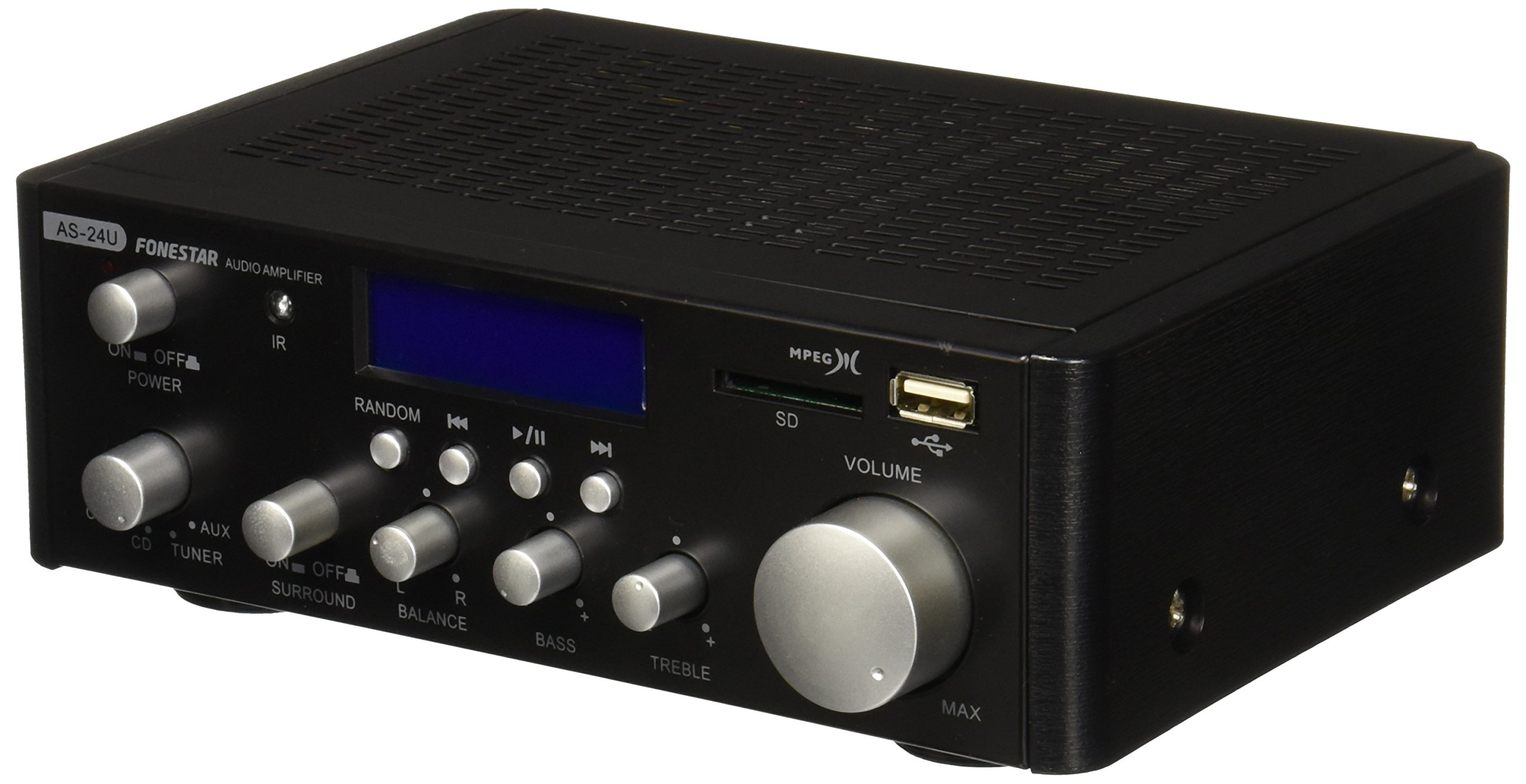
Aworan 1: Iwaju view of the Fonestar AS-24U amplifier, showing the main controls and display.
3.2 ru Panel
The rear panel provides all necessary connections for audio input sources, speaker outputs, and power.

Aworan 2: Ẹyin view of the Fonestar AS-24U amplifier, detailing input/output ports and power connection.
- INPUT (AUX, TUNER, CD): RCA stereo inputs for connecting external audio sources.
- SPEAKER OUT (STEREO): Spring clip terminals for connecting passive speakers (4-8 Ω).
- SPEAKER OUT (SURROUND): Additional spring clip terminals for surround speakers (8 Ω).
- AGBARA NINU: AC power input for the main power cable.
- VOLTAGE YAN: Switch for selecting between 115V and 230V power input. Ensure this is set correctly for your region.
3.3 Iṣakoso latọna jijin
Iṣakoso latọna jijin ti a fi kun gba laaye lati ṣiṣẹ ni irọrun ti ẹrọ naa amplifier's media playback functions.
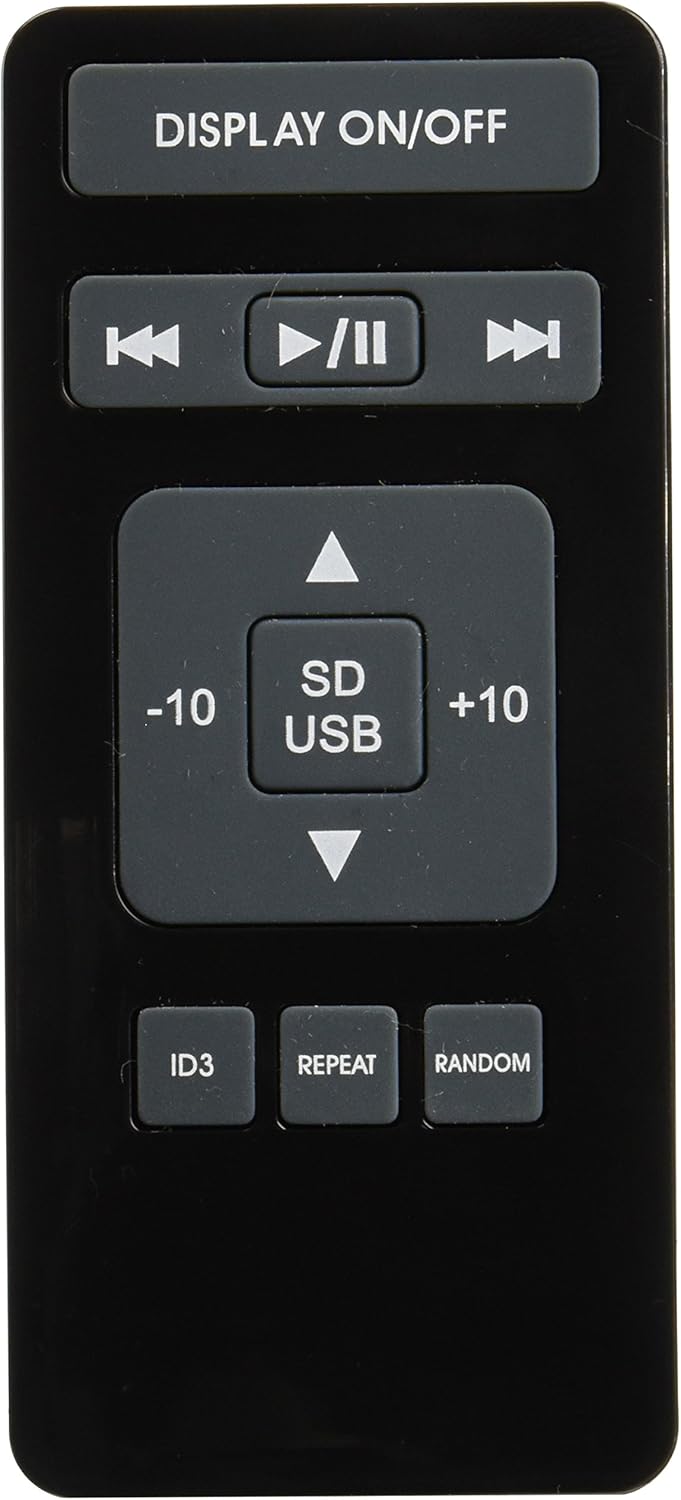
Image 3: Remote control for the Fonestar AS-24U amplifier, showing buttons for media playback and display control.
- Ṣe afihan ON / PA: Toggles the front panel display.
- PLAY/PAUSE, PREVIOUS/NEXT: Controls for media playback.
- SD/USB: Selects between SD card and USB drive as the media source.
- -10/+10: Skips tracks by 10.
- ID3: Displays ID3 tag alaye fun MP3 files.
- Tun: Toggles repeat modes (e.g., repeat one, repeat all).
- ID: Toggles random playback.
4. Eto
4.1 Nsopọ Agbọrọsọ
- Rii daju pe amplifier ti wa ni pipa ati yọọ kuro.
- Connect your passive speakers to the SPEAKER OUT terminals on the rear panel.
- Match the positive (+) terminal on the amplifier to the positive (+) terminal on your speaker, and the negative (-) to the negative (-).
- For stereo speakers, use the 4-8 Ω terminals. For surround speakers, use the 8 Ω terminals. Ensure your speakers' impedance matches the amplifier ká pato.
4.2 Nsopọ Awọn orisun ohun
- Connect your audio devices (e.g., CD player, tuner, auxiliary device) to the corresponding RCA INPUT jacks (CD, TUNER, AUX) on the rear panel.
- Ensure left and right channels are correctly matched (red for right, white for left).
4.3 Asopọ agbara
- Ṣe àyẹ̀wò FOL náàTAGE SELECTOR switch on the rear panel is set to the correct voltage for your region (e.g., 230V).
- Connect the power cable to the POWER IN socket on the rear panel and then to a suitable wall outlet.
5. Awọn ilana Iṣiṣẹ
5.1 Titan / Pa a
Press the power button on the front panel to turn the amplifier on or off. A soft start protection circuit is integrated.
5.2 Yiyan Orisun Input
Use the input selector knob or buttons on the front panel to choose between CD, TUNER, AUX, USB, or SD inputs.
5.3 Siṣàtúnṣe iwọn
Rotate the main volume knob on the front panel to adjust the overall sound level. Start with a low volume and gradually increase it to a comfortable listening level.
5.4 Sisisẹsẹhin USB/SD
- Fi awakọ filasi USB tabi kaadi SD ti o ni ohun MP3 sinu filesinu iho ti o yẹ lori iwaju nronu.
- Select the USB or SD input using the input selector.
- Use the playback controls (Play/Pause, Previous/Next) on the front panel or remote control to manage your music.
- The remote control allows for additional functions like skipping 10 tracks (+10/-10), displaying ID3 tags, repeating tracks, and random playback.
6. Itọju
6.1 Ninu
Lati nu awọn amplifier, first unplug it from the power outlet. Use a soft, dry cloth to wipe down the exterior surfaces. Do not use abrasive cleaners, waxes, or solvents as they may damage the finish.
6.2 Ibi ipamọ
Ti o ba titoju awọn amplifier for an extended period, ensure it is unplugged, clean, and stored in a cool, dry place away from direct sunlight and extreme temperatures.
7. Laasigbotitusita
- Ko si Agbara:
- Check if the power cable is securely connected to both the amplifia ati ibudo ogiri.
- Rii daju pe iṣan ogiri jẹ iṣẹ-ṣiṣe.
- Ṣe àyẹ̀wò FOL náàTAGE SELECTOR switch is set correctly.
- Ko si Ohun:
- Jẹrisi pe a yan orisun titẹ sii to tọ.
- Ṣàyẹ̀wò gbogbo àwọn ìsopọ̀ agbọrọsọ fún polarity tó yẹ àti ìbáramu tó dájú.
- Rii daju pe iwọn didun ti wa ni titan ko si dakẹ.
- Ṣe idanwo pẹlu orisun ohun afetigbọ miiran.
- Ohun Yiyi:
- Din iwọn didun dinku.
- Check speaker impedance compatibility.
- Rí i dájú pé àwọn okùn ohùn kò bàjẹ́ àti pé wọ́n so wọ́n pọ̀ dáadáa.
- USB/SD Playback Issues:
- Ensure the USB drive or SD card is formatted to a compatible file eto (fun apẹẹrẹ, FAT32).
- Jẹrisi pe ohun naa files wa ni ọna kika MP3.
- Gbiyanju awakọ USB miiran tabi kaadi SD kan.
8. Awọn pato
| Brand | FONSTAR |
| Awoṣe | AS-24U |
| Stereo Power Output | 25 + 25 W max, 15 + 15 W RMS (4 Ω), 12 + 12 W RMS (8 Ω) |
| Surround Power Output | 10 + 10 W max, 6 + 6 W RMS (8 Ω) |
| Awọn igbewọle | 3 stereo (CD, Tuner, AUX), 2 x RCA 400 mV |
| Awọn aabo | Ibẹrẹ asọ, Circuit kukuru, apọju |
| Voltage | 230 Volts |
| Awọn iwọn (L x W x H) | 5 x 5 x 10 cm (isunmọ 50 x 50 x 100 mm) |
| Iwọn | 1.9 kg |
| Agbọrọsọ Asopọmọra | Ti firanṣẹ |
9. Atilẹyin ọja ati Support
This Fonestar AS-24U amplifier comes with a standard manufacturer's warranty. Please refer to the warranty card included with your purchase for specific terms and conditions. For technical support, service, or warranty claims, please contact your retailer or the official Fonestar customer service.