
Supersonic SC-25
SuperSonic SC-25 2.0 Channel DVD Player with USB Input User Manual
Awoṣe: SC-25
Ọrọ Iṣaaju
O ṣeun fun riraasing the SuperSonic SC-25 2.0 Channel DVD Player with USB Input. This manual provides essential information for the safe and efficient operation of your new device. Please read it thoroughly before use and retain it for future reference.
Awọn iṣọra Aabo
- Ma ṣe fi ẹrọ naa han si ojo tabi ọrinrin lati yago fun ina tabi mọnamọna.
- Maṣe ṣii casing. Tọkasi gbogbo iṣẹ si oṣiṣẹ oṣiṣẹ.
- Rii daju pe fentilesonu to dara ni ayika ẹyọ naa.
- Yẹra fún gbígbé ohun èlò náà sí orí àwọn ibi tí kò dúró dáadáa.
- Ge asopọ okun agbara nigba iji manamana tabi nigba lilo fun igba pipẹ.
Package Awọn akoonu
Before setup, please verify that all items are present:
- 1 SuperSonic SC-25 DVD Player Unit
- 1 Iṣakoso latọna jijin
- 1 Itọsọna olumulo (iwe yii)
- Okun agbara
- Audio/Video (AV) Cable
Awọn ilana iṣeto
1. Nsopọ si Telifisonu kan
- Ensure both the DVD player and your television are powered off.
- Connect one end of the AV cable (red, white, yellow connectors) to the corresponding output jacks on the back of the DVD player.
- Connect the other end of the AV cable to the corresponding input jacks on your television.
- For optimal video quality, ensure the television input is set to the correct AV channel (e.g., Video 1, AV1). The player supports NTSC video format.
2. Asopọ agbara
- Plug the power cable into the AC IN port on the back of the DVD player.
- So opin keji okun ina sinu ibudo ina deede.
3. Agbara akọkọ Lori
- Press the Power button on the front panel of the DVD player or on the remote control.
- Turn on your television and select the correct input source (e.g., AV1, Video 1) to see the DVD player's display.
Awọn ilana Iṣiṣẹ
1. Sisisiṣẹpọ disiki
- Press the OPEN/CLOSE button on the front panel or remote control to open the disc tray.
- Place a compatible disc (DVD, CD, VCD, SVCD, MP3, Picture CD, CD-R, CD-RW) onto the disc tray with the label side facing up.
- Press the OPEN/CLOSE button again to close the disc tray. The player will automatically begin reading the disc.
- Lo awọn bọtini PLAY, PAUSE, STOP, FAST FORWARD, ati REWIND lori iṣakoso latọna jijin lati ṣakoso ṣiṣiṣẹsẹhin.
- The player supports multi-level fast forward and backward scan functionalities.
2. USB Sisisẹsẹhin
- Insert a USB flash drive into the USB input port on the front of the DVD player.
- The player should automatically detect the USB device and display its contents. If not, use the SOURCE or USB button on the remote to switch to USB mode.
- Lilö kiri nipasẹ rẹ files using the arrow keys and SELECT/ENTER button on the remote.
- The player supports MP3 file format for audio playback.
3. Language and Subtitle Settings
- During DVD playback, press the AUDIO button on the remote to cycle through available audio languages (up to 8 languages supported).
- Press the SUBTITLE button on the remote to cycle through available subtitle languages (up to 32 subtitles supported).
Itoju
1. Ninu Unit
- Wipe the exterior of the DVD player with a soft, dry cloth.
- Do not use liquid cleaners or aerosol sprays, as they may damage the finish or internal components.
2. Cleaning Disiki
- Mu awọn disiki mu nipasẹ awọn egbegbe wọn lati yago fun awọn ika ọwọ.
- If a disc is dirty, wipe it gently from the center outwards with a soft, lint-free cloth.
- Do not use abrasive cleaners or solvents on discs.
3. Ibi ipamọ
- Tọ́jú ẹ̀rọ orin DVD náà sí ibi tí ó tutù tí ó sì gbẹ, tí kò sí ìmọ́lẹ̀ oòrùn tààrà àti ooru tó le koko.
- When not in use, store discs in their cases to protect them from dust and scratches.
Laasigbotitusita
| Isoro | Owun to le Fa | Ojutu |
|---|---|---|
| Ko si agbara | Okun agbara ko sopọ; Agbara iṣan ko ṣiṣẹ. | Rii daju pe okun agbara ti wa ni edidi ni aabo. Ṣe idanwo iṣan jade pẹlu ẹrọ miiran. |
| Ko si aworan tabi ohun | AV cables incorrectly connected; Incorrect TV input selected. | Check AV cable connections. Select the correct input source on your TV. |
| Disiki ko dun | Disc is dirty or scratched; Disc is incompatible; Disc inserted incorrectly. | Clean the disc. Ensure the disc type is supported. Insert disc with label side up. |
| Ẹrọ USB ko mọ | USB device not properly inserted; Unsupported file format on USB. | Re-insert the USB device. Ensure files wa ni ọna kika MP3. |
Awọn pato
- Brand: Supersonic
- Nọmba awoṣe: SC-25
- Media Iru: CD, DVD (Compatible with DVD/CD/VCD/SVCD/MP3/Picture/CD-R/CD-RW)
- Imọ-ẹrọ Asopọmọra: Powerline (Implies standard AC power connection)
- Àwọ̀: Dudu
- Ìwọ̀n Nkan: 1.9 iwon
- Awọn ẹrọ ibaramu: Tẹlifisiọnu
- Input Video Compatibility: NTSC
- Nọmba awọn ikanni: 2
- Ọna fidio Analog: NTSC
- Iru Adari: Isakoṣo latọna jijin
- File Format (USB): MP3
- UPC: 639131000254
- Olupese: SUPERSONIC INC.
- Awọn iwọn idii: 7.874 H x 24.13 L x 24.13 W (centimeters)
- Ìwúwo Apo: 2.160 iwon
- Ilu isenbale: China
Atilẹyin ọja ati Support
This SuperSonic SC-25 DVD Player is covered by a Atilẹyin ọja olupese. For specific details regarding warranty terms and conditions, please refer to the documentation included with your purchase or contact SuperSonic customer support.
For technical assistance or customer service inquiries, please visit the official SuperSonic website or contact their support channels. Keep your purchase receipt for warranty claims.
Ọja Pariview
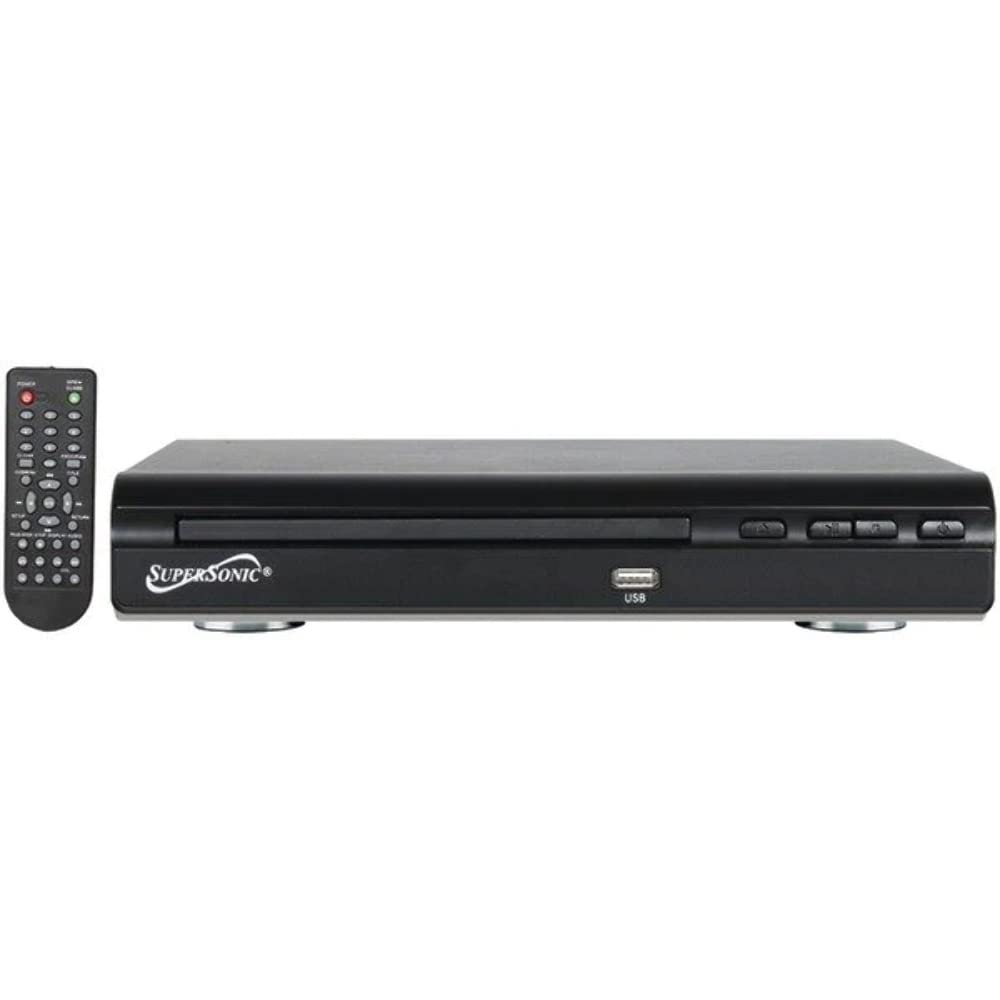
Iwaju view of the SuperSonic SC-25 DVD player, showing the disc tray, USB port, and control buttons.
Ask a question about this manual
Ask about setup, troubleshooting, compatibility, parts, safety, or missing instructions. Manuals+ will review the question and use this page’s manual context to help answer it.