
1. Ifihan
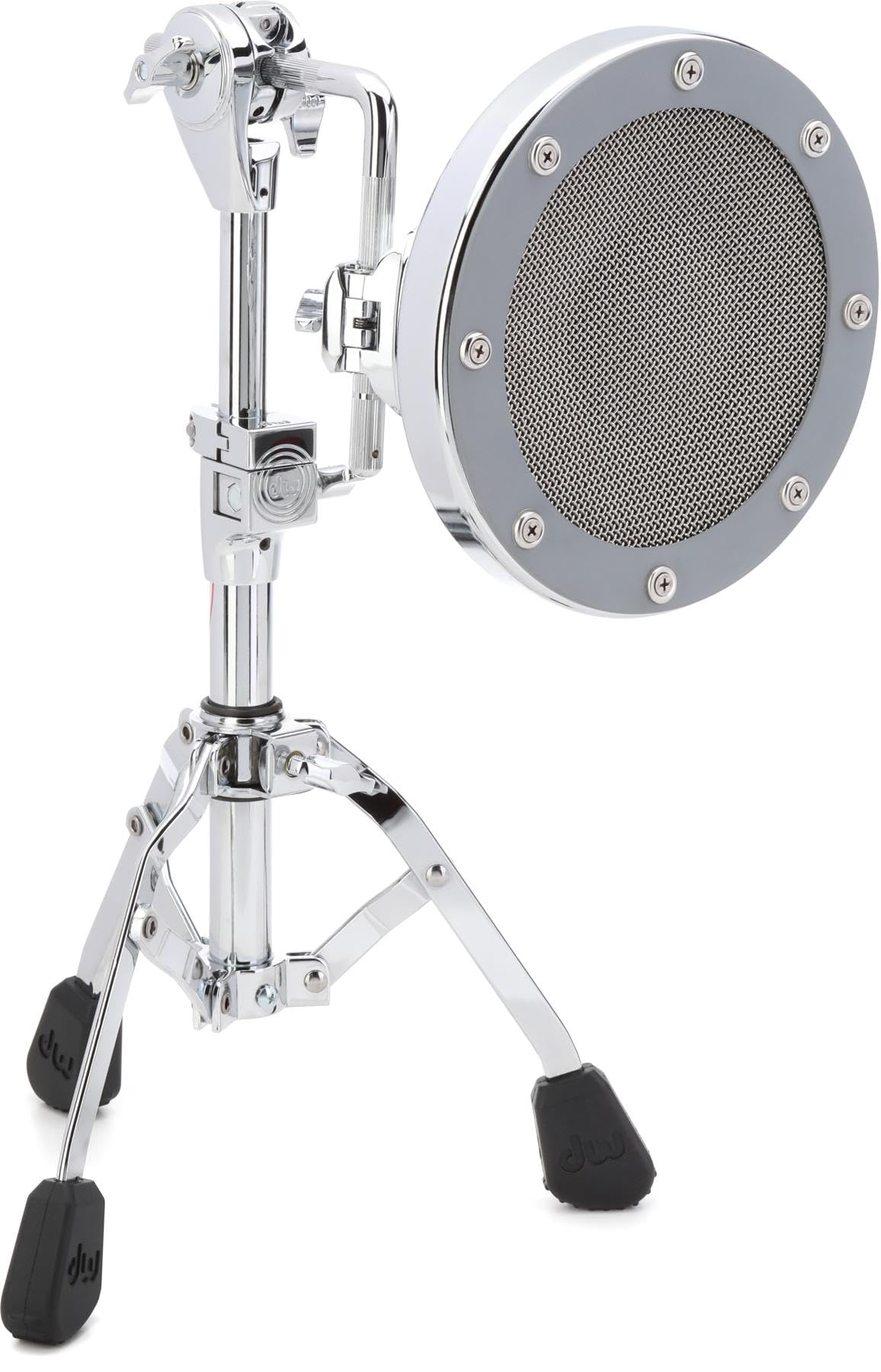
The DW The Moon Mic is a specialized low-frequency microphone designed to capture the rich, complex low end of instruments such as bass drums, floor toms, and bass cabs. Its unique design, featuring an 8-inch diaphragm and resonance-trapping concave housing, ensures a warm, lingering fullness in your sound. The sleek chrome cap helps reject off-axis sound, providing a controlled cardioid polar pattern suitable for both stage ati awọn agbegbe ile isise.
Awọn ẹya pataki pẹlu:
- Dynamic Cardioid Microphone with Patented Radius Housing
- Oke Atẹgun
- Duro Tripod
2. Eto
Follow these steps to set up your DW The Moon Mic:
- Yọ awọn ohun elo kuro: Carefully remove the Moon Mic, mounting bracket, and tripod stand from their packaging.
- Kó ìdúró mẹ́ta jọ: Extend the legs of the tripod stand to a stable position. Ensure all locking mechanisms are secure.
- So akọmọ iṣagbesori: Secure the mounting bracket to the top of the tripod stand. The bracket is designed to hold the microphone securely.
- Gbe Gbohungbohun: Gently slide the DW The Moon Mic into the mounting bracket. Ensure it is firmly seated and oriented correctly.
- Okun So pọ: Connect a standard XLR microphone cable (not included) to the output of the Moon Mic and to your mixer or audio interface.
3. Awọn ilana Iṣiṣẹ
The DW The Moon Mic is designed for optimal performance when positioned correctly:
- Positioning for Bass Drum: Place the Moon Mic approximately 2-6 inches from the resonant head of the bass drum, or inside the drum if a port is available. Experiment with distance and angle to achieve the desired low-end response.
- Positioning for Floor Tom/Bass Cab: For floor toms or bass cabs, position the microphone near the speaker or drum head, focusing on capturing the fundamental low frequencies.
- Àpẹẹrẹ Pola: The Moon Mic features a controlled cardioid polar pattern, meaning it is most sensitive to sound coming from the front and rejects sound from the sides and rear. Aim the front of the microphone directly at the sound source.
- Ipalara: The microphone has a standard 250-ohm impedance, making it compatible with most professional audio equipment.
4. Itọju
Proper care will ensure the longevity and performance of your DW The Moon Mic:
- Ninu: Use a soft, dry cloth to wipe down the microphone's exterior. Avoid using harsh chemicals or abrasive materials, which can damage the finish.
- Ibi ipamọ: When not in use, store the microphone in a protective case or bag to prevent dust accumulation and physical damage. Keep it in a cool, dry environment.
- Mimu: Always handle the microphone with care. Avoid dropping it or subjecting it to strong impacts.
5. Laasigbotitusita
If you encounter issues with your DW The Moon Mic, consider the following common troubleshooting steps:
- Ko si Ijade ohun:
- Ensure the XLR cable is securely connected to both the microphone and your audio device.
- Verify that the input channel on your mixer or interface is selected and its gain is appropriately set.
- Ṣe ìdánwò pẹ̀lú okùn XLR mìíràn láti yọ ìkùnà okùn náà kúrò.
- Poor Sound Quality / Hum / Buzz:
- Check for proper grounding in your audio system.
- Ensure the microphone is not too close to sources of electromagnetic interference (e.g., power supplies, fluorescent lights).
- Adjust microphone positioning to minimize unwanted room reflections or bleed from other instruments.
- Microphone Not Stable:
- Ensure the tripod stand legs are fully extended and locked.
- Verify the mounting bracket is securely tightened to both the stand and the microphone.
6. Awọn pato
| Nọmba awoṣe | DSMM7000L |
| Brand | DW |
| Àwọ̀ | Chrome |
| Ohun elo | Irin ti ko njepata |
| Iwọn Nkan | 12.1 iwon |
| Awọn Iwọn Nkan (L x W x H) | 18.35 x 15.15 x 8.9 inches |
| Ipilẹ Iru | Tripod |
| Awọn irinše to wa | Gbohungbohun |
| UPC | 647139236148 |
7. atilẹyin ọja Information
The DW The Moon Mic comes with a 2-odun atilẹyin ọja. This warranty covers defects in materials and workmanship under normal use. Please retain your proof of purchase for any warranty claims. For detailed terms and conditions, refer to the official DW webojula tabi kan si atilẹyin alabara.
8. Onibara Support
For further assistance, technical support, or warranty inquiries, please contact DW customer service. Refer to the official DW website for the most current contact information, including phone numbers, email addresses, and support hours.