
Ọrọ Iṣaaju
This manual provides detailed instructions for the operation and maintenance of your Calypso K5609/3 Digital Quartz Watch. Please read this manual thoroughly before using your watch to ensure proper function and longevity. Keep this manual for future reference.
Alaye Aabo
- Yago fun ṣiṣafihan aago si awọn iwọn otutu to gaju (gbona tabi otutu) fun awọn akoko gigun.
- Do not attempt to open the watch case or replace the battery yourself, as this may void the warranty and compromise water resistance. Contact a qualified technician.
- Clean the watch with a soft, dry cloth. Avoid using chemical cleaners.
- While the watch is water-resistant up to 100 meters, avoid operating buttons underwater to prevent water ingress.
Package Awọn akoonu
- Calypso K5609/3 Digital Quartz Watch
- Afowoyi Olumulo (iwe-ipamọ yii)
Ṣọraview
Your Calypso K5609/3 watch features a digital display with various functions. Familiarize yourself with the buttons and display layout.
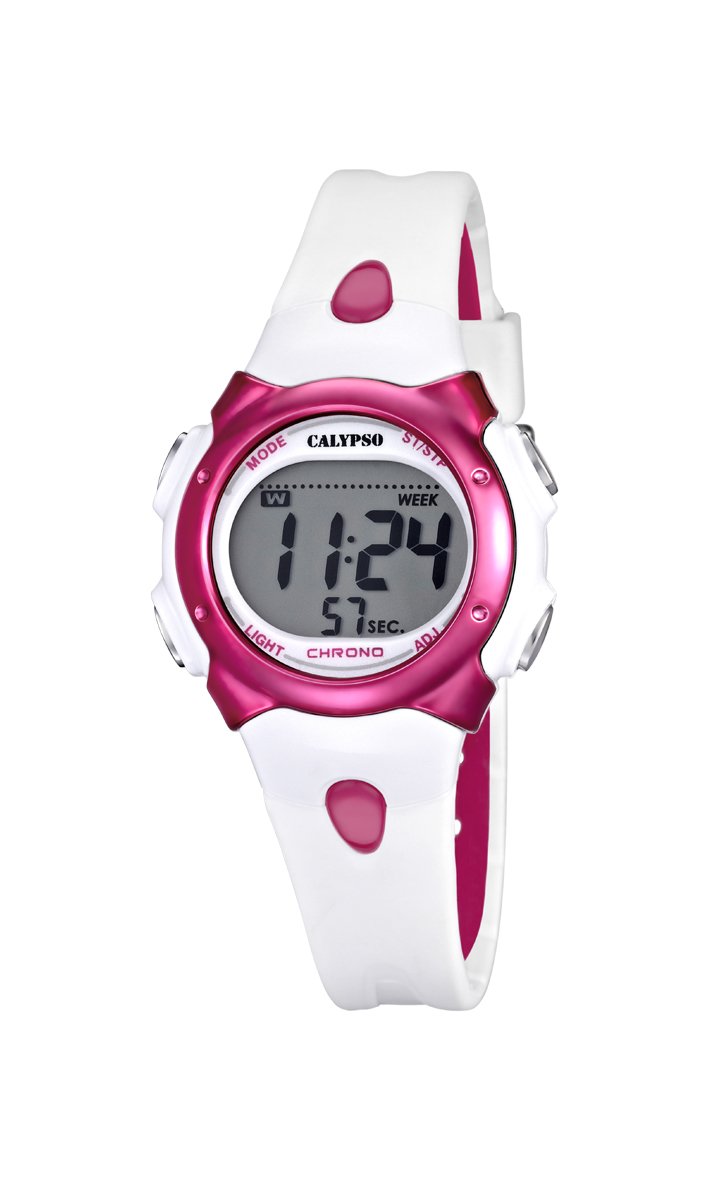
Nọmba 1: Iwaju view of the Calypso K5609/3 Digital Quartz Watch. This image shows the watch face with its digital display and the overall design of the watch, including the white plastic strap.

Nọmba 2: Igun view of the Calypso K5609/3 Digital Quartz Watch. This image provides a different perspective of the watch, highlighting its round case shape and the texture of the plastic strap.
Button Functions (Typical Digital Watch Layout)
While specific button labels may vary, most digital watches follow a similar pattern:
- Bọtini MODE: Awọn iyipo nipasẹ awọn ipo oriṣiriṣi (Aago, Itaniji, Chronograph).
- Bọtini ṢETO/ṢAtunṣe: Ti a lo lati tẹ ipo eto sii ati jẹrisi awọn aṣayan.
- Bọtini Ibẹrẹ/Duro: Used to start/stop chronograph, adjust values upwards.
- Bọtini Imọlẹ: Activates the backlight for illumination.
Refer to the markings on your specific watch for exact button identification.
Ṣeto
Eto Aago ati Ọjọ
- Tẹ awọn MODE button repeatedly until the time display starts flashing or you enter the time setting mode.
- Tẹ awọn ṢETO/ṢAtunṣe Bọtini lati yan nọmba ti o fẹ yipada (fun apẹẹrẹ, awọn wakati, iṣẹju, ọdun, oṣu, ọjọ).
- Lo awọn Bẹrẹ/Duro bọtini lati mu awọn ti o yan iye. Mu o mọlẹ fun yiyara tolesese.
- Tesiwaju titẹ ṢETO/ṢAtunṣe ati Bẹrẹ/Duro until all time and date settings are correct.
- Tẹ awọn MODE bọtini lati jade kuro ni ipo eto ati pada si ifihan akoko deede.
Ṣiṣeto Itaniji naa
- Tẹ awọn MODE button until you reach the Alarm mode (often indicated by "AL" or a bell icon).
- Tẹ awọn ṢETO/ṢAtunṣe button to select the alarm hour.
- Lo awọn Bẹrẹ/Duro bọtini lati ṣeto aago itaniji ti o fẹ.
- Tẹ ṢETO/ṢAtunṣe again to select the alarm minute.
- Lo awọn Bẹrẹ/Duro bọtini lati ṣeto iṣẹju itaniji ti o fẹ.
- Tẹ MODE lati jade kuro ni ipo itaniji.
- Láti mu/mu itaniji naa ṣiṣẹ, tẹ nigbagbogbo Bẹrẹ/Duro bọ́tìnì nígbà tí ó bá wà ní ipò ìró. Àmì ìró yóò farahàn/parẹ́ lórí ìbòjú.
Ṣiṣẹ
Lilo Chronograph (Aago iṣẹju-aaya)
- Tẹ awọn MODE button until you reach the Chronograph mode (often indicated by "ST" or "CH"). The display should show "00:00:00".
- Tẹ awọn Bẹrẹ/Duro bọtini lati bẹrẹ chronograph.
- Tẹ awọn Bẹrẹ/Duro bọtini lẹẹkansi lati da chronograph duro.
- To reset the chronograph, press the ṢETO/ṢAtunṣe bọ́tìnì nígbà tí a bá dá chronograph dúró.
- Tẹ MODE to exit the chronograph mode.
Išẹ Backlight
Lati tan imọlẹ ifihan ni awọn ipo ina kekere, tẹ awọn Imọlẹ bọtini. Ina backlight yoo ojo melo duro lori fun iseju kan diẹ.
Omi Resistance
Your Calypso K5609/3 watch is water-resistant up to 100 meters (10 ATM). This means it is suitable for swimming and snorkeling. However, it is not recommended for scuba diving. Do not operate any buttons while the watch is submerged in water, as this can compromise the water seal.
Itoju
Ninu Rẹ Watch
Regularly clean your watch to maintain its appearance and function. Use a soft, slightly damp cloth to wipe the case and strap. For the plastic strap, mild soap and water can be used, but ensure no soap residue remains. Avoid harsh chemicals or abrasive materials.
Batiri Rirọpo
The watch is powered by a quartz battery. When the display becomes dim or the watch stops functioning, the battery may need replacement. Battery life varies depending on usage, especially backlight and alarm functions. It is recommended to have the battery replaced by a qualified watch technician to ensure the water resistance seal is properly maintained.
Laasigbotitusita
| Isoro | Owun to le Fa | Ojutu |
|---|---|---|
| Ifihan aago naa jẹ ofo tabi di dudu. | Kekere tabi okú batiri. | Rọpo batiri naa (niyanju nipasẹ alamọdaju). |
| Akoko ko tọ. | Akoko ko ṣeto bi o ti tọ tabi atunṣe lairotẹlẹ. | Tọ́ka sí abala "Ṣíṣe Àkókò àti Ọjọ́" láti tún àkókò náà ṣe. |
| Itaniji ko dun. | Itaniji ko mu ṣiṣẹ tabi ṣeto ti ko tọ. | Ensure alarm is activated and set to the correct time. |
| Omi inu aago. | Buttons operated underwater or seal compromised. | Lẹsẹkẹsẹ gba iṣọ naa si ọdọ alamọja kan fun ayewo ati atunṣe lati yago fun ibajẹ siwaju. |
Awọn pato
- Awoṣe: K5609/3
- Brand: Calypso
- Iru ifihan: Oni-nọmba
- Gbigbe: Kuotisi
- Ohun elo ọran: Ṣiṣu
- Opin Ọran: 33 mm
- Sisanra Ọran: 8 mm
- Ohun elo Ẹgbẹ: Ṣiṣu
- Ìbú Bàbá: 14 mm
- Irú Àkọ́kọ́: Pin Buckle (Boucle Ardillon)
- Ohun elo Window kiakia: Akiriliki
- Omi Resistance: 100 Mita (ATM 10)
- Awọn ẹya pataki: Alarm, Chronograph, Day-Date-Month Calendar
- Orisun Agbara: Agbara Batiri
- Awọn iwọn ọja: 20 x 20 x 20 cm; 50 grams (packaging dimensions, watch itself is smaller)
Atilẹyin ọja ati Support
For warranty information and customer support, please refer to the official Calypso webaaye tabi kan si alagbata ti a fun ni aṣẹ. Tọju iwe-ẹri rira rẹ bi ẹri rira fun awọn iṣeduro atilẹyin ọja.
Fun iranlọwọ siwaju sii, jọwọ ṣabẹwo: www.calypsowatches.com