
1. Ifihan
Thank you for choosing the Antec HCG-850M 850W Power Supply. This manual provides essential information for the safe and efficient installation, operation, and maintenance of your power supply unit. Please read this manual thoroughly before installation and retain it for future reference.
2. Alaye Aabo
Máa tẹ̀lé àwọn ìlànà ààbò wọ̀nyí láti dènà ìpalára tàbí ìbàjẹ́ sí ara rẹ nígbà gbogbo:
- Maṣe ṣe open the power supply casing. Iwọn gigatages ni o wa inu, paapaa nigba ti kuro ni unplugged.
- Maṣe ṣe insert any objects into the power supply's ventilation openings.
- Ensure the power supply is installed in a well-ventilated area.
- Use only the modular cables provided with this power supply. Using incompatible cables can cause damage.
- Disconnect the AC power cord from the wall outlet before installing or removing the power supply.
- This product is designed for use in personal computers only.
3. Package Awọn akoonu
Daju pe gbogbo awọn nkan wa ninu apo rẹ:
- Antec HCG-850M 850W Power Supply
- Modular Cable Set (PCI-E, SATA, Peripheral, CPU)
- AC Agbara okun
- Iṣagbesori skru
- Afowoyi Olumulo (iwe-ipamọ yii)
4. Ọja Ipariview
The Antec HCG-850M is an 850-watt, 80 PLUS Bronze certified, semi-modular power supply designed for high-performance personal computers. It features a quiet 135mm fan for efficient cooling and robust protection circuits to ensure stable power delivery.
4.1 Key Awọn ẹya ara ẹrọ
- 850 Watts Continuous Power
- 80 PLUS Bronze Certified Efficiency
- Semi-Modular Cable Management
- 135mm ipalọlọ Fan
- ATX Fọọmù ifosiwewe
- Multiple Protection Circuits (OCP, OVP, UVP, SCP, OPP, OTP)
4.2 Power Ipese Unit
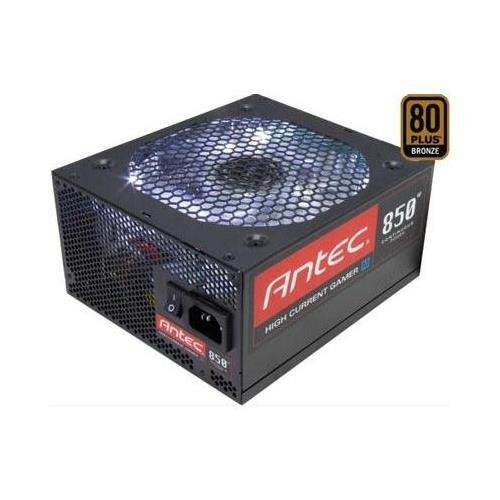
Aworan 1: Iwaju view of the Antec HCG-850M 850W Power Supply, showing the fan grille and modular cable connectors. This unit provides stable power to your computer components.
5. Eto ati fifi sori
Follow these steps to install your Antec HCG-850M power supply:
- Mura Eto Rẹ: Rii daju pe kọmputa rẹ ti wa ni pipa patapata ati yọọ kuro lati inu iṣan ogiri. Ṣii apoti kọnputa rẹ.
- Yọ PSU Atijọ kuro (ti o ba wulo): Ge gbogbo awọn kebulu kuro lati ipese agbara atijọ rẹ. Yọọ kuro ki o yọ PSU atijọ kuro ninu ọran naa.
- Gbe PSU Tuntun naa: Carefully place the Antec HCG-850M into the power supply bay of your computer case. Secure it with the provided mounting screws. Ensure the fan is oriented correctly for optimal airflow (typically facing down if there's a bottom vent, or up if not).
- So awọn okun pataki pọ:
- Connect the 24-pin ATX motherboard power cable.
- Connect the 4+4-pin or 8-pin EPS/CPU power cable to your motherboard.
- So awọn okun onirin pọ: Attach the necessary modular cables for your components (e.g., PCI-E for graphics cards, SATA for hard drives/SSDs, Peripheral for fans/accessories). Connect them securely to both the power supply and the respective components.
- Iṣakoso USB: Awọn kebulu ipa-ọna daradara lati mu iṣan-afẹfẹ pọ si ati ẹwa.
- Pa Apo ati Agbara Tan: Close your computer case. Connect the AC power cord to the power supply and then to a wall outlet. Flip the power switch on the PSU to the 'ON' position. Power on your computer.
6. Awọn ilana Iṣiṣẹ
Once installed, the Antec HCG-850M operates automatically. Here are some general operating guidelines:
- Titan/Apapa: Use your computer's power button to turn the system on or off. The switch on the power supply itself should generally remain in the 'ON' position during normal operation.
- Iduroṣinṣin eto: Ensure your system is stable. If you experience unexpected shutdowns or reboots, refer to the troubleshooting section.
- Afẹfẹ: Maintain good airflow around your computer case to prevent overheating of components, including the power supply.
7. Itọju
Itọju to peye le fa igbesi aye ipese agbara rẹ pọ si:
- Pipa eruku: Periodically clean dust from the power supply's fan grille and the interior of your computer case using compressed air. Always disconnect the AC power cord before cleaning.
- Ṣayẹwo USB: Occasionally check that all power cables are securely connected to the power supply and components.
- Ayika: Operate the power supply in a clean, dry environment with stable temperatures.
8. Laasigbotitusita
If you encounter issues with your power supply, try the following steps:
8.1 No Power to System
- Ensure the AC power cord is securely plugged into both the wall outlet and the power supply.
- Check that the power supply's ON/OFF switch is in the 'ON' position.
- Verify all internal power cables (24-pin ATX, CPU, PCI-E) are correctly and firmly connected.
- Test the wall outlet with another device to ensure it has power.
- If possible, test the power supply in another known working system or with a PSU tester.
8.2 System Instability or Random Shutdowns
- Rii daju pe awọn ibeere agbara eto rẹ ko kọja agbara 850W ti PSU.
- Check for overheating components. Ensure proper case ventilation and clean any dust buildup.
- Verify all power connections are secure. Loose connections can cause intermittent power delivery.
- If the issue persists, it may indicate a fault with the power supply or another component. Consider professional diagnosis.
9. Awọn pato
| Ẹya ara ẹrọ | Ẹ̀kúnrẹ́rẹ́ |
|---|---|
| Nọmba awoṣe | HCG-850M |
| Ijade Wattage | 850 Wattis |
| Ijẹrisi ṣiṣe | 80 PLUS Idẹ |
| Fọọmù ifosiwewe | ATX |
| Ọna Itutu | Afẹfẹ (Ẹyin milimita 135) |
| Modulu Iru | Ologbele-Modular |
| Awọn ẹrọ ibaramu | Kọmputa ti ara ẹni |
| Iwọn Nkan | 9 Poun (iwọn 4.08 kg) |
| ASIN | B00ESAI3M0 |
10. Atilẹyin ọja ati Support
Antec products are backed by a manufacturer's warranty. For specific warranty terms and conditions, please refer to the warranty card included with your product or visit the official Antec website. For technical support or customer service, please contact Antec directly through their official support channels.
Antec osise Webojula: www.antec.com