
1. Ifihan
The GIMA 30801 Light Source is a compact and lightweight device specifically designed for various endoscopic applications. It incorporates a 150-watt halogen bulb, providing bright illumination, and features a variable intensity control that allows adjustment from 50 to 150W. This manual provides essential information for the safe and effective operation, routine maintenance, and basic troubleshooting of your GIMA 30801 Light Source.
2. Alaye Aabo
Always read and understand this manual completely before operating the device. Failure to follow safety instructions may result in injury or damage to the equipment.
- Aabo Itanna: Ensure the device is connected only to a grounded power outlet with the specified voltage (230 V - 50 Hz). Do not use damaged power cords or adapters.
- Ikilọ Ooru: The halogen bulb generates significant heat during operation. Allow the device to cool completely before handling, moving, or attempting bulb replacement. Avoid direct contact with the light output port during operation.
- Afẹfẹ: Do not block the ventilation openings on the device. Adequate airflow is crucial for preventing overheating and ensuring proper function.
- Itọju: Only qualified personnel should perform repairs. Use only GIMA-approved accessories and replacement parts, especially for the halogen bulb.
- Ayika: Do not operate the device in the presence of flammable anesthetics or other explosive mixtures.
3. Ọja Ipariview
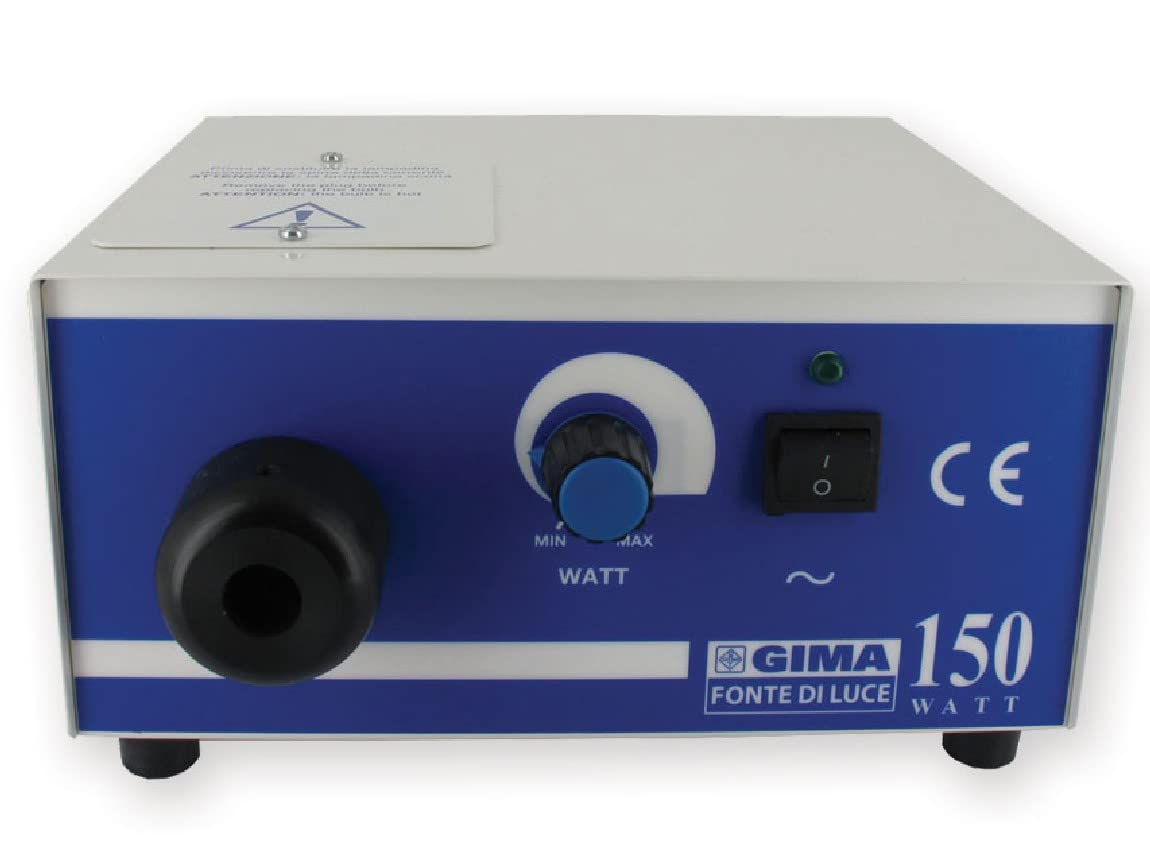
The GIMA 30801 Light Source unit is designed for ease of use and reliability. It features a robust metal casing àti àwọn ìṣàkóso tó ṣeé lóye.
This image displays the GIMA 30801 Light Source unit, a compact device with a blue and white casing. A power cord is connected to the front, leading to a light guide. To the right, several metallic endoscopic attachments are shown, including different sizes of specula and an obturator. The unit itself is labeled '30801', the light guide '30818', and the attachments '29970'.
Awọn eroja pataki:
- Ẹka akọkọ: Houses the halogen bulb, cooling fan, and control circuitry.
- Agbara Yi pada: Located on the front panel, used to turn the device ON/OFF.
- Intensity Control Knob: Allows adjustment of light output from 50W to 150W.
- Light Output Port: Connection point for the fiber optic light guide.
- Awọn ṣiṣi atẹgun: Located on the sides and rear for heat dissipation.
4. Eto
Follow these steps to set up your GIMA 30801 Light Source:
- Ṣii silẹ: Carefully remove the light source from its packaging. Inspect the unit for any visible damage that may have occurred during transit.
- Ibi: Place the light source on a stable, flat, and dry surface. Ensure there is sufficient space around the unit for proper ventilation and airflow. Avoid placing it near heat sources or in direct sunlight.
- Asopọ agbara: Connect the provided power cable to the power inlet on the rear of the device. Then, plug the power cable into a grounded 230 V, 50 Hz electrical outlet.
- Light Guide Connection: Insert the fiber optic light guide into the light output port on the front panel of the unit. Ensure the connection is secure and fully seated to prevent light leakage.
5. Awọn ilana Iṣiṣẹ
Operating the GIMA 30801 Light Source is straightforward:
- Agbara Tan: Press the main power switch located on the front panel to turn on the device. An indicator light will illuminate, confirming the unit is powered.
- Ṣatunṣe Kikan: Rotate the intensity control knob clockwise to increase the light output and counter-clockwise to decrease it. Adjust the brightness to the desired level for your endoscopic procedure, ranging from 50W to 150W.
- Agbara Pa: After use, press the main power switch to turn off the device. Disconnect the power cable from the wall outlet if the device will not be used for an extended period.
6. Itọju
Regular maintenance ensures the longevity and optimal performance of your light source.
Ninu
- Nigbagbogbo ge asopọ ẹrọ lati ipese agbara ṣaaju ṣiṣe mimọ.
- Mu ese ita ita ti ẹyọkan pẹlu asọ, damp cloth. A mild, non-abrasive detergent can be used if necessary.
- Do not allow any liquids to enter the device. Avoid using harsh chemicals, solvents, or abrasive cleaning agents.
- Ensure all ventilation openings are free from dust and debris. Use a soft brush or compressed air to gently clear them if needed.
Rirọpo boolubu
The halogen bulb has a finite lifespan and will eventually need replacement. Always use a genuine GIMA 150W halogen bulb for replacement.
- Rii daju pe ẹrọ ti wa ni pipa ati ge asopọ lati ipese agbara.
- Crucially, allow the unit to cool down completely before attempting to replace the bulb. The bulb and surrounding components can be extremely hot.
- Locate the small access opening on the top side of the unit, designed for easy bulb replacement.
- Carefully open the access cover. Gently remove the old halogen bulb.
- Insert the new 150W halogen bulb, ensuring it is correctly seated in its socket. Avoid touching the glass of the new bulb with bare hands, as oils from your skin can reduce its lifespan. Use a clean cloth or gloves if necessary.
- Securely close the access opening.
7. Laasigbotitusita
This section addresses common issues you might encounter with your GIMA 30801 Light Source.
- Ko si Ijade Imọlẹ:
- Check if the power cable is securely connected to both the device and the wall outlet.
- Rí i dájú pé switch agbára àkọ́kọ́ wà ní ipò 'ON'.
- Verify that the halogen bulb is correctly installed and not burnt out. Replace the bulb if it appears dark or broken.
- Check the internal fuses (two protection fuses, 1.6A). If a fuse is blown, it must be replaced by qualified service personnel.
- Insufficient Light Intensity:
- Rotate the intensity control knob clockwise to increase brightness.
- The bulb may be nearing the end of its operational life and producing less light. Consider replacing the bulb.
- Ohun elo gbigbona:
- Ensure that all ventilation openings are clear and not obstructed by objects or dust.
- Verify that the internal cooling fan is operating. If the fan is not working, discontinue use and contact service personnel.
If you experience issues not covered here, or if problems persist after attempting these solutions, please contact qualified service personnel or your GIMA distributor for assistance.
8. Awọn pato
| Awoṣe | GIMA 30801 |
| Agbara agbara | Max 170 Watt |
| Boolubu Iru | Halogen, 150 Watt |
| Ibi ti ina elekitiriki ti nwa | 230 V - 50 Hz |
| Awọn fiusi | Two protection fuses, 1.6A |
| Awọn iwọn (L x W x H) | 21 x 20 x 11 cm |
| Iwọn | 4.8 kg |
| Olupese | GIMA |
9. Atilẹyin ọja ati Support
For detailed warranty information, terms, and conditions, please refer to the warranty card or documentation included with your GIMA 30801 Light Source purchase. For technical support, service, or to order replacement parts, please contact your authorized GIMA distributor or visit the official GIMA webojula.