
Eurotime 23708-00
Eurotime LCD Digital Alarm Clock Model 23708-00 User Manual
Awoṣe: 23708-00
Ọrọ Iṣaaju
This manual provides instructions for the setup, operation, and maintenance of your Eurotime LCD Digital Alarm Clock, Model 23708-00. Please read this manual thoroughly before using the product to ensure proper function and longevity.
The Eurotime LCD Digital Alarm Clock features an LCD display, 7-color changing LED lighting, multiple natural alarm tones, and displays time, date, day of the week, and indoor temperature. It also includes a snooze function and a countdown feature.
Alaye Aabo
- Jeki ẹrọ naa kuro ni omi ati ọriniinitutu giga.
- Ma ṣe fi ẹrọ naa han si imọlẹ orun taara tabi awọn iwọn otutu to gaju.
- Use only the specified battery type (3 x 1.5V AAA batteries).
- Maṣe dapọ atijọ ati awọn batiri titun, tabi awọn oriṣiriṣi awọn batiri.
- Sọ awọn batiri ti a lo ni ifojusọna ni ibamu si awọn ilana agbegbe.
- Ma ṣe gbiyanju lati tunto tabi tun ẹrọ naa funrararẹ. Kan si oṣiṣẹ ti o peye fun iṣẹ.
Package Awọn akoonu
- Eurotime LCD Digital Alarm Clock (Model 23708-00)
- 3 x 1.5V AAA Awọn batiri
- Afowoyi Olumulo (iwe-ipamọ yii)
Ọja Pariview
Mọ ara rẹ pẹ̀lú àwọn ohun èlò àti ìdarí aago ìkìlọ̀ rẹ.
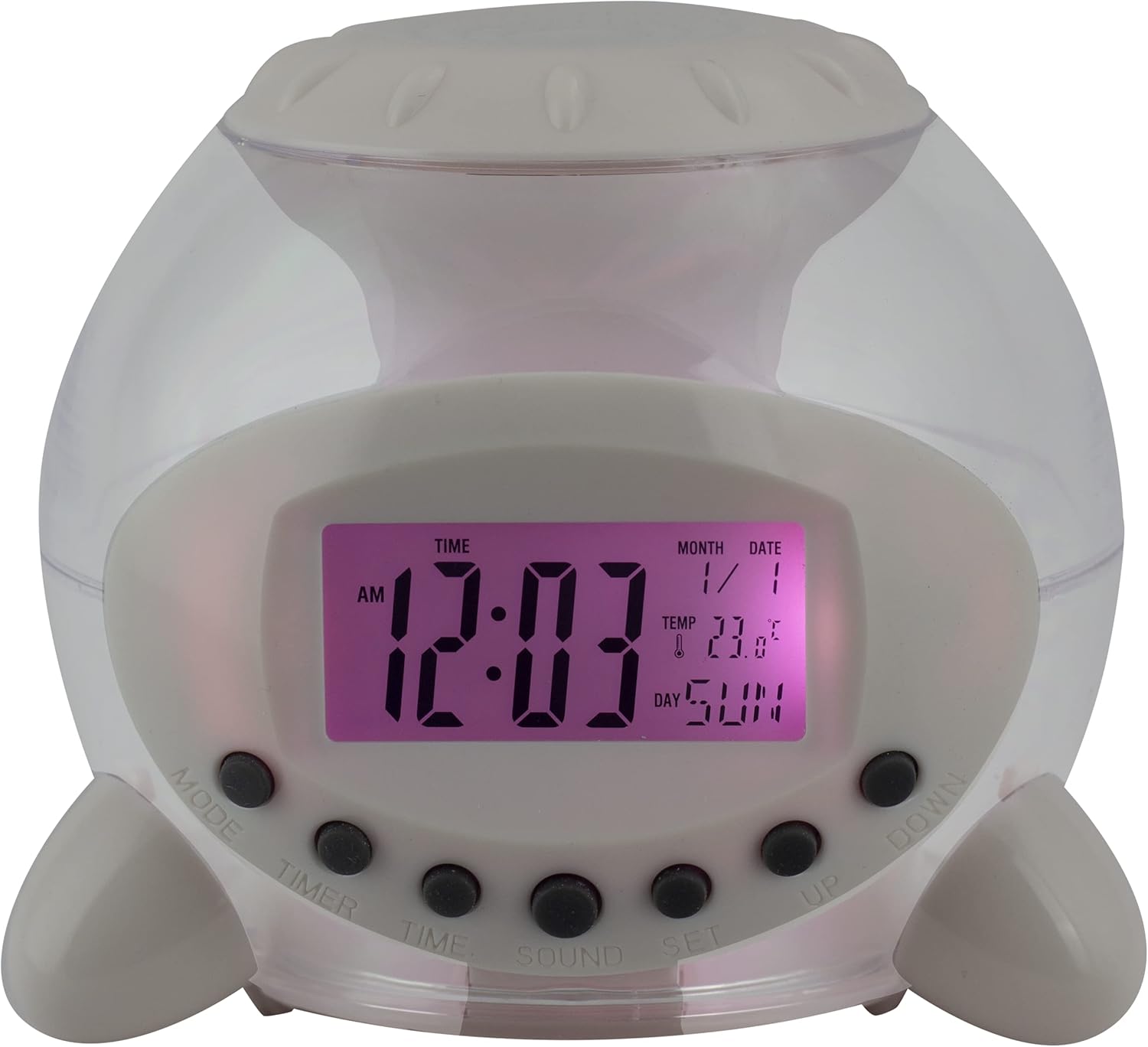
olusin 1: Iwaju View of the Alarm Clock. This image displays the front of the Eurotime LCD Digital Alarm Clock, highlighting its transparent plastic housing and the central LCD screen. The screen shows the time (12:03 AM), month (1), date (1), temperature (23.8°C), and day (SUN). Below the screen are control buttons labeled MODE, TIMER, TIME, SOUND, and SET, along with UP and DOWN buttons.

olusin 2: Apa View pẹlu Awọn bọtini Iṣakoso. This image shows a side perspective of the alarm clock, emphasizing the array of control buttons located on the front-bottom edge. The transparent housing allows a glimpse of the internal structure and the LED lighting effect. The buttons are clearly visible for user interaction.

olusin 3: Apa View with Internal Lighting. This image provides another side view, illustrating the transparent housing and the internal LED lighting. The light emanates from the base, creating a soft glow within the clock's structure, demonstrating its color-changing feature.
Awọn bọtini Iṣakoso:
- Ipo: Switches between time display, alarm setting, and countdown timer.
- Aago: Activates and sets the countdown timer.
- Àkókò: Used to set the current time and date.
- OHUN: Selects alarm tones or natural sounds.
- Ṣeto: Confirms settings or enters setting mode.
- UP / isalẹ: Adjusts values during setting modes.
Ṣeto
1. Fifi sori batiri
- Locate the battery compartment on the bottom of the alarm clock.
- Ṣii ideri iyẹwu batiri naa.
- Insert three (3) 1.5V AAA batteries, ensuring correct polarity (+/-).
- Pa ideri batiri naa ni aabo.
Akiyesi: The clock will automatically power on after battery installation. The display may flash, indicating it's ready for time setting.
Awọn ilana Iṣiṣẹ
1. Eto Aago ati Ọjọ
- Ni ipo ifihan akoko deede, tẹ bọtini naa AKOKO button once. The hour digits will flash.
- Lo awọn UP or SILE awọn bọtini lati ṣatunṣe awọn wakati.
- Tẹ AKOKO again to move to minute setting. Adjust with UP or SILE.
- Tesiwaju titẹ AKOKO to cycle through year, month, and date settings, adjusting each with UP or SILE.
- After setting the date, press AKOKO one last time or wait a few seconds for the settings to be saved and return to normal display.
2. Ṣiṣeto Itaniji
- Tẹ awọn MODE button until "ALARM" appears on the display (or an alarm icon).
- Tẹ awọn SET Bọ́tìnì náà. Àwọn nọ́mbà wákàtí ìkìlọ̀ náà yóò máa tàn yanranyanran.
- Lo awọn UP or SILE awọn bọtini lati ṣatunṣe aago itaniji.
- Tẹ SET again to move to minute setting. Adjust with UP or SILE.
- Tẹ SET one last time to confirm the alarm time.
- Lati mu itaniji ṣiṣẹ/mu ma ṣiṣẹ, tẹ awọn UP button in alarm display mode. An alarm icon will appear/disappear.
3. Iṣẹ lẹẹkọọkan
Tí ìró ìró bá dún, tẹ bọ́tìnì èyíkéyìí (àyàfi SET or MODE) to activate the snooze function. The alarm will pause and sound again after a few minutes (duration is adjustable, refer to advanced settings if available).
Láti pa itaniji náà pátápátá, tẹ SET button when it is sounding.
4. Color Changing LED Lighting
The alarm clock features a 7-color changing LED light. This function typically activates automatically when the alarm sounds or can be manually toggled. Refer to the MODE or SET button for specific controls related to the lighting, if available.
5. Natural Alarm Tones
To select an alarm tone:
- In alarm setting mode (after pressing MODE to display alarm time), press the OHUN bọtini.
- Lo awọn UP or SILE buttons to cycle through the available natural alarm tones.
- Tẹ SET lati jẹrisi aṣayan rẹ.
6. Countdown Feature
Lati lo aago akoko kika:
- Tẹ awọn MODE button until "TIMER" appears on the display.
- Tẹ awọn Aago bọtini. Awọn nọmba wakati yoo filasi.
- Lo UP or SILE to set the desired countdown hour.
- Tẹ Aago again to set minutes, then seconds.
- Tẹ SET lati bẹrẹ kika.
- To pause or resume, press SET. Lati tunto, tẹ MODE.
Itoju
Ninu
- Fi aṣọ rírọ̀ tí ó gbẹ nu aago náà.
- Do not use abrasive cleaners or solvents, as they may damage the plastic housing or display.
Batiri Rirọpo
When the display dims or functions become erratic, it is time to replace the batteries. Follow the "Battery Installation" steps in the Setup section.
Laasigbotitusita
| Isoro | Owun to le Fa | Ojutu |
|---|---|---|
| Ifihan ti ṣofo tabi baibai. | Àwọn bátìrì tí kò tó tàbí tí ó ti bàjẹ́. Fífi bátìrì tí kò tọ́ sí. | Replace batteries with new 1.5V AAA batteries. Ensure correct polarity. |
| Itaniji ko dun. | Alarm is not activated. Alarm volume is too low (if adjustable). | Ensure the alarm icon is displayed. Check alarm settings. |
| Akoko/ọjọ ko tọ. | Not set correctly after battery installation or power interruption. | Follow "Setting Time and Date" instructions to reset. |
| Color changing light not working. | Feature not activated or malfunction. | Check operating instructions for light activation. If problem persists, contact support. |
Awọn pato
- Brand: Eurotime
- Nọmba awoṣe: 23708-00
- Awọn iwọn ọja: 8.99 x 8.99 x 8 cm
- Ìwúwo: 120 g
- Ohun elo: Ṣiṣu
- Iru ifihan: LCD oni -nọmba
- Awọn ẹya pataki: Calendar display, Snooze, Alarm, 7-Color Changing LED, Natural Alarm Tones, Countdown Feature, Indoor Temperature Display
- Orisun Agbara: Awọn Batiri AAA 3 x 1.5V (pẹlu)
Atilẹyin ọja ati Support
For warranty information or technical support, please refer to the retailer where the product was purchased or visit the official Eurotime webojula. Tọju iwe-ẹri rira rẹ bi ẹri rira.