
1. Ọja Ipariview
The OREI UHD-402 is a high-performance 4x2 HDMI Matrix Switch designed to connect up to four HDMI source devices to two HDMI displays. It supports Ultra HD 4K@60Hz resolution, HDMI 2.0, and HDCP 2.2, ensuring compatibility with the latest video content. This versatile switch allows for flexible routing, enabling you to display any of the four input sources on either of the two output displays, or mirror a single source to both. Advanced audio support includes DTS-HD and Dolby TrueHD, providing an immersive audio experience. Additionally, it features an Audio Return Channel (ARC) function on Input 4 and Output A, allowing TV audio to be returned to a compatible audio system. The compact design and included IR remote control make it an ideal solution for various residential and commercial AV installations.
2. Package Awọn akoonu
Jọwọ rii daju pe gbogbo awọn nkan wa ninu package rẹ:
- 1 x OREI UHD-402 HDMI Matrix Switch
- 1 x 5V DC Power Adapter
- 1 x IR Iṣakoso latọna jijin
- 1 x Itọsọna olumulo

Image: Contents of the OREI UHD-402 package, showing the main switch unit, power adapter, IR remote control, and user manual.
3. Awọn ẹya Ọja
- 4x2 HDMI Matrix Switch: Connects up to four HDMI source devices and routes them independently to two TVs, monitors, or projectors.
- Ultra HD 4K Performance: Supports 4K@60Hz (3840x2160) with HDMI 2.0 and up to 600MHz pixel clock for sharp visuals.
- Ibamu HDCP 2.2: Fully compliant with HDCP 2.2 protected content.
- Premium Audio Support: Supports high-quality audio formats including DTS-HD and Dolby TrueHD.
- ARC Functionality: Audio Return Channel (ARC) support on Input 4 and Output A allows TV audio return to compatible audio systems.
- IR Isakoṣo latọna jijin: Includes an IR remote for convenient source switching and output control.
- Iwapọ ati Apẹrẹ ti o tọ: Stylish housing engineered for stable signal transmission and reduced interference.
4. Ọja Ipariview (Front & Rear Panel)
Iwaju Panel
The front panel features an HDMI Input 1 port for quick access, along with LED indicators for active inputs (1-4) and active outputs (A and B). Dedicated 'SELECT A' and 'SELECT B' buttons allow manual switching of sources for each output.
Ru Panel
The rear panel includes HDMI Inputs 2, 3, and 4, as well as HDMI Outputs A and B. A Micro USB port is provided for power input. Input 4 and Output A are ARC-enabled for audio return functionality.
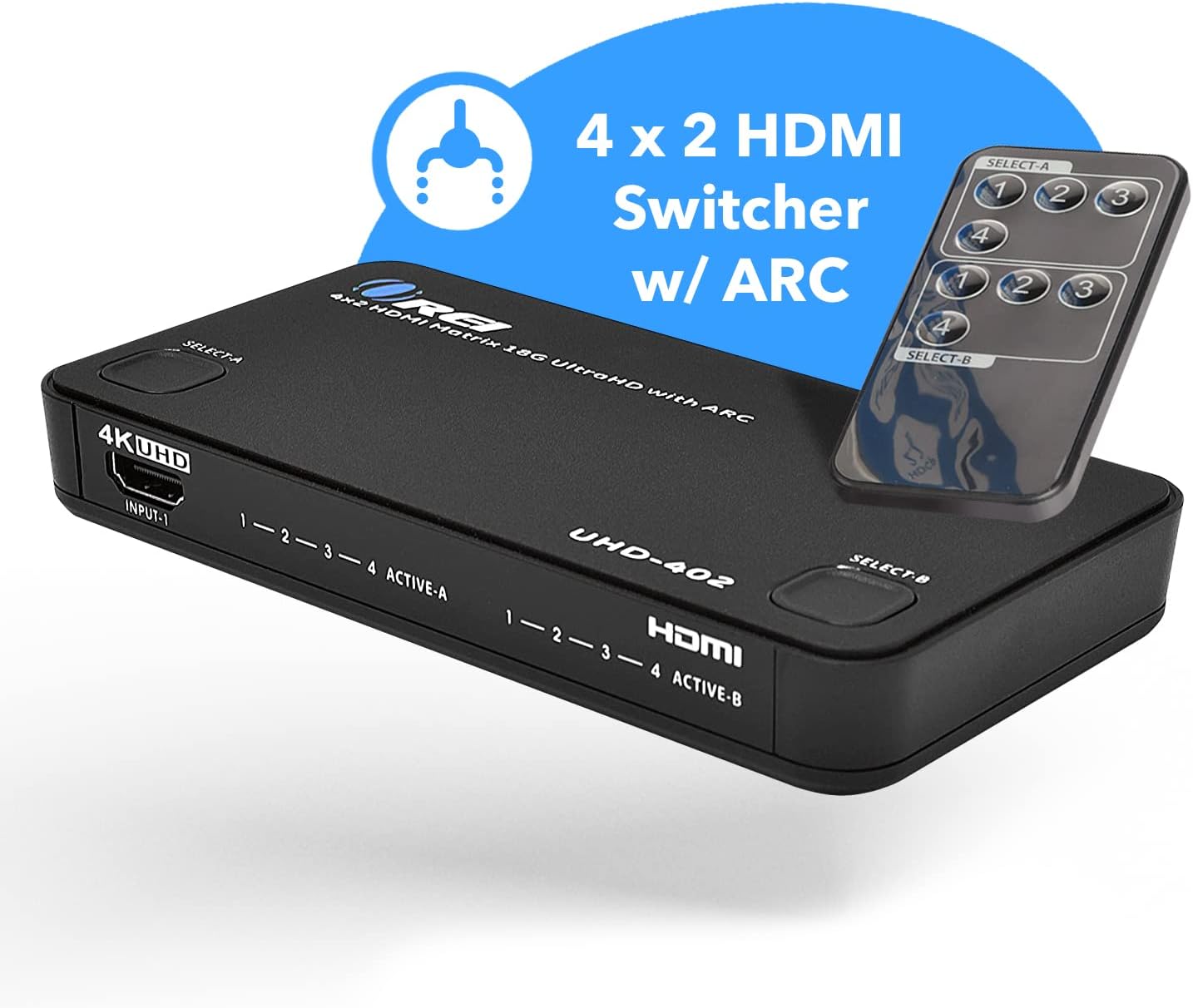
Image: Front and rear panels of the OREI UHD-402, highlighting HDMI input/output ports, power input, and control buttons.
5. Eto & Asopọ
Follow these steps to connect your OREI UHD-402 HDMI Matrix Switch:
- Connect your HDMI source devices (e.g., DVD player, game console, streaming box, laptop) to the HDMI Input ports (1-4) on the UHD-402.
- Connect your HDMI display devices (e.g., TV, monitor, projector) to the HDMI Output ports (A and B) on the UHD-402.
- For ARC functionality, connect an ARC-enabled TV to Output A and an ARC-enabled soundbar or audio receiver to Input 4.
- Connect the provided 5V DC power adapter to the Micro USB power port on the UHD-402 and then plug it into a power outlet.
- Agbara lori gbogbo awọn ẹrọ ti a ti sopọ.

Image: Diagram illustrating how to connect various HDMI sources to the UHD-402 and route them to two displays in either splitter or matrix mode.

Image: ARC Audio Extraction setup, detailing the connection between an ARC-enabled TV, soundbar, and the UHD-402.
Fidio: Ipariview of the OREI UHD-402 HDMI Matrix, demonstrating its features and connection capabilities. This video provides a visual guide to setting up the device with various HDMI sources and displays.
6. Awọn ilana Iṣiṣẹ
The OREI UHD-402 offers flexible control options for switching between inputs and managing outputs:
Iwaju Panel Iṣakoso
- Press the 'SELECT A' button to cycle through HDMI Inputs 1-4 for Output A.
- Press the 'SELECT B' button to cycle through HDMI Inputs 1-4 for Output B.
- LED indicators will illuminate to show the currently active input for each output.
IR Isakoṣo latọna jijin
Use the included IR remote control for convenient switching from a distance:
- The remote has dedicated buttons for each input (1-4) and each output (A and B).
- To select an input for Output A, press the corresponding input number button under 'SELECT A'.
- To select an input for Output B, press the corresponding input number button under 'SELECT B'.

Image: The UHD-402 unit shown with its IR remote control, demonstrating the ease of switching between splitter and matrix modes.
7. Supported Media & Devices
The OREI UHD-402 is compatible with a wide range of HDMI sources and supports various media standards:
- Awọn ẹrọ atilẹyin: Laptops/PCs, Home Surveillance Systems, Streaming Devices (Roku, Apple TV, Fire Stick, Chromecast), Video Game Consoles (Xbox, PlayStation), DVD/Blu-Ray Players, Satellite Receivers, Projectors, and more.
- Awọn Ilana Fidio: Full UHD 4K@60Hz, 2K@60Hz.
- HDMI Ijẹwọgbigba: HDMI 2.0.
- Ibamu HDCP: HDCP 2.2 certified.
- Atilẹyin ohun: Dolby TrueHD, DTS-HD Master Audio, PCM.
- Atilẹyin ARC: Full ARC support included for compatible devices.

Image: Compatible HDMI sources that can be connected to the UHD-402 HDMI Matrix Switch.
8. Imọ ni pato
| Awoṣe | UHD-402 |
| Àwọ̀ | Dudu |
| Asopọmọra Iru | HDMI |
| Nọmba ti Ports | 4 Awọn igbewọle, 2 Awọn abajade |
| Atilẹyin ipinnu | Up to 4K@60Hz (3840x2160) |
| HDMI Ẹya | HDMI 2.0 |
| Ẹya HDCP | HDCP 2.2 |
| Awọn ọna kika ohun | DTS-HD, Dolby TrueHD, PCM |
| Atilẹyin ARC | Yes (Input 4 & Output A) |
| Ọna Iṣakoso | Front Panel Buttons, IR Remote |
| Awọn iwọn Nkan (D x W x H) | 3.09"D x 5.91"W x 0.81"H |
| Iwọn Nkan | 8.71 iwon |

Image: Visual representation of the UHD-402's compact size and weight, along with key technical specifications.
9. Laasigbotitusita
If you encounter issues with your OREI UHD-402, please refer to the following common troubleshooting steps:
- Ko si Fidio/Ohùn: Ensure all HDMI cables are securely connected. Verify that the correct input source is selected on the matrix switch and the correct input is selected on your display. Check the power connection to the UHD-402.
- Ifiranṣẹ Alailowaya: Try using shorter, high-quality HDMI cables, especially for 4K resolutions. Ensure all devices are powered on and functioning correctly.
- ARC Not Working: Confirm that both your TV and soundbar/receiver are ARC-enabled and connected to the designated ARC ports (Input 4 and Output A) on the UHD-402. Check your TV's audio settings to ensure ARC is enabled and outputting to the external audio system.
- Awọn oran Iṣakoso Latọna jijin: Ensure the remote has working batteries and there are no obstructions between the remote and the matrix switch's IR receiver.
10. Atilẹyin ọja & Atilẹyin
The OREI UHD-402 4K HDMI Matrix Switch comes with a 1-odun olupese ká atilẹyin ọja. For technical assistance or warranty claims, please contact OREI customer support.
- Alaye olubasọrọ Olupese: info@orei.com
- Packer Contact Information: info@fayzelectronics.com , 99250 12671

Image: OREI's commitment to quality, highlighting over 10 years of experience and a 1-year limited warranty with lifetime local support.