
1. Ifihan
Thank you for choosing the SCHWAIGER DCR600HD Full HD Cable TV Receiver. This manual provides essential information for the safe and efficient use of your device. Please read these instructions carefully before installation and operation, and keep them for future reference.
2. Awọn ilana aabo
- Ibi ti ina elekitiriki ti nwa: Only use the power adapter supplied with the device. Ensure the voltage ibaamu ti agbegbe rẹ ipese agbara.
- Afẹfẹ: Do not block ventilation openings. Ensure adequate space around the receiver for proper airflow to prevent overheating.
- Ọrinrin: Keep the device away from water, moisture, and high humidity. Do not expose it to rain or splashes.
- Ninu: Ge asopọ agbara ṣaaju ṣiṣe mimọ. Lo asọ asọ ti o gbẹ. Ma ṣe lo olomi tabi awọn olutọpa aerosol.
- Ibi: Place the receiver on a stable, flat surface. Avoid direct sunlight, heat sources, and strong magnetic fields.
- Ṣiṣẹ: Ma ṣe gbiyanju lati ṣii tabi tun ẹrọ naa funrararẹ. Tọkasi gbogbo iṣẹ si oṣiṣẹ oṣiṣẹ.
3. Package Awọn akoonu
Jọwọ ṣayẹwo package fun awọn nkan wọnyi:
- SCHWAIGER DCR600HD Cable TV Receiver
- Isakoṣo latọna jijin
- Power Cable (integrated or separate adapter)
- Afowoyi Olumulo (iwe-ipamọ yii)
4. Ọja Ipariview
4.1 Igbimọ iwaju
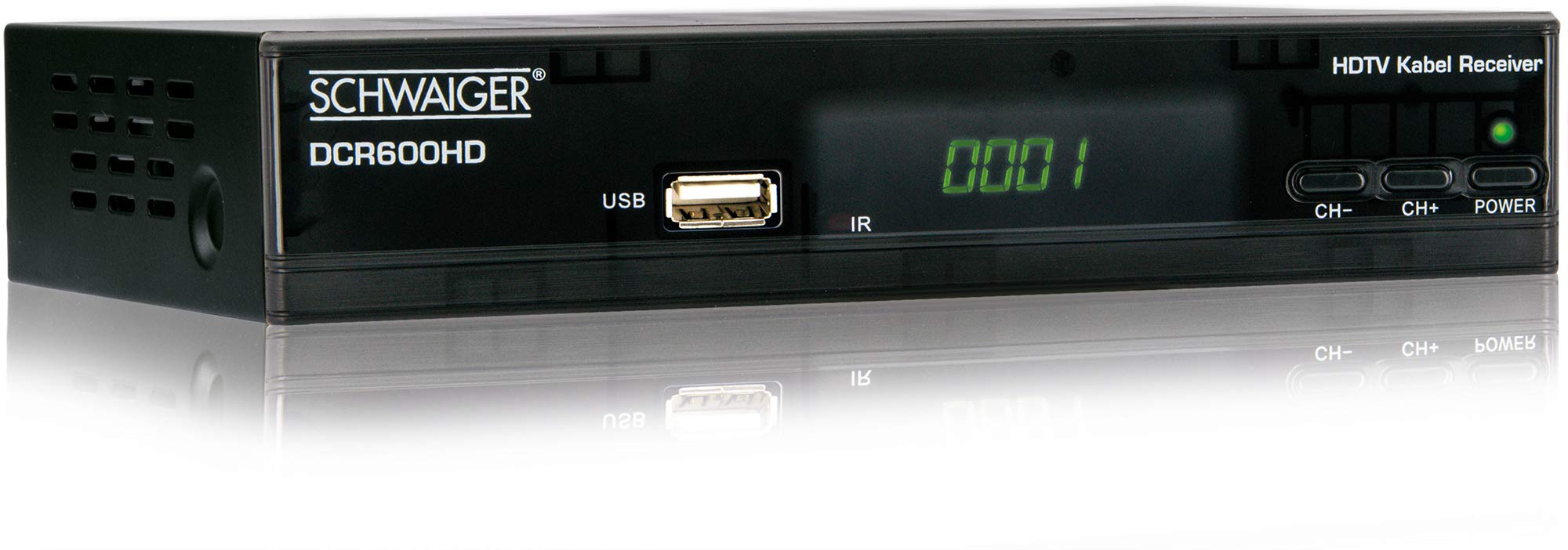
Aworan: Iwaju view of the SCHWAIGER DCR600HD receiver, showing the display, USB port, IR receiver, and control buttons.
- Ifihan: Ó fi nọ́mbà ikanni tàbí àkókò hàn.
- Ibudo USB: For connecting USB storage devices for media playback.
- IR: Olugba infurarẹẹdi fun isakoṣo latọna jijin.
- CH- / CH+: Buttons for changing channels.
- AGBARA: Button to turn the receiver on or off (standby).
4.2 ru Panel

Aworan: Ẹyìn view of the SCHWAIGER DCR600HD receiver, displaying various input and output ports.
- RF IN: Input for connecting to your cable TV network.
- ETHERNET / LAN: For network connection (if supported for updates or specific services).
- HDMI: High-Definition Multimedia Interface output for connecting to an HD TV.
- TV SCART (CVBS): SCART output for connecting to older TVs or other devices.
- ~220-240V 50/60Hz: Power input for the receiver.
4.3 Iṣakoso latọna jijin

Aworan: Layout of the SCHWAIGER DCR600HD remote control, showing various function buttons.
The remote control allows you to operate all functions of your receiver. Familiarize yourself with the button layout for easy navigation.
5. Eto
5.1 Nsopọ Olugba
- Connect to Cable Network: Connect your cable TV antenna cable to the RF IN port on the rear panel of the receiver.
- Sopọ si TV:
- For High Definition (HD) picture quality, connect an HDMI cable from the HDMI ibudo lori olugba naa si titẹ sii HDMI lori TV rẹ.
- For standard definition (SD) or older TVs, connect a SCART cable from the TV SCART (CVBS) port on the receiver to the SCART input on your TV.
- So agbara: Plug the power cable into the receiver's power input and then into a wall outlet.
- Turn on TV: Switch on your television and select the correct input source (HDMI or SCART) corresponding to your connection.
5.2 First-Time fifi sori
Upon first power-on, the receiver will typically guide you through an initial setup process:
- Aṣayan ede: Use the remote control to select your preferred language for the on-screen menus.
- Aṣayan Orilẹ-ede: Select your country. This helps configure regional settings and channel frequencies.
- Iwoye ikanni: The receiver will prompt you to perform an automatic channel scan. Confirm to start scanning for available cable TV channels. This process may take several minutes.
- Fi Eto pamọ: Once the scan is complete, save the found channels. Your receiver is now ready for use.
6. Awọn ilana Iṣiṣẹ
6.1 Ipilẹ isẹ
- Titan/Apapa: Tẹ awọn AGBARA button on the remote control or front panel to switch the receiver on or to standby mode.
- Aṣayan ikanni: Lo awọn CH+ / CH- buttons on the remote or front panel to change channels sequentially. Alternatively, use the number buttons to directly enter a channel number.
- Atunse iwọn didun: Lo awọn VOL+ / VOL- buttons on the remote control to adjust the audio volume.
- Pa ẹnu mọ́: Tẹ awọn IKU button to temporarily turn off the sound. Press again to restore.
6.2 Itọsọna Eto Itanna (EPG)
The EPG provides a schedule of current and upcoming TV programs.
- Tẹ awọn EPG button on the remote control to access the Electronic Program Guide.
- Navigate through channels and program times using the arrow buttons.
- Tẹ OK si view alaye alaye nipa eto ti o yan.
6.3 Media Sisisẹsẹhin nipasẹ USB
O le mu multimedia ṣiṣẹ files (AVI, MKV, MP3) from a USB storage device.
- Fi awakọ filasi USB tabi dirafu lile ita sinu USB ibudo lori ni iwaju nronu.
- The receiver should detect the USB device and prompt you to open the media player, or you can access it via the main menu.
- Lilö kiri nipasẹ rẹ files and folders using the arrow buttons and press OK to select and play a file.
- Use the media control buttons (Play, Pause, Stop, Fast Forward, Rewind) on the remote control for playback.
6.4 Teletext
Access teletext services provided by broadcasters.
- Tẹ awọn TTX button on the remote control to activate teletext.
- Use the number buttons to enter page numbers or the arrow buttons to navigate.
- Tẹ TTX again to exit teletext.
7. Itọju
- Ninu: Regularly wipe the receiver with a soft, dry, lint-free cloth. Do not use abrasive cleaners, waxes, or solvents.
- Afẹfẹ: Ensure that the ventilation slots are not obstructed by dust or other objects.
- Awọn imudojuiwọn sọfitiwia: Lorekore ṣayẹwo olupese ká website for any available software updates for your model. Follow the instructions provided with the update carefully.
8. Laasigbotitusita
If you encounter problems with your receiver, refer to the following common issues and solutions:
| Isoro | Owun to le Fa / Solusan |
|---|---|
| Ko si aworan tabi ohun |
|
| Isakoṣo latọna jijin ko ṣiṣẹ |
|
| No channels found during scan |
|
| USB media not playing |
|
9. Awọn pato
| Ẹya ara ẹrọ | Apejuwe |
|---|---|
| Orukọ awoṣe | DCR600HD |
| Ọja Iru | Digital DVB TV Tuner / Digital Player |
| Àwọ̀ | Dudu |
| Awọn iwọn (W x D x H) | 17 cm x 4.5 cm x 10 cm |
| Iwọn | 380 g |
| Asopọmọra Technology | HDMI, USB, SCART, RF |
| Awọn ẹrọ ibaramu | Tẹlifisiọnu |
| Fidio fifi koodu | H.264 |
| Awọn ipinnu atilẹyin | 576i, 576p, 720p, 1080i, 1080p |
| Awọn ipin ipin | 4:3, 16:9 |
| Ipo Ijade Ohun | Sitẹrio |
| Awọn ọna kika Audio atilẹyin | MP3 |
| Awọn oriṣi Media atilẹyin | AVI, MKV, MP3 |
| Lapapọ Awọn ibudo USB | 1 (USB 4-pin Type A) |
| Lapapọ HDMI Ports | 1 |
| Agbara agbara | 3.8 W |
| Voltage | 240 Volts |
| Pataki Awọn ẹya ara ẹrọ | Electronic Program Guide (EPG), Teletext, Built-in Bluetooth (Note: Bluetooth functionality may vary by region/firmware) |
| Isakoṣo latọna jijin | To wa |
10. Atilẹyin ọja ati Support
For warranty information and technical support, please refer to the documentation included with your product packaging or visit the official SCHWAIGER webojula. Tọju iwe-ẹri rira rẹ bi ẹri rira fun awọn iṣeduro atilẹyin ọja.