
1. Ifihan
This manual provides comprehensive instructions for the setup, operation, and maintenance of your A4tech Natural A Ergonomic Keyboard, model KRS-85. Designed with patented A-Shape keys and round-edged keycaps, this keyboard aims to promote a natural typing position, thereby helping to prevent Repetitive Strain Injury (RSI).
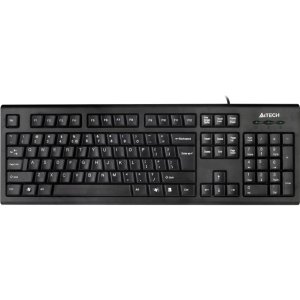
Figure 1: A4tech Natural A Ergonomic Keyboard (KRS-85). This image displays the full layout of the black wired keyboard, highlighting its ergonomic design with A-Shape keys and round keycaps.
2. Eto
2.1 System Awọn ibeere
- IBM or Compatible Systems
- Windows 2000 / XP (X64) / 2003 (X64) / Vista
2.2 Nsopọ Keyboard
- Wa ibudo USB ti o wa lori kọnputa rẹ.
- Insert the USB connector of the A4tech KRS-85 keyboard firmly into the USB port.
- Ẹrọ iṣẹ rẹ yẹ ki o ṣawari laifọwọyi ati fi awọn awakọ pataki sii. Ilana yii le gba awọn iṣẹju diẹ.
- Once installation is complete, the keyboard is ready for use.
3. Awọn ilana Iṣiṣẹ
The A4tech Natural A Keyboard is designed for comfortable and efficient typing. Its unique features are intended to enhance your typing experience and reduce strain.
3.1 Key Awọn ẹya ara ẹrọ
- Patented A-Shape Keys: The layout of the keys is designed to align with the natural position of your hands and wrists, promoting a more relaxed posture.
- Round Edged Keycaps: These keycaps provide a smooth and comfortable typing surface.
- Ifilelẹ Boṣewa: The keyboard features a full-size layout including a numeric keypad, function keys (F1-F12), and navigation keys.
3.2 Ipilẹ Lilo
Use the keyboard as you would any standard computer keyboard for typing, navigating, and executing commands. The ergonomic design is intended to provide comfort during extended use.
4. Itọju
Itọju to dara ṣe idaniloju igbesi aye gigun ati iṣẹ to dara julọ ti keyboard rẹ.
4.1 Ninu
- Ge asopọ keyboard kuro lati kọnputa rẹ ṣaaju ṣiṣe mimọ.
- Lo asọ asọ, ti ko ni lint die-die dampened pẹlu omi tabi a ìwọnba ninu ojutu lati mu ese awọn dada ti awọn keyboard.
- Yẹra fun lilo awọn kẹmika lile, awọn olutọpa abrasive, tabi ọrinrin pupọ.
- Fun mimọ laarin awọn bọtini, lo afẹfẹ fisinuirindigbindigbin lati yọ eruku ati idoti kuro.
5. Laasigbotitusita
If you encounter issues with your A4tech Natural A Keyboard, please refer to the following common solutions.
5.1 Keyboard Ko fesi
- Ensure the USB cable is securely connected to a working USB port on your computer. Try a different USB port.
- Tun kọmputa rẹ bẹrẹ.
- Check your computer's Device Manager (Windows) to see if the keyboard is recognized and if there are any driver issues.
5.2 Specific Key Combinations Not Working (e.g., Ctrl-Alt-Del)
- Some users have reported that certain key combinations, such as Ctrl-Alt-Del, may not function as expected on this keyboard with Windows operating systems. This is a known compatibility limitation for some configurations.
- If this issue persists, consider using alternative methods for these functions within your operating system, or consult A4tech support for potential workarounds or driver updates if available.
6. Awọn pato
| Ẹya ara ẹrọ | Ẹ̀kúnrẹ́rẹ́ |
|---|---|
| Orukọ ọja | Natural_A Rounded Edge Keyboard |
| Nọmba awoṣe | KRS-85 |
| Asopọmọra Technology | Cable (USB) |
| Apejuwe Keyboard | Ergonomic |
| Nọmba ti Awọn bọtini | 85 |
| Ọja Mefa | 19.69 x 7.87 x 1.97 inches |
| Iwọn Nkan | 2.2 iwon |
| Olupese | ERGOGUYS (A4tech Co., Ltd) |
| Ọjọ Akọkọ Wa | Oṣu Kẹwa Ọjọ 31, Ọdun 2013 |
7. atilẹyin ọja Information
The A4tech Natural A Ergonomic Keyboard (KRS-85) comes with a 1-Odun Atilẹyin ọja Limited from the manufacturer. This warranty covers defects in materials and workmanship under normal use.
Please retain your proof of purchase for warranty claims. For detailed terms and conditions, refer to the warranty documentation provided with your product or contact the manufacturer directly.
8. Atilẹyin
For further assistance, technical support, or warranty inquiries, please contact the manufacturer or your point of purchase. Ensure you have your product model number (KRS-85) and proof of purchase ready when contacting support.