
1. Ifihan
This manual provides essential instructions for the installation, operation, and maintenance of the BFT Elba BU Control Unit, model D113717 00002. This unit is designed for controlling gate automation systems, ensuring reliable and safe operation. Please read this manual carefully before proceeding with any installation or operation. Keep this manual for future reference.
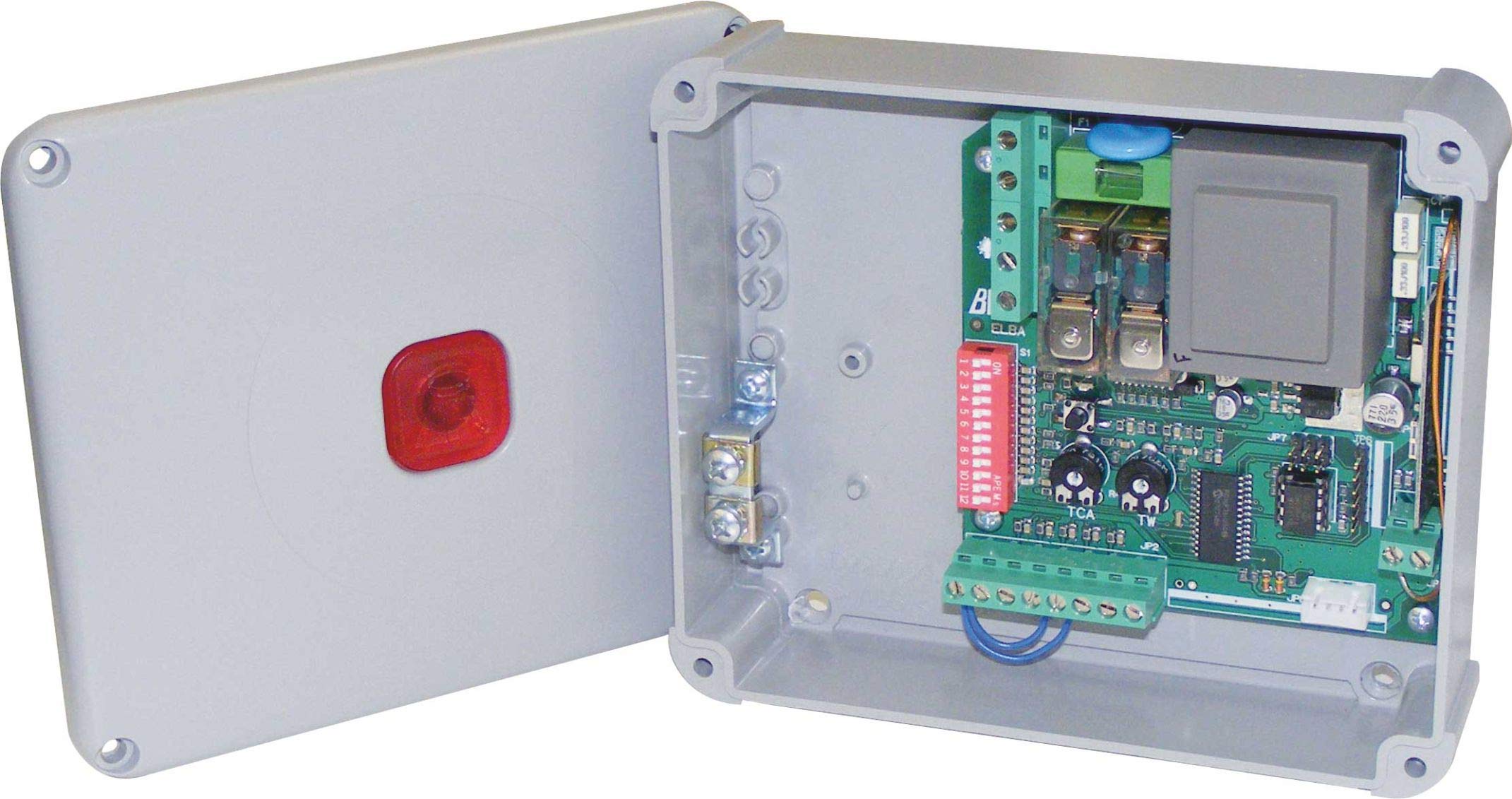
Nọmba 1: BFT Elba BU Control Unit D113717 00002. This image shows the main control board with various terminals and components.
2. Alaye Aabo
IKILO: Incorrect installation or improper use can cause serious injury or damage.
- All installation and maintenance work must be performed by qualified personnel only.
- Disconnect power before performing any work on the control unit.
- Ensure all electrical connections comply with local and national electrical codes.
- Do not expose the unit to moisture, rain, or extreme temperatures.
- Use only original BFT spare parts and accessories.
- Keep children and unauthorized persons away from the gate automation system during operation.
3. Package Awọn akoonu
Daju pe gbogbo awọn paati wa ati pe ko bajẹ lori ṣiṣi silẹ:
- BFT Elba BU Control Unit (Model D113717 00002)
- Ilana Afowoyi (iwe yii)
- Mounting hardware (screws, anchors - may vary)
- Wiring terminals (pre-installed or separate - may vary)
4. Eto ati fifi sori
This section outlines the general steps for installing the control unit. Refer to detailed wiring diagrams provided with the product for specific connections.
- Iṣagbesori: Securely mount the control unit in a protective enclosure, away from direct weather exposure and vibrations. Ensure adequate ventilation.
- Asopọ agbara: Connect the main power supply (230V AC, 50 Hz) to the designated terminals. Ensure proper grounding.
- Awọn Isopọ mọto: Connect the gate motor(s) to the appropriate output terminals on the control unit.
- Awọn isopọ ẹya ẹrọ: Connect safety devices (e.g., photocells, safety edges), command devices (e.g., push buttons, key switches), and other accessories (e.g., flashing lights) to their respective terminals.
- Asopọmọra Antenna: If using a radio receiver, connect the antenna to improve signal reception.
- Agbara Ibẹrẹ: After all connections are verified, apply power to the unit. Observe any indicator lights for initial status.
5. Awọn ilana Iṣiṣẹ
The BFT Elba BU Control Unit offers various functionalities for gate automation.
- Eto: The unit typically features a programming interface (e.g., dip switches, push buttons, or a display) to set operating parameters such as opening/closing times, force, pause times, and safety logic. Refer to the detailed programming guide for your specific gate system.
- Isẹ afọwọṣe: In case of power failure or emergency, the gate can usually be disengaged for manual operation. Consult your gate motor's manual for instructions on manual release.
- Isakoṣo latọna jijin: If a radio receiver is connected, remote controls can be programmed to operate the gate. Follow the instructions for pairing remote controls with the receiver.
6. Itọju
Regular maintenance ensures the longevity and safe operation of your BFT Elba BU Control Unit and the entire gate automation system.
- Ayewo Ọdọọdun: Have a qualified technician inspect the control unit and all associated components annually.
- Mimọ: Keep the control unit enclosure clean and free from dust, insects, and debris.
- Ṣiṣayẹwo onirin: Lojoojumọ, ṣayẹwo gbogbo awọn asopọ waya fun wiwọ ati awọn ami ti yiya tabi ibajẹ.
- Awọn Ẹrọ Aabo: Regularly test all safety devices (photocells, safety edges) to ensure they are functioning correctly.
- Ge asopọ agbara: Always disconnect the main power supply before performing any cleaning or inspection inside the control unit.
7. Laasigbotitusita
Ṣaaju ki o to kan si atilẹyin imọ-ẹrọ, tunview awọn oran ti o wọpọ wọnyi ati awọn solusan ti o pọju wọn.
| Isoro | Owun to le Fa | Ojutu |
|---|---|---|
| Ẹnubodè kò dáhùn sí àwọn àṣẹ. | No power, remote control battery flat, safety device activated, faulty wiring. | Check power supply, replace remote battery, check safety devices for obstructions, inspect wiring connections. |
| Ẹnu-ọna ṣi ṣugbọn ko tii. | Safety device (e.g., photocell) obstructed or misaligned, programming error. | Clear obstruction from safety devices, clean photocell lenses, realign photocells, check programming parameters. |
| Gate operates intermittently. | Loose wiring connection, interference with remote signal, motor issue. | Check all wiring connections, ensure antenna is properly connected, consult a technician for motor diagnosis. |
If the problem persists after attempting these solutions, contact a qualified BFT service technician.
8. Awọn pato
| Ẹya ara ẹrọ | Ẹ̀kúnrẹ́rẹ́ |
|---|---|
| Nọmba awoṣe | D113717 |
| Brand | BFT |
| Iṣagbewọle Voltage | 230 V AC |
| Igbohunsafẹfẹ | 50 Hz |
| Olupese | B.F.T. SRL |
| Awọn ẹrọ ibaramu | Gate automation systems (e.g., gate motors, safety sensors) |
9. Atilẹyin ọja ati Support
For detailed warranty information, please refer to the official warranty documentation provided with your product or visit the official BFT webojula.
For technical support, spare parts, or service, please contact your authorized BFT dealer or a qualified service technician. Ensure you have your product model number (D113717 00002) and purchase details available when seeking support.
Pataki: Any unauthorized repairs or modifications will void the product warranty.