
Ọrọ Iṣaaju
This manual provides comprehensive instructions for the Superior Hotel TV Universal Programmable Remote Control, Model 8054242080070. This remote is specifically designed for hotel environments, featuring large buttons for ease of use and a disabled menu access button to prevent unauthorized changes to TV settings. It is programmable via PC for simple setup.
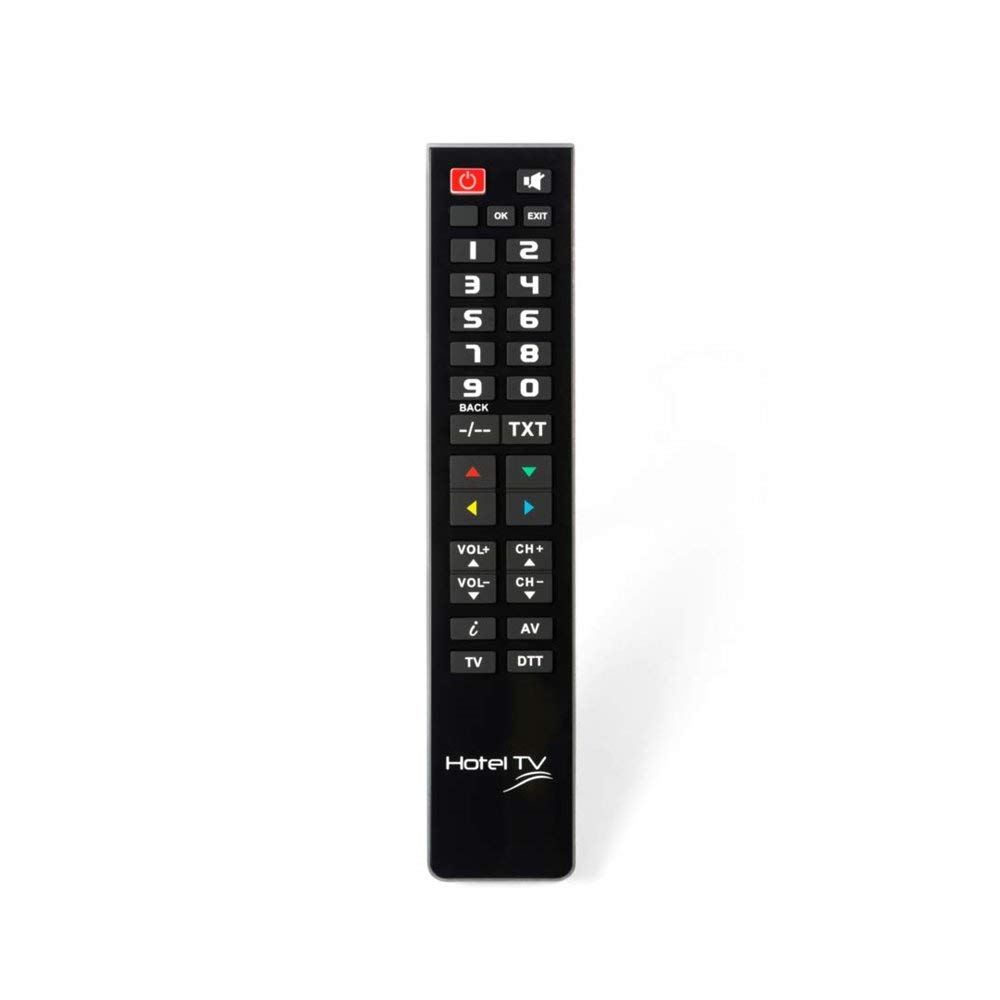
Image: Superior Hotel TV Universal Programmable Remote Control, showing its compact design and large buttons.
Ṣeto
1. Fifi sori batiri
- Wa ideri iyẹwu batiri ni ẹhin isakoṣo latọna jijin.
- Gbe ideri si isalẹ tabi tẹ latch lati ṣii.
- Insert two AAA (LR03) batteries, ensuring the correct polarity (+ and -) as indicated inside the compartment. Akiyesi: Awọn batiri ko si.
- Rọpo ideri iyẹwu batiri titi ti o fi tẹ ni aabo sinu aaye.
2. PC Programming
The remote control requires programming via a personal computer to function with your specific TV model. Follow these steps:
- Visit the official programming software webojula: www.telecontrol.tv.
- Download and install the programming software onto your PC.
- Connect the remote control to your PC using a compatible USB cable (not included).
- Follow the on-screen instructions within the software to select your TV brand and model, and program the remote control.
- Once programming is complete, disconnect the remote control from your PC.
Awọn ilana Iṣiṣẹ
After successful programming, the remote control is ready for use. Its design focuses on essential functions for hotel guests.
- Bọtini agbara: Tẹ lati tan TV tabi pa.
- Ikanni Soke/Isalẹ: Use these buttons to change TV channels sequentially.
- Iwọn didun Soke/Isalẹ: Adjust the TV's audio volume.
- Bọtini Mute: Temporarily silence the TV audio.
- Awọn bọtini nọmba (0-9): Taara yan awọn ikanni TV.
Akiyesi pataki: The menu access button is intentionally inactive on this remote control. This design prevents guests from altering TV settings, ensuring consistent operation within a hotel environment.
Itoju
Batiri Rirọpo
When the remote control's performance degrades or it stops responding, replace the batteries. Follow the battery installation steps outlined in the "Setup" section. Always use new AAA (LR03) alkaline batteries.
Ninu
Lati nu isakoṣo latọna jijin, rọra nu dada rẹ pẹlu asọ ti o gbẹ. Fun idoti alagidi, die-die dampen the cloth with water or a mild, non-abrasive cleaner. Avoid using harsh chemicals or submerging the remote in liquid.
Laasigbotitusita
- Latọna jijin ko dahun:
- Ṣayẹwo boya a ti fi awọn batiri sii daradara ati pe wọn ni idiyele ti o to. Rọpo ti o ba wulo.
- Rii daju pe ko si awọn idena laarin isakoṣo latọna jijin ati olugba infurarẹẹdi ti TV.
- Verify that the remote was programmed correctly for your TV model using the PC software.
- Awọn bọtini ko ṣiṣẹ:
- Some buttons, like the menu button, are intentionally disabled for hotel use.
- If essential buttons are not working, re-program the remote control via PC.
- Clean the remote control to ensure no debris is interfering with button presses.
- Programming issues:
- Ensure your PC meets the minimum requirements for the programming software.
- Use a reliable USB cable for connection.
- Refer to the software's help section or the telecontrol.tv website for specific programming guidance.
Awọn pato
| Brand | Awọn Itanna Itanna Giga |
| Nọmba awoṣe | 8054242080070 |
| Awọn ẹrọ ibaramu | Tẹlifisiọnu |
| Asopọmọra Technology | Igbohunsafẹfẹ Redio (RF) |
| Pataki Ẹya | Pre-programmed (via PC) |
| Awọn ẹrọ Atilẹyin ti o pọju | 1 |
| Nọmba ti Awọn bọtini | 1 (referring to the main function set, not individual keys) |
| Ibiti o pọju | 10 Mita |
| Batiri Apejuwe | AAA (LR03) |
| UPC / EAN | 08054242080070 |
Atilẹyin ọja ati Support
Alaye atilẹyin ọja
Specific warranty details for the Superior Hotel TV Universal Programmable Remote Control are not provided in this manual. Please refer to your purchase documentation or contact your vendor for warranty terms and conditions.
Oluranlowo lati tun nkan se
For technical assistance, programming software, and additional information, please visit the official webojula: