
1. Ifihan
This instruction manual provides detailed guidance for the safe and effective use of your Lepro 12V LED Strip Light. This flexible, non-waterproof LED tape light features SMD 2835 LEDs and is 16.4 feet (5 meters) in length, emitting a daylight white light. Please read this manual thoroughly before installation and operation.

Image 1.1: Lepro 12V LED Strip Light, 16.4ft, shown with its packaging and coiled strip.
2. Alaye Aabo
- Adapter agbara: A 12V power adapter is required and not included. Ensure the power adapter used is rated for 12V DC output. Do not use a power adapter with an output voltage higher than 12V, as this can damage the LED strip and pose a safety risk.
- Wattage ibamu: The LED strip has a wattage of 16W. Ensure the total wattage of the LED strip lights does not exceed the maximum wattage capacity of your power adapter.
- O wu Ooru: Awọn ṣiṣẹ voltage is 12V, resulting in extremely low heat generation, making it safe to touch and suitable for environments accessible to children.
- Alailagbara: The strip light is flexible but fragile. Exercise caution during installation and handling to avoid tearing or excessive bending, which can damage the internal circuitry.
- Lilo inu ile Nikan: This product is designed for indoor use and is non-waterproof. Avoid exposure to moisture or outdoor elements.
3. Package Awọn akoonu
Upon opening the package, verify that all components are present and undamaged. The package includes:
- 1 x Lepro 12V LED Strip Light (16.4 ft / 5m)
- 1 x Itọsọna olumulo
Akiyesi: A 12V power adapter is ko si ati ki o gbọdọ wa ni ra lọtọ.

Image 3.1: Illustration of package contents, highlighting the LED strip light and user manual. The power adapter is not included.
4. Eto ati fifi sori
Tẹle awọn igbesẹ wọnyi fun fifi sori ẹrọ daradara ti ina LED rinhoho rẹ:
- Ṣetan Ilẹ: Ensure the installation surface is clean, dry, and smooth. Wipe the surface thoroughly to remove any dust, grease, or moisture.
- Wọ́n àti Gé (Àṣàyàn): The LED strip can be cut every 3 LEDs along the designated cutting marks. Use sharp scissors to ensure a clean cut. Do not cut in any other location, as this will damage the strip.
- Peeli ati Stick: Carefully peel off the protective backing from the self-adhesive tape on the back of the LED strip. Press the strip firmly onto the prepared surface, ensuring good contact along its entire length.
- Ni aabo pẹlu Awọn agekuru (Aṣayan): For added security, especially on textured surfaces or corners, use fixing clips (not included) to further secure the strip.
- So agbara: Connect the LED strip to a compatible 12V DC power adapter (not included). Ensure the polarity is correct.
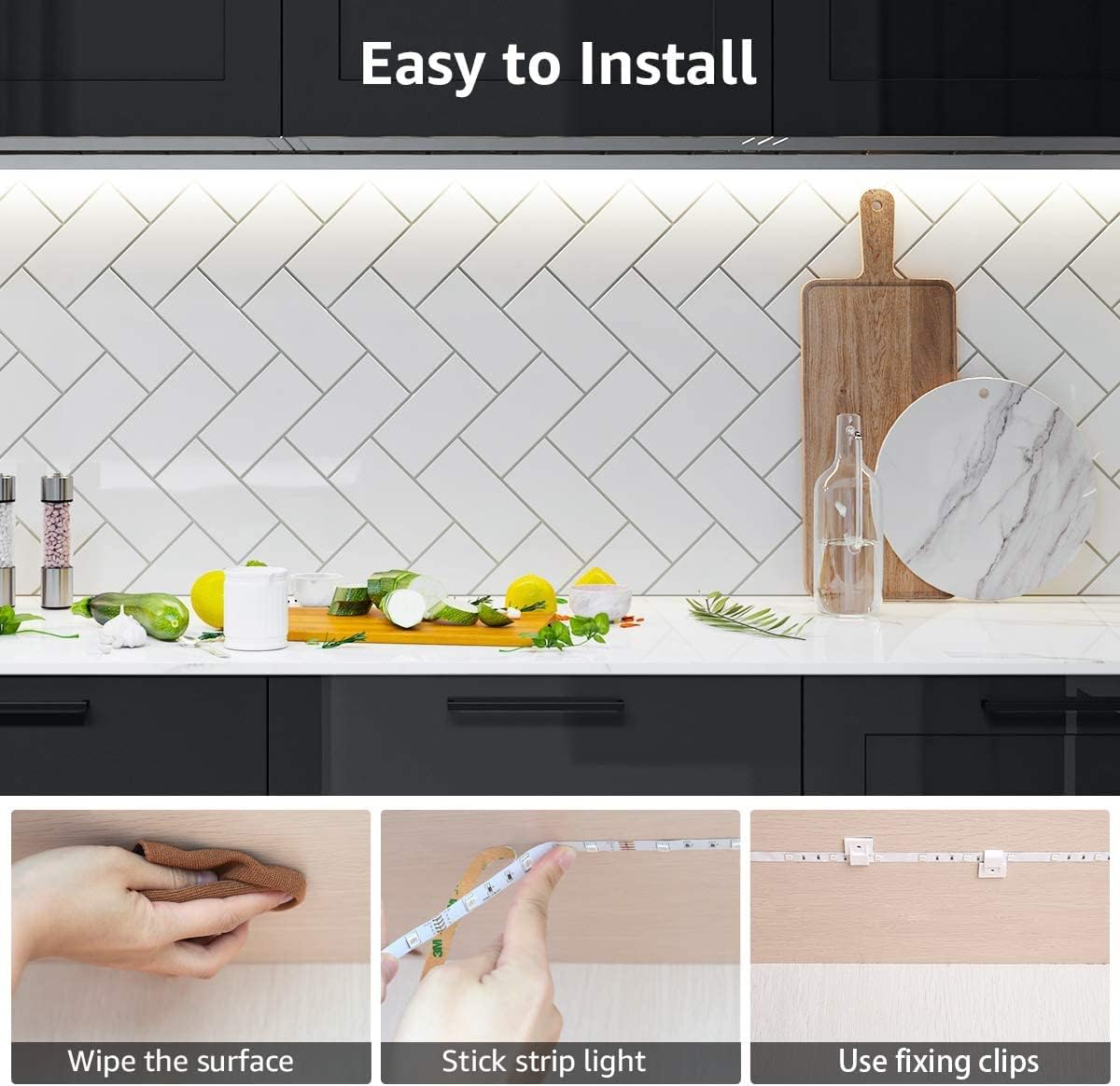
Image 4.1: Visual guide for easy installation, showing surface preparation, adhesive application, and optional use of fixing clips.

Image 4.2: The LED strip's flexibility allows for various shapes and DIY installations.
5. Awọn ilana Iṣiṣẹ
Once the LED strip is securely installed and connected to a compatible 12V DC power adapter, simply plug the power adapter into a standard electrical outlet. The LED strip will illuminate. To turn off the lights, unplug the power adapter or use an inline switch if one is integrated into your power setup.
The LED strip provides a consistent daylight white light (6000K) suitable for various indoor applications.

Aworan 5.1: Example of the 6000K Daylight White illumination provided by the LED strip.
6. Itọju
- Ninu: Ensure the LED strip is unplugged before cleaning. Gently wipe the surface of the strip with a soft, dry cloth. Do not use liquid cleaners or abrasive materials.
- Ayewo: Periodically inspect the strip for any signs of damage, such as cuts, tears, or loose connections. If damage is found, discontinue use and replace the strip.
- Ibi ipamọ: If storing the LED strip, ensure it is coiled loosely and kept in a dry, cool place away from direct sunlight.
7. Laasigbotitusita
| Isoro | Owun to le Fa | Ojutu |
|---|---|---|
| LED rinhoho ko ni tan imọlẹ. |
|
|
| Part of the LED strip is not lighting up. |
|
|
| Adhesive is not sticking well. |
|
|
8. Awọn pato
| Ẹya ara ẹrọ | Ẹ̀kúnrẹ́rẹ́ |
|---|---|
| Brand | Adẹtẹ |
| Nọmba awoṣe | 4100057-DW |
| Imọlẹ Orisun Orisun | LED (SMD 2835) |
| Awọ Imọlẹ | Ojumomo White |
| Iwọn otutu awọ | 6000 Kelvin |
| Flux Imọlẹ | 1200 Lumens |
| Voltage | 12 Volts DC |
| Wattage | 16 Wattis |
| Gigun | 16.4 ft (mita 5) |
| Awọn iwọn (L x W x H) | 196.85 x 0.31 x 0.08 inches |
| Ohun elo | Ejò, Ṣiṣu |
| inu ile / ita gbangba Lilo | Ninu ile Nikan |
| Omi Resistance Ipele | Non-Waterproof (IP20) |
| Pataki Awọn ẹya ara ẹrọ | Slim, flexible, cuttable, self-adhesive |
9. Atilẹyin ọja ati Support
Fun alaye atilẹyin ọja tabi atilẹyin imọ-ẹrọ, jọwọ tọka si Lepro osise webojula tabi kan si wọn onibara iṣẹ taara. Tọju iwe-ẹri rira rẹ bi ẹri rira.
You can visit the Lepro store on Amazon for more products and support: Ile itaja Amazon Lepro