
1. Ifihan
This manual provides essential instructions for the safe and efficient operation of your ICOM BC-152 charger. Please read this manual thoroughly before using the charger to ensure proper setup, operation, and maintenance. Keep this manual for future reference.
2. Alaye Aabo
Always observe the following safety precautions to prevent injury, damage to the charger, or damage to the device being charged.
- Use only with compatible ICOM battery packs. Using incompatible batteries may cause fire, explosion, or injury.
- Ma ṣe fi ṣaja han si ojo, ọrinrin, tabi awọn iwọn otutu to gaju.
- Má ṣe tú charger náà ká tàbí yí i padà. Tọ́ka gbogbo iṣẹ́ ìtọ́jú náà sí àwọn òṣìṣẹ́ tó mọ̀ nípa rẹ̀.
- Rii daju pe iṣan agbara voltage matches the charger's specifications.
- Jeki ṣaja kuro lati awọn orisun ooru ati orun taara.
- Yọ ṣaja kuro ninu ibudo agbara nigbati ko ba si ni lilo tabi ṣaaju ki o to nu.
3. Eto
3.1 Ṣiṣii silẹ
Carefully remove the ICOM BC-152 charger from its packaging. Verify that all components are present:
- ICOM BC-152 Charger Unit
- AC Adapter (if included)
- Ilana Afowoyi (iwe yii)
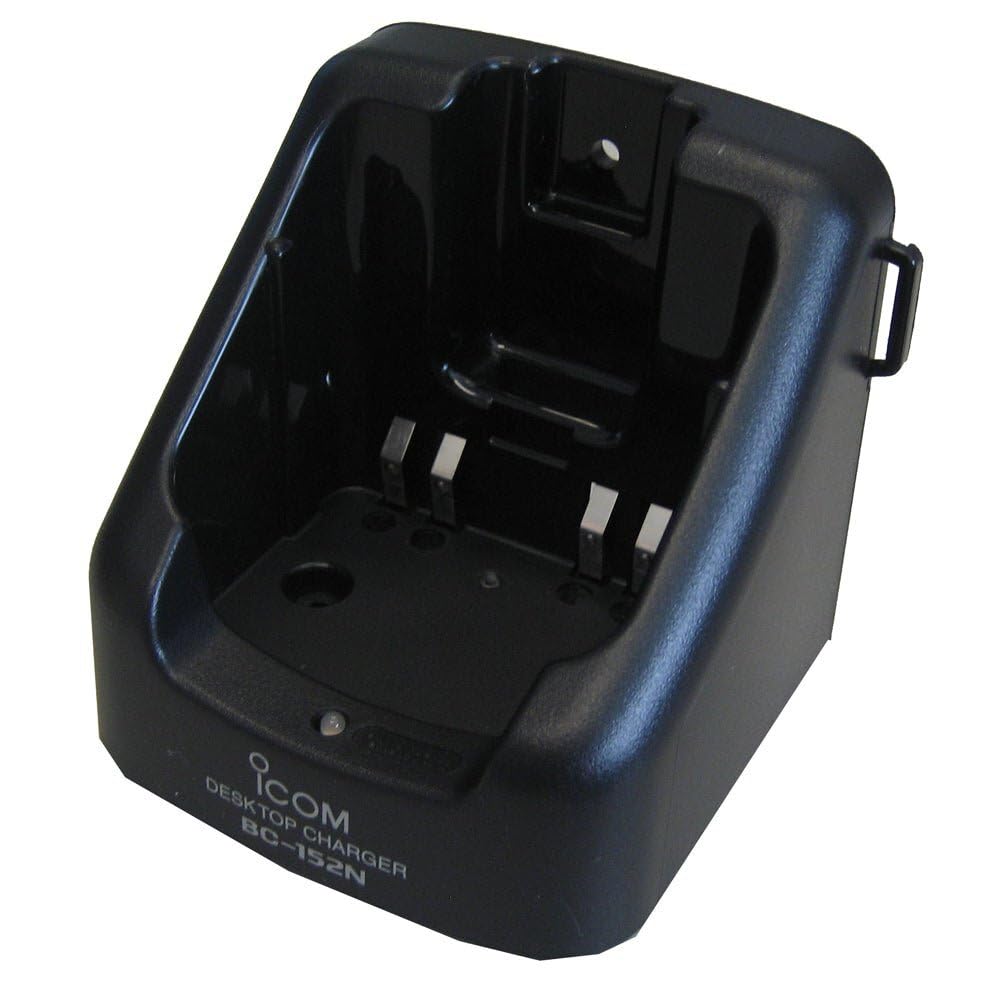
Figure 1: The ICOM BC-152 charger unit. This image shows the compact black charger with a single slot for a battery pack.
3.2 Nsopọ Agbara
- Connect the AC adapter cable to the DC input jack on the rear of the BC-152 charger unit.
- Pulọọgi AC ohun ti nmu badọgba sinu kan boṣewa iṣan iṣan.
- Ṣaja ti šetan fun lilo.
4. Awọn ilana Iṣiṣẹ
4.1 Ngba agbara Pack Batiri
Follow these steps to charge a compatible ICOM battery pack:
- Ensure the charger is connected to a power source as described in Section 3.2.
- Carefully insert the battery pack into the charging slot of the BC-152 charger. Ensure it is seated firmly.
- Observe the charging indicator light.
4.2 Awọn imọlẹ Atọka
The BC-152 charger features an LED indicator to show the charging status:
- Pupa (Solidi): Batiri n gba agbara lọwọ lọwọlọwọ.
- Alawọ ewe (Solidi): Charging is complete. The battery pack is fully charged.
- Pupa didan: Charging error or battery fault. Remove the battery and re-insert. If the error persists, consult the troubleshooting section.
- Ko si Imọlẹ: Charger is not connected to power, or no battery is inserted.
Charging time may vary depending on the battery's capacity and its current charge level. Typically, a fully depleted battery will take approximately 2-4 hours to charge.
5. Itọju
5.1 Ninu
Lati ṣetọju iṣẹ ti o dara julọ ati irisi:
- Yọọ ṣaja nigbagbogbo lati inu iṣan agbara ṣaaju ṣiṣe mimọ.
- Lo aṣọ rirọ ati gbigbẹ lati nu ita ti ṣaja naa.
- Ma ṣe lo awọn afọmọ abrasive, nkanmimu, tabi awọn kẹmika lile.
- Ensure no moisture enters the charging slot or power input.
5.2 Ibi ipamọ
When not in use for extended periods, store the charger in a cool, dry place, away from direct sunlight and extreme temperatures. Disconnect it from the power supply.
6. Laasigbotitusita
If you encounter issues with your BC-152 charger, refer to the table below for common problems and solutions.
| Isoro | Owun to le Fa | Ojutu |
|---|---|---|
| Ina Atọka Ṣaja wa ni pipa. | No power supply or battery not inserted. | Check AC adapter connection. Ensure battery is correctly inserted. |
| Atọka ina seju pupa. | Battery fault or charging error. | Remove and re-insert the battery. Try a different compatible battery if available. |
| Batiri ko gba agbara. | Faulty battery, charger, or power supply. | Verify power connection. Test with a known good battery. If problem persists, contact support. |
7. Awọn pato
| Brand | ICOM |
| Awoṣe | BC-152 |
| Iṣagbewọle Voltage | 12-16V DC (via AC adapter) |
| O wujade Voltage | 8.4V DC |
| Gbigba agbara lọwọlọwọ | Isunmọ. 450mA |
| Awọn iwọn (W×H×D) | Approx. 80 × 50 × 90 mm (3.1 × 2.0 × 3.5 inches) |
| Iwọn | 0.18 Poun (iwọn 82g) |
| Àwọ̀ | Dudu |
Akiyesi: Awọn pato jẹ koko ọrọ si iyipada laisi akiyesi fun ilọsiwaju.
8. atilẹyin ọja Information
ICOM products are manufactured with high-quality components and are subject to rigorous quality control. This product is covered by a limited warranty against defects in materials and workmanship. The specific terms and duration of the warranty may vary by region. Please refer to the warranty card included with your purchase or visit the official ICOM webaaye fun alaye atilẹyin ọja alaye.
This warranty does not cover damage caused by misuse, accident, unauthorized modification, or improper installation.
9. Onibara Support
If you have any questions, require technical assistance, or need to report a problem that cannot be resolved using the troubleshooting guide, please contact ICOM customer support.
ICOM America Inc.
Visit ICOM America's Contact Page
Please have your product model (BC-152) and serial number ready when contacting support.