
BLACK + DEKERE D988
BLACK+DECKER D988 Finishing Attachment Sander Instruction Manual
Ọrọ Iṣaaju
This manual provides essential instructions for the safe and effective use of your BLACK+DECKER D988 Finishing Attachment Sander. Please read this manual thoroughly before operating the tool and retain it for future reference.
Alaye Aabo pataki
Nigbagbogbo tẹle awọn iṣọra aabo ipilẹ lati dinku eewu ina, mọnamọna, ati ipalara ti ara ẹni.
- Wọ aabo oju.
- Wọ aabo igbọran.
- Rii daju pe workpiece wa ni aabo clamped.
- Pa ọwọ kuro ninu gbigbe awọn ẹya.
- Disconnect the tool from the power source before changing accessories or performing maintenance.
- Lo awọn ẹya ẹrọ ti a ṣe iṣeduro nikan.
Ṣeto
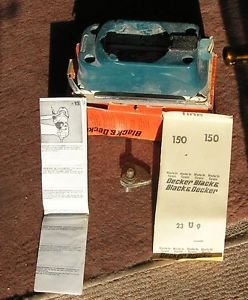
Image showing the BLACK+DECKER D988 Finishing Attachment Sander, a compact sanding head designed to attach to a compatible power unit.
Ṣiṣi silẹ
Carefully remove the finishing attachment sander and all accessories from the packaging. Inspect for any damage.
Attaching to Power Unit
The D988 is an attachment. Ensure your BLACK+DECKER power unit is compatible.
- Align the attachment with the power unit's drive shaft.
- Push the attachment firmly onto the power unit until it clicks into place.
- Verify the attachment is securely fastened before use.
Attaching Sanding Sheets
The D988 uses hook-and-loop sanding sheets.
- Ensure the power unit is disconnected from the power supply.
- Peel off the old sanding sheet if present.
- Align the new sanding sheet with the base of the attachment, ensuring the holes (if any) match for dust extraction.
- Press the sanding sheet firmly onto the hook-and-loop base.
Awọn ilana Iṣiṣẹ
Gbogbogbo Isẹ
Connect the power unit to a suitable power source.
Mu ọpa naa duro ṣinṣin pẹlu ọwọ mejeeji.
Place the sanding base flat on the workpiece before starting the tool.
Move the sander slowly and evenly over the surface. Avoid applying excessive pressure, as this can reduce efficiency and damage the workpiece or tool.
For optimal results, sand with the grain of the wood.
Isediwon ekuru
If your power unit or attachment has a dust extraction port, connect a suitable dust bag or vacuum cleaner to minimize dust exposure.
Itoju
Itọju deede ṣe idaniloju iṣẹ ṣiṣe ti o dara julọ ati fa igbesi aye ọpa rẹ pọ si.
Ninu
After each use, disconnect the tool from the power supply.
Wipe the exterior of the tool with a damp asọ. Maṣe lo awọn kẹmika ti o lewu tabi awọn afọmọ abrasive.
Clear any dust buildup from the ventilation openings to prevent overheating.
Sanding Pad Inspection
Periodically inspect the hook-and-loop sanding pad for wear or damage. A worn pad will not hold sanding sheets effectively. Replace if necessary.
Ibi ipamọ
Tọ́jú ohun èlò náà sí ibi gbígbẹ, tí ó ní ààbò, tí àwọn ọmọdé kò lè dé.
Laasigbotitusita
| Isoro | Owun to le Fa | Ojutu |
|---|---|---|
| Irinṣẹ ko bẹrẹ | Ko si ipese agbara | Check power connection, fuse, or circuit breaker. |
| Ko dara sanding išẹ | Iyanrin ti o wọ | Replace sanding sheet. |
| Ko dara sanding išẹ | Agbara ti o pọju ti a lo | Reduce pressure; let the tool do the work. |
| Sanding sheet detaches | Worn hook-and-loop pad | Rọpo paadi iyanrin. |
Awọn pato
- Awoṣe: D988
- Brand: BLACK+DECKER
- Ìwọ̀n Nkan: 500 giramu
- Iyara Yiyi to pọju: 10000 rpm
- ASIN: B00IQQ92IG
- Olupese: Black & Decker
Atilẹyin ọja ati Support
For warranty information or technical support, please refer to the documentation provided with your BLACK+DECKER power unit or visit the official BLACK+DECKER webojula.
This attachment is covered by the standard BLACK+DECKER warranty applicable to its power tool system.
Ask a question about this manual
Ask about setup, troubleshooting, compatibility, parts, safety, or missing instructions. Manuals+ will review the question and use this page’s manual context to help answer it.