
1. Ifihan
This manual provides essential information for the installation, operation, and maintenance of your Intel Core i7-4790 Processor. Designed for desktop computing, this processor offers a balance of performance and efficiency for various applications, from everyday tasks to demanding gaming and content creation. Please read this manual thoroughly before proceeding with installation.
2. Alaye Aabo
Always observe the following safety precautions to prevent damage to the processor or other components, and to ensure personal safety:
- Idena Sisanjade Electrostatic (ESD): Processors are sensitive to static electricity. Always wear an anti-static wrist strap or frequently touch a grounded metal object before handling the processor.
- Mu pẹlu Itọju: Avoid touching the gold contacts or the bottom of the processor. Hold the processor by its edges.
- Agbara Pa: Ensure your computer system is completely powered off and unplugged from the wall outlet before installing or removing any components.
- Afẹfẹ: Rii daju pe sisan afẹfẹ deedee laarin apoti kọnputa rẹ lati ṣe idiwọ igbona pupọ.
- Fifi sori Ọjọgbọn: Ti o ko ba ni idaniloju nipa igbesẹ eyikeyi, kan si onimọ-ẹrọ ti o peye.

Figure 2.1: System Protection Reminder
This image illustrates the importance of protecting your computer system, emphasizing the need for careful handling and proper installation practices to ensure the longevity and security of your components.
3. Package Awọn akoonu
Jẹrisi pe package rẹ ni awọn nkan wọnyi ninu:
- Isise Intel Core i7-4790
- Intel Stock CPU Cooler (if purchased as a boxed processor)
- Àwọn ìwé àkọsílẹ̀ (fún àpẹẹrẹ, Ìtọ́sọ́nà Ìbẹ̀rẹ̀ Kíákíá, Ìwífún nípa Àtìlẹ́yìn)
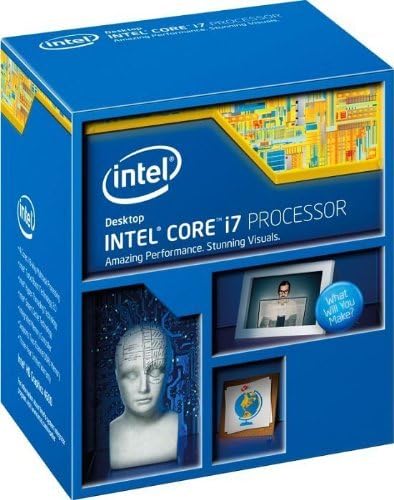
Figure 3.1: Processor Retail Box (Front)
This image displays the front of the Intel Core i7 Processor retail packaging, highlighting the brand and product line.

Figure 3.2: Processor Retail Box (Side)
This image shows the side of the Intel Core i7 Processor retail box, where the model number BX80646I74790 and UPC are visible for identification.
4. Eto ati fifi sori
The Intel Core i7-4790 Processor uses the LGA 1150 socket. Ensure your motherboard is compatible with this socket type and supports 4th Generation Intel Core processors (Haswell refresh). A BIOS update may be required for some Z87 motherboards.
4.1 Akojọ aṣyn fifi sori ẹrọ tẹlẹ
- Compatible Motherboard (LGA 1150 socket)
- Lẹ́ẹ̀tì gbígbóná (tí a kò bá fi sí orí itutu tẹ́lẹ̀)
- Screwdriver (for cooler installation)
- Anti-aimi okun ọwọ
4.2 Awọn Igbesẹ Fifi sori ẹrọ Processor
- Mura modaboudu: Open the CPU socket retention lever on the motherboard. Lift the metal load plate.
- Orient the Processor: Carefully align the processor with the socket. Look for the golden triangle or notch on one corner of the processor and match it with the corresponding mark on the socket. Do not force the processor into the socket.
- Joko ero isise naa: Gently lower the processor straight down into the socket. It should sit without resistance.
- Ṣe aabo fun ero isise naa: Close the metal load plate over the processor, then push down the retention lever until it clicks into place.
- Apply Thermal Paste (if necessary): If your CPU cooler does not have pre-applied thermal paste, apply a small amount (pea-sized dot) to the center of the CPU's integrated heat spreader (IHS).
- Fi ẹrọ kuru Sipiyu sori ẹrọ: Mount the CPU cooler according to its specific instructions. Ensure it makes firm, even contact with the processor's IHS.
- Connect Cooler Fan: Connect the CPU cooler fan cable to the designated CPU_FAN header on the motherboard.

Figure 4.1: Intel Core i7-4790 Processor
Aworan yii fihan oke view of the Intel Core i7-4790 Processor, illustrating its physical appearance and branding, which is crucial for correct orientation during installation.
5. Ṣiṣẹ ẹrọ isise
Once installed, the Intel Core i7-4790 Processor operates automatically within your system. Its performance is managed by the operating system and motherboard BIOS/UEFI settings. Key features include:
- Imọ-ẹrọ Igbelaruge Intel Turbo 2.0: Dynamically increases the processor's frequency as needed by taking advantage of thermal and power headroom to deliver a burst of speed when you need it.
- Imọ-ẹrọ Titẹ-ọna kika Intel: Allows each processor core to work on two tasks at the same time, improving multitasking performance.
- Intel HD Graphics 4600: Integrated graphics solution for display output and light graphics tasks.
- Imọ-ẹrọ Foju Intel (VT-x): Enables one hardware platform to function as multiple "virtual" platforms, offering improved manageability, security, and flexibility.
For optimal performance, ensure your operating system and drivers are up to date. Adjusting power management settings in your operating system or BIOS can also influence processor behavior and power consumption.
6. Itọju
Processors generally require minimal maintenance. The primary focus should be on maintaining an optimal operating environment:
- Yiyọ eruku kuro: Regularly clean dust from your computer case, especially from CPU cooler fins and fans, to ensure efficient heat dissipation. Use compressed air for this purpose.
- Lẹẹ igbona: If you remove the CPU cooler for any reason, it is recommended to clean off the old thermal paste from both the CPU and the cooler base and apply fresh thermal paste before reinstallation.
- Abojuto iwọn otutu: Use system monitoring software to keep an eye on CPU temperatures, especially under heavy load, to ensure it stays within safe operating limits.
7. Laasigbotitusita
If you encounter issues after installing your Intel Core i7-4790 Processor, consider the following troubleshooting steps:
- No Display/No Boot:
- Double-check all power connections to the motherboard and CPU.
- Ensure the processor is correctly seated in its socket and the retention lever is locked.
- Verify RAM modules are properly installed.
- Confirm motherboard BIOS is updated to support the i7-4790, especially if using an older Z87 chipset.
- Igbóná púpọ̀:
- Ensure the CPU cooler is correctly installed and making good contact with the CPU.
- Verify thermal paste application.
- Check that the CPU cooler fan is spinning and connected to the correct header.
- Improve case airflow by ensuring proper fan configuration and removing obstructions.
- Aisedeede/iparun eto:
- Run diagnostic tools for memory and storage.
- Rii daju pe gbogbo awọn awakọ (chipset, awọn aworan) ti wa ni imudojuiwọn.
- Check for BIOS updates for your motherboard.
8. Awọn pato
| Ẹya ara ẹrọ | Sipesifikesonu |
|---|---|
| Nọmba awoṣe | BX80646I74790 |
| Orúkọ Pàtàkì | Haswell |
| Iwọn Core | 4 |
| Iwọn Iwọn | 8 |
| Iyara aago | 3.6 GHz |
| Max Turbo Igbohunsafẹfẹ | 4.0 GHz |
| Intel Smart kaṣe | 8 MB |
| DMI2 | 5.0 GT/s |
| Lithography | 22nm |
| Soketi | LGA 1150 |
| Agbára Apẹrẹ Gbígbóná Tó Pọ̀ Jùlọ (TDP) | 84 W |
| Ìwọ̀n Ìrántí Tó Pọ̀ Jùlọ | 25.6 GB/s |
| isise Graphics | Awọn aworan Intel HD 4600 |
| Igbohunsafẹfẹ Ipilẹ Aworan | 350 MHz |
| Àwòrán Ìgbohùngbà Oníyípadà Púpọ̀ jùlọ | 1.2 GHz |
| Iṣeto Sipiyu to pọ julọ | 1 |
| Awọn imọ-ẹrọ to ti ni ilọsiwaju | Intel Turbo Boost 2.0, Hyper-Threading, Virtualization (VT-x, VT-d), AES New Instructions, Secure Key, OS Guard, Trusted Execution Technology |
9. Atilẹyin ọja ati Support
This Intel processor is covered by Intel's standard warranty. For specific warranty terms and conditions, please refer to the documentation included with your processor or visit the official Intel support website. Please note that opening the product or improper installation may void the warranty.
For technical support, driver downloads, and further assistance, please visit the official Intel support portal. When contacting support, have your processor's model number (BX80646I74790) and any relevant system information ready.
Pataki: No refunds or returns are accepted if the product has been opened, unless due to a manufacturing defect. In the event of a return, the buyer is responsible for return shipping costs. Please contact the seller or Intel support for return authorization and procedures.