
Mastech MS6514
Mastech MS6514 Dual Channel Digital Thermometer
Temperature Logger Tester with USB Interface
Ọrọ Iṣaaju
The Mastech MS6514 is a high-precision, dual-channel digital thermometer designed for accurate temperature measurement and data logging. It supports various thermocouple types (J, K, T, E, R, S, N) and features a USB interface for data transfer to a computer. This manual provides essential information for the safe and effective operation, maintenance, and troubleshooting of your MS6514 thermometer.
Alaye Aabo
Please read and understand all safety instructions before operating the device. Failure to do so may result in injury or damage to the instrument.
- Ma ṣe ṣisẹ ẹrọ naa ti o ba han pe o bajẹ tabi ti idabobo ba ti bajẹ.
- Ensure correct battery polarity when installing.
- Yago fun ṣiṣafihan ẹrọ naa si awọn iwọn otutu to gaju, ọriniinitutu, tabi oorun taara.
- Má ṣe gbìyànjú láti tún ẹ̀rọ náà ṣe tàbí láti ṣe àtúnṣe rẹ̀. Tọ́ka gbogbo iṣẹ́ ìtọ́jú náà sí àwọn òṣìṣẹ́ tó mọ̀ nípa rẹ̀.
- Use only specified thermocouple types and ensure they are properly connected.
- Jeki ẹrọ naa mọ ki o gbẹ.
Package Awọn akoonu
Daju pe gbogbo awọn nkan ti a ṣe akojọ rẹ si isalẹ wa ninu package rẹ:
- Mastech MS6514 Digital Thermometer (1 unit)
- Okun USB (ẹyọkan 1)
- CD Software (1 unit)
- Temperature Probe (2 units)
- Afowoyi Olumulo (iwe-ipamọ yii)
Ọja Pariview
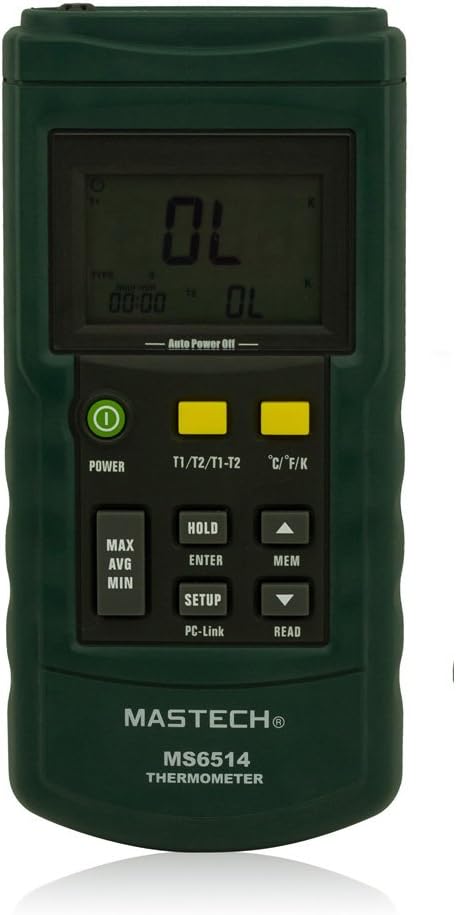
olusin 1: Iwaju view of the MS6514 thermometer, highlighting the LCD display and button layout.

Figure 2: Side and back views illustrating the physical dimensions and battery compartment of the MS6514.

Figure 3: The MS6514 thermometer with its standard accessories, including the USB cable and two temperature probes.
The MS6514 features a clear LCD display, intuitive button controls, and robust construction. Key components include:
- Ifihan LCD: Shows temperature readings, units, time, and various indicators.
- Bọtini AGBARA: Tan ẹrọ naa si tan tabi pa.
- T1/T2/T1-T2 Button: Toggles between displaying temperature from probe 1, probe 2, or the difference between T1 and T2.
- °C/°F/K Button: Changes the temperature unit between Celsius, Fahrenheit, and Kelvin.
- Bọtini Max/AVG/MIN: Cycles through maximum, average, and minimum recorded temperature values.
- HOLD/ENTER/SETUP Button: Holds the current reading, confirms selections in setup mode, or enters setup mode.
- MEM/READ Button: Accesses memory functions to store or recall data.
- Awọn itọka oke/isalẹ: Lilọ kiri lori awọn akojọ aṣayan tabi ṣatunṣe awọn eto.
- Ibudo USB: Fun asopọ si kọmputa kan fun gbigbe data.
- Thermocouple Inputs (T1, T2): Jacks for connecting K-type thermocouples.
Ṣeto
1. Fifi sori batiri
- Wa yara batiri ni ẹhin ẹrọ naa.
- Ṣii ideri batiri naa.
- Fi batiri 9V tuntun sii, ki o si kiyesi polarity ti o tọ (+/-).
- Pa ideri batiri naa ni aabo.
2. Thermocouple Connection
- Identify the T1 and T2 input jacks at the top of the thermometer.
- Connect your desired thermocouple probes into the T1 and/or T2 jacks. Ensure a firm connection.
- Note: The device supports J, K, T, E, R, S, N type thermocouples. Ensure the correct type is selected in the device settings for accurate readings.
3. Software Installation (for Data Logging)
- Insert the provided CD Software into your computer's CD/DVD drive.
- Follow the on-screen instructions to install the necessary drivers and data logging software.
- Connect the MS6514 to your computer using the supplied USB cable.
- Launch the installed software to begin data transfer and logging.
Awọn ilana Iṣiṣẹ
Titan / Paa
Tẹ awọn AGBARA button to turn the thermometer on or off. The device features an automatic shutdown function to conserve battery life; the auto-off time can be configured in the setup menu.
Selecting Temperature Units (°C/°F/K)
Tẹ awọn °C/°F/K button to cycle through Celsius, Fahrenheit, and Kelvin temperature units.
Dual Input Display (T1, T2, T1-T2)
Tẹ awọn T1/T2/T1-T2 button to switch the display between:
- T1: Temperature reading from the first thermocouple input.
- T2: Temperature reading from the second thermocouple input.
- T1-T2: The temperature difference between the two inputs.
Maximum, Minimum, and Average Measurement
Tẹ awọn Max/AVG/MIN bọtini lati view the maximum, minimum, or average temperature recorded since the last reset or power-on. Press repeatedly to cycle through these values.
Idaduro data
Tẹ awọn DIMU button (short press) to freeze the current temperature reading on the display. Press again to release the hold function.
Data Logging and Memory
The MS6514 can store up to 1000 data points, either automatically or manually.
- Ibi ipamọ Afowoyi: While in normal measurement mode, press the MEM button (short press) to manually save the current reading.
- Ibi ipamọ Aifọwọyi: Configure the automatic storage interval in the setup menu. The device will log data at the set interval.
- Reading Stored Data: Tẹ mọlẹ MEM bọtini, lẹhinna lo awọn Soke / Isalẹ arrows to scroll through stored data points.
USB Interface for Data Transfer
Connect the thermometer to your computer using the USB cable. Use the provided software to transfer logged data, view real-time readings, and configure device settings from your computer.
User Auto-Calibration and Thermocouple Deviation Compensation
The device features a user auto-calibration function and thermocouple deviation compensation to ensure accuracy. Refer to the detailed instructions in the software manual or the device's internal setup menu for proper execution of these functions. It is crucial to understand the procedure before attempting self-calibration.
Itoju
Ninu
Nu ẹrọ naa pẹlu asọ, damp Aṣọ. Má ṣe lo àwọn ohun ìfọṣọ tàbí àwọn ohun èlò ìfọṣọ. Rí i dájú pé ẹ̀rọ náà gbẹ kí o tó kó o pamọ́ tàbí kí o tó lò ó.
Batiri Rirọpo
When the low battery indicator appears on the display, replace the 9V battery as described in the "Battery Installation" section. Remove the battery if the device will not be used for an extended period.
Ibi ipamọ
Store the thermometer in a cool, dry place, away from direct sunlight and extreme temperatures. Keep it in its protective case (if provided) to prevent damage.
Laasigbotitusita
| Isoro | Owun to le Fa | Ojutu |
|---|---|---|
| Ẹrọ naa ko ṣiṣẹ. | Kekere tabi okú batiri; fifi sori batiri ti ko tọ. | Replace the 9V battery; ensure correct polarity. |
| Awọn kika iwọn otutu ti ko pe. | Incorrect thermocouple type selected; damaged thermocouple; need for calibration. | Verify thermocouple type in settings; check thermocouple for damage and replace if necessary; perform user auto-calibration. |
| Cannot connect to PC via USB. | Driver not installed or corrupted; faulty USB cable/port; software issue. | Reinstall drivers from the provided CD; try a different USB cable or port; ensure software is running correctly. |
| "OL" or "---" displayed. | Temperature out of range; open thermocouple circuit. | Ensure temperature is within specified range; check thermocouple connection and integrity. |
Awọn pato
| Paramita | Iye |
|---|---|
| Ohun elo | ABS ile |
| Supported Thermocouple Types | J, K, T, E, R, S, N |
| Awọn iwọn otutu | °C, °F, K (Kelvin) |
| Measurement Range (K-type) | -200.0°C si +1372°C / -328.0°F si +2501°F |
| Measurement Range (J-type) | -210.0°C si +1200°C / -346.0°F si +2192°F |
| Measurement Range (T-type) | -250.0°C si +400°C / -418.0°F si +752°F |
| Measurement Range (E-type) | -150.0°C si +1000°C / -238.0°F si +1832°F |
| Measurement Range (R-type) | 0°C si +1767°C / 32°F si +3212°F |
| Measurement Range (S-type) | 0°C si +1767°C / 32°F si +3212°F |
| Measurement Range (N-type) | -200.0°C si +1300°C / -328.0°F si +2372°F |
| Ipinnu Ifihan | 0.1°C / °F / K (for values <1000); 1°C / °F / K (for values ≥1000, R/S types) |
| Accuracy (K, J, T, E) | ± (0.2% + 0.5°C) |
| Accuracy (R, S) | ± (0.2% + 1°C) |
| Accuracy (N) | ± (0.2% + 0.5°C) |
| Iwọn iwọn otutu | RẸ-90 |
| Awọn Ilana to wulo | NIST-175 |
| Agbara Ibi ipamọ data | 1000 data points (automatic and manual) |
| Ni wiwo | USB |
| Ibi ti ina elekitiriki ti nwa | 9V batiri |
| Awọn iwọn (L x W x H) | Nǹkan bíi 188mm x 85mm x 39mm (7.5 x 3.3 x 1.5 inches) |
| Iwọn | Isunmọ. 1.12 iwon |
Atilẹyin ọja ati Support
Warranty information for the Mastech MS6514 Digital Thermometer is typically provided with your purchase documentation. Please refer to the warranty card or contact your point of purchase for specific details regarding warranty coverage and duration.
For technical support, service, or inquiries not covered in this manual, please contact Mastech customer service or visit the official Mastech website. Contact information can usually be found on the product packaging or the manufacturer's webojula.
Ask a question about this manual
Ask about setup, troubleshooting, compatibility, parts, safety, or missing instructions. Manuals+ will review the question and use this page’s manual context to help answer it.