
Ọrọ Iṣaaju
This manual provides comprehensive instructions for the setup, operation, and maintenance of your Genius SW-2.1 355 Speaker System. Please read this manual thoroughly before using the product to ensure proper functionality and to maximize your listening experience.
Alaye Aabo
Ṣe akiyesi awọn iṣọra ailewu wọnyi lati yago fun ibajẹ si ẹrọ tabi ipalara si ararẹ:
- Do not expose the speakers to water or moisture.
- Yẹra fún gbígbé àwọn agbọ́hùnsọrọ̀ sí ibi tí ooru ti ń gbóná tàbí sí ibi tí oòrùn ti ń tàn tààrà.
- Ensure proper ventilation around the subwoofer to prevent overheating.
- Lo oluyipada agbara nikan ti a pese pẹlu ẹyọkan.
- Ma ṣe gbiyanju lati ṣii tabi tun ẹrọ naa funrararẹ. Tọkasi gbogbo iṣẹ si oṣiṣẹ oṣiṣẹ.
- Jeki kuro ni arọwọto awọn ọmọde.
Package Awọn akoonu
Jẹrisi pe gbogbo awọn ohun kan wa ninu package:
- 1 x Subwoofer unit
- 2 x Satẹlaiti agbọrọsọ
- 1 x Audio input cable (3.5mm stereo jack)
- 1 x Oluyipada agbara
- 1 x Itọsọna olumulo (iwe yii)
Ọja Pariview
The Genius SW-2.1 355 Speaker System consists of a subwoofer and two satellite speakers designed to deliver clear audio and powerful bass for your multimedia needs.
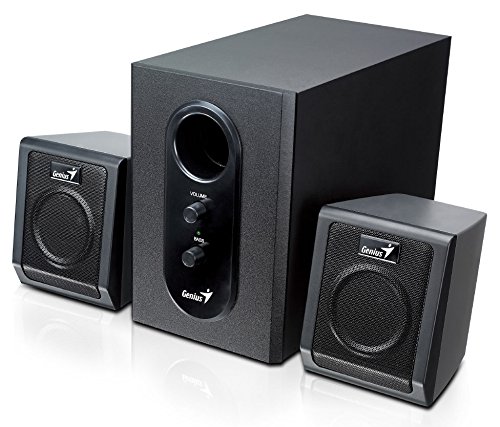
This image displays the Genius SW-2.1 355 Speaker System. It features a central, larger subwoofer unit with volume and bass control knobs on its front panel, and two smaller satellite speakers positioned on either side. All components are black.
Awọn eroja:
- Subwoofers: The main unit housing the bass driver and control panel.
- Àwọn Agbọrọsọ Satẹlaiti: Two compact speakers for mid-range and high-frequency audio.
- Ibi iwaju alabujuto: Located on the subwoofer, featuring Volume and Bass adjustment knobs.
Ṣeto
- Gbigbe Awọn Agbọrọsọ: Place the subwoofer on the floor or a sturdy surface. Position the satellite speakers on either side of your listening area, facing towards you for optimal stereo separation.
- Àwọn Agbọrọsọ Satẹlaiti Tó Sopọ̀: Connect the cables from the two satellite speakers to the corresponding output jacks on the rear of the subwoofer unit. Ensure a secure connection.
- Nsopọ Orisun Olohun: Connect one end of the 3.5mm audio input cable to the "Audio In" jack on the subwoofer. Connect the other end to the audio output jack (e.g., headphone jack) of your computer, MP3 player, smartphone, or other audio source.
- Agbara asopọ: Plug the power adapter into the DC input jack on the subwoofer. Then, plug the power adapter into a standard electrical outlet.
- Agbara Tan: Turn on the speaker system using the power switch, usually integrated with the volume knob.
Isẹ
- Titan / Paa ati Iṣakoso Iwọn didun: The main knob on the subwoofer controls both power and overall volume. Rotate clockwise to turn on and increase volume; rotate counter-clockwise to decrease volume and turn off.
- Atunse Bass: Use the "Bass" knob on the subwoofer to adjust the level of low-frequency sound. Rotate clockwise to increase bass, and counter-clockwise to decrease it, according to your preference.
- Audio Source Volume: For optimal sound quality, set the volume on your audio source (computer, phone, etc.) to about 75% and then use the speaker system's volume control for fine adjustments.
Itoju
- Ninu: Use a soft, dry cloth to clean the surfaces of the speakers. Do not use liquid cleaners or abrasive materials.
- Ibi ipamọ: Ti o ba tọju awọn agbohunsoke fun akoko ti o gbooro sii, ge asopọ wọn lati agbara ati fi wọn pamọ si ibi ti o tutu, ti o gbẹ.
- Iṣakoso USB: Ensure cables are not tangled or pinched to prevent damage.
Laasigbotitusita
| Isoro | Owun to le Fa | Ojutu |
|---|---|---|
| Ko si ohun |
|
|
| Ohun ti o daru |
|
|
| Bass alailagbara |
|
|
Awọn pato
| Ẹya ara ẹrọ | Ẹ̀kúnrẹ́rẹ́ |
|---|---|
| Orukọ awoṣe | SW-2.1 355 |
| Agbọrọsọ Iru | 2.1 Channel Multimedia Speaker System (Bookshelf, Satellite, Subwoofer) |
| Lapapọ Agbara Ijade | 10 Watts RMS (5W Subwoofer + 2.5W x 2 Satellites) |
| Ohun elo | Wood (Subwoofer) |
| Asopọmọra Technology | Onísòwò (ìtẹ̀wọlé ohùn 3.5mm) |
| Awọn ẹrọ ibaramu | MP3 Player, Personal Computer, Smartphones, Tablets, Televisions |
| Awọn iṣakoso | Iwọn didun, Bass |
| Orisun agbara | DC |
| Iwọn Nkan | 2.78 kg |
| Package Mefa | 39.6 x 25 x 18.4 cm |
Atilẹyin ọja ati Support
Genius products are designed for reliability and performance. For information regarding warranty coverage, technical support, or service inquiries, please refer to the warranty card included with your product or visit the official Genius webojula. Tọju iwe-ẹri rira rẹ bi ẹri rira.