
1. Ifihan
This manual provides detailed instructions for the proper use, setup, and maintenance of your Genius HS-920BT Bluetooth Headset. Please read this manual thoroughly before using the device to ensure optimal performance and longevity.
The Genius HS-920BT is a versatile Bluetooth headset designed for wireless audio streaming and hands-free communication with compatible devices such as smartphones, tablets, and PCs.
2. Package Awọn akoonu
Daju pe gbogbo awọn nkan wa ninu apo rẹ:
- Genius HS-920BT Bluetooth Headset
- Okun Ngba agbara USB
- Multi-language User Manual (this document)
3. Ọja Ipariview
The HS-920BT headset features an adjustable headband and comfortable earcups, integrating controls for audio playback and call management.
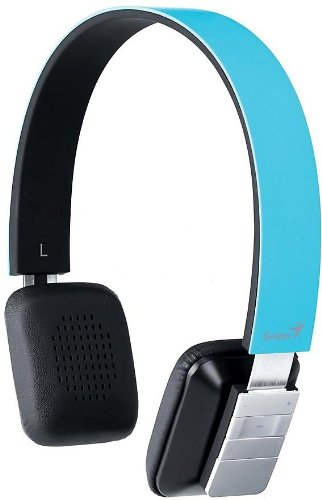
Figure 1: Genius HS-920BT Bluetooth Headset (Blue)
This image displays the Genius HS-920BT Bluetooth Headset in blue, viewed from an angle, highlighting its adjustable headband and earcup design.
Awọn ẹya pataki:
- Wireless Bluetooth connectivity for audio and calls (A2DP support)
- Integrated rechargeable Lithium-Ion battery
- Gbohungbohun ti a ṣe sinu fun ibaraẹnisọrọ laisi ọwọ
- On-ear controls for volume adjustment, track skipping (AVRCP support)
- Aṣọ adijositabulu fun ibaramu itura
- 40 mm driver units for clear sound
4. Eto
4.1 Ngba agbara si Agbekọri
Before initial use, fully charge the headset. Use the provided USB charging cable.
- Connect the small end of the USB charging cable to the charging port on the headset.
- So opin okun USB pọ mọ ibudo USB ti o ni agbara (fun apẹẹrẹ, kọmputa, adapter odi USB).
- The LED indicator on the headset will illuminate during charging and change color or turn off when fully charged. Refer to the headset's LED behavior for specific indications.
Gbigba agbara ni kikun maa n gba to awọn wakati 2-3.
4.2 Sisopọ pọ pẹlu Ẹrọ Bluetooth kan
To use the HS-920BT wirelessly, you must pair it with your Bluetooth-enabled device.
- Agbara Tan: Press and hold the Power button on the headset until the LED indicator flashes, usually alternating blue and red, indicating pairing mode.
- Mu Bluetooth ṣiṣẹ: On your smartphone, tablet, or PC, enable Bluetooth functionality.
- Wa fun Awọn ẹrọ: In your device's Bluetooth settings, search for available devices. The headset should appear as "HS-920BT".
- Yan ati So pọ: Select "HS-920BT" from the list. If prompted for a passcode, enter "0000" (four zeros).
- Ìmúdájú: Once paired, the headset's LED indicator will typically flash blue slowly, and your device will confirm the connection.
Agbekọri naa yoo gbiyanju lati tun so mọ ẹrọ ti a so pọ mọ nikẹhin nigbati o ba tan ina, ti Bluetooth ẹrọ naa ba n ṣiṣẹ ati pe o wa laarin ibiti o ti le to.
5. Awọn ilana Iṣiṣẹ
The HS-920BT features intuitive controls located on the earcup.

Figure 2: Earcup Controls of HS-920BT
This image shows a close-up of the right earcup of the Genius HS-920BT Bluetooth Headset, detailing the control buttons for power, volume, and track navigation.
5.1 Agbara Tan / Pa
- Agbara Tan: Tẹ bọtini agbara ki o si dimu fun bii iṣẹju-aaya mẹta titi ti ifihan LED yoo fi tan bulu.
- Agbara Pa: Tẹ mọlẹ bọtini agbara fun isunmọ awọn aaya 3 titi ti itọkasi LED yoo wa ni pipa.
5.2 Sisisẹsẹhin Orin
- Ṣiṣẹ/Daduro: Tẹ bọtini Play/Sinmi ni ẹẹkan.
- Orin t’okan: Press the "Next Track" button (usually marked with a forward arrow).
- Tẹlẹ Orin: Press the "Previous Track" button (usually marked with a backward arrow).
5.3 ipe Management
- Idahun/Ipe Ipari: Press the Multi-function button (often the same as Play/Pause) once during an incoming call to answer, or once during a call to end it.
- Kọ Ipe: Press and hold the Multi-function button for approximately 2 seconds during an incoming call.
- Nọmba Ikẹhin Tun Tun: Double-press the Multi-function button when not on a call.
5.4 Iṣakoso iwọn didun
- Mu iwọn didun pọ si: Press the Volume Up button (+).
- Din iwọn didun silẹ: Press the Volume Down button (-).
6. Itọju
Proper care ensures the longevity of your headset.
- Ninu: Lo aṣọ rírọrùn tí ó gbẹ láti nu agbekọri naa. Maṣe lo awọn ohun elo fifọ tabi awọn ohun elo olomi.
- Ibi ipamọ: Tọju agbekari naa ni itura, aye gbigbẹ kuro lati orun taara ati awọn iwọn otutu to gaju.
- Itọju Batiri: Lati tọju igbesi aye batiri, yago fun gbigba agbara si batiri ni kikun nigbagbogbo. Gba agbara si agbekari nigbagbogbo, paapaa ti ko ba wa ni lilo fun awọn akoko gigun.
- Ifihan omi: Agbekọri kii ṣe mabomire. Yago fun ifihan si omi tabi ọrinrin pupọ.
7. Laasigbotitusita
If you encounter issues with your HS-920BT headset, refer to the following common solutions:
| Isoro | Owun to le Solusan |
|---|---|
| Agbekọri ko ni agbara. | Ensure the battery is charged. Connect the headset to a power source using the USB cable. |
| A ko le so agbekọri pọ mọ ẹrọ kan. |
|
| Ko si ohun tabi iwọn kekere. |
|
| Didara ipe ko dara. |
|
8. Awọn pato
| Orukọ awoṣe: | HS-920BT |
| Imọ-ẹrọ Alailowaya: | Bluetooth |
| Awọn Ẹka Awakọ: | 40 mm |
| Batiri: | Litiumu-Ion gbigba agbara ti a ṣe sinu |
| Iru Iṣakoso: | Volume Control, Track Navigation, Call Management |
| Gbohungbohun: | Ti a ṣe sinu |
| Ni atilẹyin Profiles: | A2DP, AVRCP |
| Platform Hardware: | Kọ̀ǹpútà, Fóònù alágbèéká, Táblẹ́ẹ̀tì |
| Ìwọ̀n Nkan: | 110 giramu |
| Awọn iwọn (LxWxH): | 13.6 x 17.3 x 2.9 cm |
9. Atilẹyin ọja ati Support
For warranty information and technical support, please refer to the warranty card included with your product or visit the official Genius webojula. Tọju iwe-ẹri rira rẹ bi ẹri rira.
For further assistance, you may contact Genius customer service through their official channels.