
1. Ifihan
This manual provides essential information for the proper installation, operation, and maintenance of your Master-Bilt MBCB60 Fusion Chef Stand. Please read these instructions thoroughly before operating the unit to ensure safe and efficient performance. Retain this manual for future reference.
2. Alaye Aabo
Observe all safety precautions to prevent injury and damage to the unit. This appliance is intended for commercial use only.
- Aabo Itanna: Ensure the unit is connected to a grounded 115 Volt electrical supply. Do not use extension cords. Disconnect power before any service or cleaning.
- Afẹfẹ: Maintain adequate clearance around the refrigeration unit for proper airflow. Blocking vents can lead to overheating and reduced efficiency.
- Agbara iwuwo: Do not exceed the maximum weight capacity of the chef stand top surface. Refer to specifications for details.
- Awọn ohun elo ina: Do not store flammable or explosive materials inside or near the unit.
- Gbigbe Ẹka naa: Use caution when moving the unit, especially on uneven surfaces. Ensure casters are locked once in position.
3. Ọja Ipariview
The Master-Bilt MBCB60 Fusion Chef Stand is a robust, stainless steel refrigerated base designed for commercial kitchens. It features two spacious drawers for cold storage and a durable top surface suitable for supporting cooking equipment.
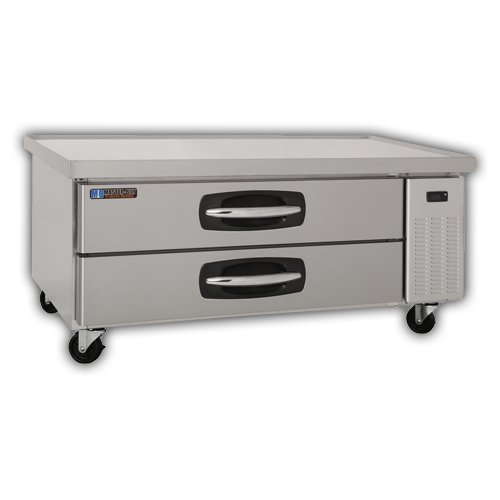
Awọn eroja pataki:
- Ode Irin Alagbara: Ti o tọ ati rọrun lati nu.
- Refrigerated Drawers: Two pull-out drawers for organized cold storage.
- Awọn Casters: Four heavy-duty casters for mobility, with locking mechanisms.
- Ibi iwaju alabujuto: (Typically located near the refrigeration unit) For temperature adjustment and display.
- Condenser Unit: Located on the right side, responsible for cooling.
4. Eto ati fifi sori
4.1 Ṣiṣii silẹ
- Fi ìṣọ́ra yọ gbogbo ohun èlò ìdìpọ̀ kúrò, títí kan àwọn fíìmù ààbò tàbí àwọn téèpù.
- Inspect the unit for any shipping damage. Report any damage immediately to your supplier.
4.2 Ibi
- Position the chef stand on a level, sturdy surface capable of supporting its weight plus the weight of any equipment placed on top.
- Ensure adequate ventilation. Maintain a minimum of 4 inches (10 cm) clearance from walls or other equipment on all sides, especially around the condenser unit.
- Avoid direct sunlight or proximity to heat-generating appliances (ovens, fryers) to optimize performance.
- Lock the casters once the unit is in its final position.
4.3 Itanna Asopọ
- Connect the unit to a dedicated 115 Volt, 60 Hz, single-phase grounded electrical outlet.
- Ma ṣe lo awọn pilogi ohun ti nmu badọgba tabi awọn okun itẹsiwaju.
- Verify that the power supply matches the requirements listed on the unit's data plate.
4.4 Ni ibẹrẹ Cleaning
- Before first use, clean the interior and exterior surfaces with a mild soap and water solution. Rinse thoroughly and dry.
5. Awọn ilana Iṣiṣẹ
5.1 Agbara Lori
- After connecting to power, the unit will typically power on automatically or require a press of the power button on the control panel.
- Allow the unit to run for several hours empty to reach the desired temperature before loading with food products.
5.2 otutu Iṣakoso
- The digital control panel allows for precise temperature adjustment. Refer to the specific controller's instructions for detailed programming.
- Recommended operating temperature for food safety is typically between 33°F and 41°F (0.5°C and 5°C).
5.3 Loading Drawers
- Load drawers evenly to ensure proper airflow and temperature distribution.
- Do not block internal air vents.
- Ensure drawers are fully closed after each use to maintain temperature and energy efficiency.
6. Itọju ati Cleaning
Regular maintenance ensures optimal performance and extends the lifespan of your chef stand.
6.1 Daily Cleaning
- Wipe down interior and exterior stainless steel surfaces with a soft cloth and mild, non-abrasive cleaner.
- Clean drawer gaskets to ensure a tight seal.
6.2 Monthly Cleaning (or as needed)
- Okun Condenser: Disconnect power. Carefully clean the condenser coil using a brush or vacuum cleaner to remove dust and debris. A dirty coil reduces efficiency and can lead to compressor failure.
- Sisan Pan: Inspect and clean the drain pan to prevent blockages and odors.
7. Laasigbotitusita
Ṣaaju ki o to kan si iṣẹ, tunview Àwọn ìṣòro àti ojútùú tó wọ́pọ̀ yìí.
| Isoro | Owun to le Fa | Ojutu |
|---|---|---|
| Unit ko itutu | Ipese agbara oro Opo idọti idọti Door/drawer not sealed Eto igbona | Ṣayẹwo asopọ agbara ati fifọ Circuit Mọ condenser okun Ensure drawers are fully closed; check gaskets Adjust thermostat to lower setting |
| Ariwo ti o pọju | Awọn paati alaimuṣinṣin Idilọwọ àìpẹ Ẹka kii ṣe ipele | Inspect for loose parts and tighten Check fan for obstructions Level the unit using caster adjustments |
| Omi lori pakà | Clogged sisan laini Ọriniinitutu ti o pọju | Ko laini omi kuro Ensure drawers are closed; reduce ambient humidity if possible |
8. Awọn pato
| Ẹya ara ẹrọ | Ẹ̀kúnrẹ́rẹ́ |
|---|---|
| Awoṣe | MBCB60 (02-72539) |
| Brand | Titunto si-Bilt |
| Awọn iwọn Ọja (W x D x H) | 60 x 31 x 25.5 inches |
| Iwọn Nkan | 250 iwon |
| Agbara | 9.8 Onigun Ẹsẹ |
| Itanna Awọn ibeere | 115 Volts |
| Ohun elo | Irin ti ko njepata |
| Iru fifi sori ẹrọ | Sisun |
9. Atilẹyin ọja ati Support
For warranty information, technical support, or service inquiries, please contact Master-Bilt customer service or your authorized dealer. Keep your purchase receipt and model number (MBCB60) readily available when contacting support.
Master-Bilt Contact Information: Refer to the official Master-Bilt website or product documentation for the most current contact details.