
1. Ifihan
This manual provides comprehensive instructions for the installation, operation, and maintenance of the Came RE862 Dual-Channel Surface-Mount Receiver. The RE862 is a versatile radio receiver designed for various applications, including gate and garage door automation systems. It operates at a frequency of 868.35 MHz and features two independent channels, offering flexible control options. Its robust design with IP54 protection allows for outdoor installation.
Please read this manual carefully before proceeding with installation or operation to ensure safe and correct use of the device.
2. Alaye Aabo
- Aabo Itanna: Installation and wiring must be performed by qualified personnel in accordance with local electrical codes and regulations. Disconnect power before performing any work on the receiver.
- Ibi ti ina elekitiriki ti nwa: Ensure the power supply (12-24V AC/DC) matches the receiver's requirements. Incorrect voltage le ba ẹrọ naa jẹ.
- Awọn ipo Ayika: While the RE862 has an IP54 rating for outdoor use, avoid installing it in locations subject to extreme temperatures, direct water jets, or corrosive substances.
- Ìjánu: Keep the receiver away from strong electromagnetic fields or other radio frequency devices that could cause interference.
- Lilo ti a pinnu: Use the receiver only for its intended purpose as a radio control device for automation systems.
3. Package Awọn akoonu
Daju pe gbogbo awọn paati wa ati pe ko bajẹ lori ṣiṣi silẹ:
- Came RE862 Dual-Channel Receiver Unit
- Awọn ilana Ilana ati Iṣiwe
- Siseto siseto
- Ohun elo iṣagbesori (skru, awọn pilogi ogiri)
- "Rolling Code Memory" Module (if included, refer to programming guide for use)
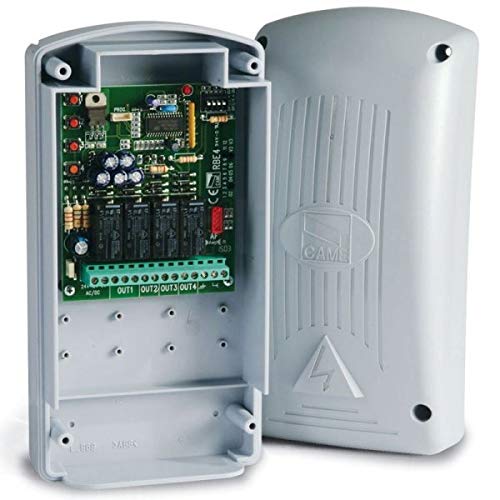
Figure 1: Came RE862 Dual-Channel Surface-Mount Receiver. This image shows the compact, black receiver unit, designed for surface mounting.
4. Eto ati fifi sori
4.1 Fifi sori ẹrọ olugba naa
- Choose a suitable location for mounting. Due to its IP54 rating, the RE862 can be installed outdoors, but ensure it is protected from direct mechanical impact.
- Mark the drilling points on the wall or surface using the receiver's mounting holes as a template.
- Lu ihò ki o si fi yẹ odi plugs.
- Secure the receiver to the surface using the provided screws.
4.2 Awọn isopọ onirin
The RE862 receiver requires a 12-24V AC or DC power supply. It provides two Normally Open (NO) contact outputs, one for each channel.
- Ibi ti ina elekitiriki ti nwa: Connect the 12-24V AC/DC power supply to the designated terminals on the receiver. Observe polarity if using DC power.
- Ijade ikanni 1: Connect the output terminals for Channel 1 to the control input of your automation system (e.g., gate opener, garage door opener). This is a Normally Open (NO) contact.
- Ijade ikanni 2: Connect the output terminals for Channel 2 to the control input of your second automation system or function. This is also a Normally Open (NO) contact.
Refer to the detailed wiring diagram included with your product for specific terminal assignments. Ensure all connections are secure and insulated.
5. Awọn ilana Iṣiṣẹ
5.1 Ṣíṣeto Àwọn Ìṣàkóso Lílo Agbára Gíga Jùlọ
The RE862 receiver is designed to work with Came 868.35 MHz remote controls. The programming process typically involves placing the receiver into a learning mode and then transmitting a signal from the remote control.
- Tẹ Ipo Ẹkọ sii: Locate the programming button (often labeled "PROG" or "MEM") on the RE862 receiver. Press and hold this button until an indicator LED (usually red or green) illuminates or flashes, indicating the receiver is in learning mode.
- Gbigbe lati Latọna jijin: While the receiver is in learning mode, press the desired button on your Came remote control that you wish to associate with Channel 1. The receiver's LED should change its behavior (e.g., flash rapidly, turn solid, or turn off) to confirm successful learning.
- Repeat for Channel 2 (if applicable): If you wish to program a second button on the remote for Channel 2, repeat the process. Some receivers may require re-entering learning mode for each channel or have a specific sequence for multi-channel programming.
- Jáde Ipò Ẹ̀kọ́: The receiver will typically exit learning mode automatically after a short period of inactivity or after a successful programming sequence. Some models may require a short press of the programming button to exit.
For detailed programming steps, including instructions for the "Rolling Code Memory" module if present, refer to the specific programming guide provided with your receiver. The exact procedure may vary slightly depending on the firmware version.
5.2 Iṣẹ idanwo
After programming, test the remote control's functionality. Press the programmed button on the remote. The receiver's output relay for the corresponding channel should activate, and your connected automation system should respond.
6. Itọju
- Ninu: Periodically clean the exterior of the receiver with a soft, dry cloth. Do not use abrasive cleaners or solvents.
- Ayewo: Regularly inspect wiring connections for signs of wear, corrosion, or damage. Ensure the housing remains securely mounted and free from cracks.
- Eriali: Ensure the antenna (if external) is unobstructed and in good condition for optimal range.
- Awọn imudojuiwọn famuwia: Check the Came official website for any available firmware updates, though these typically require specialized tools.
7. Laasigbotitusita
| Isoro | Owun to le Fa | Ojutu |
|---|---|---|
| Olùgbà kò ní agbára. | Ko si ipese agbara tabi vol ti ko tọtage. | Check power connections and ensure 12-24V AC/DC is supplied. Verify polarity for DC. |
| Remote control does not activate the system. | Remote not programmed, incorrect frequency, or out of range. | Re-program the remote control (Section 5.1). Ensure the remote operates at 868.35 MHz. Check for obstructions and ensure you are within operating range. |
| System activates intermittently. | Interference, weak signal, or loose wiring. | Check for sources of interference. Ensure antenna is clear. Inspect all wiring connections for tightness. |
| "Rolling Code Memory" module not understood. | Lack of specific instructions. | This module typically enhances security by managing rolling codes. Refer to the detailed programming guide for its specific integration and benefits. If no guide is available, contact Came support. |
8. Awọn pato
| Ẹya ara ẹrọ | Ẹ̀kúnrẹ́rẹ́ |
|---|---|
| Nọmba awoṣe | RE862 |
| Brand | Wa |
| Awọn ikanni | 2 |
| Igbohunsafẹfẹ | 868.35 MHz |
| Ibi ti ina elekitiriki ti nwa | 12 - 24V AC/DC |
| Ojade Irisi | Normally Open (NO) contact per channel |
| Idaabobo Rating | IP54 (o dara fun fifi sori ita gbangba) |
| Asopọmọra Technology | Igbohunsafẹfẹ Redio |
| Àwọ̀ | Dudu |
9. Atilẹyin ọja ati Support
Came products are manufactured to high-quality standards. For warranty information, please refer to the warranty card included with your purchase or visit the official Came webojula. Jeki ẹri rira rẹ fun awọn iṣeduro atilẹyin ọja.
For technical support, troubleshooting assistance beyond this manual, or to inquire about spare parts, please contact your authorized Came dealer or the official Came customer service department. Contact details can typically be found on the Came webaaye tabi ninu iwe ọja rẹ.