
Ọrọ Iṣaaju
This user manual provides comprehensive instructions for the safe and efficient use of your Onida 24-inch HD Ready LED TV, model LEO24HRD. Please read this manual thoroughly before operating the television and retain it for future reference.
Alaye Aabo pataki
Nigbagbogbo tẹle awọn iṣọra aabo ipilẹ nigba lilo tẹlifisiọnu yii lati dinku eewu ina, mọnamọna, ati ipalara.
- Ma ṣe fi TV han si ojo tabi ọrinrin.
- Ma ṣii TV casing; tọka gbogbo iṣẹ si oṣiṣẹ ti o peye.
- Rii daju pe fentilesonu to dara ni ayika TV.
- Jeki TV kuro lati orun taara, awọn orisun ooru, ati awọn iwọn otutu to gaju.
- Lo okun agbara nikan ti a pese pẹlu TV.
- Yọ TV kuro lakoko iji manamana tabi nigbati a ko lo fun igba pipẹ.
Package Awọn akoonu
Jẹrisi pe gbogbo awọn ohun kan wa ninu package:
- Onida LEO24HRD LED TV
- Isakoṣo latọna jijin
- Okun agbara
- Iduro Tabili (ti o ba wulo)
- Afowoyi Olumulo (iwe-ipamọ yii)

Aworan: Iwaju view of the Onida LEO24HRD LED TV with its included table stand.
Ṣeto
1. So Iduro
If you are not wall-mounting the TV, attach the provided stand:
- Fi pẹ̀lẹ́pẹ̀lẹ́ gbé ibojú tẹlifíṣọ̀n náà sí orí ilẹ̀ rírọ̀ tí ó tẹ́jú kí ó má baà jẹ́ kí ó fọ́.
- Ṣe deede iduro pẹlu awọn ihò fifi sori isalẹ ti TV.
- Secure the stand using the screws provided. Do not overtighten.
2. Nsopọ Ita Awọn ẹrọ
The Onida LEO24HRD TV features various ports for connecting external devices. Refer to the images below for port locations.

Aworan: Ẹyin view of the Onida LEO24HRD TV, highlighting the input/output ports.

Aworan: Alaye view of the connectivity ports on the Onida LEO24HRD TV, including HDMI, USB, VGA, and AV inputs.
- HDMI: Connect Blu-ray players, gaming consoles, or set-top boxes. This model has 1 HDMI port.
- USB: So awọn ẹrọ ibi ipamọ USB pọ fun ṣiṣiṣẹsẹhin media. Awoṣe yii ni ibudo USB kan.
- VGA (PC IN): So kọmputa pọ.
- AV NI: So awọn ẹrọ agbalagba pọ nipa lilo fidio apapo ati awọn kebulu ohun sitẹrio.
- RF IN: So eriali tabi okun TV pọ.
3. Asopọ agbara
So okùn agbára náà mọ́ inú ìtẹ̀síwájú agbára TV náà, lẹ́yìn náà sínú ihò ìtajà ògiri. Rí i dájú pé ìpele náà wà ní ìwọ̀n.tage ibaamu awọn TV ká ibeere.
Isẹ
1. Iṣeto akoko-akọkọ
Upon first power-on, the TV will guide you through initial setup steps:
- Aṣayan ede: Yan ede ti o fẹ julọ.
- Orilẹ-ede/Agbegbe: Select your country for correct channel tuning.
- Iwoye ikanni: The TV will automatically scan for available channels. This may take several minutes.
2. Lilo isakoṣo latọna jijin
The remote control allows full functionality of your TV. Insert two AAA batteries (not included) into the remote control, observing polarity.

Image: The remote control for the Onida LEO24HRD TV, showing power, volume, channel, input, and navigation buttons.
- Bọtini agbara: Tan TV si tan tabi paa.
- Orisun/Iwọle: Yan orisun titẹ sii (HDMI, AV, TV).
- Iwọn didun +/-: Ṣe atunṣe ipele iwọn didun.
- ikanni +/-: Ayipada TV awọn ikanni.
- Akojọ: Accesses the TV's main menu for settings adjustments.
- Awọn bọtini lilọ kiri (Soke/isalẹ/osi/Ọtun/DARA): Lilọ kiri nipasẹ awọn akojọ aṣayan ati jẹrisi awọn aṣayan.
3. Siṣàtúnṣe Eto
Tẹ awọn Akojọ aṣyn button on the remote to access settings such as:
- Eto aworan: Brightness, Contrast, Color, Sharpness, Picture Mode.
- Eto Ohun: Volume, Bass, Treble, Sound Mode, Balance.
- Eto ikanni: Auto Scan, Manual Scan, Channel List.
- Eto akoko: Clock, Sleep Timer, Auto Standby.
- Eto Eto: Language, OSD Duration, Factory Reset.
Itoju
Ninu TV
- Yọọ TV nigba gbogbo ṣaaju ṣiṣe mimọ.
- Lo asọ ti o gbẹ lati nu iboju ati minisita.
- Fun awọn ami alagidi, fẹẹrẹ dampen asọ pẹlu omi tabi kan ìwọnba, ti kii-abrasive iboju regede.
- Maṣe lo ọti-lile, benzene, tinrin, tabi awọn nkan ti o le yipada.
Ibi ipamọ
If storing the TV for an extended period, ensure it is unplugged, clean, and stored in a dry, dust-free environment. Use original packaging if available.
Laasigbotitusita
| Isoro | Owun to le Fa | Ojutu |
|---|---|---|
| Ko si agbara | Okun agbara ko sopọ; iṣan agbara ko ṣiṣẹ. | Ṣayẹwo asopọ okun agbara; igbeyewo iṣan pẹlu ẹrọ miiran. |
| Ko si aworan, ṣugbọn ohun wa | A ti yan orisun titẹ sii ti ko tọ; a ti pa ẹrọ ita tabi a ti ge asopọ kuro. | Tẹ Orisun button to select correct input; check external device power and connections. |
| Ko si ohun, ṣugbọn aworan wa | Ohùn tí a dákẹ́ tàbí tí ó lọ sílẹ̀ jù; àwọn ètò ìjáde ohùn tí kò tọ́. | Unmute volume or increase level; check audio settings in the menu. |
| Isakoṣo latọna jijin ko ṣiṣẹ | Awọn batiri ti ku tabi ti fi sii ni aṣiṣe; idilọwọ laarin latọna jijin ati TV. | Rọpo awọn batiri; rii daju laini oju ti o han gbangba si sensọ IR ti TV. |
| Didara aworan ti ko dara | Weak antenna signal; incorrect picture settings. | Adjust antenna position; perform channel scan; adjust picture settings. |
Awọn pato
| Ẹya ara ẹrọ | Ẹ̀kúnrẹ́rẹ́ |
|---|---|
| Awoṣe | LEO24HRD |
| Iwon iboju | 24 inches (59.94 cm) |
| Ifihan ọna ẹrọ | LED |
| Ipinnu | HD Ṣetan (awọn piksẹli 1366 x 768) |
| Apakan Ipin | 1.77:1 |
| Viewigun igun | Awọn iwọn 176 |
| Oṣuwọn sọtun | 60 Hz |
| Ijade ohun | 20 Wattis (sitẹrio) |
| Asopọmọra | 1x HDMI, 1x USB, VGA, AV In, RF In |
| Iṣagbesori Iru | Ògiri Ògiri |
| Orisun agbara | AC |
| Iwọn Nkan | 4.6 kg |
| Package Mefa | 64 x 45.2 x 14.2 cm |
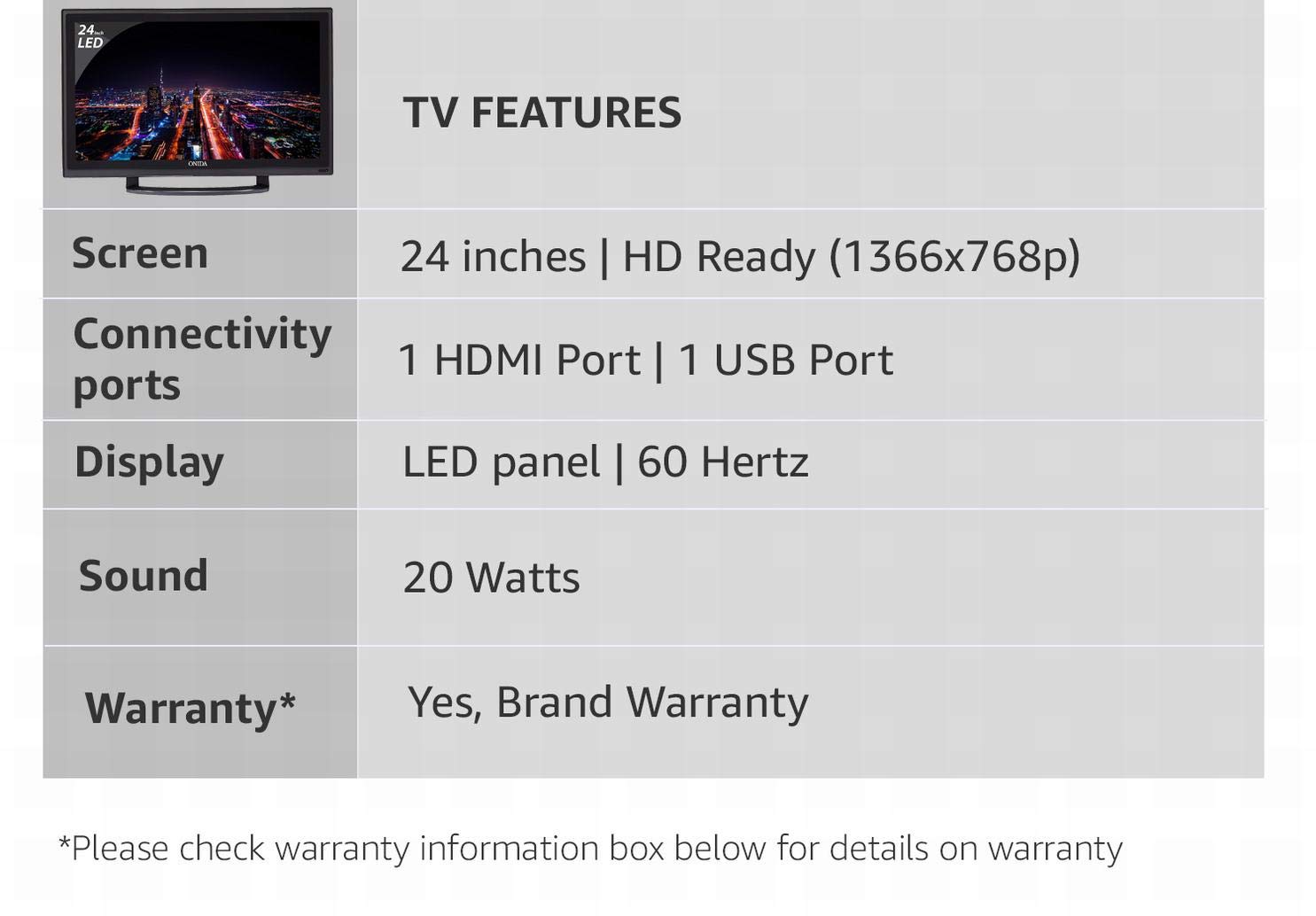
Image: Summary of key TV features including screen size, resolution, connectivity, display type, sound, and warranty.
Atilẹyin ọja ati Support
Alaye atilẹyin ọja
This Onida LEO24HRD LED TV comes with a 1 Odun atilẹyin ọja from the date of purchase. Please retain your purchase receipt as proof of warranty. The warranty covers manufacturing defects and does not cover damage caused by misuse, accidents, or unauthorized repairs.
Onibara Support
For technical assistance, service requests, or further information, please contact Onida customer support. Refer to the official Onida webaaye tabi iwe rira rẹ fun awọn alaye olubasọrọ lọwọlọwọ julọ.
You can visit the official Onida store page for more information: Onida Store