
Shaw Direct URC600
Shaw Direct IRC600 Remote Control User Manual
Awoṣe: URC600
Ọrọ Iṣaaju
This user manual provides detailed instructions for the Shaw Direct IRC600 Remote Control (Model URC600). It covers everything from initial setup and basic operation to maintenance and troubleshooting, ensuring you get the most out of your remote control. This remote is designed for seamless control of your Shaw Direct satellite receiver.
Ọja Pariview
The Shaw Direct IRC600 remote control is an ergonomic device designed for intuitive control of your satellite television experience. Below are images illustrating the remote's design and key features.

olusin 1: Iwaju view of the Shaw Direct IRC600 Remote Control, showing all buttons and the Shaw Direct logo at the bottom.

Figure 2: The Shaw Direct IRC600 Remote Control positioned on top of a compatible black satellite receiver, illustrating its typical use context.
Ṣeto
1. Fifi sori batiri
The IRC600 remote control requires two (2) AA batteries for operation. Ensure correct polarity when inserting the batteries.
- Wa yara batiri ni ẹhin isakoṣo latọna jijin.
- Gbe ideri batiri si isalẹ lati ṣii.
- Fi awọn batiri AA meji sii, ti o baamu awọn ebute rere (+) ati odi (-) gẹgẹbi itọkasi inu yara naa.
- Gbe ideri batiri pada si aaye titi yoo fi tẹ ni aabo.
2. Lilo akọkọ
Once batteries are installed, the remote is ready for use with your Shaw Direct satellite receiver. Point the remote directly at the receiver for optimal performance.
Ṣiṣẹ Iṣakoso Latọna jijin
The IRC600 remote control features a variety of buttons for comprehensive control of your Shaw Direct satellite receiver. Familiarize yourself with the layout and functions below.
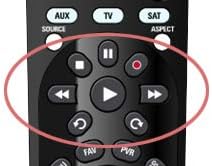
olusin 3: Isunmọ view of the media playback controls on the Shaw Direct IRC600 Remote Control, highlighted for easy identification.
Key Button Functions:
- AGBARA: Turns the satellite receiver on or off.
- AUX/TV/SAT: Selects the device the remote controls (Auxiliary, Television, or Satellite Receiver).
- VOL +/-: Ṣe atunṣe ipele iwọn didun.
- CH +/-: Iyipada ikanni soke tabi isalẹ.
- DÁKÚN: Mu ohun naa mu tabi mu ohun kuro.
- Itọnisọna: Ṣe afihan itọsọna eto.
- Akojọ: Accesses the main menu of the satellite receiver.
- ALAYE: Ṣe afihan alaye nipa eto lọwọlọwọ.
- ENTER/OK: Ó ń jẹ́rìí sí àwọn àṣàyàn tàbí ó ń wọlé sí àkójọ kan.
- Àwọn bọ́tìnì ọfà (Òkè, Ìsàlẹ̀, Òsì, Ọ̀tún): Navigates through menus and program guides.
- JADE: Jade ni ti isiyi akojọ aṣayan tabi iboju.
- DVR Controls (Play, Pause, Stop, Rewind, Fast Forward, Record): Controls playback of recorded content.
- Paadi Nọmba (0-9): Tẹ awọn nọmba ikanni taara.
Using DVR Controls:
As shown in Figure 3, the central cluster of buttons includes dedicated controls for your Digital Video Recorder (DVR) functions:
- ERE (▶): Starts playback of recorded content or resumes paused content.
- PAUSE (∥∥): Temporarily stops playback.
- Duro (■): Duro ṣiṣiṣẹsẹhin.
- ÌDÁKÚN (◀◀): Àtúnṣe akoonu.
- FAST FORWARD (▶▶): Àkóónú tó yára síwájú.
- Àkọsílẹ̀ (●): Ó bẹ̀rẹ̀ sí í gba ìforúkọsílẹ̀ ètò ìsinsìnyí.
No official product videos were found for this model from the seller. Please refer to the text descriptions and images for operational guidance.
Itoju
1. Batiri Rirọpo
When the remote control's performance degrades (e.g., reduced range, unresponsive buttons), it is likely time to replace the batteries. Follow the battery installation steps outlined in the Setup section.
2. Ninu
To maintain the remote's appearance and functionality, clean it periodically:
- Lo asọ ti o rọ, ti o gbẹ lati nu dada ti isakoṣo latọna jijin.
- Fun idoti alagidi, die-die dampen asọ pẹlu omi tabi a ìwọnba, ti kii-abrasive regede. Yago fun ọrinrin pupọ.
- Má ṣe lo àwọn kẹ́míkà líle, àwọn ohun èlò ìfọ́, tàbí àwọn ohun èlò ìfọmọ́ra, nítorí pé wọ́n lè ba ìparí tàbí àwọn ohun èlò inú remote náà jẹ́.
Laasigbotitusita
| Isoro | Owun to le Fa | Ojutu |
|---|---|---|
| Latọna jijin ko dahun. | Awọn batiri ti o ku tabi ti ko tọ fi sii. | Ropo awọn batiri, aridaju ti o tọ polarity. |
| Latọna jijin ni opin ibiti o ti le lo tabi idahun ti o le waye lẹẹkọọkan. | Low batteries; Obstruction between remote and receiver; Remote not pointed directly at receiver. | Replace batteries; Remove any obstructions; Ensure direct line of sight to the receiver. |
| Specific buttons not working. | Idọti tabi idoti labẹ bọtini; Ti abẹnu aiṣedeede. | Clean the remote surface around the button. If problem persists, consider replacing the remote. |
| Remote controls TV instead of satellite receiver (or vice-versa). | Incorrect device mode selected. | Press the appropriate mode button (AUX, TV, or SAT) to select the desired device. |
Awọn pato
- Brand: Shaw taara
- Nọmba awoṣe: URC600
- Awọn iwọn ọja: 8 x 1.5 x 2 inches
- Ìwọ̀n Nkan: 7 iwon
- Awọn batiri: Awọn batiri AA 2 nilo
- Àwọ̀: Dudu
- Ẹya Pataki: Apẹrẹ ergonomic
- Nọmba ti o pọju ti Awọn ẹrọ Atilẹyin: 1 (dedicated to satellite receiver, with TV/Auxiliary mode switching)
- Awọn ẹrọ ibaramu: Awọn olugba Satẹlaiti
- Olupese: Motorola
- Ọjọ Akọkọ Wa: Oṣu kejila ọjọ 22, ọdun 2014
Atilẹyin ọja ati Support
Specific warranty details and direct support contact information for the Shaw Direct IRC600 Remote Control are not available in the provided product data. For warranty claims or technical support, please refer to the documentation included with your Shaw Direct satellite receiver or visit the official Shaw Direct webojula fun onibara iṣẹ alaye olubasọrọ.