
1. Ifihan
This manual provides detailed instructions for the installation, operation, and maintenance of your Antec P50 Window R Mid-Tower PC Case. The Antec P50 Window R is designed for silent computing with optimized airflow and support for Micro ATX and Mini-ITX motherboards. It features a dual-chamber structure, liquid cooling support, and multiple drive bays for a versatile build.
Jọwọ ka iwe afọwọkọ yii daradara ṣaaju ki o to bẹrẹ fifi sori ẹrọ lati rii daju iṣeto to dara ati lati mu iṣẹ ṣiṣe ati gigun ti eto rẹ pọ si.
2. Eto ati fifi sori
2.1 Unpacking ati ayewo
Carefully remove the PC case from its packaging. Inspect the case for any signs of damage that may have occurred during shipping. Retain the packaging for future transport or warranty claims.
2.2 Removing Side Panels
Locate and unscrew the thumbscrews on the rear of the case. Slide the side panels backward and lift them off to access the interior.

Aworan: Angled view of the Antec P50 Window R PC Case, showing its compact mid-tower design and front panel.
2.3 Fifi sori modaboudu
- Fi I/O shield sinu ẹhin šiši ọran naa.
- Ensure the motherboard standoffs are correctly aligned for your Micro ATX or Mini-ITX motherboard.
- Fi pẹ̀lẹ́pẹ̀lẹ́ gbé motherboard náà sí orí àwọn ìdádúró, kí o sì ṣe àtúnṣe àwọn ihò skru náà.
- Ṣe aabo modaboudu pẹlu awọn skru ti a pese.

Aworan: inu view of the Antec P50 Window R PC Case, highlighting the motherboard tray and cable routing options.
2.4 Fifi sori ẹrọ Ipese Agbara
The P50 Window R supports bottom-mount power supplies. Install your power supply into the designated compartment at the bottom rear of the case and secure it with screws.
2.5 wakọ fifi sori
The case features 6 drive bays:
- One 5.25" external drive bay (for optical drives).
- Three 3.5" HDD drive bays.
- Two 2.5" SSD drive bays.
Follow the case's internal guides for tool-less or screw-based installation of your storage devices.

Aworan: inu view of the Antec P50 Window R PC Case, showing the rear of the motherboard tray with cable management space and drive bay locations.
2.6 Imugboroosi kaadi sori
The case provides 4 expansion slots. Remove the slot covers as needed and install your graphics card or other expansion cards, securing them with screws.
2.7 Fan ati Radiator sori
The P50 Window R comes with pre-installed fans: two 120mm fans and one 80mm fan at the front, and one 80mm fan at the rear. It supports additional 80mm/120mm fan mounts and a 240mm radiator in the front or top for liquid cooling.
- For liquid cooling, install the 240mm radiator in the designated front or top mounting points.
- Ensure fans are oriented correctly for optimal airflow (intake at front, exhaust at rear/top).
2.8 USB Management
Lo àwọn ibi tí a ti gé àwọn okùn ìtọ́sọ́nà àti àwọn ibi tí a ti so mọ́ ẹ̀yìn àtẹ motherboard láti ṣàkóso àwọn okùn. Èyí mú kí afẹ́fẹ́ àti ẹwà wọn sunwọ̀n síi.
2.9 Ìsopọ̀ Pánẹ́lì Iwájú I/O
Connect the front panel cables (USB 3.0, USB 2.0, HD Audio, Power Switch, Reset Switch, Power LED, HDD LED) to the corresponding headers on your motherboard. Refer to your motherboard manual for header locations.
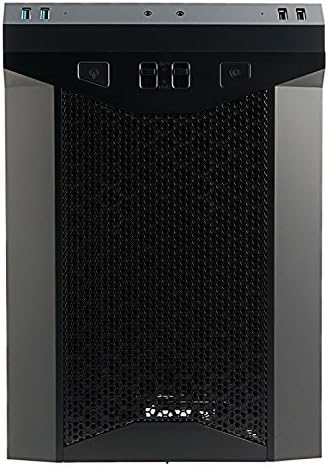
Aworan: Iwaju view of the Antec P50 Window R PC Case, showing the mesh intake and front panel controls.
3. Isẹ
3.1 Àwọn Ìṣàkóso àti Àwọn Ìbùdó Ìwájú Pánẹ́lì
Pẹpẹ iwaju pese iwọle ti o rọrun si:
- Bọtini agbara: To turn the system on or off.
- Bọtini atunto: Lati tun eto naa bẹrẹ.
- Awọn ibudo USB 3.0 (x2): Fun ga-iyara data gbigbe.
- Awọn ibudo USB 2.0 (x2): Fun boṣewa USB awọn ẹrọ.
- Awọn Jacks Audio: For headphones and microphone.
- Awọn iṣakoso onifẹ: Two fan control switches are available to adjust fan speeds for optimal balance between cooling and noise.
3.2 Ìṣàn afẹ́fẹ́ àti Ìtútù
The P50 Window R features a dual-chamber structure designed for direct airflow, separating heat-generating components. The pre-installed fans and additional mounting options ensure efficient cooling for your system.
4. Itọju
4.1 Ninu eruku Ajọ
Regularly clean the dust filters to maintain optimal airflow and prevent dust buildup inside the case. Dust filters are typically located at the front, top, and bottom (for the power supply intake). Gently remove them and clean with compressed air or rinse with water (ensure they are completely dry before reinstallation).
4.2 Gbogbogbo Cleaning
Lo asọ, damp cloth to clean the exterior surfaces of the case. Avoid abrasive cleaners. For interior cleaning, use compressed air to remove dust from components and internal surfaces.
5. Laasigbotitusita
5.1 System Ko Alagbara Lori
- Ensure all power cables (24-pin ATX, 8-pin CPU, GPU power) are securely connected to the motherboard and components.
- Rí i dájú pé switi ipese agbara wa ni ipo 'ON'.
- Check that the front panel power switch cable is correctly connected to the motherboard header.
5.2 Nmu ariwo
- Ṣàyẹ̀wò bóyá àwọn okùn kan ń dí àwọn abẹ́ afẹ́fẹ́ lọ́wọ́.
- Ensure all fans are securely mounted.
- Utilize the front panel fan controls to adjust fan speeds.
5.3 Poor Cooling Performance
- Clean all dust filters to ensure unrestricted airflow.
- Verify that fans are oriented correctly (intake/exhaust).
- Ensure proper cable management to avoid blocking airflow.
5.4 Front Panel USB/Audio Ports Not Working
- Confirm that the front panel USB and audio cables are correctly connected to the corresponding headers on your motherboard.
6. Awọn pato
| Ẹya ara ẹrọ | Ẹ̀kúnrẹ́rẹ́ |
|---|---|
| Orukọ awoṣe | P50 WINDOW R |
| Iru Irú | Ile-iṣọ Mid |
| Modaboudu Ibamu | Micro ATX, Mini-ITX |
| Iwọn (D x W x H) | 355mm x 260mm x 355mm (13.98"D x 355"H) |
| Ohun elo | Polycarbonate (PC) |
| Wakọ Bays | 1 x 5.25" (external), 3 x 3.5" HDD, 2 x 2.5" SSD |
| Imugboroosi Iho | 4 |
| Iwaju Awọn Ibudo I / O | 2 x USB 3.0, 2 x USB 2.0, Audio In/Out, 2 x Fan Controls |
| Awọn onijakidijagan ti a ti fi sii tẹlẹ | Front: 2 x 120mm, 1 x 80mm; Rear: 1 x 80mm |
| Aami Ifowopamọ Omi Liquid | 240mm radiator (front/top) |
| Max Video Card Size | 300mm |
| Max Sipiyu kula Iga | 130mm |
| Iṣagbesori Ipese agbara | Isalẹ Oke |
| Iwọn Nkan | 11.7 iwon |
7. atilẹyin ọja Information
The Antec P50 Window R PC Case comes with a Limited Warranty period (parts): 1 year. Please retain your proof of purchase for warranty claims. For specific terms and conditions, refer to the official Antec webojula tabi kan si atilẹyin alabara.
8. Atilẹyin
For further assistance, technical support, or to inquire about replacement parts, please visit the official Antec website or contact their customer service department. You can often find FAQs, driver downloads, and additional resources on the manufacturer's support pages.
Antec Osise Webojula: www.antec.com