
1. Ifihan
The PowerDrive PD3000 is a 3000 Watt power inverter designed to convert 12V DC power from your vehicle's battery into 115V AC household power. This unit provides 3000 Watts of continuous AC power and has a high surge capacity of up to 6000 Watts to accommodate devices with high starting power requirements. It features integrated Bluetooth wireless technology for remote monitoring and control via a mobile application, along with a removable control panel for flexible placement. This manual provides essential information for the safe and efficient operation of your PowerDrive PD3000 inverter.
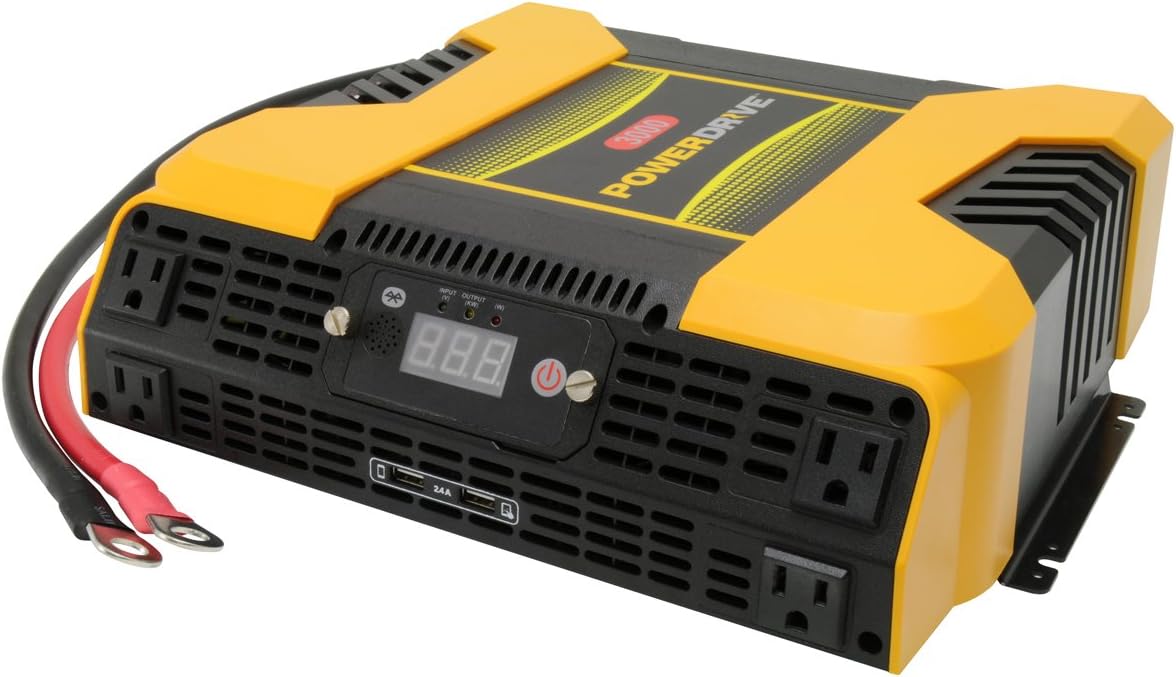
Figure 1.1: PowerDrive PD3000 3000 Watt Power Inverter, front view with outlets and display.
2. Alaye Aabo
Please read and understand all safety instructions before installing or operating the inverter. Failure to follow these instructions may result in electrical shock, fire, serious injury, or property damage.
- Ewu Itanna: Maṣe ṣii inverter casing. Ko si awọn ẹya ti olumulo-iṣẹ ninu. Tọkasi gbogbo iṣẹ si awọn oṣiṣẹ iṣẹ ti o peye.
- Ewu ina: Do not operate the inverter near flammable materials, gases, or vapors. Ensure adequate ventilation around the inverter.
- Aabo Batiri: Connect the inverter only to a 12V DC battery system. Ensure battery terminals are clean and connections are secure. Wear eye protection and gloves when working with batteries.
- Afẹfẹ: Rii daju pe ẹrọ oluyipada ti fi sii ni agbegbe ti o ni afẹfẹ daradara. Ma ṣe dina awọn ṣiṣi atẹgun.
- Idaabobo Apọju: Do not exceed the inverter's continuous power rating of 3000 Watts. Overloading can damage the inverter and connected devices.
- Ọrinrin: Má ṣe fi inverter hàn sí òjò, ọrinrin, tàbí fífọ́.
3. Package Awọn akoonu
Rii daju pe gbogbo awọn nkan wa lori ṣiṣi silẹ:
- PowerDrive PD3000 Power Inverter Unit
- Ilana itọnisọna
- Battery Cables (Red and Black)
- Removable Control Panel with Cable
4. Awọn ẹya Ọja
The PowerDrive PD3000 inverter offers a range of features for versatile power conversion:
- Ijade Agbara giga: Delivers 3000 Watts of continuous AC power with a 6000 Watt surge capacity.
- Ọpọlọpọ awọn ibudo AC: Equipped with four (4) 3-prong AC outlets to support various devices.
- Awọn ibudo gbigba agbara USB: Includes two (2) USB power ports (shared 2400mA total output) for charging mobile devices.
- Asopọmọra Bluetooth: Allows remote access to features and settings via a free downloadable mobile application.
- Removable Control Panel: Detachable control panel enables remote monitoring and testing, offering installation flexibility.
- Ikole ti o tọ: Features a robust ABS PVC composite housing designed to protect internal electronic components.
- Awọn Aabo Aabo: Incorporates audible alarms and automatic shut-off triggers for low battery, high battery, and overload conditions.

Figure 4.1: Front panel of the PowerDrive PD3000 showing AC outlets, USB ports, and digital display.
5. Eto ati fifi sori
Fifi sori ẹrọ to peye ṣe pataki fun ailewu ati iṣẹ ṣiṣe ti inverter rẹ daradara.
5.1 Iṣagbesori ẹrọ oluyipada
- Choose a dry, well-ventilated location away from direct sunlight, heat sources, and flammable materials.
- Rii daju pe aaye to wa ni ayika oluyipada fun gbigbe afẹfẹ, paapaa ni ayika awọn onijakidijagan itutu agbaiye.
- Mount the inverter securely using appropriate hardware (not included) to prevent movement during operation.
5.2 Sísopọ̀ mọ́ Orísun Agbára DC 12V
Pataki: Ensure the inverter is turned OFF before making any connections.
- Sopọ awọn PUPA (positive) battery cable to the PUPA (positive) terminal on the inverter. Tighten securely.
- So awọn miiran opin ti awọn PUPA (positive) battery cable to the rere (+) terminal of your 12V DC battery. Tighten securely.
- Sopọ awọn DUDU (negative) battery cable to the DUDU (negative) terminal on the inverter. Tighten securely.
- So awọn miiran opin ti awọn DUDU (negative) battery cable to the odi (-) terminal of your 12V DC battery. Tighten securely.
- Verify all connections are tight and free from corrosion. Loose connections can cause overheating and damage.

Figure 5.1: PowerDrive PD3000 Inverter showing battery cable connections.

olusin 5.2: Ẹyìn view of the PowerDrive PD3000 showing cooling fans and battery terminals.
5.3 Removable Control Panel Installation
The control panel can be used directly on the inverter or detached for remote operation.
- To use remotely, gently pull the control panel from the inverter.
- Connect the provided cable to the port on the back of the detached control panel and to the corresponding port on the inverter.
- Mount the control panel in a convenient location for monitoring and control.

Figure 5.3: PowerDrive PD3000 Inverter with its control panel detached for remote use.
6. Awọn ilana Iṣiṣẹ
6.1 Titan / Pa a
- After ensuring all battery connections are secure, press and hold the power button on the inverter or the remote control panel for approximately 1-2 seconds.
- The digital display will illuminate, and the inverter will begin providing AC power.
- Láti pa á, tẹ bọ́tìnnì agbára náà kí o sì di mọ́lẹ̀ lẹ́ẹ̀kan sí i títí tí ìbòjú náà yóò fi pa á.
6.2 Connecting AC Devices
- Plug your 115V AC devices into the 3-prong AC outlets on the front of the inverter.
- Rii daju lapapọ wattage of all connected devices does not exceed 3000 Watts.
- For devices with high starting loads (e.g., motors, compressors), ensure their surge wattage is within the inverter's 6000 Watt surge capacity.
6.3 Lilo awọn ibudo gbigba agbara USB
- Connect your USB-powered devices (e.g., smartphones, tablets) to the USB ports.
- The two USB ports share a total output of 2400mA (2.4A).
6.4 Understanding the Digital Display and Indicators
The digital display shows real-time information such as input voltage or output wattage. Indicator lights provide status feedback:
- LED igbewọle: Indicates the status of the DC input power.
- LED ti njade: Indicates the status of the AC output power.
- LED aṣiṣe: Illuminates to indicate an error condition (e.g., overload, low/high voltagati).
7. Bluetooth Asopọmọra
The PowerDrive PD3000 features Bluetooth wireless technology, allowing you to monitor and control the inverter using a compatible smartphone application.
7.1 Downloading the Mobile App
- Wa fun the official PowerDrive inverter app on your smartphone's app store (e.g., Apple App Store, Google Play Store).
- Ṣe igbasilẹ ati fi sori ẹrọ ohun elo naa.
7.2 Pairing with Your Inverter
- Rii daju pe Bluetooth ti ṣiṣẹ lori foonuiyara rẹ.
- Turn on the PowerDrive PD3000 inverter.
- Open the PowerDrive mobile app. The app should automatically detect nearby PowerDrive inverters.
- Follow the on-screen prompts within the app to pair with your PD3000 inverter.
7.3 App Awọn ẹya ara ẹrọ
Once paired, the app allows you to:
- Bojuto igbewọle voltage ati wu wattage.
- View inverter status and fault codes.
- Remotely turn the inverter on or off.
- Adjust certain settings (refer to the app's help section for details).

Figure 7.1: Smartphone displaying the PowerDrive mobile application interface.
8. Itọju
Itọju deedee ṣe idaniloju iṣẹ ti o dara julọ ati igba pipẹ ti inverter rẹ.
- Ninu: Máa fọ ìta inverter náà lẹ́ẹ̀kọ̀ọ̀kan pẹ̀lú aṣọ gbígbẹ tí ó rọ. Má ṣe lo àwọn ohun ìfọṣọ omi tàbí àwọn ohun èlò ìfọṣọ.
- Afẹfẹ: Ensure the cooling fans and ventilation openings are free from dust and debris. Use compressed air to clear blockages if necessary.
- Awọn isopọ: Regularly check battery cable connections for tightness and corrosion. Clean terminals with a wire brush if corrosion is present.
- Ibi ipamọ: Ti o ba tọju ẹrọ oluyipada fun akoko ti o gbooro sii, ge asopọ kuro ninu batiri ki o tọju rẹ si ibi ti o tutu, ti o gbẹ.
9. Laasigbotitusita
This section addresses common issues you might encounter with your PowerDrive PD3000 inverter.
9.1 Wọpọ Oran ati Solusan
- Ẹ̀rọ Inverter Kò Tan:
- Ṣàyẹ̀wò àwọn ìsopọ̀ bátírì fún wíwà ní ìdúró àti ìdúró tó yẹ.
- Rii daju pe batiri voltage is above 10.5V DC (Low Battery Shut Down Point).
- Verify the power button is pressed and held for the required duration.
- Ko si AC Output:
- Check if the inverter is powered on and the Output LED is illuminated.
- Ensure the connected AC device is functioning correctly.
- Check for an overload condition (Fault LED illuminated). Reduce the load.
- Audible Alarm / Fault LED On:
- Itaniji Batiri Kekere: Activates at 11 ± 0.3V DC. Recharge or replace the battery. The inverter will shut down at 10.5 ± 0.3V DC.
- High Battery Shut Down: Occurs at 15.5 ± 0.5V DC. Check the charging system of your vehicle.
- Apọju: Lapapọ wattage of connected devices exceeds 3000 Watts. Disconnect some devices.
- Lori iwọn otutu: Inverter is overheating. Ensure proper ventilation and reduce load.
- Awọn oran Asopọ Bluetooth:
- Ensure Bluetooth is enabled on your smartphone and the inverter is powered on.
- Restart the mobile app and try pairing again.
- Ensure your smartphone is within range of the inverter.
10. Awọn pato
| Sipesifikesonu | Iye |
|---|---|
| Awoṣe | PD3000 |
| Continuous AC Power Output | 3000 Wattis |
| Tente agbara gbaradi | 6000 Wattis |
| DC Input Voltage | 12.8V |
| AC wu Voltage | 115V |
| AC o wu Igbohunsafẹfẹ | 58Hz-62Hz |
| Ijade USB | 5V / 2 (Shared 2400mA) |
| Iṣiṣẹ (O pọju) | > 88% |
| Iṣiṣẹ (Iru ni kikun) | > 84% |
| Battery Drain (No AC Load) | <0.6A |
| Low Battery Alarm Trigger | 11 ± 0.3V DC |
| Low Battery Shut Down Point | 10.5 ± 0.3V DC |
| High Battery Shut Down Point | 15.5 ± 0.5V DC |
| Recovering Voltage after Under Voltage Turn-off | 12 ± 0.3V DC |
| Iwọn Nkan | 12.14 iwon |
| Ọja Mefa | 16.2 x 16.3 x 7.6 inches |
11. Atilẹyin ọja ati Support
For warranty information or technical support, please refer to the documentation included with your purchase or visit the official PowerDrive webojula. Jeki ẹri rira rẹ fun eyikeyi awọn ibeere atilẹyin ọja.