
Ọrọ Iṣaaju
This manual provides detailed instructions for the setup, operation, and maintenance of your Grundig PFR9900 Stenorette St 3221 Transcription Kit. Please read this manual carefully before using the device to ensure proper function and longevity.
Package Awọn akoonu
Jẹrisi pe gbogbo awọn ohun kan wa ninu package:
- Stenorette St 3221 Transcription Station
- Ipese agbara 683
- Digta Swingphone 568 GBS Headset
- Foot Pedal 536
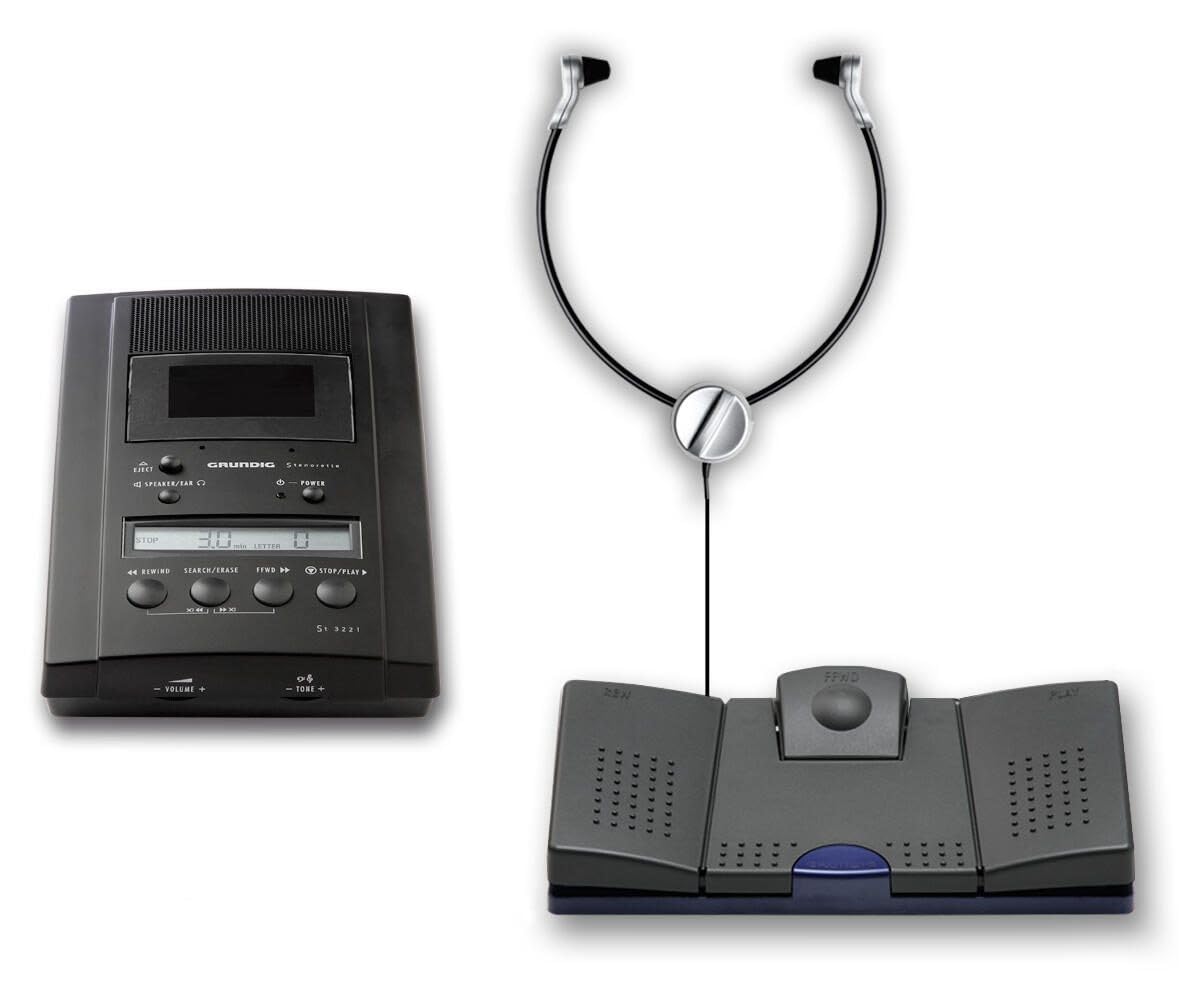
Nọmba 1: Components of the Grundig PFR9900 Stenorette St 3221 Transcription Kit. Shown are the transcription station on the left, and the Digta Swingphone 568 GBS headset connected to the Foot Pedal 536 on the right.
Awọn ilana iṣeto
- Sopọ Ipese Agbara: Plug the Power Supply 683 into the designated power input port on the Stenorette St 3221 Transcription Station. Connect the power supply to a suitable electrical outlet.
- So Agbekọri pọ: Plug the Digta Swingphone 568 GBS Headset into the headset jack on the transcription station. Ensure the Grundig plug is securely inserted.
- So Ẹsẹ Pẹdalu: Connect the Foot Pedal 536 to the foot pedal input port on the transcription station. Ensure the Grundig plug is securely inserted.
- Insert Cassette: Open the cassette compartment and insert a standard dictation cassette. Close the compartment securely.
Awọn ilana Iṣiṣẹ
Stenorette St 3221 Transcription Station
- Titan/Apapa: Use the power button to turn the device on or off. The LCD display will illuminate upon power-on.
- Iṣakoso iwọn didun: Adjust the listening volume using the dedicated volume controls on the station.
- Iyara Sisisẹsẹhin: The playback speed can be adjusted by +/- 15% using the speed control buttons. This allows for comfortable transcription.
- Ifihan LCD: The clear LCD display shows tape counter, playback speed, and other relevant status information.
- End-of-Tape Alert: An audible signal will indicate when the tape is nearing its end.
- Cassette Malfunction Alert: An alert signal will sound in case of a cassette malfunction.
Foot Pedal 536
The Foot Pedal 536 provides hands-free control over playback functions:
- Bẹrẹ/Duro: Press the central pedal to start or stop playback.
- Siwaju siwaju: Press the right pedal for fast forward.
- Yipada: Press the left pedal for rewind.
Digta Swingphone 568 GBS Headset
The headset is designed for comfort during extended use:
- Place the headset comfortably over your ears. The under-chin style protects your hairstyle.
- Adjust the volume on the transcription station for optimal listening.
Itoju
- Ninu: Use a soft, dry cloth to clean the exterior of the transcription station, headset, and foot pedal. Do not use liquid cleaners or abrasive materials.
- Awọn ori teepu: Periodically clean the tape heads with a specialized tape head cleaning solution and swab to ensure optimal audio quality. Refer to a separate guide for detailed tape head cleaning procedures if necessary.
- Ibi ipamọ: Store the kit in a clean, dry environment away from direct sunlight and extreme temperatures.
Laasigbotitusita
| Isoro | Owun to le Fa | Ojutu |
|---|---|---|
| Ko si agbara | Power supply not connected; power outlet not active. | Ensure power supply is securely connected to the station and a working outlet. |
| Ko si ohun lati agbekari | Headset not connected; volume too low; faulty headset. | Check headset connection. Increase volume. Test with another headset if available. |
| Pẹda ẹsẹ̀ kò dáhùn sí | Foot pedal not connected; faulty foot pedal. | Verify foot pedal connection. |
| Didara ohun afetigbọ | Dirty tape heads; worn-out cassette; incorrect playback speed. | Clean tape heads. Try a different cassette. Adjust playback speed. |
Awọn pato
- Awoṣe: Grundig PFR9900 Stenorette St 3221
- Olupese: Grundig Business Systems
- Awọn iwọn (L x W x H): 29.5 x 16.5 x 21 cm
- Ìwúwo: 1.43 kg
- Àwọ̀: Dudu
- Iyara Sisisẹsẹhin: Adjustable +/- 15%
- Agbekọri: Digta Swingphone 568 GBS (Grundig plug)
- Ẹsẹ ẹsẹ: Foot Pedal 536 (Grundig plug)
- Ibi ti ina elekitiriki ti nwa: 683
Atilẹyin ọja ati Support
For warranty information and technical support, please refer to the official Grundig Business Systems website or contact your authorized Grundig dealer. Keep your purchase receipt for warranty claims.
Olupese: Grundig Business Systems