
1. Ifihan
Thank you for choosing the Mabe HMM70SW Microwave Oven. This manual provides important information for the proper installation, operation, and maintenance of your appliance. Please read these instructions carefully before using the microwave oven and keep them for future reference.
2. Awọn ilana aabo
Lati dinku eewu ina, mọnamọna, ipalara si eniyan, tabi ifihan si agbara makirowefu pupọ nigba lilo ohun elo rẹ, tẹle awọn iṣọra ipilẹ, pẹlu atẹle naa:
- Ka gbogbo awọn ilana ṣaaju lilo ohun elo naa.
- Maṣe gbiyanju lati ṣiṣẹ adiro yii pẹlu ṣiṣi ilẹkun nitori eyi le ja si ifihan ipalara si agbara makirowefu.
- Ma ṣe gbe ohun kan si laarin oju iwaju adiro ati ẹnu-ọna tabi jẹ ki ile tabi aloku mimọ lati ṣajọpọ lori awọn ibi ifamọ.
- Ma ṣe ṣiṣẹ lọla ti o ba bajẹ. O ṣe pataki ni pataki pe ilẹkun adiro tilekun daradara ati pe ko si ibaje si: (1) ilẹkun (ti tẹ), (2) awọn mitari ati awọn latches (ti fọ tabi titu), (3) awọn edidi ilẹkun ati awọn oju-ile.
- adiro ko yẹ ki o tunše tabi tunše nipasẹ ẹnikẹni ayafi awọn oṣiṣẹ iṣẹ ti o peye daradara.
- Rii daju pe fentilesonu to dara ni ayika ẹyọ naa. Ma ṣe dina eyikeyi awọn ṣiṣi atẹgun.
- Maṣe lo awọn kemikali ibajẹ tabi awọn eefin ninu ohun elo yii.
- Ma ṣe gbona awọn olomi tabi awọn ounjẹ miiran ninu awọn apoti ti a fi edidi nitori wọn le gbamu.
- Lo awọn ohun elo onjẹ-ailewu makirowefu nigbagbogbo.
3. Ọja Ipariview
The Mabe HMM70SW is a compact and efficient microwave oven designed for residential use. It features a 0.7 cubic feet (20 L) capacity, 10 power levels, and a variety of quick-cook functions.
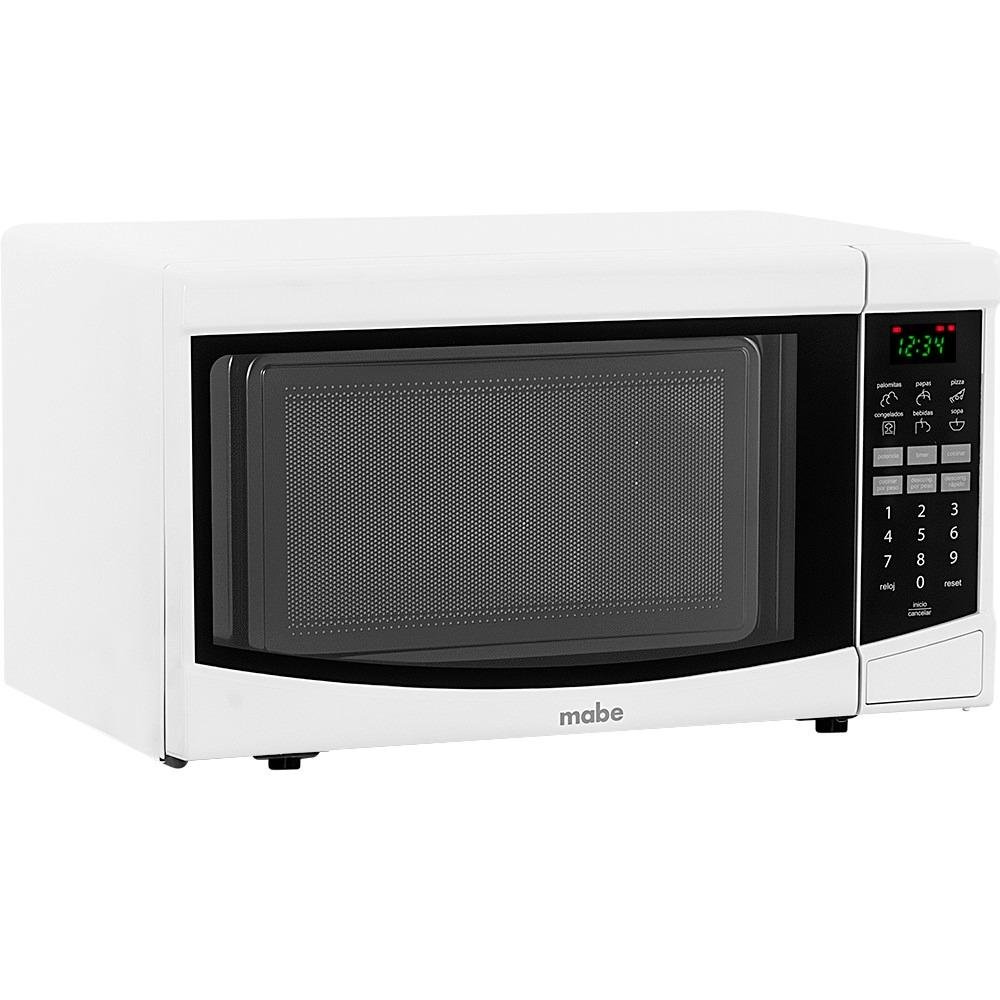
Nọmba 1: Mabe HMM70SW Microwave Oven. The image displays the microwave with approximate dimensions labeled: Height 33cm, Width 45.2cm, and Depth 33cm. Please refer to the specifications section for precise product dimensions.
Ibi iwaju alabujuto
The control panel features a digital display and touch-sensitive buttons for various functions. Key features include:
- Ifihan Digital: Ó fi àkókò, agbára, àti ipò sísè hàn.
- Number Pad (1-9, 0): Used to enter cooking times, clock settings, and quantities.
- Awọn iṣẹ iyara: Dedicated buttons for common items like Popcorn, Potatoes, Pizza, Beverages, Frozen Food, and Soup.
- Clock (Reloj): Lati ṣeto akoko lọwọlọwọ.
- Start/Cancel (Inicio/Cancelar): To start or stop cooking.
- Tun: To clear settings.
The interior includes a rotating glass turntable to ensure even cooking.
4. Eto ati fifi sori
Ṣiṣi silẹ
Carefully remove the microwave oven from its packaging. Remove all packing materials, including any protective film or tape. Check the oven for any damage, such as dents or a misaligned door. Do not operate the oven if it is damaged.
Ipo
- Place the microwave oven on a flat, stable surface that can support its weight.
- Ensure there is adequate space around the oven for proper ventilation. Leave at least 4 inches (10 cm) of space on the top, back, and sides.
- Do not place the oven near heat sources such as a range or oven.
- Keep the oven away from radio and TV sets to avoid interference.
Asopọ Itanna
Plug the microwave oven into a grounded 120V, 60Hz electrical outlet. Do not use an extension cord or adapter. Ensure the electrical circuit is adequately rated for the appliance's power consumption.
5. Awọn ilana Iṣiṣẹ
Ṣiṣeto aago
- Tẹ awọn Aago (Reloj) bọtini.
- Lo paadi nọmba lati tẹ akoko ti isiyi sii (fun apẹẹrẹ, 12:30).
- Tẹ awọn Aago (Reloj) bọtini lẹẹkansi lati jẹrisi.
Ipilẹ Makirowefu Sise
- Place food in a microwave-safe container on the turntable. Close the door securely.
- Tẹ àkókò sísè tí o fẹ́ nípa lílo pádì nọ́mbà (fún àpẹẹrẹ, 1 fún ìṣẹ́jú 1, 30 fún ìṣẹ́jú 30).
- Tẹ awọn Bẹrẹ (Inicio) button. The oven will begin cooking at full power.
- To adjust power level: After entering time, press the Ipele Agbara button (if available, or refer to specific model instructions for power level adjustment) and then enter a number from 1 to 10 (10 being full power). Then press Bẹrẹ (Inicio).
Using Quick Functions
Your microwave oven includes 6 quick functions for convenient cooking:
- Ṣe agbado: Press the Popcorn button once for standard popcorn bags.
- Potatoes (Papas): Press the Potatoes button and select the quantity (e.g., 1 for one potato, 2 for two).
- Pizza: Press the Pizza button and select the quantity/size.
- Beverages (Bebidas): Press the Beverages button and select the number of servings.
- Frozen Food (Congelados): Press the Frozen Food button and select the type/weight.
- Soup (Sopa): Press the Soup button and select the quantity.
For each quick function, the oven will automatically set the appropriate cooking time and power level. Follow the on-screen prompts or refer to the specific function details in your full manual.
Automatic Defrost (Descongelado Automático)
- Gbe awọn tutunini ounje lori turntable.
- Tẹ awọn Defrost (Descongelado) bọtini.
- Tẹ iwuwo ounjẹ naa sii nipa lilo paadi nọmba.
- Tẹ awọn Bẹrẹ (Inicio) button. The oven will calculate the defrosting time and power level automatically.
6. Itọju ati Cleaning
Ninu deede ati itọju yoo rii daju igbesi aye gigun ati iṣẹ aipe ti adiro makirowefu rẹ.
Ita Cleaning
Mu ese ita gbangba pẹlu asọ, damp asọ ati ìwọnba detergent. Yago fun abrasive ose tabi scouring paadi.
Inu ilohunsoke Cleaning
Clean the interior cavity regularly. For stubborn food splatters, place a bowl of water with lemon slices inside and microwave for 2-3 minutes. The steam will loosen food particles, making them easier to wipe away with a damp cloth. Do not use harsh detergents or abrasive materials.
Turntable Cleaning
Awọn gilasi turntable ati rola oruka le wa ni kuro fun ninu. Fọ wọn ninu omi gbona, ọṣẹ tabi ninu ẹrọ fifọ. Rii daju pe wọn ti gbẹ patapata ṣaaju gbigbe wọn pada sinu adiro.
7. Laasigbotitusita
Ti o ba pade awọn ọran pẹlu adiro makirowefu rẹ, tọka si awọn iṣoro ti o wọpọ ati awọn ojutu wọnyi:
| Isoro | Owun to le Fa | Ojutu |
|---|---|---|
| Lọla ko bẹrẹ | Okun agbara ko ṣafọ sinu; Ilekun ko tii daradara; Fiusi fẹ tabi Circuit fifọ tripped. | Rí i dájú pé okùn agbára náà wà ní ìpamọ́ dáadáa; Ti ilẹ̀kùn náà dáadáa; Ṣàyẹ̀wò fíùsì ilé tàbí kí o tún ẹ̀rọ ìfọ́wọ́sí oníṣẹ́ náà ṣe. |
| Ounjẹ kii ṣe alapapo | Incorrect cooking time or power level set; Microwave-safe cookware not used. | Adjust cooking time and power level; Use appropriate microwave-safe dishes. |
| Turntable ko yiyi | Turntable or roller ring not correctly placed; Obstruction under the turntable. | Ensure turntable and roller ring are correctly seated; Remove any obstructions. |
| Gilobu ina ko ṣiṣẹ | Gilobu ina nilo aropo. | Kan si oṣiṣẹ iṣẹ ti o peye fun rirọpo boolubu. |
If the problem persists after trying these solutions, please contact Mabe customer service or a qualified technician.
8. Awọn pato
| Ẹya ara ẹrọ | Sipesifikesonu |
|---|---|
| Brand | Mabe |
| Nọmba awoṣe | HMM70SW |
| Àwọ̀ | Funfun |
| Agbara | 0.7 cubic feet (20 L) |
| Awọn iwọn Ọja (H x W x D) | 26.2 cm x 45.2 cm x 33 cm (10.3 ni x 17.8 ni x 13 in) |
| Agbara | 110 Wattis |
| Voltage | 120 Volts |
| Ohun elo | Irin ti ko njepata |
| Pataki Awọn ẹya ara ẹrọ | Rotating Plate, Quick Access Keys |
| Iwọn Ọja | 10.5 kilogram (23.1 lbs) |
| Adarí Iru | Fọwọkan |
| Iṣeduro Lilo | Ibugbe |
| Iru fifi sori ẹrọ | Countertop |
| Awọn irinše to wa | Warranty, Microwave Oven, User Manual |
| ASIN | B00XD4MRC4 |
| Akọkọ Wa Ọjọ | Oṣu Karun ọjọ 8, Ọdun 2015 |
9. Atilẹyin ọja ati Support
Your Mabe HMM70SW Microwave Oven comes with a manufacturer's warranty. Please refer to the warranty card included with your product for specific terms and conditions. For technical support, service, or to inquire about replacement parts, please contact Mabe customer service through their official webaaye tabi alaye olubasọrọ ti a pese ninu iwe atilẹyin ọja rẹ.