
1. Ifihan
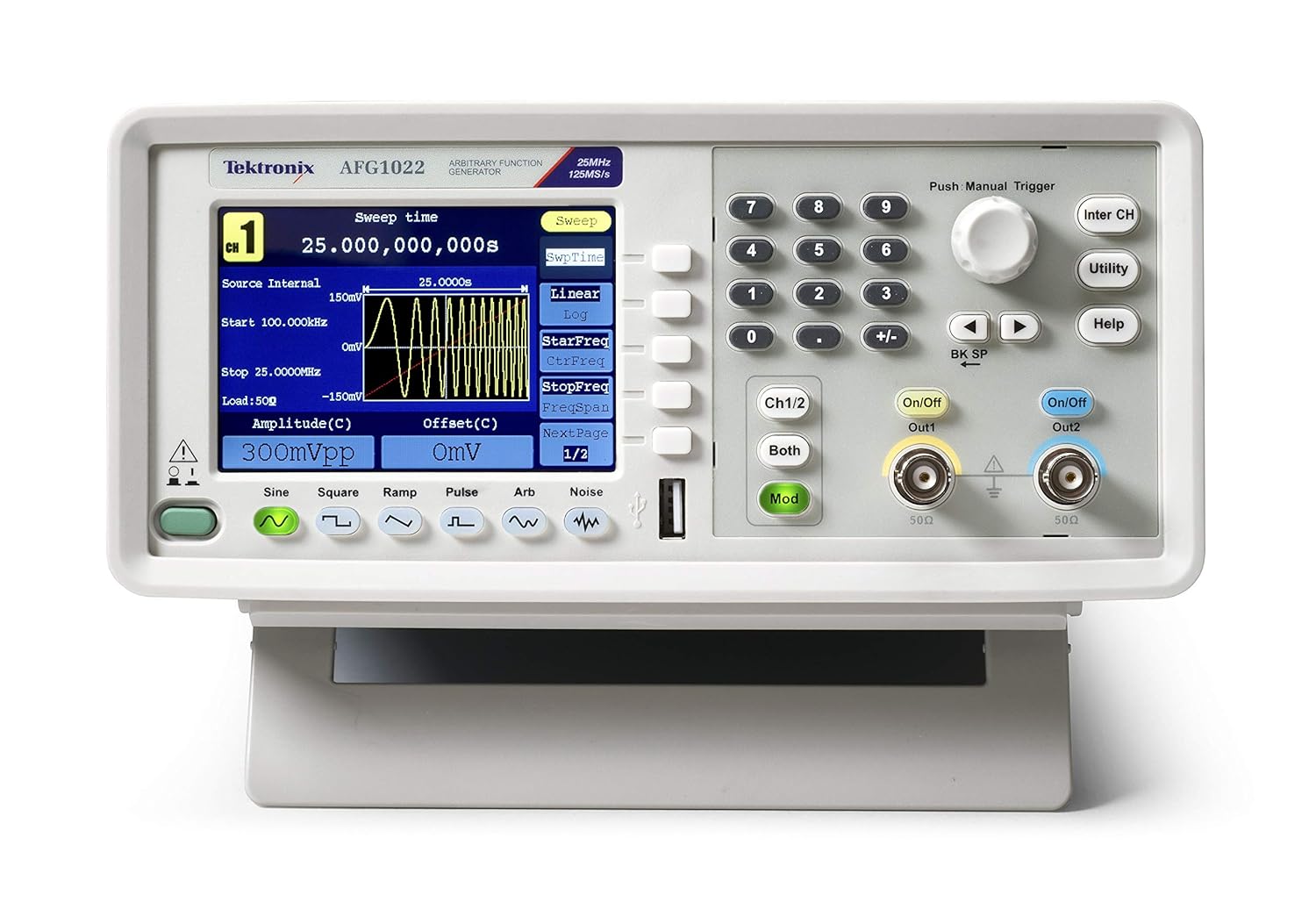
The Tektronix AFG1022 Arbitrary Function Generator is a versatile instrument designed for generating various waveforms required in laboratory and testing environments. With a bandwidth of 25 MHz or 60 MHz and dual output channels, it provides an output amplitude ranging from 1 mVpp to 10 Vpp across its full bandwidth. This device offers a comprehensive set of features for waveform generation, making it a valuable tool for a wide range of applications.
Awọn ẹya pataki pẹlu:
- Dual-channel operation with 25 MHz bandwidth.
- Abajade amplitude from 1 mVpp to 10 Vpp.
- 14-bit vertical resolution and 1 µHz frequency resolution.
- 50 built-in arbitrary waveforms.
- Support for continuous, modulation, sweep, and burst modes.
- Dedicated 3.95-inch TFT LCD display for clear visualization.
- User-friendly front panel and menu navigation.
2. Alaye Aabo
Before operating the Tektronix AFG1022, please read and understand all safety instructions to prevent injury and avoid damage to the instrument or other connected equipment. This device is designed for use by qualified personnel only.
Awọn iṣọra Aabo Gbogbogbo:
- Ilẹ: Always ensure the instrument is properly grounded. The power cord provided has a three-prong plug for this purpose. Do not defeat the grounding-type plug.
- Orisun Agbara: Connect the instrument to a power source that is within the specified voltage range (100-240V AC, 50/60 Hz). Verify the line selector switch on the rear panel is set correctly for your local voltage.
- Afẹfẹ: Ensure proper ventilation around the instrument. Do not block ventilation openings. Overheating can cause damage.
- Ayika: Operate the instrument in a clean, dry environment. Avoid exposure to moisture, extreme temperatures, or corrosive gases.
- Ṣiṣẹ: Refer all servicing to qualified service personnel. Do not attempt to service the instrument yourself unless you are qualified to do so.
- Awọn okun ati awọn asopọ: Use only specified cables and connectors. Ensure all connections are secure before applying power.
- Ninu: Ge asopọ agbara ṣaaju ṣiṣe mimọ. Lo asọ asọ ti o gbẹ. Ma ṣe lo olomi tabi awọn olutọpa aerosol.
3. Ohun ti o wa ninu Apoti
Upon unpacking your Tektronix AFG1022 Arbitrary Function Generator, please verify that all the following items are included:
- Tektronix AFG1022 Arbitrary Function Generator Unit
- Gbólóhùn ti ibamu
- CD (containing software and documentation)
- Afowoyi Olumulo (iwe-ipamọ yii)
- Fuse (2 pieces, spare)
- Cables (3 pieces, including USB and BNC cables)
- Ijẹrisi odiwọn
- Okun agbara
If any items are missing or damaged, please contact your Tektronix supplier or customer support immediately.
4. Eto
Follow these steps to set up your AFG1022 Arbitrary Function Generator for initial use.
4.1 Unpacking ati ayewo
- Carefully remove the instrument and all accessories from the packaging.
- Inspect the instrument for any signs of physical damage that may have occurred during transit. If damage is found, contact your supplier.
- Retain the original packaging materials for future transport or storage.
4.2 Asopọ agbara
- Locate the power inlet on the rear panel of the AFG1022.
- Ṣayẹwo awọn Ayanfẹ ila yipada lori nronu ẹhin ti ṣeto si vol ti o tọtage for your region (110V AC or 220V AC). Adjust if necessary.
- Connect the provided power cord to the instrument's power inlet and then to a grounded AC power outlet.

4.3 Nsopọ Awọn abajade
- Identify the two output channels (Out1 and Out2) on the front panel. These are BNC connectors.
- Connect appropriate BNC cables from the desired output channel(s) to your test circuit or device under test.
- Ensure the impedance setting on the AFG1022 matches the impedance of your load (typically 50Ω or high impedance).
5. Awọn ilana Iṣiṣẹ
Yi apakan pese ohun loriview of the basic operation of the Tektronix AFG1022. For detailed instructions on specific functions, refer to the comprehensive user manual provided on the included CD.
5.1 Powering On and Initial Screen
- Press the power button located on the front panel to turn on the instrument.
- The display will show the Tektronix logo and then transition to the main waveform generation interface.
5.2 Ìṣẹ̀dá Ìgbì Wíwọ́-ẹ̀rọ Ìpìlẹ̀
The AFG1022 can generate various standard waveforms and arbitrary waveforms.
- Selecting Waveform Type: Use the dedicated buttons below the display (Sine, Square, Ramp, Pulse, Arb, Noise) to select the desired waveform.
- Setting Frequency: Use the numeric keypad and the rotary knob to input the desired frequency. The display will update in real-time.
- Eto Amplitude and Offset: Ṣatunṣe awọn amplitude (Vpp) and DC offset (V) using the corresponding soft keys and the rotary knob.
- Enabling Output: Tẹ awọn Tan/Pa a button for Channel 1 (Out1) or Channel 2 (Out2) to enable the waveform output. The button will illuminate when the output is active.

5.3 Awọn iṣẹ ilọsiwaju
- Iṣatunṣe: Tẹ awọn Mod button to access modulation settings (AM, FM, PM, FSK, PWM).
- Gbigbe: Configure frequency sweeps by pressing the Gba bọtini rirọ.
- Ti nwaye: Generate burst waveforms by pressing the Ti nwaye bọtini rirọ.
- Awọn ọna igbi lainidii: The AFG1022 supports user-defined arbitrary waveforms. Refer to the full manual for instructions on creating and loading custom waveforms.
6. Itọju
Proper maintenance ensures the longevity and optimal performance of your Tektronix AFG1022.
6.1 Ninu
- Always disconnect the power cord before cleaning the instrument.
- Use a soft, dry cloth to wipe the exterior surfaces. For stubborn dirt, a cloth lightly dampened with mild detergent and water may be used.
- Do not use abrasive cleaners, solvents, or strong chemicals, as these can damage the plastic parts and labels.
- Avoid spraying liquids directly onto the instrument.
6.2 Fiusi Rirọpo
If the instrument does not power on, check the fuse located in the power inlet on the rear panel. Ensure the replacement fuse matches the specified type and rating (e.g., 250V, 2A). Refer to the full manual for detailed instructions on fuse replacement.
6.3 Idiwọn
For continued accuracy, periodic calibration by qualified service personnel is recommended. Refer to the calibration certificate for the recommended calibration interval.
7. Laasigbotitusita
This section provides solutions to common issues you might encounter with your AFG1022. If the problem persists, contact Tektronix customer support.
| Isoro | Owun to le Fa | Ojutu |
|---|---|---|
| Ohun elo ko ni agbara lori. | No power, faulty power cord, blown fuse. | Check power cord connection. Verify power outlet. Check and replace fuse if necessary. Ensure line selector is correct. |
| Ko si ifihan igbi. | Output channel not enabled, incorrect amplitude/offset settings, faulty cable, incorrect load impedance. | Press the On/Off button for the desired channel. Verify amplitude and offset settings. Check BNC cable connections. Ensure load impedance matches instrument setting. |
| Ifihan ti ṣofo tabi tio tutunini. | Software error, internal fault. | Power cycle the instrument (turn off, wait 10 seconds, turn on). If issue persists, contact support. |
| Incorrect waveform shape/frequency. | Incorrect settings, external interference. | Ṣe àyẹ̀wò lẹ́ẹ̀mejì gbogbo àwọn pàrámítà ìgbì omi (ìgbohùngbà, amplitude, offset, modulation settings). Ensure proper shielding of cables. |
8. Awọn pato
The following table lists the key specifications for the Tektronix AFG1022 Arbitrary Function Generator. All specifications are typical unless otherwise noted.
| Paramita | Iye |
|---|---|
| Orukọ awoṣe | AFG1022 |
| Bandiwidi | 25 MHz |
| Awọn ikanni | Meji-ikanni |
| Abajade Amplitude | 1 mVpp to 10 Vpp |
| Ipinnu Inaro | 14-bit |
| Ipinnu Igbohunsafẹfẹ | 1 µHz |
| Built-in Waveforms | 50 Arbitrary Waveforms |
| Ifihan | 3.95-inch TFT LCD |
| Orisun agbara | Electricity Powered |
| Voltage | 100-240V AC (selectable) |
| Iwọn Nkan | 4.9 kilogram (10.8 poun) |
| Package Mefa | 17.2 x 14 x 11.4 inches |
| Olupese | Tektronix |
| Ọjọ Akọkọ Wa | Oṣu Keje 15, Ọdun 2015 |
9. Atilẹyin ọja & Atilẹyin
Tektronix products are designed for reliability and performance. For specific warranty terms and conditions applicable to your AFG1022, please refer to the warranty information provided with your purchase or visit the official Tektronix webojula.
Atilẹyin Onibara:
If you require technical assistance, have questions about your instrument, or need to arrange for service, please contact Tektronix customer support. Support contact information can typically be found on the Tektronix webaaye tabi ninu iwe ti o wa pẹlu ọja rẹ.
When contacting support, please have your instrument's model number (AFG1022) and serial number ready. The serial number is located on the rear panel of the instrument.
For the latest information, drivers, software, and additional resources, please visit the official Tektronix webojula: www.tek.com