
Ọrọ Iṣaaju
This manual provides detailed instructions for the proper use and maintenance of your Casio STL-S110H-1ACF Tough Solar Runner Digital Watch. This timepiece is designed for active individuals, featuring solar power, multiple digital functions, and a durable resin construction.
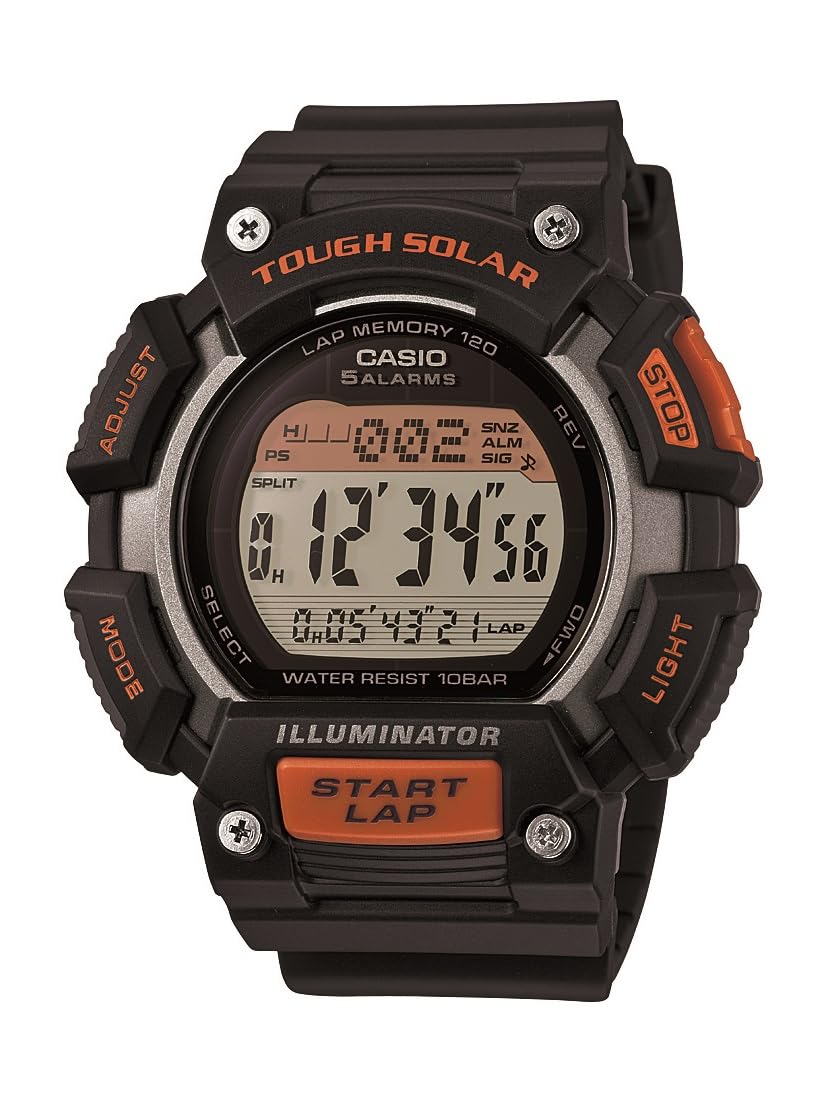
Nọmba 1: Casio STL-S110H-1ACF Tough Solar Runner Digital Watch. This image displays the watch's digital face, resin case, and band, highlighting its robust design.
Ṣeto
1. Gbigba agbara akọkọ
Your watch is equipped with Tough Solar technology, which converts light into electrical energy. Before initial use, or if the display is blank, expose the watch to bright light for several hours. Ensure the watch face is directly exposed to light for efficient charging.
- Ayika gbigba agbara: Place the watch near a window or under a strong artificial light source. Avoid extreme heat.
- Atọka Ipele Batiri: The watch features a battery level indicator. Ensure it shows a sufficient charge before setting the time and using functions.
2. Ṣiṣeto Aago ati Ọjọ
- Ni Ipo Ṣiṣe Aago, tẹ mọlẹ ṢAtunṣe button (usually top-left) until the city code starts to flash. This indicates the setting mode.
- Lo awọn MODE button (usually bottom-left) to cycle through the settings: City Code → DST (Daylight Saving Time) → 12/24-hour format → Seconds → Hour → Minute → Year → Month → Day.
- Lo awọn WÁ or Siwaju / yiyipada buttons (usually top-right and bottom-right) to change the flashing value.
- Ni kete ti gbogbo eto ba tọ, tẹ bọtini naa ṢAtunṣe bọtini lẹẹkansi lati jade ni ipo eto.
Awọn ilana Iṣiṣẹ
Your Casio STL-S110H-1ACF watch offers various modes and functions. Use the MODE button to navigate between them.
1. Ipo akoko
This is the default mode, displaying the current time, day, and date. From this mode, you can activate the LED light.
- Imọlẹ LED: Tẹ awọn Imọlẹ button (usually top-right) to illuminate the display. The light features an after-glow function.
2. Ipo aago iṣẹju-aaya
The stopwatch measures elapsed time, split times, and two finishes. It has a capacity of 1/100-second for 100 hours.
- Tẹ Ipo Aago Iduro nipa lilo MODE bọtini.
- Tẹ awọn Bẹrẹ/Duro button (usually bottom-right) to start timing.
- Tẹ Bẹrẹ/Duro lẹẹkansi lati da.
- Tẹ awọn Tunto button (usually top-right) to reset to zero.
- Fun awọn akoko pipin, tẹ PIN (usually top-right) while timing, then Bẹrẹ/Duro to stop, and Tunto lati ko.
3. Kika Aago Ipo
The watch includes two independent countdown timers, useful for interval training or specific tasks.
- Tẹ Ipo Aago Kika silẹ nipa lilo MODE bọtini.
- Tẹ mọlẹ ṢAtunṣe bọtini lati tẹ ipo eto sii.
- Lo awọn MODE button to select which timer (T1 or T2) to set, and then to cycle through hours, minutes, and seconds.
- Lo awọn WÁ or Siwaju / yiyipada awọn bọtini lati yi awọn iye.
- Tẹ ṢAtunṣe lati jade ni ipo eto.
- Tẹ Bẹrẹ/Duro lati bẹrẹ tabi da kika.
4. World Time Ipo
View akoko lọwọlọwọ ni awọn ilu 48 (awọn agbegbe akoko 29) ni ayika agbaye.
- Enter World Time Mode using the MODE bọtini.
- Lo awọn WÁ or Siwaju / yiyipada awọn bọtini lati yi lọ nipasẹ awọn koodu ilu.
- To swap your Home City time with the World Time City, press the ṢAtunṣe ati WÁ awọn bọtini ni nigbakannaa.
5. Ipo Itaniji
Set up to five daily alarms and an hourly akoko ifihan agbara.
- Tẹ Ipo Itaniji sii nipa lilo MODE bọtini.
- Lo awọn WÁ or Siwaju / yiyipada buttons to select an alarm (AL1 to AL5) or the Hourly Ifihan akoko (SIG).
- Tẹ mọlẹ ṢAtunṣe bọtini lati tẹ ipo itaniji sii.
- Lo awọn MODE button to select hour or minute.
- Lo awọn WÁ or Siwaju / yiyipada awọn bọtini lati yi awọn iye.
- Tẹ ṢAtunṣe lati jade ni ipo eto.
- To turn an alarm or the hourly time signal on/off, select it and press the Bẹrẹ/Duro bọtini.
Itoju
1. Ninu
- Mu aago naa nu pẹlu asọ ti o tutu, ti o gbẹ lati yọ idoti ati ọrinrin kuro.
- Fun idoti agidi, lo asọ rirọ dampened with water and a mild neutral detergent. Avoid harsh chemicals.
- Clean the resin band regularly to prevent skin irritation and maintain its appearance.
2. Solar Charging Care
- Ensure the watch face is regularly exposed to light to maintain optimal battery charge.
- Avoid prolonged storage in dark places, as this can lead to battery depletion.
- Do not expose the watch to extremely high temperatures during charging (e.g., on a car dashboard in direct sunlight).
3. Omi Resistance
This watch is designed for daily use and can withstand splashes or brief immersion in water. However, it is not suitable for diving or prolonged underwater use. Do not operate buttons while the watch is wet.
Laasigbotitusita
- Ifihan ti ṣofo tabi baibai: The watch battery may be low. Expose the watch to bright light for several hours to recharge.
- Akoko ko pe: Re-adjust the time and date settings as described in the "Setting the Time and Date" section. Ensure the correct home city and DST settings are selected.
- Awọn bọtini ko dahun: This could indicate a very low battery level. Charge the watch fully. If the issue persists, contact customer support.
- Watch stops functioning after exposure to water: Ensure buttons were not pressed underwater. Allow the watch to dry completely. If issues persist, seek professional service.
Awọn pato
| Nọmba awoṣe | STLS110H-1A |
| Orisun agbara | Tough Solar (Solar rechargeable battery) |
| Igbesi aye batiri (Gbigba agbara ni kikun) | Approx. 11 months (without further exposure to light) |
| Ohun elo ọran | Resini |
| Ohun elo Band | Resini |
| Ohun elo Window kiakia | Eruku |
| Case Mefa | 49 mm (iwọn ila opin) |
| Ọja Mefa | 5.26 x 5.46 x 1.4 cm |
| Iwọn | 54.43 g |
| Omi Resistance | General daily use (splash resistant) |
| Awọn iṣẹ | LED light with after-glow, 5 daily alarms, hourly time signal, world time (48 cities), stopwatch (1/100-second, 100-hour capacity), 2 countdown timers, auto-calendar. |
Atilẹyin ọja ati Support
Your Casio watch is covered by a manufacturer's warranty. Please refer to the warranty card included with your purchase for specific terms and conditions, including warranty period and coverage details. For technical support, service, or inquiries regarding your watch, please contact Casio customer service through their official webaaye tabi alaye olubasọrọ ti a pese ninu iwe atilẹyin ọja rẹ.
For further assistance, visit the official Casio support webojula: www.casio.com/support