
1. Ifihan
The Edifier P180 is a stereo earbud headset designed for clear audio and convenient communication. Featuring an inline microphone and control, it offers a comfortable listening experience for various devices.

Figure 1: Edifier P180 Wired Earbud Headset
2. Ohun ti o wa ninu Apoti
- Edifier P180 Earbud Headset
- USB
3. Key Awọn ẹya ara ẹrọ
- Classic Comfort: Ergonomic design for comfortable wear without irritating the ear canal.
- Didara ohun to gaju: Equipped with 16mm neodymium magnetic monomers for high-fidelity audio playback.
- Integrated Microphone and Control: 3.5mm stereo earphones with a built-in microphone and remote button for mobile phone communication.
- Iṣẹ ṣiṣe: Single button control for picking up/hanging up calls and skipping songs (device dependent for iOS/Android).
- Apẹrẹ ti o tọ: Constructed with quality materials for longevity.

Figure 2: Ergonomic design for comfortable fit.
4. Eto
- Yọọ kuro: Carefully remove the Edifier P180 headset from its packaging.
- Ṣayẹwo: Check the earbuds and cable for any visible damage.
- Sopọ: Insert the 3.5mm audio jack into the headphone port of your compatible device (smartphone, tablet, computer, etc.). Ensure the jack is fully inserted for proper audio and microphone function.
- Ipo: Place the earbuds comfortably in your ears. The ergonomic design is intended to rest well without causing irritation.
5. Awọn ilana Iṣiṣẹ
The Edifier P180 features an inline control button for easy management of calls and music playback.
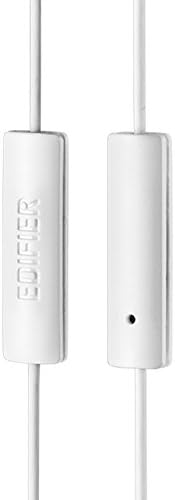
Figure 3: Inline microphone and control button.
- Idahun / Ipari Awọn ipe: Tẹ bọtini iṣakoso lẹẹkan lati dahun ipe ti nwọle. Tẹ lẹẹkansi lati pari ipe ti n ṣiṣẹ.
- Orin tí ń gbá/Dídádúró: Press the control button once to play or pause audio playback.
- Awọn orin ti n fo: Double-press the control button to skip to the next track. Triple-press to go to the previous track (functionality may vary by device and operating system).
- Oluranlọwọ ohun: Long-press the control button to activate your device's voice assistant (e.g., Siri, Google Assistant).
Fidio 1: Ọja osise ti pariview of the Edifier P180 Classic Earbud Headsets, demonstrating features and usage.
6. Itọju
- Ninu: Fi aṣọ gbígbẹ àti etí rọ́rọ́ nu ẹ́tí àti okùn náà. Yẹra fún lílo àwọn kẹ́míkà líle tàbí àwọn ohun èlò ìfọ́ra.
- Ibi ipamọ: When not in use, store the headset in a clean, dry place, away from extreme temperatures and direct sunlight. Avoid tangling the cable.
- Yago fun Ọrinrin: Do not expose the headset to water or excessive moisture, as this can damage the internal components.
7. Laasigbotitusita
- Ko si Ohun:
- Rí i dájú pé a ti fi jack 3.5mm náà sínú ibudo ohùn ẹ̀rọ rẹ pátápátá.
- Ṣayẹwo awọn eto iwọn didun ẹrọ rẹ.
- Test the earbuds with another device to rule out a device-specific issue.
- Gbohungbohun Ko Ṣiṣẹ:
- Rii daju pe o ti fi jaketi 3.5mm sii ni kikun.
- Ṣàyẹ̀wò àwọn ètò ìtẹ̀síwájú gbohùngbohùn ẹ̀rọ rẹ.
- Ṣe idanwo gbohungbohun pẹlu ẹrọ miiran tabi ohun elo.
- Ohùn Àdéhùn:
- Check the cable for any kinks or damage.
- Rii daju pe Jack ohun afetigbọ jẹ mimọ ati ofe ti idoti.
8. Awọn pato
| Ẹya ara ẹrọ | Sipesifikesonu |
|---|---|
| Nọmba awoṣe | P180 |
| Idahun Igbohunsafẹfẹ | 20 Hz - 20,000 Hz |
| Awọn agbekọri Jack | 3.5 mm Jack |
| Asopọmọra Technology | Ti firanṣẹ |
| Iwọn Nkan | 1.76 iwon (50 Giramu) |
| Ọja Mefa | 2.01 x 5.59 x 0.91 inches |
| Ohun elo | Neodymium |
| Iṣakoso Iru | Inline Control Button |
| Ipalara | 32 ohms |
| Ariwo Iṣakoso | Iyasọtọ ohun |
9. Atilẹyin ọja & Atilẹyin
The Edifier P180 headset is backed by a 1-odun atilẹyin ọja. For any support inquiries or warranty claims, please refer to the contact information provided with your purchase or visit the official Edifier webojula.