
1. Ifihan
This manual provides instructions for the safe and effective operation of the ALLOSUN EM420B Digital Multimeter. This compact 3 1/2 digit digital multimeter is designed for measuring DC and AC voltage, DC and AC current, resistance, temperature, diode, transistor, continuity, and capacitance. It features polarity indication, data hold, MAX mode, overrange indication, and automatic power-off. Please read this manual thoroughly before use.
2. Alaye Aabo
IKILO:
- Rí i dájú pé a ti ṣètò multimeter náà sí iṣẹ́ àti ìwọ̀n tó yẹ kí o tó ṣe àwọn ìwọ̀n náà.
- Do not exceed the maximum input values for any range. Maximum operating voltage jẹ 1000 Volts.
- Ṣọra pupọ nigbati o ba n ṣiṣẹ pẹlu awọn iyika laaye.
- Ṣe àyẹ̀wò àwọn ìdánwò ìdánwò fún ìbàjẹ́ kí o tó lò ó ní gbogbo ìgbà. Má ṣe lò ó tí ìdènà bá bàjẹ́.
- Rọpo awọn batiri lẹsẹkẹsẹ nigbati ifihan batiri kekere ba han lati rii daju pe o peye awọn kika.
- Má ṣe lo multimeter náà bí ó bá dàbí pé ó ti bàjẹ́ tàbí tí kò bá ṣiṣẹ́ dáadáa.
- Refer to the manual for specific CAT rating information and appropriate usage environments.
3. Ọja Ipariview
The ALLOSUN EM420B Digital Multimeter is a versatile tool for electrical measurements. Below is an image illustrating its main components.

olusin 3.1: Iwaju view of the ALLOSUN EM420B Digital Multimeter, showing the LCD display, rotary function switch, and input terminals.
3.1 Ifihan
The multimeter features a 3 1/2 digit backlight LCD with a maximum reading of 1999. It updates 2-3 times per second.

Figure 3.2: Close-up of the LCD display, indicating measurement values and units.
3.2 Controls and Terminals
- Yiyi pada: A lo lati yan awọn iṣẹ wiwọn ati awọn sakani.
- Bọ́tìnì FUNK: Selects between different functions within a single rotary switch position (e.g., AC/DC, Diode/Continuity).
- Bọtini RANGE: Manually selects measurement range or toggles auto-ranging.
- MAX/H Button: Activates MAX mode (displays maximum reading) or Data Hold (freezes current reading). Press for 2 seconds for MAX mode.
- DATA H Button: Activates Data Hold function.
- Bọtini Imọlẹhin: Ó mú kí ìmọ́lẹ̀ ìbòjú ìfihàn ṣiṣẹ́.
- Ibùdó IWỌN: Positive input for most voltage, awọn wiwọn resistance, ati capacitance.
- Ibudo COM: Wọpọ (odi) igbewọle fun gbogbo awọn wiwọn.
- 10A Terminal: Ìgbékalẹ̀ fún ìwọ̀n agbára ìṣàn omi gíga (tó 10A).
- mA/µA Terminal: Input for low current (mA/µA) measurements.
4. Eto
4.1 Fifi sori batiri
The multimeter is powered by three 1.5V AAA batteries (not provided). To install or replace batteries:
- Rii daju pe multimeter ti wa ni pipa ati pe awọn idari idanwo ti ge asopọ.
- Wa awọn yara batiri lori pada ti awọn kuro.
- Lo screwdriver lati ṣii ideri iyẹwu batiri naa.
- Insert three AAA batteries, observing correct polarity (+ and -).
- Rọpo ideri kompaktimenti batiri ki o ni aabo pẹlu dabaru.

olusin 4.1: Ẹyìn view of the multimeter, highlighting the battery compartment.
A low battery indicator will appear on the display when batteries need replacement.
5. Awọn ilana Iṣiṣẹ
5.1 Gbogbogbo isẹ
- To turn on the multimeter, rotate the function switch from OFF to the desired measurement function.
- The multimeter features automatic power-off to conserve battery life. It will power off after a period of inactivity.
- To turn off, rotate the function switch to OFF.
5.2 Idiwon DC Voltage (V=)
- Insert the red test lead into the "INPUT" jack and the black test lead into the "COM" jack.
- Set the rotary switch to the "V=" position.
- So awọn itọsọna idanwo kọja paati tabi iyika lati wọn.
- Ka voltage value on the display. The polarity will be indicated.
5.3 Iwọn AC Voltage (V~)
- Insert the red test lead into the "INPUT" jack and the black test lead into the "COM" jack.
- Set the rotary switch to the "V~" position.
- So awọn itọsọna idanwo kọja AC voltage orisun.
- Ka voltage iye lori ifihan.
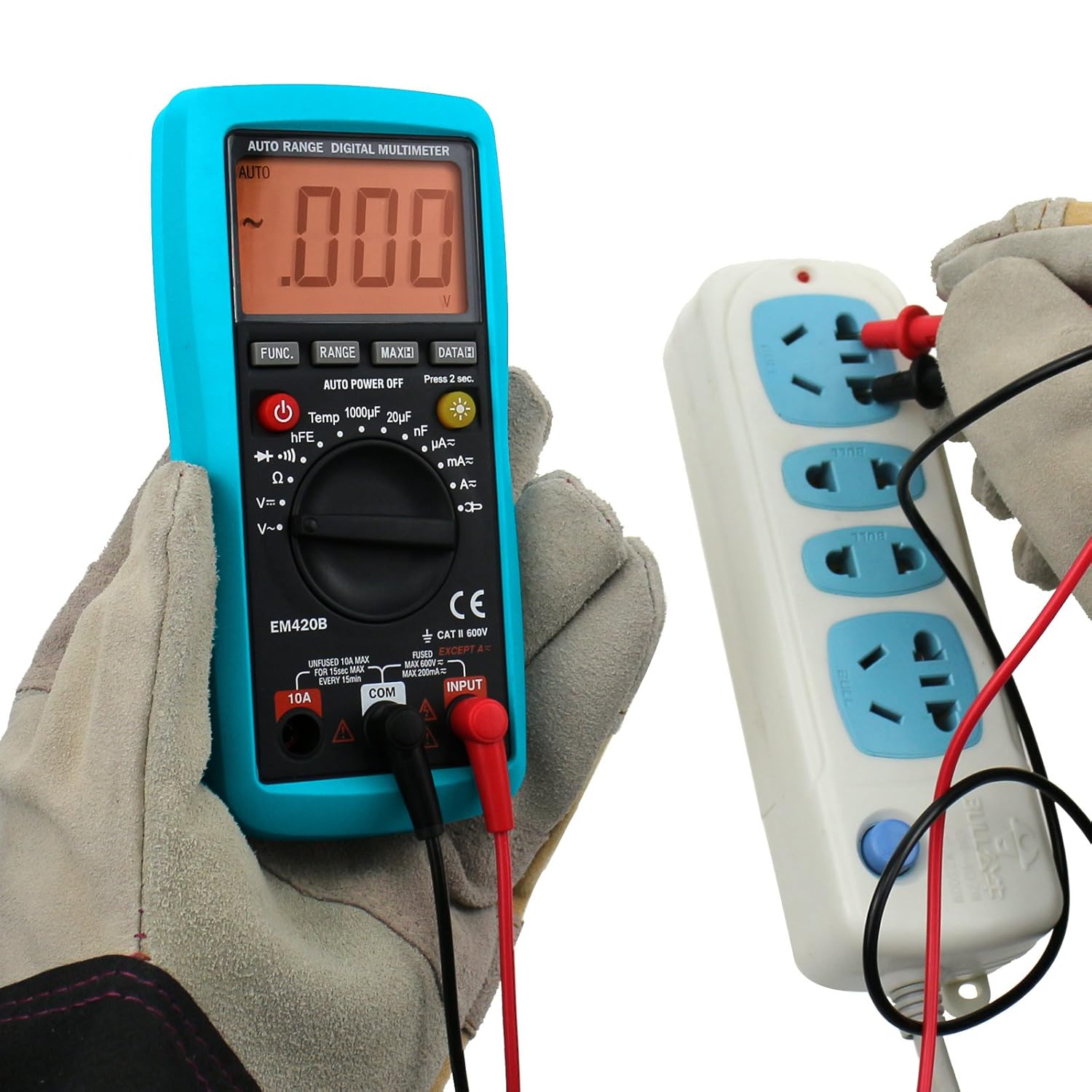
Àwòrán 5.1: Wíwọ̀n ìpele ACtage from a power outlet.
5.4 Measuring DC Current (A=, mA=, µA=)
CAUTION: Never connect the multimeter in parallel with a voltage source when measuring current, as this can damage the meter or blow the fuse.
- Determine the expected current range. For currents up to 10A, use the "10A" jack. For lower currents, use the "mA/µA" jack. The black lead always goes into "COM".
- Set the rotary switch to the appropriate "A=", "mA=", or "µA=" position.
- Fọ́ àyíká náà kí o sì so multimeter pọ̀ ní ìtẹ̀léra pẹ̀lú ẹrù náà.
- Ka iye lọwọlọwọ lori ifihan naa.
5.5 Measuring AC Current (A~, mA~, µA~)
CAUTION: Never connect the multimeter in parallel with a voltage source when measuring current.
- Determine the expected current range. For currents up to 10A, use the "10A" jack. For lower currents, use the "mA/µA" jack. The black lead always goes into "COM".
- Set the rotary switch to the appropriate "A~", "mA~", or "µA~" position.
- Fọ́ àyíká náà kí o sì so multimeter pọ̀ ní ìtẹ̀léra pẹ̀lú ẹrù náà.
- Ka iye lọwọlọwọ lori ifihan naa.
5.6 Ìwọ̀n Àìdádúró (Ω)
- Insert the red test lead into the "INPUT" jack and the black test lead into the "COM" jack.
- Set the rotary switch to the "Ω" position.
- Rí i dájú pé agbára ìṣiṣẹ́ tàbí ohun èlò náà ti dínkù kí o tó wọn agbára ìdènà.
- So awọn itọsọna idanwo kọja paati naa.
- Ka iye resistance lori ifihan.
5.7 Idanwo Diode
- Insert the red test lead into the "INPUT" jack and the black test lead into the "COM" jack.
- Set the rotary switch to the "Diode Test" position (indicated by a diode symbol).
- So okun pupa mọ anode ati okun dudu mọ katode ti diode naa.
- Awọn àpapọ yoo fi awọn siwaju voltage drop. Reverse the leads; the display should show "OL" (open loop) for a good diode.
5.8 Igbeyewo Ilọsiwaju
- Insert the red test lead into the "INPUT" jack and the black test lead into the "COM" jack.
- Set the rotary switch to the "Continuity Test" position (indicated by a continuity symbol).
- So awọn itọsọna idanwo kọja Circuit tabi paati.
- If continuity exists (resistance below approximately 50Ω), the built-in buzzer will sound. The display will show the resistance value.
5.9 Idanwo Transistor (hFE)
- Ṣeto iyipada iyipo si ipo "hFE".
- Insert the transistor (NPN or PNP) into the appropriate sockets of the hFE adapter.
- Ka iye hFE lori ifihan naa.

Figure 5.2: Performing a transistor hFE test using the adapter.
5.10 Iwọn Agbara
(Applicable to EM420B model only)
- Insert the red test lead into the "INPUT" jack and the black test lead into the "COM" jack.
- Set the rotary switch to the capacitance range (e.g., "1000µF", "20µF", "200nF").
- Rii daju pe capacitor ti gba silẹ ni kikun ṣaaju wiwọn.
- So awọn itọsọna idanwo kọja awọn ebute kapasito.
- Ka iye kapasito lori ifihan.
5.11 Data idaduro Išė
Press the "DATA H" button to freeze the current reading on the display. Press it again to release the hold and resume live readings.
5.12 MAX Mode
Press and hold the "MAX/H" button for 2 seconds to activate MAX mode. The multimeter will display the maximum value measured since the mode was activated. Press again to exit MAX mode.
6. Itọju
6.1 Ninu
Pa ọran naa pẹlu ipolowoamp cloth and mild detergent. Do not use abrasives or solvents. Ensure the multimeter is off and disconnected from all circuits before cleaning.
6.2 Batiri Rirọpo
Refer to Section 4.1 for battery replacement instructions. Always replace all three AAA batteries at the same time with new ones.
6.3 Fiusi Rirọpo
If the current measurement function stops working, the fuse may be blown. Fuse replacement should only be performed by qualified personnel. Refer to the specifications for the correct fuse type and rating.
7. Laasigbotitusita
| Isoro | Owun to le Fa | Ojutu |
|---|---|---|
| Ko si ifihan tabi baibai àpapọ | Awọn batiri ti o ku tabi kekere | Rọpo awọn batiri (Apakan 4.1) |
| "OL" (Àfikún) tí a fi hàn | Input exceeds selected range or meter's maximum capacity | Select a higher range or ensure input is within meter's limits. |
| Awọn kika ti ko tọ | A ti yan iṣẹ/ibiti ti ko tọ; asopọ okun idanwo ti ko dara; batiri kekere | Verify settings, check connections, replace batteries. |
| Iwọn lọwọlọwọ ko ṣiṣẹ | Fiusi ti fẹ | Rọpo fiusi (wo Abala 6.3). |
8. Awọn pato
| Paramita | Iye |
|---|---|
| Ifihan | LCD, 1999 counts, updates 2-3 times/sec |
| Overrange Atọka | "OL" shown on the display |
| Batiri | 3 x 1.5V AAA or equivalent (Not provided) |
| Itọkasi Polarity odi | Negative sign "-" shown automatically |
| Itọkasi Batiri Kekere | Battery symbol shown on the display |
| Awọn iwọn otutu ti nṣiṣẹ | 0℃ ~ 40℃, <75%RH |
| Ibi ipamọ otutu | -10℃ ~ 50℃, <85%RH |
| Awọn iwọn | 158 x 75 x 35 mm |
| Iwọn | Nipa 200g |
| O pọju Ṣiṣẹ Voltage | 1000 Volts |
| Awọn ẹya ẹrọ | Manual, Test leads, K-type Thermocouple, Adapter |
9. Atilẹyin ọja ati Support
For warranty information or technical support, please refer to the documentation included with your purchase or contact ALLOSUN customer service. Keep your purchase receipt as proof of purchase.