
1. Ọja Ipariview
The RGBZONE 17-Key RF Wireless Remote LED Controller is designed to provide convenient and versatile control over your RGB LED strip lights. This compact controller and its accompanying RF remote allow for easy adjustment of colors, brightness, and dynamic lighting modes. It is compatible with 5050, 3528, and 5630 RGB LED strip lights operating on DC 5V, 12V, or 24V.

Image 1.1: RGBZONE 17-Key RF Wireless Remote LED Controller and Remote.
Awọn ẹya pataki:
- RF Wireless Remote Control: No line-of-sight required, works through walls and doors.
- Jakejado Voltage Compatibility: Supports DC 5V, 12V, and 24V LED strip lights.
- Multiple Lighting Modes: Features 19 dynamic modes and 20 static colors.
- Adjustable Brightness & Speed: 5-level brightness adjustment and 10 levels of dynamic speed regulation.
- Memory Function: Remembers the last light setting when powered off.
2. Eto ati fifi sori
Follow these steps to correctly set up your RGBZONE LED Controller:
- Connect LED Strip to Controller: Ensure the 4-pin connector from your RGB LED strip aligns correctly with the controller's 4-pin output. Pay attention to the arrow markings on both the controller and the strip connector to ensure proper polarity. The arrow on the controller should align with the positive (+) pin on the LED strip.
- Sopọ Ipese Agbara: Connect your DC 5V/12V/24V power supply to the DC input jack on the controller. The voltage of your power supply must match the voltage requirements of your LED strip.
- Batiri Iṣakoso Latọna jijin: The 17-Key RF remote control requires a CR2025 3V battery. Ensure the battery is correctly inserted. Remove any plastic tab from the battery compartment before first use.
- Sisọpọ (ti o ba jẹ dandan): The controller and remote are typically pre-paired. If you need to re-pair or pair a new remote, ensure only the desired LED strip is powered on. Turn off the LED strip, then press the 'COLOR+' and 'BRIGHT+' buttons simultaneously on the remote. The light strip will flash to indicate successful pairing.

Image 2.1: Proper connection of the 4-pin LED strip to the controller, aligning arrows.

Image 2.2: Connection diagram for power supply, RF remote controller, and LED strip lights.
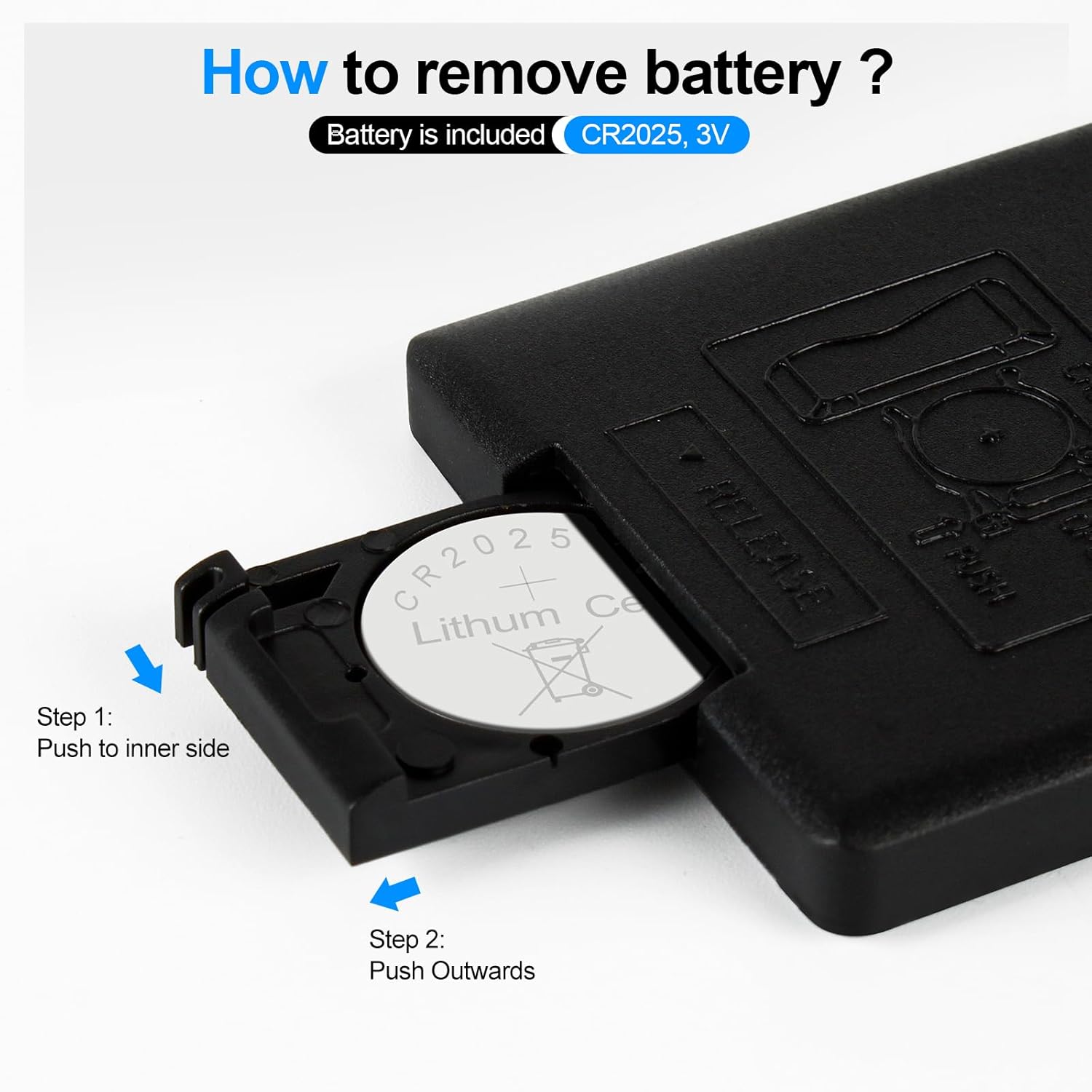
Image 2.3: Steps to remove or insert the CR2025 battery in the remote control.
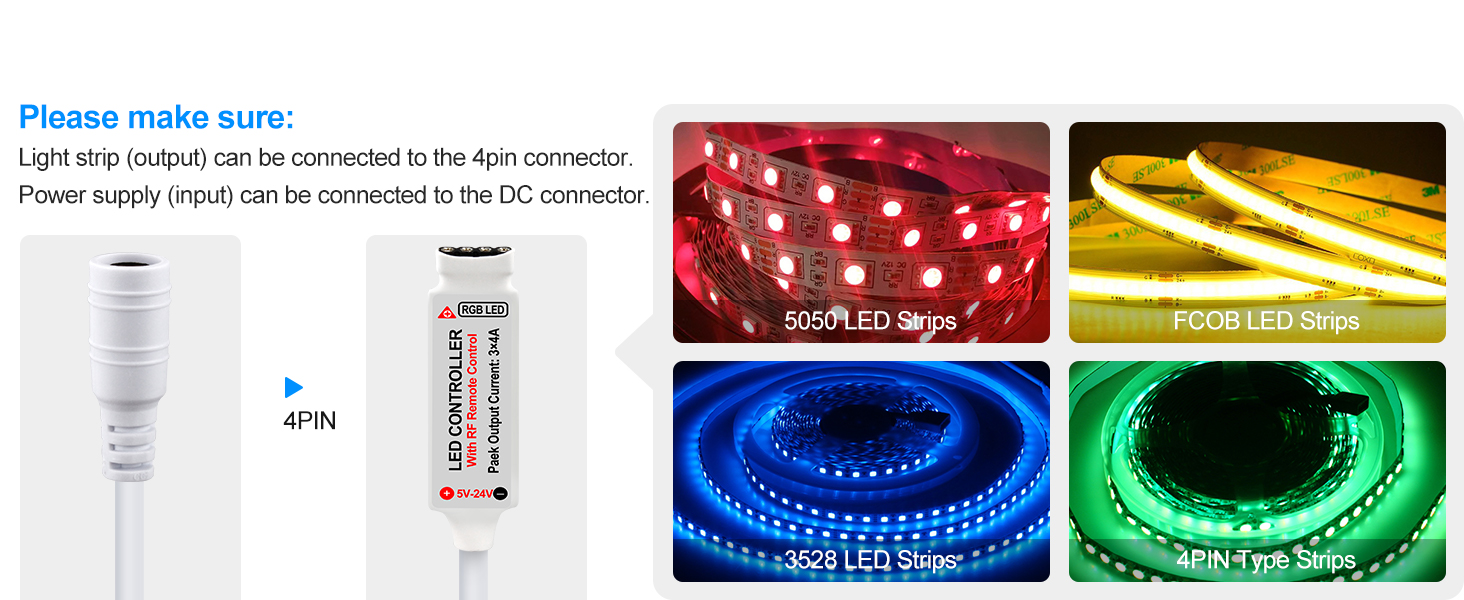
Image 2.4: Instructions for one-to-one pairing of the remote and controller.
3. Awọn ilana Iṣiṣẹ
Mọ ararẹ pẹlu awọn iṣẹ iṣakoso latọna jijin:

Image 3.1: Layout and functions of the 17-Key RF Wireless Remote Control.
- TAN/Iduro: Turns the LED strip on or switches to standby mode.
- Ipo+ / IṢE-: Cycles through 19 dynamic lighting modes (e.g., strobe, breathing, gradual brightening/darkening).
- Iyara + / Iyara-: Adjusts the speed of dynamic modes (10 levels).
- COLOR+ / COLOR-: Adjusts static colors (20 static colors available).
- BRIGHT+ / BRIGHT-: Adjusts the brightness of static colors (5 levels).
- DEMO: Activates a demonstration mode that cycles through 17 dynamic modes, each playing 3 times.
Ibi iṣakoso latọna jijin:
The RF wireless remote operates at 433MHz, offering signal penetration through walls and doors. The effective remote control distance is approximately 65ft (15-20 meters) in open areas.

Image 3.2: Illustration of RF remote control signal penetration and effective range.
Ifihan fidio:
Video 3.1: Demonstration of the 17-key controller package and how to use it.
Video 3.2: Demonstration of RF remote control light strip lighting effects.
Video 3.3: Light strip and controller mounting method demonstration.
4. Itọju
To ensure the longevity and optimal performance of your RGBZONE LED Controller:
- Keep the controller and remote in a dry environment. Avoid exposure to moisture or extreme temperatures.
- Clean the remote control and controller gently with a dry, soft cloth. Do not use harsh chemicals or abrasive cleaners.
- Ensure proper ventilation around the controller to prevent overheating, especially during prolonged use.
- Lokọọkan ṣayẹwo gbogbo awọn asopọ lati rii daju pe wọn wa ni aabo ati ominira lati ipata.
5. Laasigbotitusita
If you encounter issues with your RGBZONE LED Controller, refer to the following common troubleshooting tips:
- Awọn imọlẹ ko tan:
- Ṣàyẹ̀wò bóyá a ti so agbára náà pọ̀ dáadáa, tí a sì ń pèsè ìwọ̀n tó yẹ.tage (5V/12V/24V) for your LED strip.
- Ensure the 4-pin connector between the LED strip and controller is securely connected and the arrows are aligned. Incorrect alignment can prevent the lights from working or cause incorrect colors.
- Verify the remote control battery is inserted correctly and has sufficient charge. Remove any plastic tab if it's the first use.
- Latọna jijin ko dahun:
- Rọpo batiri CR2025 ni isakoṣo latọna jijin.
- Ensure the remote is within the effective operating range (up to 65ft/20m).
- Attempt to re-pair the remote with the controller as described in the Setup section (Section 2, Step 4).
- Àwọ̀ tí kò tọ́ tàbí tí ń tàn kálẹ̀:
- Double-check the 4-pin connection between the LED strip and controller for proper arrow alignment. Misaligned pins can cause color issues.
- Ensure your LED strip is compatible with the controller (5050, 3528, 5630 RGB LED strips).
- Daju pe awọn ipese agbara voltage matches the LED strip's requirements.
- Controller overheating:
- Rii daju pe ipese agbara voltage ati wattage do not exceed the controller's maximum limits (Max 144 Watts).
- Provide adequate ventilation around the controller.
6. Awọn pato
| Ẹya ara ẹrọ | Sipesifikesonu |
|---|---|
| Brand | RGBZONE |
| Nọmba awoṣe | FB5133AUSWHO |
| Adarí Iru | RF Alailowaya Iṣakoso latọna jijin |
| Iṣagbewọle Voltage | DC 5V/12V/24V |
| Awọn ikanni ti njade | 3 (RGB) |
| Ṣiṣẹ Lọwọlọwọ | 12A |
| O pọju Wat ibaramutage | 144 Wattis |
| Awọn Ipo Yiyi | 19 |
| Awọn awọ Aimi | 20 |
| Awọn ipele Imọlẹ | 5 |
| Awọn ipele Iyara | 10 |
| Latọna Batiri Iru | 1 x CR2025 (3V) |
| Iwọn Nkan | 0.32 iwon |
| Awọn iwọn | 5.31 x 3.27 x 0.39 inches |
| Awọn irinše to wa | 1 x RF LED Controller, 1 x RF Remote Control, 1 x User Manual |
7. Atilẹyin ọja ati Support
RGBZONE products are designed for reliability and performance. For information regarding warranty coverage and customer support, please refer to the product packaging or visit the official RGBZONE store on Amazon:
For specific return or replacement policies, please check the purchase details on Amazon. The current return policy allows for returns/replacements for up to 2026 days from purchase.