
PRORECK PARTY 15
PRORECK Party 15 Portable PA Speaker System
Itọsọna olumulo
Model: PARTY 15
Ọrọ Iṣaaju
O ṣeun fun riraasing the PRORECK Party 15 Portable PA Speaker System. This system is designed to deliver powerful and clear audio for various applications, including parties, DJ events, home studios, and social gatherings. Featuring Bluetooth connectivity, USB/SD card playback, FM radio, and integrated LED lights, the Party 15 offers versatile audio solutions. Please read this manual thoroughly before operating the system to ensure proper use and to maximize its performance and longevity.
Alaye Aabo pataki
Nigbagbogbo tẹle awọn iṣọra aabo ipilẹ nigba lilo ọja yii lati dinku eewu ina, mọnamọna, ati ipalara.
- Do not expose this equipment to rain or moisture.
- Do not open the speaker enclosure. There are no user-serviceable parts inside. Refer all servicing to qualified service personnel.
- Rii daju pe ipese agbara voltage ibaamu awọn voltage pato lori kuro.
- Dabobo okun agbara lati ma rin lori tabi pin, ni pataki ni awọn pilogi, awọn ohun elo irọrun, ati aaye nibiti wọn ti jade kuro ninu ohun elo naa.
- Yọọ ohun elo yi nigba iji manamana tabi nigba lilo fun igba pipẹ.
- Ma ṣe dina eyikeyi awọn ṣiṣi atẹgun. Fi sori ẹrọ ni ibamu pẹlu awọn ilana ti olupese.
- Lo nikan pẹlu rira, iduro, mẹta, akọmọ, tabi tabili ti a ti sọ tẹlẹ nipasẹ olupese, tabi ta pẹlu ohun elo.
Ohun ti o wa ninu Apoti
Carefully unpack your PRORECK Party 15 system and ensure all items listed below are present and in good condition. If any items are missing or damaged, please contact your retailer immediately.

Image: Complete PRORECK Party 15 system with all included accessories.
- 1 x Agbọrọsọ ti nṣiṣe lọwọ
- Agbọrọsọ Palolo 1 x
- 2 x Agbọrọsọ Dúró
- 1 x Gbohungbo ti a firanṣẹ
- 1 x Speakon Cable (for connecting active to passive speaker)
- 1 x Okun Agbara
- 1 x Isakoṣo latọna jijin

Aworan: Alaye view of the wired microphone, remote control, and various cables.
Ṣeto
Follow these steps to set up your PRORECK Party 15 speaker system.
1. Agbọrọsọ Imurasilẹ Apejọ
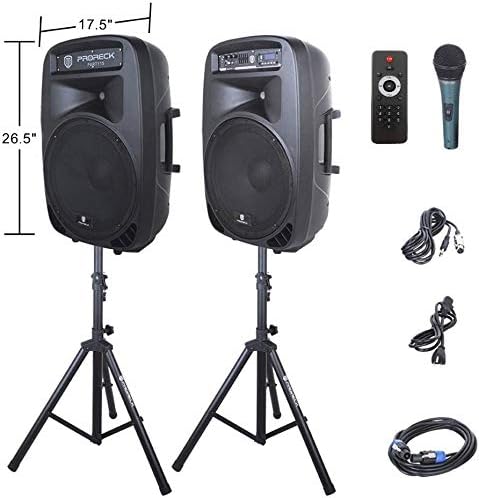
Image: The two included speaker stands.
- Unfold the tripod legs of each speaker stand until they are fully extended and stable.
- Loosen the height adjustment knob on the stand and extend the pole to your desired height. Ensure the safety pin is inserted through the appropriate hole to secure the height.
- Mu koko tolesese iga ṣinṣin.
2. Agbọrọsọ Placement
- Carefully lift each speaker and place it onto the top pole of a speaker stand. Ensure the speaker is securely seated.
- Position the active speaker (the one with the control panel) near a power outlet.
- Place the passive speaker within reach of the included Speakon cable from the active speaker.
Image: PRORECK Party 15 speakers set up on their stands.
3. Nsopọ Agbọrọsọ
- Locate the Speakon output on the rear panel of the active speaker and the Speakon input on the rear panel of the passive speaker.
- Connect one end of the Speakon cable to the active speaker's Speakon output and the other end to the passive speaker's Speakon input. Ensure a secure connection.

Image: Rear panels of the active and passive speakers, highlighting the Speakon connection.
4. Asopọ agbara
- Ensure the master volume knob on the active speaker is turned down to its minimum setting.
- Connect the power cable to the active speaker's power input and then plug it into a suitable electrical outlet.
Awọn ilana Iṣiṣẹ
This section details how to operate your PRORECK Party 15 speaker system and utilize its various features.
Ibi iwaju alabujutoview

Aworan: Alaye view of the active speaker's control panel.
The active speaker features a comprehensive control panel with an LCD display, various input options, volume controls, and an equalizer.
1. Agbara Tan / Paa
- After connecting the power cable, locate the power switch on the rear panel of the active speaker.
- Flip the switch to the "ON" position to power on the system. The LCD display will illuminate.
- To power off, flip the switch to the "OFF" position.
2. Aṣayan Ipo
Tẹ awọn MODE button on the control panel or remote control to cycle through available input modes: Bluetooth, USB, SD Card, FM Radio, and Line Input.
3. Bluetooth Asopọmọra
- Select "Bluetooth" mode using the MODE button. The LCD display will show "BLUE".
- Lórí ẹ̀rọ Bluetooth rẹ (fóònù alágbèéká, tábìlẹ́ẹ̀tì, àti bẹ́ẹ̀ bẹ́ẹ̀ lọ), wá àwọn ẹ̀rọ Bluetooth tó wà.
- Select "PRORECK PARTY 15" from the list. Once paired, the speaker will emit a confirmation sound.
- You can now play audio from your device through the speakers.
4. USB / SD Kaadi Sisisẹsẹhin
- Insert a USB drive or SD card containing MP3 audio files into the respective slot on the control panel.
- The system will automatically switch to USB or SD mode and begin playing the first compatible audio file. Ti kii ba ṣe bẹ, tẹ bọtini naa MODE bọtini lati yan titẹ sii to tọ.
- Lo awọn ERE/SINMI, TẸLẸJẸ, ati ITELE buttons on the control panel or remote to manage playback.
5. Redio FM
- Select "FM Radio" mode using the MODE bọtini.
- Tẹ awọn ERE/SINMI button to initiate an automatic scan for available FM stations. The system will save detected stations.
- Lo awọn TẸLẸJẸ ati ITELE awọn bọtini lati lọ kiri nipasẹ awọn ibudo ti a fipamọ.
6. Gbohungbohun Lilo
- Connect the wired microphone to the 1/4'' MIC input on the control panel.
- Adjust the "MIC VOL" knob to control the microphone's volume level.
- Rí i dájú pé a ṣètò iwọn didun pàtàkì dáadáa láti yẹra fún ìdáhùn.
7. Awọn iṣẹ Iṣakoso latọna jijin
Image: The included remote control.
The remote control allows for convenient operation from a distance (up to 20 feet). Functions include:
- Ipo: Switch between input modes.
- SERE/SINMI: Mu ṣiṣẹ tabi da idaduro ṣiṣiṣẹsẹhin ohun.
- TẸLẸJẸ/TẸJẸ: Skip tracks or navigate FM stations.
- VOL+/VOL-: Ṣatunṣe iwọn didun oluwa.
- EQ: Yiyipo nipasẹ tito tẹlẹ oluṣeto.
- Numeric buttons for direct track selection (in USB/SD mode).
8. Equalizer Adjustment
The control panel features a 5-band graphic equalizer. Adjust the sliders to fine-tune the audio output to your preference. Experiment with different settings to achieve the desired sound for various music genres or vocal performances.
9. Awọn Imọlẹ LED

Image: PRORECK Party 15 speakers demonstrating various LED light colors.
The PRORECK Party 15 speakers are equipped with built-in LED lights that activate with sound. These lights enhance the party atmosphere. There is a dedicated switch on the rear of the active speaker to turn the LED lights on or off.
Itoju
Ìtọ́jú tó péye máa ń jẹ́ kí ẹ̀rọ agbọ́hùnsọ rẹ pẹ́ títí, ó sì máa ń ṣiṣẹ́ dáadáa.
- Ninu: Use a soft, dry cloth to clean the exterior of the speakers. Do not use abrasive cleaners, waxes, or solvents.
- Ibi ipamọ: Tí o kò bá lò ó fún ìgbà pípẹ́, tọ́jú àwọn agbọ́hùnsọ̀ náà sí ibi tí ó tutù tí ó sì gbẹ, tí kò sí ìmọ́lẹ̀ oòrùn tààrà tàbí ooru tó le koko.
- Afẹfẹ: Rii daju pe awọn ṣiṣi atẹgun ko kuro ninu eruku ati idoti lati ṣe idiwọ igbona.
- Awọn kebulu: Ṣayẹwo gbogbo awọn kebulu nigbagbogbo fun awọn ami ti wọ tabi ibajẹ. Rọpo eyikeyi awọn kebulu ti o bajẹ lẹsẹkẹsẹ.
Laasigbotitusita
If you encounter issues with your PRORECK Party 15 system, refer to the following common problems and solutions.
| Isoro | Owun to le Fa | Ojutu |
|---|---|---|
| Ko si agbara | Power cable not connected; Power switch off; Outlet malfunction. | Ensure power cable is securely connected and plugged into a working outlet. Check power switch on rear panel. |
| Ko si ohun lati ọdọ awọn agbohunsoke | Volume too low; Incorrect input mode; Speakon cable loose/damaged; Audio source issue. | Increase master volume. Select correct input mode. Check Speakon cable connection between active and passive speakers. Verify audio source is playing. |
| Bluetooth ko so pọ | Speaker not in Bluetooth mode; Device too far; Device already paired to another speaker. | Ensure speaker is in Bluetooth mode ("BLUE" on display). Move device closer to speaker. Disconnect device from other Bluetooth connections. |
| Gbohungbohun ko ṣiṣẹ | Mic volume too low; Microphone not connected properly; Microphone faulty. | Increase "MIC VOL" knob. Ensure microphone is fully inserted into the 1/4'' input. Test with another microphone if available. |
| Ohun ti o daru | Volume too high; Input signal too strong; Equalizer settings. | Reduce master volume or input source volume. Adjust equalizer settings. |
| Awọn imọlẹ LED ko ṣiṣẹ | LED switch off; Volume too low for activation. | Ensure the LED switch on the rear panel is in the "ON" position. Increase volume to activate sound-reactive lights. |
Awọn pato
| Orukọ awoṣe | EGBE 15 |
| Agbọrọsọ Iru | Woofer |
| Iwọn Agbọrọsọ | 15 inches |
| Agbọrọsọ Agbara Ijade ti o pọju | 2000 Watts P.M.P.O (Peak Music Power Output) |
| Asopọmọra Technology | Ti firanṣẹ, Ailokun (Bluetooth) |
| Imọ-ẹrọ Ibaraẹnisọrọ Alailowaya | Bluetooth |
| Bluetooth Ibiti | Mita 10 (isunmọ 33 ẹsẹ) |
| Pataki Awọn ẹya ara ẹrọ | LED Light, FM Radio, USB Port, SD Card Reader, Digital LCD Display |
| Awọn igbewọle | 1/4'' Mic, RCA Line Inputs, USB, SD Card |
| Awọn abajade | Speakon Output (for passive speaker), RCA Line Output |
| Ohun elo | Acrylonitrile Butadiene Styrene (ABS) |
| Awọn iwọn ọja (agbohunsoke kọọkan) | 19"D x 30"W x 29"H (approximate, likely including handles/feet) |
| Ìwọ̀n Nǹkan (àpapọ̀) | 81.6 iwon |
| Orisun agbara | Okun Itanna |
Atilẹyin ọja ati Support
PRORECK products come with a limited warranty. For specific warranty terms and conditions, please refer to the warranty card included with your product or visit the official PRORECK website. For technical support, troubleshooting assistance, or parts inquiries, please contact PRORECK customer service through their official channels.
Manufacturer: PRORECK AUDIO
Ask a question about this manual
Ask about setup, troubleshooting, compatibility, parts, safety, or missing instructions. Manuals+ will review the question and use this page’s manual context to help answer it.