
Ọrọ Iṣaaju
The Reflexion PS07BT is a versatile mobile karaoke system designed for portable entertainment. This unit combines powerful audio output with various connectivity options, including Bluetooth, USB, and AUX-in, along with microphone and guitar inputs. It features integrated light effects and a rechargeable battery, making it suitable for both indoor and outdoor use. This manual provides essential information for the safe and effective operation of your PS07BT system.
Alaye Aabo
Jọwọ ka gbogbo awọn ilana aabo ni pẹkipẹki ṣaaju lilo ẹrọ naa. Jeki iwe afọwọkọ yii fun itọkasi ọjọ iwaju.
- Ma ṣe fi ẹrọ naa han si ojo, ọrinrin, tabi awọn iwọn otutu to gaju.
- Avoid placing the unit near heat sources such as radiators, stoves, or other heat-producing appliances.
- Lo oluyipada agbara nikan ti a pese pẹlu ẹyọkan.
- Maṣe ṣii casing. Tọkasi gbogbo iṣẹ si oṣiṣẹ oṣiṣẹ.
- Jeki ẹyọ kuro lati awọn aaye oofa to lagbara.
- Rii daju pe fentilesonu to dara ati ki o ma ṣe dina eyikeyi awọn ṣiṣi atẹgun.
- Handle the microphone and cables with care to prevent damage.
Package Awọn akoonu
Jẹrisi pe gbogbo awọn ohun kan wa ninu package:
- Reflexion PS07BT Mobile Karaoke System
- Gbohungbohun
- Itọsọna olumulo
- Power Adapter (not explicitly listed but implied for charging)
Ọja Pariview
Familiarize yourself with the components and controls of your Reflexion PS07BT system.

olusin 1: Iwaju view of the Reflexion PS07BT Mobile Karaoke System, showcasing the speaker grille and blue LED light effects.

Olusin 2: Pariview of the PS07BT system, highlighting its dimensions (49cm height, 20cm width), LCD display, and karaoke function.
Ibi iwaju alabujuto
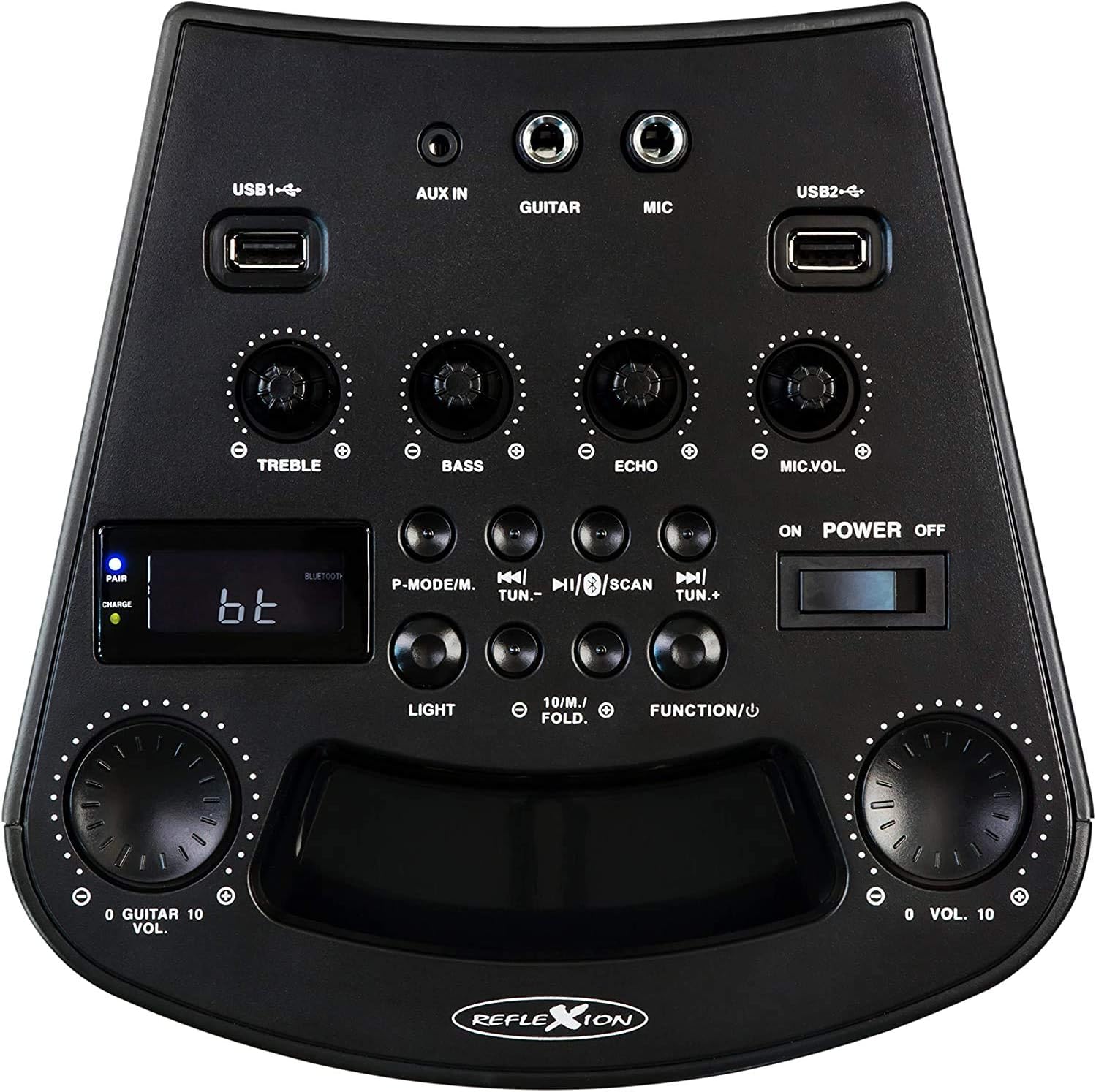
Nọmba 3: Alaye view of the PS07BT control panel, showing input ports, sound adjustment knobs, and function buttons.
- USB1 / USB2 Ports: For playing audio from USB storage devices.
- AX IN: 3.5mm input for external audio sources.
- GUITAR: 6.3mm input for connecting a guitar.
- MIC: 6.3mm input for connecting the microphone.
- KỌ́KÚN TẸ̀RÙBÙ: Adjusts high-frequency sound.
- BASS Knob: Adjusts low-frequency sound.
- Knob ECHO: Ó ń ṣàtúnṣe ipa ìró ohùn fún ìtẹ̀síwájú gbohùngbohùn.
- Kọ́nù MÁÌKÌ.VOL: Ṣe atunṣe iwọn gbohungbohun.
- P-MODE/M Button: Program mode / Mode selection.
- TUN.- / TUN.+ Buttons: Tune down / Tune up for FM radio.
- Bọtini SCAN: Scans for FM radio stations.
- Bọtini Imọlẹ: O n ṣakoso awọn ipa ina LED.
- FUNCTION/U Button: Switches between input modes (Bluetooth, USB, AUX, FM).
- VOL. Knob: Iṣakoso iwọn didun Titunto.
- POWER ON/OFF Switch: Yipada ẹyọ naa tan tabi pa.
- Ifihan LCD: Ó ń fi ipò ìsinsìnyí, ìwífún nípa orin, tàbí ìgbóhùnsáfẹ́fẹ́ FM hàn.
- PAIR/CHARGE Indicators: Bluetooth pairing status and battery charging status.
Ru Panel

Figure 4: Rear panel of the PS07BT, displaying the AC power input and product information label.
- Input Agbara AC: Connect the power adapter here for charging and operation.
- Aami ọja: Contains model number, serial number, and electrical specifications.
Ṣeto
Ngba agbara si Batiri naa
The PS07BT features a built-in rechargeable battery. Before first use, fully charge the unit.
- Connect the supplied power adapter to the AC power input on the rear of the unit.
- Pulọọgi ohun ti nmu badọgba agbara sinu iṣan ogiri kan.
- The CHARGE indicator light will illuminate during charging.
- A full charge takes approximately 4 hours. The CHARGE indicator may change or turn off once fully charged (refer to specific indicator behavior in the quick start guide if available).
Batiri ti o gba agbara ni kikun n pese to wakati 4 ti akoko ṣiṣiṣẹsẹhin.
Connecting Microphone and Guitar
To use the karaoke or instrument features:
- Insert the microphone cable into the MIC input on the control panel.
- If connecting a guitar, insert its cable into the Gita igbewọle.
- Ṣatunṣe awọn MIC.VOL ati ECHO knobs as desired during operation.
Awọn ilana Iṣiṣẹ
Titan / Paa
Gbe awọn AGBARA PA/PA switch to the 'ON' position to turn on the unit. Slide it to 'OFF' to power down.
Yíyan Ipò Ìtẹ̀wọlé
Tẹ awọn FUNCTION/U button repeatedly to cycle through available input modes: Bluetooth (bt), USB, AUX, and FM Radio.
Bluetooth Asopọ
- Turn on the PS07BT and select 'bt' mode using the FUNCTION/U button. The 'PAIR' indicator will flash, indicating it's ready for pairing.
- Mu Bluetooth ṣiṣẹ lori ẹrọ alagbeka rẹ (foonuiyara, tabulẹti, ati bẹbẹ lọ).
- Wa fun available devices and select 'Reflexion PS07BT' from the list.
- Once connected, the 'PAIR' indicator will stop flashing and remain solid. You can now play audio from your device through the PS07BT.
USB Sisisẹsẹhin
- Fi ohun elo ipamọ USB sii (fun apẹẹrẹ, kọnputa filasi USB) ti o ni ohun ninu files into either the USB1 or USB2 ibudo.
- Select 'USB' mode using the FUNCTION/U bọtini.
- Ẹyọ naa yoo bẹrẹ ohun orin laifọwọyi files from the USB device. Use the track control buttons (usually combined with TUN.-/TUN.+) to navigate tracks.
AUX-In Connection
- Connect an external audio source (e.g., MP3 player, laptop) to the AX IN ibudo lilo a 3.5mm iwe USB.
- Select 'AUX' mode using the FUNCTION/U bọtini.
- Play audio from your external device. The volume can be controlled via both the external device and the PS07BT's master volume knob.
FM Radio isẹ
- Select 'FM' mode using the FUNCTION/U bọtini.
- Tẹ awọn SCAN button to automatically scan and save available FM radio stations.
- Lo awọn TUN.- ati TUN.+ buttons to manually tune to stations or select saved stations.
Iṣẹ Karaoke
With a microphone connected to the MIC input, you can sing along to music playing from any source (Bluetooth, USB, AUX, FM). Adjust the MIC.VOL knob to control your voice volume and the ECHO knob for an echo effect.
Awọn ipa Imọlẹ
Tẹ awọn Imọlẹ button to activate or change the integrated blue LED light effects, which can synchronize with the music beat.
Iwọn didun ati Awọn atunṣe Ohun
- Iwọn Titunto: Lo iwọn nla VOL. knob to adjust the overall sound output level.
- Treble / Bass: Lo awọn TREK. ati Bass àwọn bọ́tìnì láti ṣàtúnṣe àwọn ìgbóhùnsáfẹ́fẹ́ gíga àti kékeré ohùn náà.
Itoju
Ninu
Wipe the unit with a soft, dry cloth. Do not use abrasive cleaners, waxes, or solvents as they may damage the finish. Ensure the unit is powered off and unplugged before cleaning.
Ibi ipamọ
When not in use for extended periods, store the unit in a cool, dry place, away from direct sunlight and extreme temperatures. It is recommended to fully charge the battery before storing and to recharge it every few months to maintain battery health.
Laasigbotitusita
If you encounter issues with your PS07BT, refer to the following common problems and solutions:
| Isoro | Owun to le Solusan |
|---|---|
| Ko si agbara | Ensure the power adapter is securely connected and plugged into a working outlet. Check if the battery is charged. Slide the POWER switch to ON. |
| Ko si ohun | Increase the master VOL. knob. Check the volume on your connected audio source (e.g., phone). Ensure the correct input mode (Bluetooth, USB, AUX, FM) is selected. Check all cable connections. |
| Bluetooth ko sopọ | Ensure the unit is in 'bt' mode and the 'PAIR' indicator is flashing. Turn off and on Bluetooth on your device. Move your device closer to the PS07BT. Forget the device from your phone's Bluetooth list and try pairing again. |
| Gbohungbohun ko ṣiṣẹ | Ensure the microphone is securely plugged into the MIC input. Increase the MIC.VOL knob. Check if the microphone has its own ON/OFF switch and is turned on. |
| Awọn oran ṣiṣiṣẹsẹhin USB | Ensure the USB device is formatted correctly (FAT32 recommended) and contains compatible audio files. Try a different USB device. |
Awọn pato
Technical details for the Reflexion PS07BT Mobile Karaoke System:
- Orukọ awoṣe: PS07BT
- Awọn iwọn (L x W x H): 20.2 x 49 x 20.1 cm
- Ìwúwo: 2 kilo
- Agbara Ifihan Agbọrọsọ Pupọ julọ: 320 Wattis
- Imọ-ẹrọ Asopọmọra: Bluetooth
- Ipo Ijade Ohun: Sitẹrio
- Ohun elo: Ṣiṣu
- Irú Agbọrọsọ: Subwoofer
- Awọn ẹya pataki: Bluetooth, Ibudo USB
- Igbesi aye Batiri Apapọ: wakati meji 4
- Akoko gbigba agbara: wakati meji 4
- Ọna Iṣakoso: Touch (referring to buttons/knobs)
- Total USB 2.0 Ports: 2
- Àwọ̀: Dudu
- Orisun Agbara: Corded Electric / Battery

Figure 5: The PS07BT's integrated handle allows for easy portability.
Atilẹyin ọja ati Support
The Reflexion PS07BT comes with a spare parts availability period of 1 year. For technical support or warranty inquiries, please contact your retailer or the manufacturer's customer service. Keep your proof of purchase for warranty claims.