
1. Ifihan
The AVerMedia AW330 Wireless Voice Amplifier is a portable audio system designed to enhance vocal clarity and projection in various settings such as classrooms, training sessions, meetings, and public speaking events. Its lightweight design, wireless microphone, and powerful speaker ensure your voice is heard clearly and effortlessly.
Awọn ẹya pataki:
- Apẹrẹ to gbe: Lightweight and compact for easy transport and use.
- Gbohungbohun Alailowaya: 2.4 GHz wireless lavalier microphone for stable 360° transmission.
- Ohun Alagbara: Built-in 20W speaker delivers loud, clear audio.
- Igbesi aye batiri gigun: Rechargeable lithium polymer battery provides 4 to 5 hours of use, or up to 8 hours of continuous use (depending on volume and usage).
- Asopọmọra Multimedia: Audio input port for connecting smartphones, tablets, or laptops.
- Quick Smart Pairing: Automatic microphone-to-speaker pairing for simple setup.
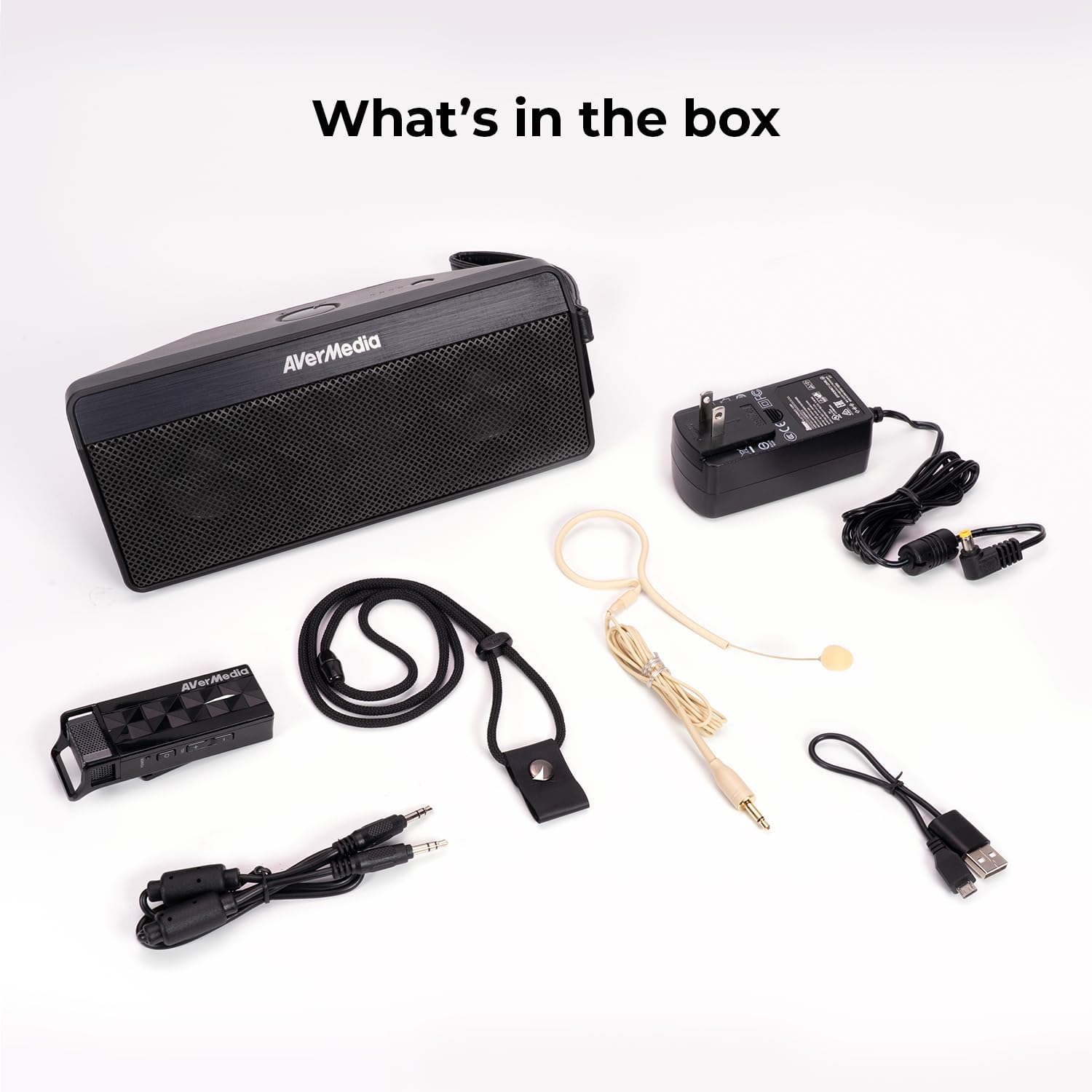
2. Ohun ti o wa ninu Apoti
- Microphone & Headset Mic
- Agbọrọsọ
- AC Power Adapter & USB Power Cable
- 3.5 mm Okun Audio
- Lanyard & Buckle
3. Ọja Ipariview
Agbọrọsọ Unit

The main speaker unit features a power button, volume controls, and an audio input port for connecting external devices. It also includes a clip for attaching to clothing or a strap.
Gbohungbohun Alailowaya
The wireless microphone includes a flexible gooseneck boom with a windscreen, volume controls, and a power button. It can be worn as a headset or clipped onto clothing.

4. Eto
- Gba agbara si Awọn ẹrọ: Before first use, fully charge both the speaker unit and the wireless microphone using the provided AC power adapter and USB power cable. The microphone uses a USB-C connection.
- Sopọ Gbohungbo: Plug the headset microphone into the wireless microphone unit.
- Agbara Tan: Turn on the speaker unit by pressing its power button. Turn on the wireless microphone unit by pressing its power button.
- Pipọpọ: The speaker microphone system features automatic microphone-to-speaker pairing for hassle-free setup. They should pair automatically upon powering on.
- Ṣatunṣe Iwọn didun: Adjust the volume on both the speaker and the microphone to your desired level.
5. Awọn ilana Iṣiṣẹ
- Ohùn Ampimuduro: Once paired, speak into the microphone. Your voice will be amplified through the speaker. Adjust volume as needed.
- External Audio Input: To play multimedia audio alongside your voice, connect your smartphone, tablet, or laptop to the speaker unit's Audio In port using the 3.5 mm audio cable.
- Awọn aṣayan wiwọ: Utilize the clip on the speaker to attach it to your clothing, or use the lanyard and buckle for hands-free operation. The microphone can be worn as a headset or clipped directly.
- Nfi agbara pamọ: If the microphone is turned off, the speaker will automatically turn off after five minutes to conserve battery.

6. Itọju
- Ninu: Use a soft, dry cloth to clean the surfaces of the speaker and microphone. Do not use liquid cleaners or aerosols.
- Ibi ipamọ: Tọju ẹrọ naa ni itura, aye gbigbẹ kuro lati orun taara ati awọn iwọn otutu to gaju.
- Itọju Batiri: Láti mú kí batiri pẹ́ sí i, má ṣe jẹ́ kí batiri náà máa jáde nígbà gbogbo. Tún gba agbára padà sí i nígbà gbogbo, kódà bí kò bá tiẹ̀ wà fún ìgbà pípẹ́.
- Yago fun Omi: The device is not waterproof. Keep it away from water and moisture.
7. Laasigbotitusita
- Ko si Ohun:
- Ensure both the speaker and microphone are powered on and fully charged.
- Check that the microphone and speaker are successfully paired.
- Increase the volume on both the speaker and the microphone.
- Feedback/Squealing Sound:
- Reduce the volume on the speaker or microphone.
- Ṣe alekun aaye laarin gbohungbohun ati agbọrọsọ.
- Ensure the microphone is not pointing directly at the speaker.
- Didara Ohun Ko dara:
- Check for obstructions between the microphone and speaker.
- Rí i dájú pé makirofo naa wa ni ipo ti o tọ nitosi ẹnu rẹ.
- Verify that the microphone windscreen is properly attached.
- Ohun elo Ko Ngba agbara:
- Ensure the charging cables are securely connected to both the device and the power source.
- Gbiyanju ibudo agbara miiran tabi ibudo USB.
8. Awọn pato
| Ẹya ara ẹrọ | Sipesifikesonu |
|---|---|
| Brand | AVerMedia |
| Nọmba awoṣe | AW330 |
| Agbọrọsọ Agbara Ijade ti o pọju | 20 Wattis |
| Asopọmọra Technology | Bluetooth, WiFi |
| Ipo Ijade Ohun | Mono |
| Iṣagbesori Iru | Tabletop Oke |
| Afikun Awọn ẹya ara ẹrọ | Iṣakoso iwọn didun |
| Adarí Iru | Batiri agbara |
| Batiri Apapọ Life | 4 Hours (up to 8 hours continuous use) |
| Ibiti o pọju | 60 Ẹsẹ |
| Ọna Iṣakoso | Fọwọkan |
| Iwọn Nkan | 2.6 iwon |
| Awọn Lilo Ni pato Fun Ọja | Educational/Classroom |
9. Atilẹyin ọja ati Support
The AVerMedia AW330 Wireless Voice Amplifier wa pẹlu kan 3-odun olupese ká atilẹyin ọja. For technical support, troubleshooting, or warranty claims, please contact AVerMedia customer service.
10. Awọn fidio ọja
AVerMedia AW330 Alailowaya Classroom Audio System
Video: An official product video from AVerMedia showcasing the AW330 Wireless Classroom Audio System. It highlights its features and benefits in a classroom environment, demonstrating how teachers can use it to project their voice clearly and effectively to students.