
1. Ifihan
O ṣeun fun riraasing the Caliber HPG415BT/B Portable Bluetooth Speaker. This manual provides important information regarding the safe and efficient operation of your device. Please read it thoroughly before use and retain it for future reference.
Package Awọn akoonu
- Caliber HPG415BT/B Portable Bluetooth Speaker
- USB to Mini USB Charging Cable
- 3.5mm Audio USB
- Isakoṣo latọna jijin
- Ilana itọnisọna
2. Alaye Aabo
Lati rii daju iṣẹ ailewu ati yago fun ibajẹ, jọwọ tẹle awọn itọnisọna ailewu wọnyi:
- Ma ṣe fi ẹrọ naa han si ojo, ọrinrin, tabi awọn iwọn otutu to gaju.
- Yẹra fún gbígbé agbọ́hùnsọ̀ sí ẹ̀gbẹ́ àwọn orísun ooru bíi radiators, stovu, tàbí àwọn ohun èlò míràn tí ń mú ooru jáde.
- Ma ṣe tuka, tunṣe, tabi tun ẹya naa funrararẹ. Tọkasi gbogbo iṣẹ si oṣiṣẹ oṣiṣẹ.
- Use only the specified charging cable and power adapter (5V USB) to charge the battery.
- Jeki ẹrọ naa kuro ni awọn aaye oofa ti o lagbara.
- Aṣọ gbígbẹ nìkan ni kí o fi fọ ẹ̀rọ náà. Má ṣe lo àwọn ohun èlò ìfọmọ́ omi.
3. Awọn ẹya Ọja
The Caliber HPG415BT/B speaker offers a range of features for versatile audio playback:
- Imọ-ẹrọ Bluetooth Alailowaya: Connect wirelessly to compatible devices within a 10-meter range (Bluetooth version 2.1, supports A2DP and AVRCP profiles).
- Awọn aṣayan Sisisẹsẹhin lọpọlọpọ: Play audio from USB drives and SD cards (up to 32GB).
- Redio FM: Enjoy your favorite radio stations with automatic search and storage functions.
- Ifihan LED: Provides clear information on current mode and status.
- High Power Sound: Equipped with 2x 3W speakers for a total of 6W RMS output.
- Batiri Atungba Ijọpọ: Offers up to 5 hours of continuous playback.
- Awọn iṣakoso ogbon: Features buttons for previous/next track, play/pause, mode selection, EQ adjustment, and volume control.
- Input Audio 3.5mm: Connect external audio devices via the included audio cable.
- Isakoṣo latọna jijin: Conveniently operate the speaker from a distance.
4. Awọn iṣakoso ati Awọn isopọ
Mọ ararẹ pẹlu awọn iṣakoso agbọrọsọ ati awọn ibudo asopọ:
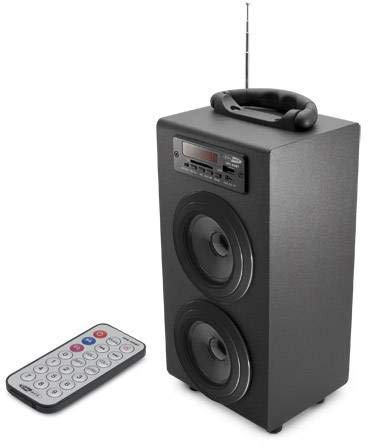
Image 1: Caliber HPG415BT/B Portable Bluetooth Speaker. This image shows the overall design of the speaker, featuring a tubular shape, front-facing speakers, and a control panel on the top or front.
Control Panel (Typical Layout)
- Bọtini MODE: Yípadà láàrín àwọn ipò Bluetooth, FM Radio, USB, SD, àti AUX.
- Bọ́tìnnì SÍré/Dúró: Bẹrẹ tabi da duro sẹhin duro.
- Àwọn bọ́tìnì Tẹ́lẹ̀/Tẹ́lẹ̀: Skips tracks in media modes or changes radio stations in FM mode.
- VOLUME +/- Buttons: Ṣe atunṣe ipele iṣelọpọ ohun.
- Bọtini EQ: Yiyipo nipasẹ tito oluṣeto.
- Agbara PA / PA Yipada: Located typically on the rear or side.
Connection Ports (Typical Layout)
- Ibudo USB: Fun asopọ awọn awakọ filasi USB.
- Iho kaadi SD: Fun fifi kaadi iranti SD sii.
- Iṣawọle AUX (3.5mm): For connecting external audio devices via cable.
- Mini USB Charging Port: Fun sisopọ okun gbigba agbara.
5. Eto
5.1 Gbigba agbara akọkọ
- Before first use, fully charge the speaker's internal battery.
- Connect the supplied Mini USB cable to the speaker's charging port.
- Connect the other end of the USB cable to a 5V USB power source (e.g., a computer USB port or a USB wall adapter, not included).
- The LED indicator will show charging status. Once fully charged, the indicator may change color or turn off.
5.2 Titan / Pa a
- To power on, slide the Power ON/OFF switch to the 'ON' position. The LED display will light up.
- To power off, slide the Power ON/OFF switch to the 'OFF' position.
6. Awọn ilana Iṣiṣẹ
6.1 Ipo Bluetooth
- Power on the speaker. It will automatically enter Bluetooth pairing mode, indicated by a flashing Bluetooth icon on the LED display.
- Mu Bluetooth ṣiṣẹ lori foonu alagbeka rẹ, tabulẹti, tabi ẹrọ Bluetooth miiran ti o ṣiṣẹ.
- Wa fun available Bluetooth devices and select "HPG415BT" from the list.
- Once paired, the speaker will emit a confirmation sound, and the Bluetooth icon on the display will stop flashing.
- You can now play audio from your connected device through the speaker. Use the PLAY/PAUSE and PREVIOUS/NEXT buttons on the speaker or remote to control playback.
6.2 FM Redio Ipo
- Tẹ awọn MODE button repeatedly until "FM" appears on the LED display.
- To perform an automatic station scan, press and hold the ERE/SINMI button. The speaker will scan and save available FM stations.
- Lo awọn Ṣaaju / IWỌ awọn bọtini lati lọ kiri nipasẹ awọn ibudo ti a fipamọ.
6.3 USB / SD Kaadi Sisisẹsẹhin
- Fi kọnputa filasi USB sinu ibudo USB tabi kaadi SD kan sinu iho kaadi SD.
- Agbọrọsọ yoo yipada laifọwọyi si ipo USB tabi SD ati bẹrẹ ohun orin dun files. Tí kò bá rí bẹ́ẹ̀, tẹ MODE bọtini lati yan orisun to tọ.
- Lo awọn ERE/SINMI ati Ṣaaju / IWỌ awọn bọtini lati ṣakoso ṣiṣiṣẹsẹhin.
6.4 Ipo Input AUX
- Connect one end of the supplied 3.5mm audio cable to the speaker's AUX input port.
- So opin keji okun naa pọ mọ agbekọri tabi ohun ti o njade lati inu ẹrọ ohun ita rẹ.
- Tẹ awọn MODE button repeatedly until "AUX" appears on the LED display.
- Control playback and volume directly from your external audio device.
7. Ngba agbara si Batiri naa
When the battery is low, the speaker may emit an audible warning or the LED indicator will show a low battery status. To charge:
- Connect the Mini USB charging cable to the speaker's charging port.
- Connect the USB end to a 5V USB power source.
- The charging indicator will illuminate. Charging typically takes several hours.
- Once fully charged, the indicator will change or turn off. Disconnect the charging cable.
8. Itọju
- Ninu: Lo aṣọ rírọrùn tí ó gbẹ láti nu ìta agbọ́rọ̀ náà. Má ṣe lo àwọn ohun ìfọṣọ, ìpara, tàbí àwọn ohun èlò ìfọṣọ.
- Ibi ipamọ: Nigbati o ko ba wa ni lilo fun awọn akoko ti o gbooro sii, tọju agbohunsoke si tutu, ibi gbigbẹ, kuro lati orun taara ati awọn iwọn otutu to gaju.
- Itọju Batiri: Láti mú kí batiri pẹ́ sí i, má ṣe jẹ́ kí batiri náà máa jáde nígbà gbogbo. Gba agbára rẹ̀ déédéé, kódà bí kò bá tiẹ̀ wà ní ìlò.
9. Laasigbotitusita
| Isoro | Owun to le Fa | Ojutu |
|---|---|---|
| Ko si agbara | Battery is discharged; Power switch is OFF. | Charge the battery; Slide the power switch to ON. |
| Ko si ohun | Iwọn didun kere ju; Ipo ti ko tọ ti yan; Ẹrọ ko sopọ mọ daradara. | Increase volume; Press MODE to select correct source; Reconnect device. |
| Bluetooth ko sopọ | Agbọrọsọ kò sí ní ipò ìsopọ̀; Bluetooth ẹ̀rọ ti pa; Agbọrọsọ jìnnà jù sí ẹ̀rọ náà. | Ensure speaker is in Bluetooth mode and flashing; Enable Bluetooth on your device; Move devices closer (within 10m). |
| FM redio aimi | Ifihan agbara; kikọlu. | Relocate the speaker for better reception; Perform an auto-scan again. |
10. Awọn pato
- Awoṣe: HPG415BT/B
- Agbara Ijade: 6W RMS (2x 3W)
- Ẹya Bluetooth: 2.1
- Iwọn Iṣiṣẹ Bluetooth: Ti o to awọn mita 10
- Asopọmọra: Bluetooth, USB, SD Card, 3.5mm AUX Input
- Media atilẹyin: USB drives, SD cards (up to 32GB)
- Redio FM: Yes, with auto-scan
- Ifihan: LED
- Iru Batiri: Integrated Rechargeable
- Igbesi aye batiri: Titi di wakati 5
- Gbigba agbara: USB 5V
- Awọn iwọn (L x W x H): 140 x 120 x 280 mm
- Ìwúwo: Isunmọ 1.04 kg (2.29 lbs)
- Iru Iṣakoso: Buttons, Remote Control
11. Atilẹyin ọja ati Support
Caliber products are designed and manufactured to the highest quality standards. For warranty information or technical support, please refer to the warranty card included with your product or visit the official Caliber webaaye fun awọn alaye olubasọrọ.