
1. Ifihan
The BH Fitness Aquo Dual Rower R309U is designed for regular home use, supporting training sessions of 3 to 7 hours per week. This rowing machine features a magnetic brake system for smooth and silent operation with various tension levels. It includes a clear electronic display to monitor time, strokes per minute, total strokes, calorie consumption, and pulse. The rower offers 8 precise manual load adjustment points to select exercise intensity and supports wireless heart rate measurement with a 5 kHz chest strap (not included). Its central pulley system ensures direct rowing strokes, providing added value for both aerobic and anaerobic workouts. The Aquo Dual Rower is also designed for quick and easy folding, and includes transport wheels for convenient storage and movement within your home.

Aworan 1.1: Akọkọ view of the BH Fitness Aquo Dual Rower. This image shows the overall design of the rowing machine, highlighting its white and black color scheme and the "Aquo" branding.
2. Alaye Aabo
Before using the BH Fitness Aquo Dual Rower, please read and understand all safety instructions. Keep this manual for future reference.
- Kan si dokita ṣaaju ki o to bẹrẹ eto adaṣe eyikeyi, paapaa ti o ba ni awọn ipo ilera ti o ti wa tẹlẹ.
- Rí i dájú pé ẹ̀rọ ìwakọ̀ ọkọ̀ ojú omi náà wà lórí ilẹ̀ tí ó tẹ́jú, tí ó sì dúró ṣinṣin pẹ̀lú ìdènà tó péye ní àyíká rẹ̀.
- Pa awọn ọmọde ati awọn ohun ọsin kuro ninu ẹrọ lakoko iṣẹ.
- Inspect the rower for any loose or damaged parts before each use. Do not use if any components are compromised.
- Wọ bàtà àti aṣọ tó yẹ fún eré ìdárayá. Yẹra fún aṣọ tó ń gbọ̀n tí ó lè wọ inú àwọn ohun tó ń gbéra.
- Má ṣe lo ara rẹ ju bó ṣe yẹ lọ. Dáwọ́ ṣíṣe eré ìdárayá dúró lẹ́sẹ̀kẹsẹ̀ tí o bá nímọ̀lára dídákú, lílọ sókè tàbí rírora.
- The maximum user weight for this rower is 120 kg (264 lbs).
- Lo ohun èlò náà fún ète rẹ̀ nìkan gẹ́gẹ́ bí a ti ṣàlàyé rẹ̀ nínú ìwé ìtọ́ni yìí.
3. Eto ati Apejọ
The BH Fitness Aquo Dual Rower is designed for straightforward assembly. All necessary tools and hardware are included. Refer to the detailed assembly diagrams in the printed manual for step-by-step instructions.
- Ṣii silẹ: Carefully remove all components from the packaging. Verify that all parts listed in the parts diagram are present.
- Ipilẹ Ipilẹ: Attach the front and rear stabilizers to the main frame using the provided bolts and washers. Ensure they are securely tightened.
- Seat Rail Installation: Connect the seat rail to the main frame. The seat should slide smoothly along the rail.
- Àfikún Ìdúró Ẹsẹ̀: Secure the footrests to the main frame. Ensure they pivot freely but are firmly attached.
- Asopọmọra console: Connect the console cables to the main unit. Mount the console securely in its designated position.
- Apejọ Handlebar: Attach the handlebar to the rowing cord.
- Ṣayẹwo Ipari: Before first use, double-check all bolts and connections to ensure they are tight and secure.

Aworan 3.1: View of the rower's seat and aluminum rail. This image illustrates the comfortable seat and the robust rail structure, which are key components for smooth rowing motion.

Aworan 3.2: Another perspective of the rower's seat and rail. This view provides additional detail on the construction and attachment points of the seat mechanism.

Aworan 3.3: Close-up of the rower's footrests. This image shows the adjustable straps and textured surface designed to secure the user's feet during exercise.
4. Awọn ilana Iṣiṣẹ
This section details how to operate your BH Fitness Aquo Dual Rower for an effective workout.
4.1. Awọn iṣẹ console
The electronic console provides clear feedback on your workout. It measures time, strokes per minute, total strokes, calorie consumption, and pulse.

Aworan 4.1: Alaye view of the rower's electronic console. This image displays the various metrics shown on the screen, including time, strokes, and calories, along with control buttons.

Aworan 4.2: Omiiran view of the rower's console, highlighting the control buttons. This image shows the 'down', 'up', 'start/stop', 'enter', and 'reset' buttons for navigating the console's features.

Aworan 4.3: The rower's console with the handlebar in view. This image demonstrates the proximity of the console to the user's hands during a workout, allowing for easy interaction.
- Titan/Apapa: The console typically activates when you begin rowing or press any button. It will automatically power off after a period of inactivity.
- Àwọn Ìwọ̀n Ìfihàn: Use the "MODE" or "DISPLAY" button (if available) to cycle through different metrics like Time, Strokes, Calories, and Pulse.
- Tun: Press the "RESET" button to clear all workout data and start a new session.
- Bẹrẹ/Duro: Use the "START/STOP" button to pause or resume your workout tracking.
4.2. Àtúnṣe Àtakò
The rower features 8 precise manual load adjustment points. This allows you to select the intensity of your exercise.
- Locate the resistance adjustment knob, usually found near the front of the machine.
- Turn the knob clockwise to increase resistance and counter-clockwise to decrease resistance.
- Adjust the resistance level to match your fitness goals and comfort.
4.3. Oṣuwọn Iṣeduro Okan
The Aquo Dual Rower supports wireless heart rate measurement using a 5 kHz chest strap (not included). This allows for high-intensity training while easily monitoring your heart rate on the console or a compatible mobile device.
- Wear a compatible 5 kHz wireless chest strap according to its manufacturer's instructions.
- Ensure the chest strap is properly paired or detected by the rower's console. Refer to your chest strap manual for pairing instructions.
- Your heart rate will be displayed on the console, providing real-time feedback during your workout.
4.4. Folding and Transport
The rower is designed for quick and easy folding to save space, and includes transport wheels for convenient movement.
- Titẹ: Follow the specific folding mechanism instructions provided in your printed manual. Typically, this involves releasing a locking pin and lifting the seat rail vertically.
- Ọkọ: Once folded, tilt the rower onto its transport wheels, located at the front stabilizer, and carefully roll it to your desired storage location.
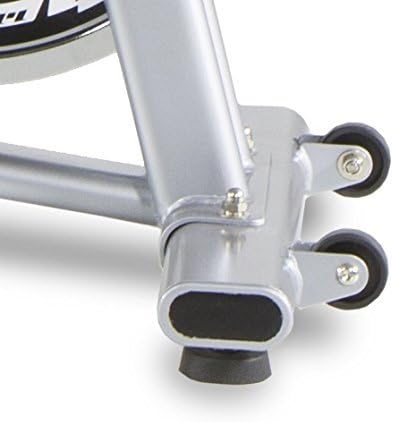
Aworan 4.4: Close-up of the rower's transport wheels. These wheels facilitate easy movement and storage of the machine when not in use.

Aworan 4.5: A user interacting with the rower's console, which includes a tablet holder. This image shows how a mobile device can be integrated for enhanced workout experiences or entertainment.
5. Itọju
Regular maintenance ensures the longevity and optimal performance of your BH Fitness Aquo Dual Rower.
- Ninu: Pa atukọ kuro pẹlu ipolowoamp aṣọ lẹ́yìn lílò kọ̀ọ̀kan láti mú òógùn àti eruku kúrò. Yẹra fún àwọn ohun ìfọṣọ tàbí àwọn ohun èlò ìfọṣọ.
- Lubrication: Periodically check the seat rail for debris and clean it. If the seat movement becomes less smooth, apply a small amount of silicone-based lubricant to the rail.
- Awọn ayewo: Regularly check all bolts, nuts, and connections for tightness. Tighten any loose fasteners. Inspect the rowing cord for any signs of wear or fraying.
- Ibi ipamọ: Nigbati o ko ba wa ni lilo fun awọn akoko ti o gbooro sii, tọju atukọ sinu mimọ, agbegbe gbigbẹ, ti ṣe pọ ni pipe lati fi aaye pamọ.
6. Laasigbotitusita
This section addresses common issues you might encounter with your BH Fitness Aquo Dual Rower.
| Isoro | Owun to le Fa | Ojutu |
|---|---|---|
| Footrests make noise during use. | Friction between pivoting plastic parts. | Apply a small amount of silicone lubricant to the pivot points. Consider adding thin washers between the moving parts if the noise persists (consult a technician if unsure). |
| Ifihan console jẹ òfo tabi aiṣedeede. | Loose cable connection, low battery (if applicable), or power supply issue. | Check all console cable connections. Ensure the power adapter is securely plugged in (if applicable). If battery-operated, replace batteries. |
| Console beep is too loud or annoying. | Default console setting. | Check the console manual for options to adjust or disable sound feedback. If no option is available, consider contacting customer support. |
| Inaccurate calorie readings. | Calorie calculations are estimates and can vary between devices. | Calorie burn is an approximation. Focus on other metrics like time, strokes, and heart rate for a more consistent measure of effort. Ensure user profile settings (weight, age) are correctly entered if the console supports it. |
| Rower shifts during exercise. | Uneven floor surface or lack of grip. | Ensure the rower is on a level surface. Use an exercise mat underneath the rower to provide better grip and protect your floor. |
7. Awọn pato
Detailed technical specifications for the BH Fitness Aquo Dual Rower R309U.
- Nọmba awoṣe: R309U
- Brand: BH Amọdaju
- Ilana Atako: Magnetic Brake System
- Awọn ipele resistance: 8 (Àtúnṣe ọwọ́)
- Ìwúwo Flywheel: 5.5 kg
- Ifihan console: Electronic LCD (Time, Strokes/Min, Total Strokes, Calories, Pulse)
- Abojuto Oṣuwọn Ọkàn: Wireless (5 kHz chest strap compatible, not included)
- Iwọn olumulo ti o pọju: 120 kg (264 lbs)
- Awọn iwọn (L x W x H): 179 cm x 50 cm x 53 cm (70.5 ni x 19.7 ni x 20.9 in)
- Awọn iwọn pọ (L x W x H): 92 cm x 51 cm x 112 cm (36.2 ni x 20.1 ni x 44.1 in)
- Iwọn Ọja: 29.5 kg (65 lbs)
- Ohun elo fireemu: Irin
- Orisun Agbara: Electrical Cable (for console)
- Awọn ẹya pataki: Quick and easy folding, Transport wheels, Central pulley system, Constant central structure inclination.
8. Atilẹyin ọja ati Support
For warranty information, please refer to the warranty card included with your product or visit the official BH Fitness website. For technical support, spare parts, or any inquiries not covered in this manual, please contact BH Fitness customer service through their official channels.
BH Fitness Official Webojula: www.bhfitness.com


