
1. Ifihan
The GAMDIAS Hermes GKB3000 is a mechanical gaming keyboard designed for enhanced durability and performance. It features GAMDIAS Certified Blue Switches with a 50 million actuation lifecycle, a 7-color spectrum backlight with 14 lighting effects, and various functional keys for an optimized gaming and typing experience. This manual provides instructions for setting up, operating, and maintaining your keyboard.
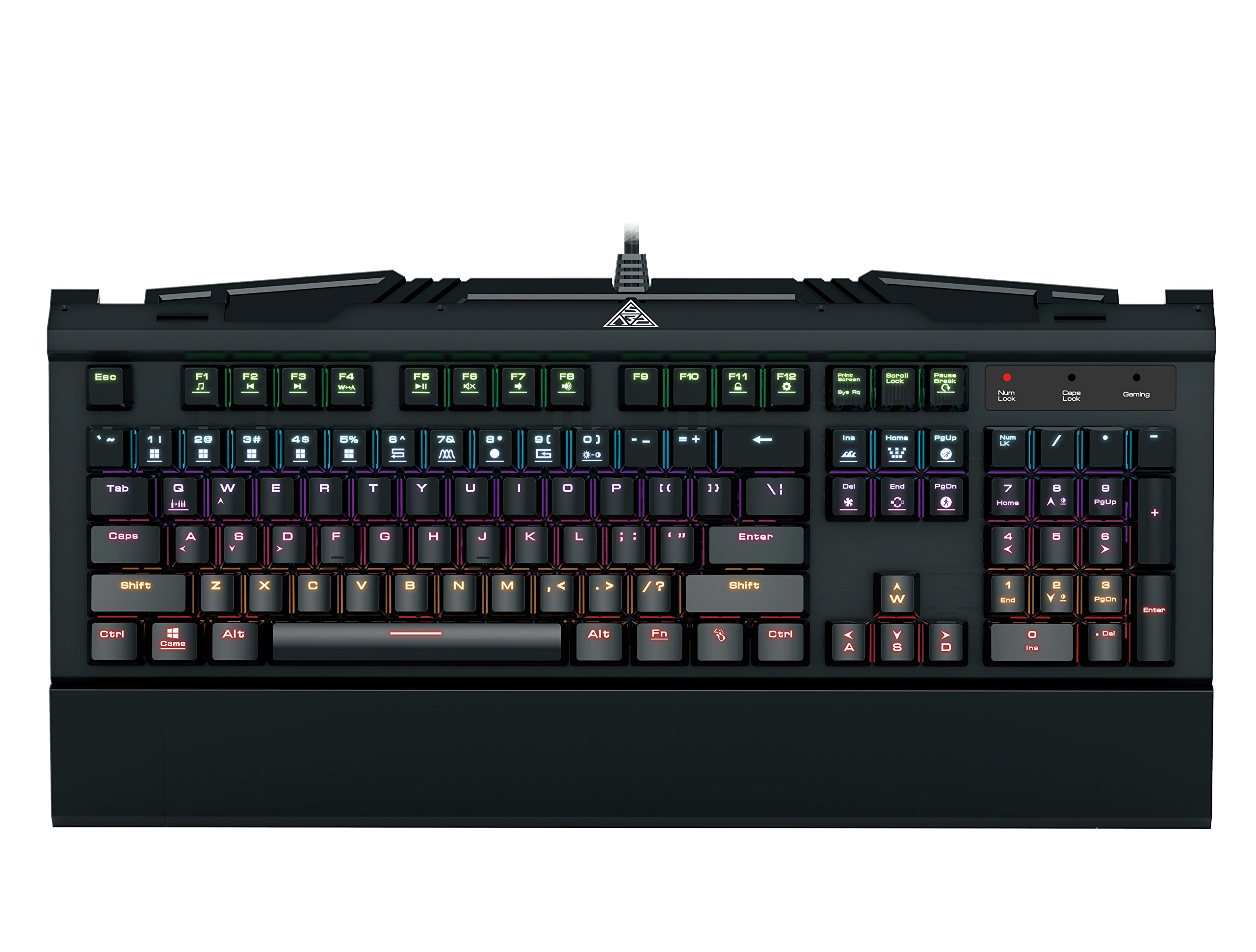
Image 1.1: The GAMDIAS Hermes GKB3000 Mechanical Gaming Keyboard. This image displays the full keyboard with its key layout and design, highlighting its compact yet robust build.
2. Package Awọn akoonu
Please check the package contents upon unboxing to ensure all items are present and undamaged.
- GAMDIAS Hermes GKB3000 Mechanical Gaming Keyboard
- Afowoyi Olumulo (iwe-ipamọ yii)
3. Eto
Follow these steps to set up your GAMDIAS Hermes GKB3000 keyboard:
- Yọ Keyboard kuro: Farabalẹ yọ keyboard kuro lati apoti rẹ.
- Sopọ si Kọmputa: Pulọọgi asopo USB-A ti okun keyboard sinu ibudo USB ti o wa lori kọnputa rẹ.
- Fifi sori Awakọ: The keyboard is plug-and-play. Your operating system (e.g., Windows) will automatically detect and install the necessary drivers. No additional software installation is typically required for basic functionality.
- Ibi: Place the keyboard on a stable, flat surface for comfortable use.
4. Awọn ilana Iṣiṣẹ
4.1. Awọn ipa Imọlẹ
The Hermes GKB3000 features a 7-color spectrum backlight with 14 sets of lighting effects. These include 9 preset effects and 5 customizable patterns.
- Àwọn ipa ìyípadà: Use the dedicated function keys (often combined with the Fn key) to cycle through the preset lighting effects. Refer to the keyboard's keycap legends for specific combinations.
- Customizing Effects: The keyboard supports 5 customizable lighting patterns. Instructions for programming these patterns are typically found in the full software suite available for download from the GAMDIAS webojú-òpó wẹ́ẹ̀bù, tí ó bá yẹ.
- Atunse Imọlẹ: Adjust backlight brightness using designated function key combinations.
4.2. Multimedia Control Keys
Access multimedia functions quickly using the dedicated multimedia control keys, often activated by holding the Fn key in combination with the F-keys (F1-F12).
- Iṣakoso iwọn didun: Increase, decrease, or mute audio.
- Sisisẹsẹhin Media: Play/pause, stop, previous track, next track.
- Awọn iṣẹ miiran: May include opening default browser, email client, or calculator.
4.3. Special Gaming Functions
- WASD-Arrow Key Swap: This feature allows you to swap the functionality of the WASD keys with the arrow keys. This is useful for certain games or user preferences. Activate this function using a specific Fn key combination (e.g., Fn + W).
- Consecutive Attack Mode: This mode enhances rapid key input for gaming. Refer to the keyboard's specific documentation or GAMDIAS software for activation and configuration details.
- Titii Keyboard: Temporarily disable the keyboard input to prevent accidental presses. Activate using a Fn bọtini apapo.
- Windows Key Disable: Prevent accidental presses of the Windows key during gaming, which can minimize your game. Activate using a Fn key combination (e.g., Fn + Win key).
- N-Kọtini Rollover: The GKB3000 supports N-key rollover, meaning multiple keys can be pressed simultaneously without ghosting or missed inputs. This ensures accurate and responsive commands during intense gaming sessions.
5. Itọju
Itọju to dara ṣe idaniloju igbesi aye gigun ati iṣẹ to dara julọ ti keyboard rẹ.
- Ninu:
- Ge asopọ keyboard kuro lati kọnputa rẹ ṣaaju ṣiṣe mimọ.
- Lo asọ asọ, ti ko ni lint die-die dampened pẹlu omi tabi kan ìwọnba ninu ojutu lati mu ese awọn dada.
- Fun eruku ati idoti laarin awọn bọtini, lo afẹfẹ fisinuirindigbindigbin.
- Yẹra fun lilo awọn kẹmika ti o lewu, awọn olutọpa abrasive, tabi awọn nkanmimu.
- Ibi ipamọ: Tọju keyboard ni itura, aye gbigbẹ kuro lati orun taara ati awọn iwọn otutu to gaju nigbati o ko ba wa ni lilo fun awọn akoko gigun.
- Mimu: Avoid dropping the keyboard or exposing it to excessive force, as this can damage the mechanical switches or internal components.
6. Laasigbotitusita
If you encounter issues with your GAMDIAS Hermes GKB3000 keyboard, refer to the following common solutions:
| Isoro | Owun to le Solusan |
|---|---|
| Keyboard ko dahun. |
|
| Backlight is not working or is dim. |
|
| Awọn bọtini kan ko ṣiṣẹ. |
|
| WASD keys are acting as arrow keys. |
|
If the problem persists after trying these solutions, please contact GAMDIAS customer support for further assistance.
7. Awọn pato
The following are the technical specifications for the GAMDIAS Hermes GKB3000 Mechanical Gaming Keyboard:
| Ẹya ara ẹrọ | Ẹ̀kúnrẹ́rẹ́ |
|---|---|
| Brand | GAMDIAS |
| Nọmba awoṣe | GKB3000 |
| Yipada Iru | GAMDIAS Certified Mechanical Blue Switches |
| Actuation Lifecycle | 50 Milionu Keystrokes |
| Imọlẹ afẹyinti | 7-Color Spectrum, 14 Lighting Effects (9 preset, 5 customizable) |
| Anti-Ghosting | N-Kọtini Rollover |
| Asopọmọra | USB-A |
| Eto isesise | Windows |
| Iwọn Nkan | 2.42 poun (isunmọ 1.1 kg) |
| Awọn iwọn Ọja (LxWxH) | 18.8 x 10.5 x 2 inches (iwọn 47.75 x 26.67 x 5.08 cm) |
| Ohun elo | Plastic with Elegant Metal Plate Design |
8. Atilẹyin ọja ati Support
GAMDIAS products are manufactured to the highest quality standards. For information regarding warranty coverage, terms, and conditions, please refer to the warranty card included with your product or visit the official GAMDIAS webojula.
For technical support, troubleshooting assistance, or any product-related inquiries, please contact GAMDIAS customer support through their official webaaye tabi alaye olubasọrọ ti a pese ninu apoti ọja rẹ.
GAMDIAS Official Webojula: www.gamdias.com