
1. Ifihan
This manual provides detailed instructions for the operation and maintenance of your Supersonic SC-1495BT Bluetooth AM/FM Boombox. Please read this manual thoroughly before using the device to ensure proper function and to maximize your listening experience.
2. Alaye Aabo
- Ma ṣe fi ẹrọ naa han si ojo tabi ọrinrin lati yago fun ina tabi mọnamọna.
- Ma ṣe dina awọn ṣiṣi atẹgun. Rii daju pe aaye to peye ni ayika ẹyọ naa fun ṣiṣan afẹfẹ to dara.
- Yago fun gbigbe ẹyọ naa si nitosi awọn orisun ooru gẹgẹbi awọn imooru, awọn iforukọsilẹ ooru, awọn adiro, tabi awọn ohun elo miiran (pẹlu ampliifiers) ti o gbe ooru jade.
- Lo awọn asomọ/awọn ẹya ara ẹrọ ti a sọ pato nipasẹ olupese.
- Yọọ ohun elo yi nigba iji manamana tabi nigba lilo fun igba pipẹ.
- Tọkasi gbogbo iṣẹ si awọn oṣiṣẹ iṣẹ ti o peye. Iṣẹ iṣẹ nilo nigbati ohun elo ba ti bajẹ ni ọna eyikeyi.
3. Package Awọn akoonu
Nígbà tí o bá ń tú àwọn ohun èlò tí ó wà ní ìsàlẹ̀, rí i dájú pé gbogbo wọn wà ní ìsàlẹ̀:
- Supersonic SC-1495BT Bluetooth AM/FM Boombox
- AC Agbara okun
4. Awọn ẹya Ọja
The Supersonic SC-1495BT Boombox offers a variety of features for versatile audio playback:
- Bluetooth Version 3.0 for wireless music streaming
- Built-in USB input for media playback
- Built-in SD card and Micro SD card slot for media playback
- 3.5 mm Line-in (AUX) jack for external audio devices
- Four-band radio: AM, FM, SW1, SW2
- Integrated rechargeable battery for portable use
- Ko àpapọ LCD
- Fast forward and rewind functions for media playback
- 360-degree rod antenna for enhanced radio reception
- Iṣakoso iwọn didun Rotari
- Earphone Jack fun igbọran ikọkọ
- AC/DC operation for flexible power options
5. Awọn iṣakoso ati Awọn isopọ
Familiarize yourself with the various controls and connection ports on your boombox.
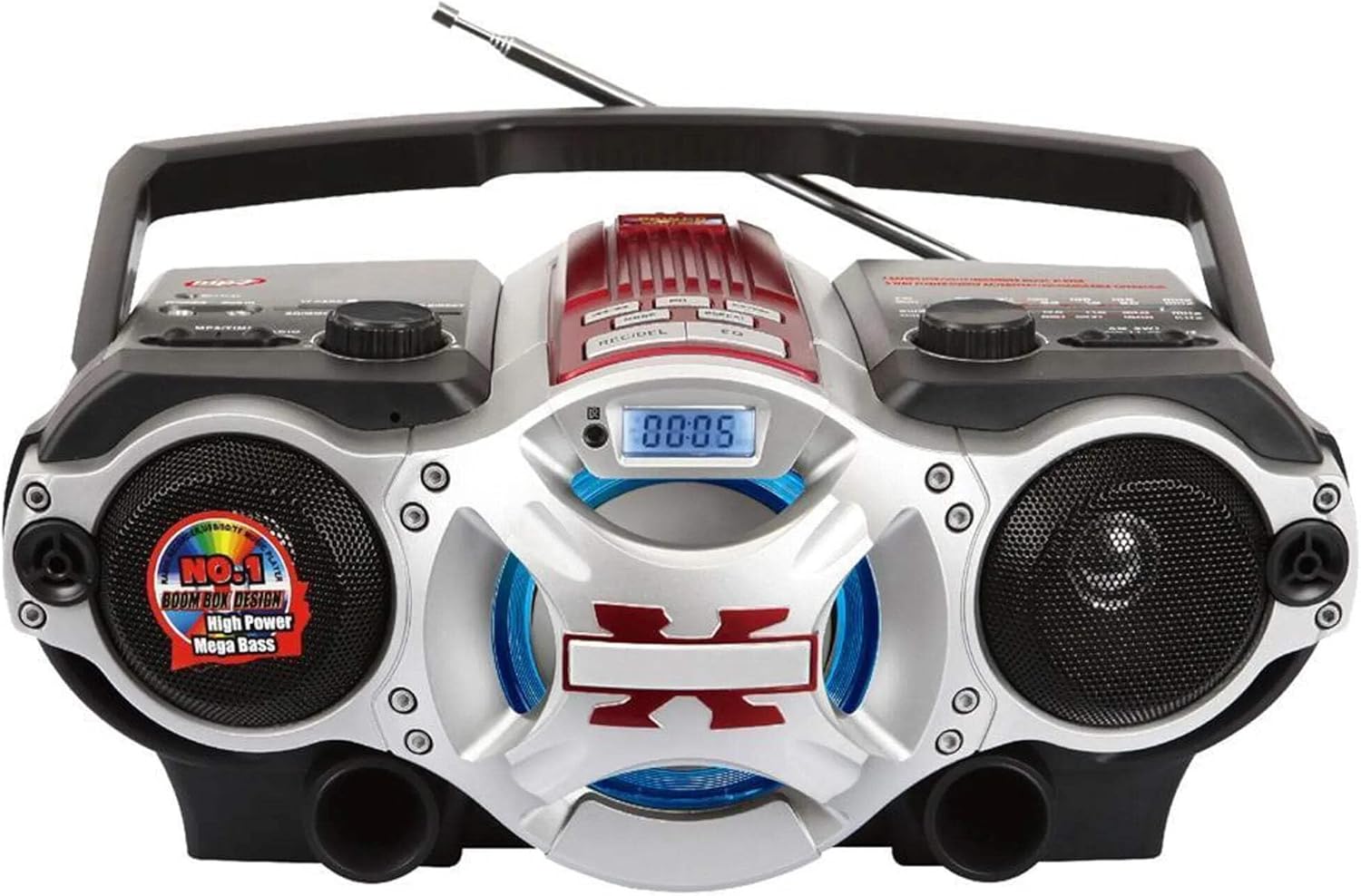
Nọmba 1: Iwaju view of the Supersonic SC-1495BT Boombox, showing the speakers, central display, and main control area.

Nọmba 2: Left side controls, including USB input, SD/Micro SD card slot, AUX IN, PHONES jack, BT/MP3/RADIO mode switch, and Rotary Volume control.

Nọmba 3: Right side controls, featuring the AM/FM/SW1/SW2 band selector, TUNING knob, and playback control buttons (Play/Pause, Skip, Mode, Clock, EQ).
6. Eto
6.1 Asopọ agbara
- Agbara AC: Connect the included AC power cord to the AC input on the back of the boombox and then plug it into a standard wall outlet. The internal rechargeable battery will begin charging.
- DC Power (Battery): The boombox has a built-in rechargeable battery. Ensure it is charged before portable use. The unit can also operate on DC power from the internal battery when not connected to AC.
6.2 Atunṣe Antenna
Extend the 360-degree rod antenna for optimal radio reception, especially for FM and SW bands. Adjust its position for the clearest signal.
7. Awọn ilana Iṣiṣẹ
7.1 Agbara Tan / Pa ati Aṣayan Ipo
- To power on the unit, slide the BT/MP3/RADIO switch to the desired mode (BT, MP3, or RADIO).
- Láti pa iná, gbé ìyípadà náà sí ipò PA.
7.2 Bluetooth Isẹ
- Gbe ipo yipada si BT (Bluetooth). The LCD display will indicate Bluetooth mode, and the unit will enter pairing mode.
- Lori ẹrọ Bluetooth ti o ṣiṣẹ (foonuiyara, tabulẹti, ati bẹbẹ lọ), mu Bluetooth ṣiṣẹ ki o wa awọn ẹrọ to wa.
- Select "SC-1495BT" from the list of devices. Once paired, the unit will emit a confirmation sound.
- You can now play audio from your device through the boombox. Use your device or the boombox's playback controls (Play/Pause, Skip) to manage music.
7.3 Radio Operation (AM/FM/SW1/SW2)
- Gbe ipo yipada si RADIO.
- Yan ẹgbẹ ti o fẹ (AM, FM, SW1, tabi SW2) ni lilo oluyipada ẹgbẹ.
- Extend and adjust the rod antenna for optimal reception.
- Yiyi awọn TUNTUN knob to scan for radio stations. The frequency will be displayed on the LCD.
7.4 USB / SD Kaadi Sisisẹsẹhin
- Gbe ipo yipada si MP3.
- Insert a USB flash drive into the USB input or an SD/Micro SD card into the corresponding slot. Ensure the card is inserted correctly.
- The unit will automatically detect and begin playing MP3 audio files lati media ti a fi sii.
- Use the playback control buttons (Play/Pause, Skip, Fast Forward, Rewind) to navigate tracks.
7.5 Iranlọwọ (AUX) Input
- Gbe ipo yipada si MP3.
- So ẹ̀rọ ohùn ìta pọ̀ mọ́ ẹ̀rọ orin (fún àpẹẹrẹ, ẹ̀rọ orin MP3, fóònù alágbèéká) mọ́ AX IN jack nipa lilo okun ohun afetigbọ 3.5mm (ko si ninu rẹ).
- Play audio from your external device. The sound will be routed through the boombox speakers. Control playback from your external device.
7.6 Iṣakoso iwọn didun
Yiyi awọn Iwọn didun kọkan ni ọna aago lati mu iwọn didun pọ si ati ni idakeji aago lati dinku.
7.7 Jack ohun afetigbọ
For private listening, plug standard 3.5mm earphones (not included) into the FOONU jack. The main speakers will be muted.
8. Itọju
- Ninu: Lo asọ asọ ti o gbẹ lati nu ode ti ẹyọ naa. Ma ṣe lo abrasive ose tabi epo.
- Ibi ipamọ: Nigbati o ko ba wa ni lilo fun awọn akoko ti o gbooro sii, tọju apoti apoti ni ibi ti o tutu, ibi gbigbẹ kuro lati orun taara ati awọn iwọn otutu to gaju.
- Itọju Batiri: To prolong the life of the built-in rechargeable battery, avoid fully discharging it frequently. Charge the unit regularly, even if not in use.
9. Laasigbotitusita
Ti o ba pade awọn ọran pẹlu apoti apoti rẹ, tọka si awọn iṣoro ti o wọpọ ati awọn ojutu wọnyi:
| Isoro | Owun to le Fa | Ojutu |
|---|---|---|
| Ko si agbara | AC cord not connected; Battery discharged; Power switch off | Ensure AC cord is securely plugged in; Charge the battery; Slide power switch to ON/BT/MP3/RADIO. |
| Ko si ohun | Volume too low; Mute activated (if applicable); Incorrect mode selected; Earphones connected | Increase volume; Ensure correct mode (BT, MP3, RADIO) is selected; Disconnect earphones. |
| Bluetooth ko so pọ | Boombox not in pairing mode; Device Bluetooth off; Too far from boombox | Ensure boombox is in BT mode; Enable Bluetooth on your device; Move device closer (within 30 feet/10 meters); Try re-pairing. |
| Gbigba redio ti ko dara | Antenna not extended/adjusted; Weak signal area | Fully extend and adjust the rod antenna; Try moving the unit to a different location. |
| USB/SD kaadi ko dun | Ti ko tọ file ọna kika; Kaadi / wakọ ko fi sii daradara; Ti bajẹ files | Rii daju files are MP3 format; Re-insert card/drive; Try a different USB drive or SD card. |
10. Awọn pato
- Awoṣe: SC-1495BT
- Brand: Supersonic
- Asopọmọra: Bluetooth (Ver. 3.0), USB, SD/Micro SD, 3.5mm AUX
- Awọn ẹgbẹ redio: Àárọ̀, FM, SW1, SW2
- Awọn ọna kika ohun ti o ni atilẹyin: MP3
- Orisun Agbara: AC 110-220V, Built-in Rechargeable Battery
- Awọn agbọrọsọ: 2 (Stẹrio)
- Awọn iwọn (L x W x H): 15 x 10 x 12 inches
- Ìwúwo: 4.3 iwon
- Olupese: Capitol Sales Company
- UPC: 639131814950
11. Atilẹyin ọja
This product comes with a 1-year limited warranty. Please retain your proof of purchase for warranty claims. For specific warranty terms and conditions, refer to the documentation included with your purchase or contact Supersonic customer support.
12. Atilẹyin
For further assistance, technical support, or inquiries regarding your Supersonic SC-1495BT Boombox, please visit the official Supersonic webojula tabi kan si wọn onibara iṣẹ Eka. Alaye olubasọrọ le ṣee ri ni igbagbogbo lori olupese webaaye tabi apoti ọja.