
1. Ifihan
This manual provides detailed instructions for the installation, operation, and maintenance of your Sanwa JLF-TP-8YT Joystick and OBSF-30 Push Button Bundle Kit. These high-quality components are designed for arcade game control panels and are compatible with various gaming systems and fight sticks. Please read this manual thoroughly before installation and use to ensure optimal performance and longevity of your product.

Image 1.1: The Sanwa JLF-TP-8YT Joystick and OBSF-30 Push Button Kit, featuring a black ball top joystick and eight black push buttons.
2. Eto ati fifi sori
2.1 Joystick Installation (JLF-TP-8YT)
The Sanwa JLF-TP-8YT joystick is designed for easy integration into control panels. It is suitable for panels made of steel or plastic with a maximum thickness of 5mm. The joystick can be configured for either 4-way or 8-way operation using the included restrictor plate.
- Prepare the Control Panel: Ensure your control panel has the appropriate mounting holes for the joystick's metal mounting plate. Refer to the dimension diagram for precise measurements.
- Mount the Joystick: Secure the joystick to the underside of the control panel using screws (not included) through the mounting plate.
- Asopọmọra Waya: Attach the included wiring harness to the joystick's microswitches. The harness typically connects to a compatible encoder board (not included) for your gaming system.
- Adjust Restrictor Plate (Optional): To switch between 4-way and 8-way operation, locate the restrictor plate at the base of the joystick. Rotate and secure it to the desired setting. The square gate is typically used for 8-way movement, while a diamond or circular gate can be used for 4-way.

Image 2.1: The Sanwa JLF-TP-8YT joystick with its wiring harness, ready for installation.
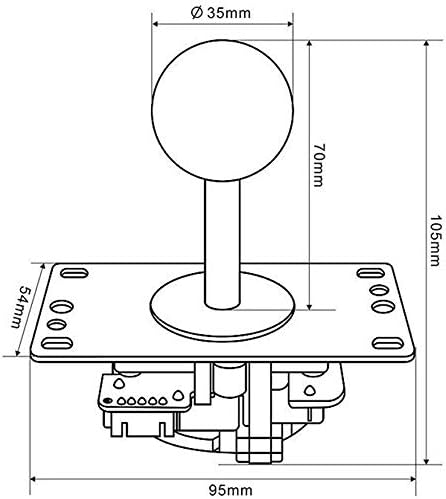
Image 2.2: Technical drawing showing the dimensions of the Sanwa JLF-TP-8YT joystick for accurate panel cutout and mounting.
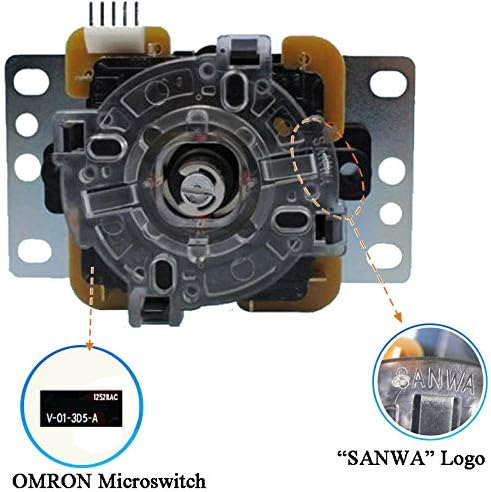
Àwòrán 2.3: Ẹ̀gbẹ́ ìsàlẹ̀ view of the Sanwa JLF-TP-8YT joystick, highlighting the OMRON microswitches and the 'SANWA' logo.

Image 2.4: The Sanwa JLF-TP-8YT joystick showing the restrictor plate at its base, used for adjusting between 4-way and 8-way movement.
2.2 Push Button Installation (OBSF-30)
The Sanwa OBSF-30 push buttons feature a snap-in design for quick and easy installation. They require a 30mm mounting hole diameter.
- Prepare the Control Panel: Ensure your control panel has 30mm diameter holes for the buttons.
- Insert Buttons: Gently push each button into its designated hole from the top of the control panel until it snaps securely into place.
- Asopọmọra Waya: Attach the appropriate wiring to the two lugs on the underside of each button's microswitch. These connections will typically lead to your encoder board.

Image 2.5: A set of eight Sanwa OBSF-30 black push buttons, ready for installation.

Image 2.6: Technical drawing illustrating the dimensions of the Sanwa OBSF-30 push button, including the 30mm mounting diameter.
3. Awọn ilana Iṣiṣẹ
3.1 Joystick isẹ
The JLF-TP-8YT joystick provides agile and precise control for arcade games. Its solid spring ensures an excellent 'Return to Center' action, allowing for quick and accurate directional inputs. The switchable ball top offers comfortable grip and responsiveness.
3.2 Push Button Operation
Sanwa OBSF-30 buttons feature non-clicking microswitches, providing a smooth, responsive, and quiet operation. Their fast reactive time and quick reset make them ideal for fighting games and other titles requiring rapid inputs.
4. Itọju
To ensure the longevity and optimal performance of your Sanwa joystick and buttons, follow these simple maintenance guidelines:
- Ninu: Regularly wipe the surfaces of the joystick ball top and push buttons with a soft, slightly damp cloth. Avoid using abrasive cleaners or harsh chemicals, as these can damage the plastic and internal components.
- Ayewo: Periodically check all connections to ensure they are secure. Inspect the joystick's restrictor plate and the buttons' snap-in mechanisms for any signs of wear or damage.
- Ibi ipamọ: If storing your arcade setup for an extended period, ensure it is in a dry, dust-free environment to prevent component degradation.
5. Laasigbotitusita
If you encounter issues with your Sanwa joystick or buttons, refer to the following common troubleshooting steps:
- Joystick Not Responding:
- Verify all wiring connections from the joystick to the encoder board are secure.
- Ensure the encoder board itself is properly connected to your gaming system.
- Check for any physical obstructions preventing the joystick from moving freely.
- Buttons Not Registering Inputs:
- Confirm that the wires are correctly attached to the button's microswitch lugs.
- Ensure the button is fully snapped into its mounting hole and not loose.
- Test the button with another known working input if possible to isolate the issue.
- Incorrect Directional Input (Joystick):
- Check the restrictor plate setting. If you intend 8-way movement, ensure the plate is set to the square gate configuration. For 4-way, ensure it's set accordingly.
- Recalibrate your controller or system if the issue persists after checking the restrictor plate.
If these steps do not resolve your issue, please contact customer support or consult online resources for further assistance.
6. Awọn pato
| Ẹya ara ẹrọ | Sipesifikesonu |
|---|---|
| Brand | SANWA |
| Joystick Model | JLF-TP-8YT |
| Awoṣe bọtini | OBSF-30 |
| Isẹ Joystick | 4-way or 8-way adjustable |
| Button Mounting Hole Diameter | 30mm |
| Compatible Control Panel Thickness | Up to 5mm (steel or plastic) |
| Joystick Dimensions (Item) | 6.69 x 4.33 x 3.54 inches |
| Joystick Dimensions (D x W x H) | 2.76"D x 3.74"W x 4.13"H |
| Asopọmọra Technology | USB (via compatible encoder, not included) |
| Awọn ẹrọ ibaramu | Playstation 2, Playstation 3, XBOX360 (with compatible controllers/adapters), Arcade Machines |
| Ipilẹṣẹ | Japan |
7. Atilẹyin ọja ati Support
For information regarding product warranty, please refer to the documentation provided at the time of purchase or contact your retailer. Sanwa products are known for their durability and quality. For technical support or further inquiries, please visit the official SANWA webojula tabi kan si eniti o ta taara.


