
1. Ọja Ipariview
This manual provides essential instructions for the safe and efficient installation, operation, and maintenance of your ZOTAC GeForce GTX 1080 AMP Extreme graphics card. Please read this manual thoroughly before proceeding with installation.
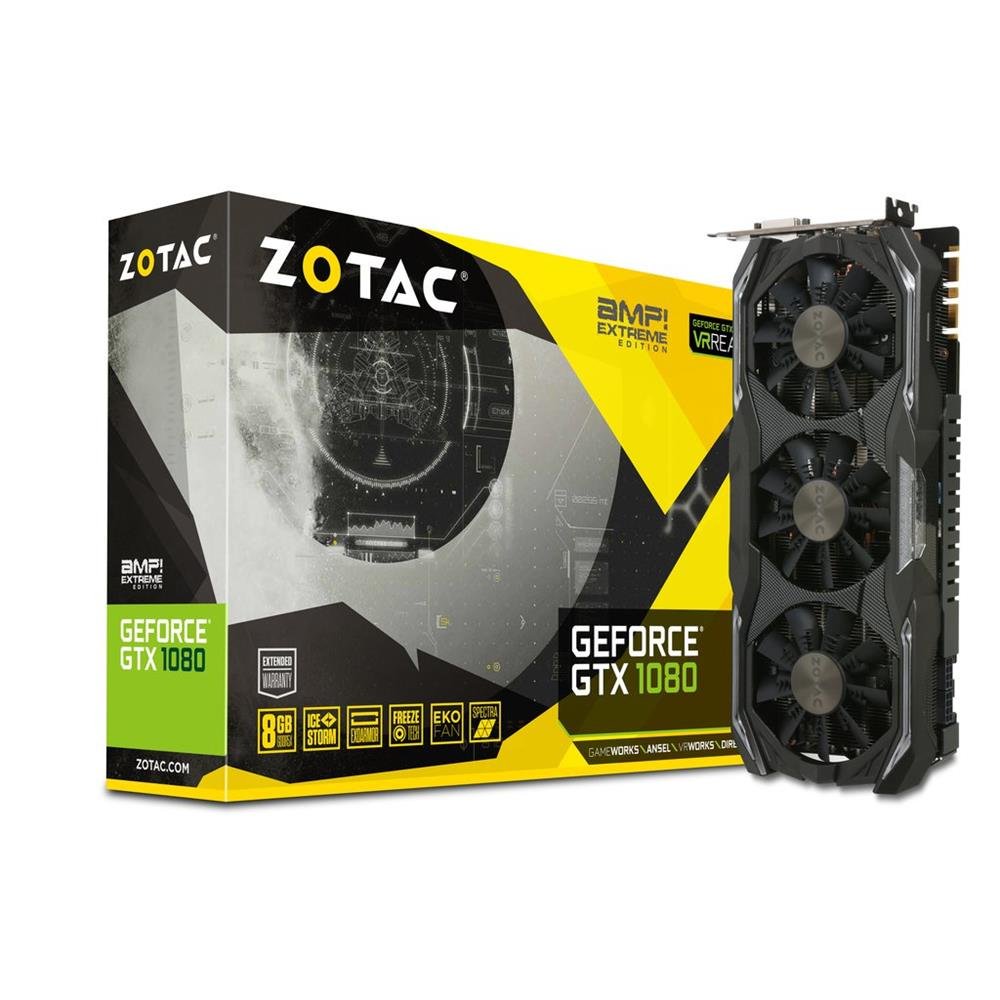
Image 1.1: ZOTAC GeForce GTX 1080 AMP Extreme Graphics Card. This image displays the front view of the graphics card, highlighting its triple-fan cooling system and overall design.
2. Package Awọn akoonu
Daju pe gbogbo awọn ohun ti a ṣe akojọ rẹ si isalẹ wa ninu package ọja rẹ:
- ZOTAC GeForce GTX 1080 AMP Extreme Graphics Card
- DVI-VGA Adapter
- Dual 6-pin to 4 x 2-pin Power Cable
- CD Awakọ
- Ilana Afowoyi (iwe yii)
3. Eto ati fifi sori
3.1. System Awọn ibeere
- PCI Express x16 slot on a compatible motherboard.
- Minimum 500W power supply with two 8-pin (or 6+2 pin) PCIe power connectors.
- Compatible operating system (e.g., Windows 7/8/10/11).
- At least 4GB of system memory (8GB recommended).
3.2. Fifi sori ti ara
- Agbara Pa: Pa kọmputa rẹ patapata ki o si yọọ okun agbara lati inu iṣan ogiri.
- Ẹran Ṣii: Open your computer case to access the motherboard and expansion slots.
- Wa PCIe Iho: Ṣe idanimọ Iho PCI Express x16 ti o wa lori modaboudu rẹ.
- Yọ Ideri Iho kuro: Yọ ideri irin kuro ni ẹhin apoti kọmputa ti o baamu si iho PCIe ti a yan.
- Fi Kaadi Awọn aworan sii: Carefully align the graphics card with the PCIe slot and press it firmly until it is fully seated. Ensure the retention clip on the slot locks into place.
- Kaadi to ni aabo: Secure the graphics card to the computer case with a screw or retention mechanism.
- So agbara: Connect the required PCIe power cables from your power supply to the graphics card. The ZOTAC GeForce GTX 1080 AMP Extreme typically requires two 8-pin (or 6+2 pin) power connectors. Use the provided dual 6-pin to 4 x 2-pin power cable if your power supply only has 6-pin connectors.
- Ọran pipade: Pa apoti kọnputa rẹ ki o tun okun agbara pọ.
3.3. Fifi sori awakọ
- Eto bata: Tan kọ̀ǹpútà rẹ. Ètò náà lè bẹ̀rẹ̀ sí í yípadà sí ipò ìfihàn tó rọrùn.
- Fi Awọn awakọ sii: Insert the provided Driver CD into your optical drive and follow the on-screen instructions to install the NVIDIA graphics drivers. Alternatively, download the latest drivers directly from the official ZOTAC or NVIDIA webAaye fun iṣẹ ti o dara julọ ati ibamu.
- Tun bẹrẹ: Tun kọmputa rẹ bẹrẹ lẹhin fifi sori ẹrọ iwakọ naa ti pari.
3.4. Nsopọ Awọn ifihan
Connect your monitor(s) to the appropriate output ports on the graphics card. This model supports HDMI, DisplayPort, and DVI connections. Use the DVI-VGA adapter if your monitor only supports VGA input.
4. Awọn ilana Iṣiṣẹ
4.1. Ipilẹ isẹ
Once the drivers are installed, your graphics card will automatically manage display output and graphics processing. You can adjust display settings, resolution, and refresh rates through your operating system's display settings or the NVIDIA Control Panel.
4.2. Multi-Monitor Setup
The ZOTAC GeForce GTX 1080 AMP Extreme supports multiple displays. Connect additional monitors to the available video output ports. Use the NVIDIA Control Panel to configure display modes such as extended desktop, duplicate displays, or NVIDIA Surround for an immersive gaming experience.
5. Itọju
Regular maintenance helps ensure optimal performance and longevity of your graphics card.
- Ninu: Periodically clean the fans and heatsink to prevent dust buildup, which can impede airflow and lead to overheating. Use compressed air to gently remove dust from the cooling fins and fan blades. Ensure the system is powered off and unplugged before cleaning.
- Fife ategun: Ensure your computer case has adequate airflow to dissipate heat generated by the graphics card. Keep the area around your PC clear of obstructions.
- Awọn imudojuiwọn Awakọ: Keep your graphics drivers updated by regularly checking the ZOTAC or NVIDIA webojula fun awọn titun awọn ẹya.
6. Laasigbotitusita
Ti o ba pade awọn ọran pẹlu kaadi eya aworan rẹ, tọka si awọn igbesẹ laasigbotitusita ti o wọpọ wọnyi:
- Ko si Abajade Ifihan:
- Ensure the monitor is correctly connected and powered on.
- Daju pe awọn eya kaadi ti wa ni kikun joko ni PCIe Iho.
- Check that all PCIe power cables are securely connected to the graphics card.
- Try connecting the monitor to a different video output port on the card or to the motherboard's integrated graphics (if available) to isolate the issue.
- Awọn ọran Awakọ:
- If you experience crashes, artifacts, or poor performance, try reinstalling the graphics drivers. Use a driver uninstaller utility to completely remove old drivers before installing new ones.
- Ensure you are installing the correct drivers for your operating system and graphics card model.
- Awọn Iṣoro Iṣe:
- Check system temperatures using monitoring software. Overheating can lead to performance throttling.
- Rii daju pe ipese agbara rẹ pade wat to kere julọtage ibeere fun awọn eya kaadi ati awọn miiran eto irinše.
- Verify that your system's BIOS/UEFI settings are configured correctly for a discrete graphics card.
7. Awọn pato
| Ẹya ara ẹrọ | Ẹ̀kúnrẹ́rẹ́ |
|---|---|
| Brand | ZOTAC |
| Orukọ awoṣe | GTX 1080 |
| Nọmba awoṣe | ZT-P10800B-10P |
| Olupilẹṣẹ Graphics | NVIDIA GeForce GTX 1080 |
| Eya Ramu Iwon | 8 GB GDDR5X |
| Iyara aago iranti | 10800 MHz |
| Engine Clock Speed | 1771 MHz (Base), 1911 MHz (Boost) |
| Video o wu Interface | HDMI, DisplayPort, DVI |
| Atọka fidio | PCI Express |
| Ipinnu Iboju ti o pọju | 7680x4320 |
| Nọmba ti Awọn onibakidijagan | 3 |
| Iṣeduro Lilo | Ere |
| Iwọn Nkan | 1.6 kilo |
| UPC | 816264016721 |
8. Atilẹyin ọja ati Support
8.1. Atilẹyin ọja
This ZOTAC graphics card comes with a 24-osu atilẹyin ọja Láti ọjọ́ tí o ti ra ọjà náà. Jọ̀wọ́ pa ẹ̀rí ìrajà rẹ mọ́ fún àwọn ẹ̀tọ́ àtìlẹ́yìn. Àtìlẹ́yìn náà bo àwọn àbùkù àti àìlera iṣẹ́-ọnà lábẹ́ lílo déédéé. Kò bo ìbàjẹ́ tí ó ṣẹlẹ̀ nípasẹ̀ ìlòkulò, ìjàǹbá, àwọn àtúnṣe tí a kò fún ní àṣẹ, tàbí fífi sori ẹrọ tí kò tọ́.
8.2. Imọ Support
For technical assistance, driver downloads, or further information, please visit the official ZOTAC webojula:
You may also refer to the FAQ section on the ZOTAC website for solutions to common issues.