
Amazon Basics BSK30BK
Amazon Basics Portable Wireless, 2.1 Bluetooth Speaker (Model BSK30BK)
Ilana itọnisọna
Ọrọ Iṣaaju
O ṣeun fun riraasing the Amazon Basics Portable Wireless, 2.1 Bluetooth Speaker. This manual provides important information regarding the setup, operation, maintenance, and troubleshooting of your new speaker. Please read it thoroughly before use and retain it for future reference.
Ọja Pariview
The Amazon Basics Portable Wireless, 2.1 Bluetooth Speaker offers high-quality sound with a portable design. It features Bluetooth connectivity for wireless audio streaming, a 3.5mm aux-in jack for wired connections, and a built-in microphone for hands-free calling.
Package Awọn akoonu
- Amazon Basics Portable Wireless, 2.1 Bluetooth Speaker
- Okun Ngba agbara USB
- Ilana itọnisọna
Agbọrọsọ irinše
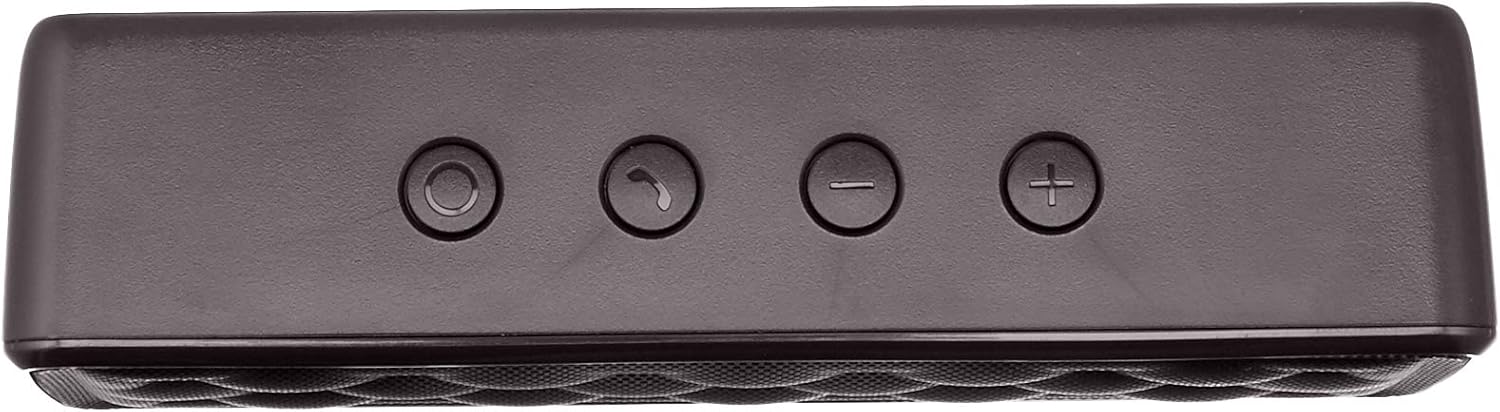


Ṣeto
1. Gbigba agbara Agbọrọsọ
Before first use, fully charge the speaker. Connect the supplied USB charging cable to the Micro USB port on the speaker and the other end to a USB power source (e.g., computer USB port, USB wall adapter). The charging indicator light will illuminate during charging and turn off when fully charged. A full charge takes approximately 3 hours.
2. Agbara lori / Paa
To power on the speaker, slide the ON/OFF switch located on the rear panel to the "ON" position. To power off, slide the switch to the "OFF" position.
Awọn ilana Iṣiṣẹ
Asopọ Bluetooth
- Ensure the speaker is powered on and within 33 feet (10 meters) of your Bluetooth-enabled device.
- The speaker will automatically enter pairing mode, indicated by a flashing blue LED light.
- Lori ẹrọ rẹ, lọ si awọn eto Bluetooth ki o wa awọn ẹrọ to wa.
- Select "Amazon Basics Speaker" from the list.
- Once paired, the blue LED light will stop flashing and remain solid. You can now stream audio wirelessly.
Note: If pairing fails, turn off the speaker and your device's Bluetooth, then repeat the steps. The speaker will attempt to reconnect to the last paired device automatically when powered on.
Sisisẹsẹhin ohun
- Iṣakoso iwọn didun: Use the '+' and '-' buttons on the top panel of the speaker to adjust the volume. You can also control the volume from your connected device.
- Ṣiṣẹ/Daduro: Use the controls on your connected device to play or pause audio.
Ọwọ-Free Ipe
When connected via Bluetooth, the speaker's built-in microphone allows for hands-free calling.
- Idahun/Ipe Ipari: Press the Call/Bluetooth button once to answer an incoming call or end an ongoing call.
- Kọ Ipe: Press and hold the Call/Bluetooth button for 2 seconds to reject an incoming call.
- Titun: Double-press the Call/Bluetooth button to redial the last number.
AUX Input Ipo
To connect non-Bluetooth audio devices, use the 3.5mm AUX input jack on the rear panel. Connect one end of a 3.5mm audio cable (not included) to the speaker's AUX port and the other end to your audio device's headphone jack. The speaker will automatically switch to AUX mode when a cable is inserted.

Itoju
- Sọ agbọrọsọ mọ pẹlu asọ asọ ti o gbẹ. Ma ṣe lo abrasive ose tabi epo.
- Yago fun ṣiṣafihan agbọrọsọ si awọn iwọn otutu to gaju, ọriniinitutu, tabi oorun taara.
- Do not immerse the speaker in water. It is not waterproof.
- Tọju agbohunsoke ni itura, ibi gbigbẹ nigbati o ko ba lo fun awọn akoko gigun.
Laasigbotitusita
| Isoro | Owun to le Fa | Ojutu |
|---|---|---|
| Agbọrọsọ ko ni agbara lori. | Batiri ti dinku. | Gba agbara si agbọrọsọ nipa lilo okun USB ti a pese. |
| Ko le so pọ nipasẹ Bluetooth. | Bluetooth is off on your device; speaker is out of range; speaker is already paired to another device. | Ensure Bluetooth is enabled on your device. Move the speaker closer to your device (within 33 feet). Disconnect from other devices or restart the speaker to enter pairing mode. |
| Ko si ohun tabi iwọn kekere. | Volume is too low on speaker or device; incorrect input mode. | Increase volume on both the speaker and your connected device. Ensure the correct input mode (Bluetooth or AUX) is active. |
| Iparun ohun. | Volume is too high; speaker is too far from the device. | Reduce the volume on the speaker and/or your device. Move the speaker closer to your device. |
Awọn pato
| Orukọ awoṣe | BSK30BK |
| Asopọmọra Technology | Bluetooth, Iranlọwọ |
| Alailowaya Ibiti | Titi de 33 ẹsẹ (10 mita) |
| Agbọrọsọ o wu Power | 2 x 2.5 Watts (5 Watts total) |
| Igbesi aye batiri | Titi di wakati 8 (lori idiyele kikun) |
| Akoko gbigba agbara | O fẹrẹ to awọn wakati 3 |
| Awọn iwọn (L x W x H) | 6.3" x 1.5" x 2.6" (16 cm x 3.8 cm x 6.6 cm) |
| Iwọn | 8.1 iwon (0.23 kg) |
| Gbohungbohun ti a ṣe sinu | Bẹẹni |
| Mabomire | Rara |
Alaye atilẹyin ọja
This product is covered by a Limited Warranty. For detailed information regarding warranty terms and conditions, please refer to the documentation included with your purchase or visit the Amazon Basics official webojula.
Onibara Support
For further assistance, troubleshooting, or product information, please visit the Amazon Basics support page or contact customer service through your Amazon account.
Alaye Aabo pataki
- Ma ṣe tuka, tunṣe, tabi tun ọja naa pada.
- Keep the product away from water and high humidity.
- Avoid prolonged exposure to direct sunlight or extreme heat.
- Ma ṣe ju silẹ tabi fi ọja si awọn ipa to lagbara.
- Sọ ọja naa ati batiri rẹ ni ifojusọna ni ibamu si awọn ilana agbegbe.
Awọn fidio ọja
No official instructional videos from the seller are available for this product at this time.
Ask a question about this manual
Ask about setup, troubleshooting, compatibility, parts, safety, or missing instructions. Manuals+ will review the question and use this page’s manual context to help answer it.