
Märklin 29792
Märklin 29792 "ICE 2" Digital Starter Ṣeto Afọwọṣe olumulo
Model: 29792 | Brand: Märklin
1. Ifihan
This manual provides essential information for the setup, operation, and maintenance of your Märklin 29792 "ICE 2" Digital Starter Set. Please read these instructions carefully before assembly and operation to ensure safe and optimal performance.

Figure 1: The Märklin 29792 "ICE 2" Digital Starter Set packaging, showing the train, tracks, and Mobile Station controller.
2. Package Awọn akoonu
The Märklin 29792 "ICE 2" Digital Starter Set includes the following components:
- Three-piece train set: Engine head, 1st class open-plan car, and 2nd class control car.
- 14 curved tracks (Märklin part number 24130)
- 9 straight tracks (Märklin part number 24188)
- 9 straight tracks (Märklin part number 24172)
- 1 pair of turnouts (Märklin part numbers 24671 and 24672)
- Track connection box
- Switching power supply (36 VA / 230 V)
- Mobile Station digital controller
- Illustrated playbook with tips and suggestions
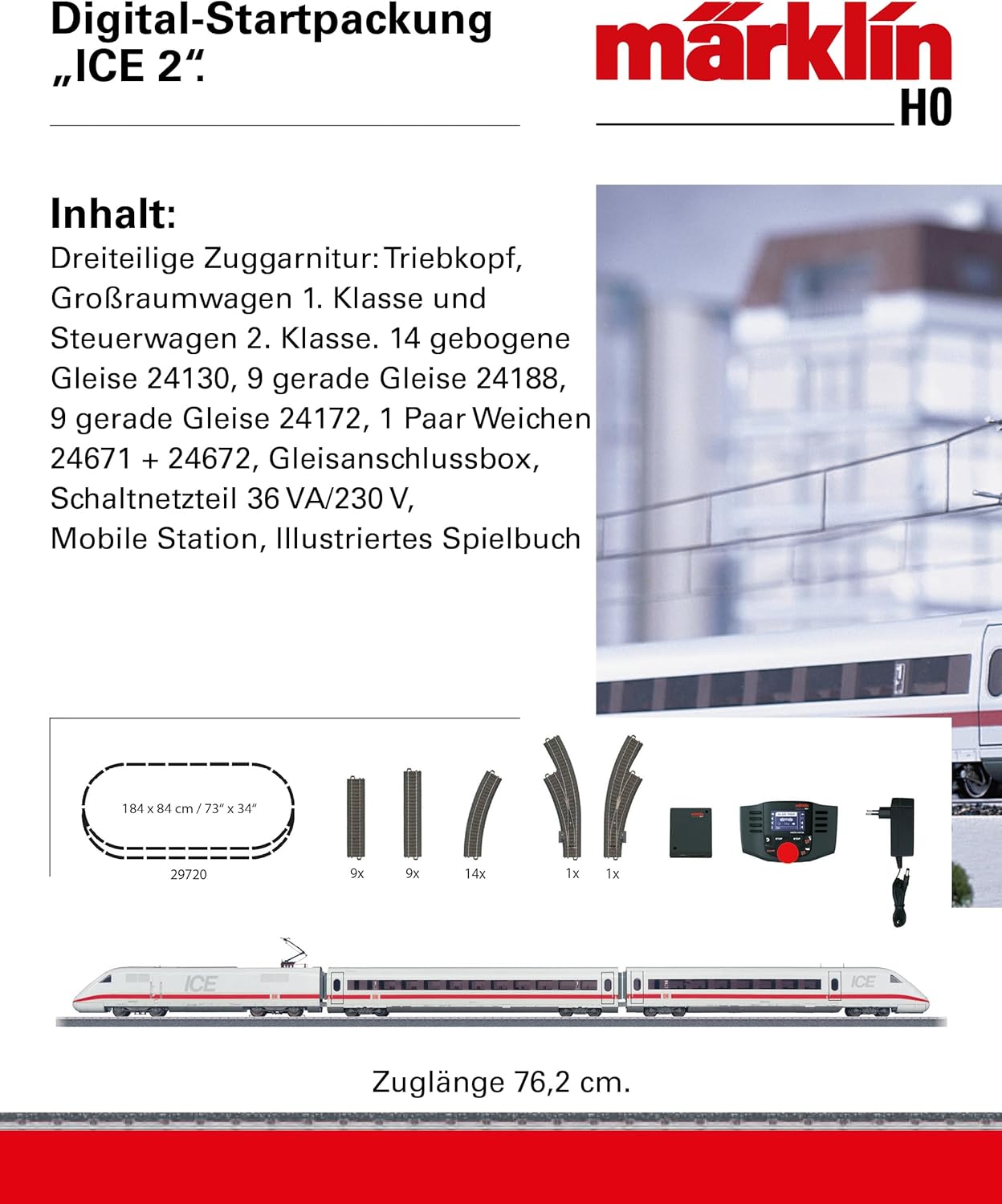
Olusin 2: Pariview of the complete set contents, including track pieces and the Mobile Station.
3. Awọn ilana iṣeto
3.1 Àkójọpọ̀ Orin
- Unpack all track pieces carefully.
- Assemble the track layout as shown in the illustrated playbook or create your own design. The set includes enough tracks to form an oval layout of approximately 184 cm x 84 cm (73" x 34").
- Ensure all track connections are firm and secure to prevent derailments and ensure proper electrical contact.
- Connect the track connection box to the assembled track.

Figure 3: The C-track system components and a suggested track layout for initial setup.
3.2 Asopọ agbara
- Connect the switching power supply to the track connection box.
- Plug the power supply into a standard 230V electrical outlet.
- Connect the Mobile Station to the track connection box.
- Rii daju pe gbogbo awọn asopọ wa ni aabo ṣaaju ilọsiwaju.
3.3 Train Placement
- Carefully place the three-piece ICE 2 train set onto the tracks. Ensure all wheels are properly seated on the rails.
- The engine head features an mfx digital decoder for automatic registration with the Mobile Station.

Figure 4: The ICE 2 train set correctly placed on the C-track system.
4. Awọn ilana Iṣiṣẹ
4.1 Mobile Station Overview
The Mobile Station is your primary control unit for the digital train set. It allows for speed control, direction changes, and activation of various sound functions.

Figure 5: The Mobile Station digital controller, showing its display and control buttons.
- Automatic Registration: The ICE 2 locomotive, equipped with an mfx decoder, will automatically register with the Mobile Station upon power-up.
- Iṣakoso iyara: Use the rotary knob to adjust the train's speed.
- Iyipada itọsọna: Press the direction button to change the train's direction.
- Awọn iṣẹ ohun: The locomotive features switchable sound functions. Refer to the illustrated playbook for a list of available sounds and their corresponding Mobile Station controls.
- Awọn itanna iwaju: The engine head's headlights are conventionally operational and can be digitally switched. The control car's lights are always on.
4.2 To ti ni ilọsiwaju Awọn ẹya ara ẹrọ
The Mobile Station supports up to 16 locomotive functions and can control magnetic accessories. For detailed information on advanced operations and expansion options with C-track supplementary packs, consult the included illustrated playbook.
5. Itọju
- Cleaning Tracks: Regularly clean the track surfaces with a soft, lint-free cloth to ensure good electrical contact. Avoid abrasive cleaners.
- Locomotive Maintenance: The locomotive's special motor and adhesive tires require minimal maintenance. Periodically check for dust or debris accumulation on the wheels and axles.
- Pantograph: The roof pantograph is mechanically functional. Handle with care to avoid damage.
- Ibi ipamọ: When not in use, store the train set and components in a dry, dust-free environment, preferably in their original packaging.
6. Laasigbotitusita
- Train not moving:
- Check all power connections from the wall outlet to the power supply, track connection box, and Mobile Station.
- Ensure the train is properly seated on the tracks and all wheels are making contact.
- Clean the track surfaces and locomotive wheels.
- Verify the Mobile Station is powered on and the locomotive is registered.
- Awọn imọlẹ ko ṣiṣẹ:
- Check track cleanliness.
- Ensure digital functions for headlights are activated via the Mobile Station.
- Sound functions not working:
- Confirm the locomotive is registered and sound functions are enabled via the Mobile Station.
- Derailments:
- Inspect track connections for proper alignment and secure fit.
- Ensure the train cars are correctly coupled.
- Check for any obstructions on the track.
For further assistance, refer to the detailed illustrated playbook or contact Märklin customer support.
7. Awọn pato
| Ẹya ara ẹrọ | Ẹ̀kúnrẹ́rẹ́ |
|---|---|
| Nọmba awoṣe | 29792 |
| Iwọn | H0 |
| Afọwọṣe | Deutsche Bahn AG (DB AG) InterCity Express class 402 |
| Train Composition | Engine head, 1st class open-plan car, 2nd class control car |
| Locomotive Decoder | mfx digital decoder with switchable sound functions |
| Powered Axles | 2 axles (on engine head) |
| Ibi ti ina elekitiriki ti nwa | 36 VA / 230 V switching power supply |
| Iṣakoso System | Mobile Station digital controller |
| Pull Length | 76.2 cm (isunmọ 30 inches) |
| Ọja Mefa | 30.55 x 1.38 x 1.97 inches |
| Iwọn Nkan | 0.32 iwon |
| Niyanju Ọjọ ori | 0 - 10 ọdún (Note: Model trains often have small parts, adult supervision recommended for younger children.) |
8. Atilẹyin ọja ati Support
For warranty information and customer support, please refer to the documentation included with your product or visit the official Märklin webojula. Jeki ẹri rira rẹ fun awọn iṣeduro atilẹyin ọja.
Märklin Official Webojula: www.maerklin.de/en/
Ask a question about this manual
Ask about setup, troubleshooting, compatibility, parts, safety, or missing instructions. Manuals+ will review the question and use this page’s manual context to help answer it.