
Ọrọ Iṣaaju
This manual provides detailed instructions for the SADES SA-708GT Gaming Headset. Designed for multi-platform compatibility, this headset offers clear audio and communication for an enhanced gaming experience. Please read this manual thoroughly before using the product to ensure proper setup and operation.
1. Awọn ilana iṣeto
1.1 Ṣíṣí àpò àti ìsopọ̀ àkọ́kọ́
The SADES SA-708GT headset is designed for plug-and-play functionality, requiring no complex software installation. Simply connect the headset to your device using the appropriate cable or adapter.

Nọmba 1.1: Headset with included adapters for Xbox 360 and PC/Notebook, and the 3.5mm audio cable.
1.2 Connecting to Gaming Consoles and PCs
- PlayStation 4 / PC / Mac / Smart Phones: Use the standard 3.5mm jack for direct connection. For PCs with separate audio and microphone ports, use the included PC adapter (P2 adapter for PC and Notebook) to split the 3.5mm jack into two separate plugs for microphone and audio.
- Xbox 360: Connect the headset using the dedicated Xbox 360 adapter. This adapter plugs into the Xbox 360 controller, allowing both audio and microphone functionality.

Nọmba 1.2: Demonstrates the in-line remote, connection to an Xbox 360 controller, and a smartphone.
1.3 Video Guide: Multi-Platform Setup
Fidio 1.1: Official SADES video demonstrating the setup and compatibility of the gaming headset across multiple platforms.
2. Awọn ilana Iṣiṣẹ
2.1 Siṣàtúnṣe fun Itunu
The headset features a soft leather cushion head pad and ear pads for comfortable extended use. The headband is adjustable to fit various head sizes. Gently slide the earcups up or down along the headband to find a secure and comfortable fit.

Nọmba 2.1: Demonstrates the adjustable headband for a personalized fit.

Nọmba 2.2: Sun mo tipetipe view of the soft, durable earcups designed for comfort.
2.2 Gbohungbohun Lilo
The SA-708GT features an omnidirectional microphone with noise cancellation for clear communication. The microphone is designed to be hidden and foldable, allowing it to be adjusted 120 degrees or tucked away when not in use.

Nọmba 2.3: Illustrates the microphone's rotational and foldable design for convenience.
2.3 In-line Remote Control
An in-line remote control is integrated into the cable for easy access to volume adjustments and microphone muting. Locate the remote on the headset cable to control your audio settings without interrupting your game.
Nọmba 2.4: Detail of the in-line remote for volume control and microphone mute.
3. Itọju
3.1 Ninu
- Use a soft, dry cloth to wipe the headset's exterior.
- For ear pads, gently wipe with a slightly damp asọ ati gba laaye lati gbẹ patapata ṣaaju lilo. Yẹra fun awọn kẹmika lile tabi awọn afọmọ abrasive.
- Keep the connectors clean and free of dust.
3.2 Ibi ipamọ
- Tọju agbekari naa ni itura, aye gbigbẹ kuro lati orun taara ati awọn iwọn otutu to gaju.
- Avoid tangling the cables to prevent damage.
- The headset features a flexible and resistant design, allowing for safe storage without damage.
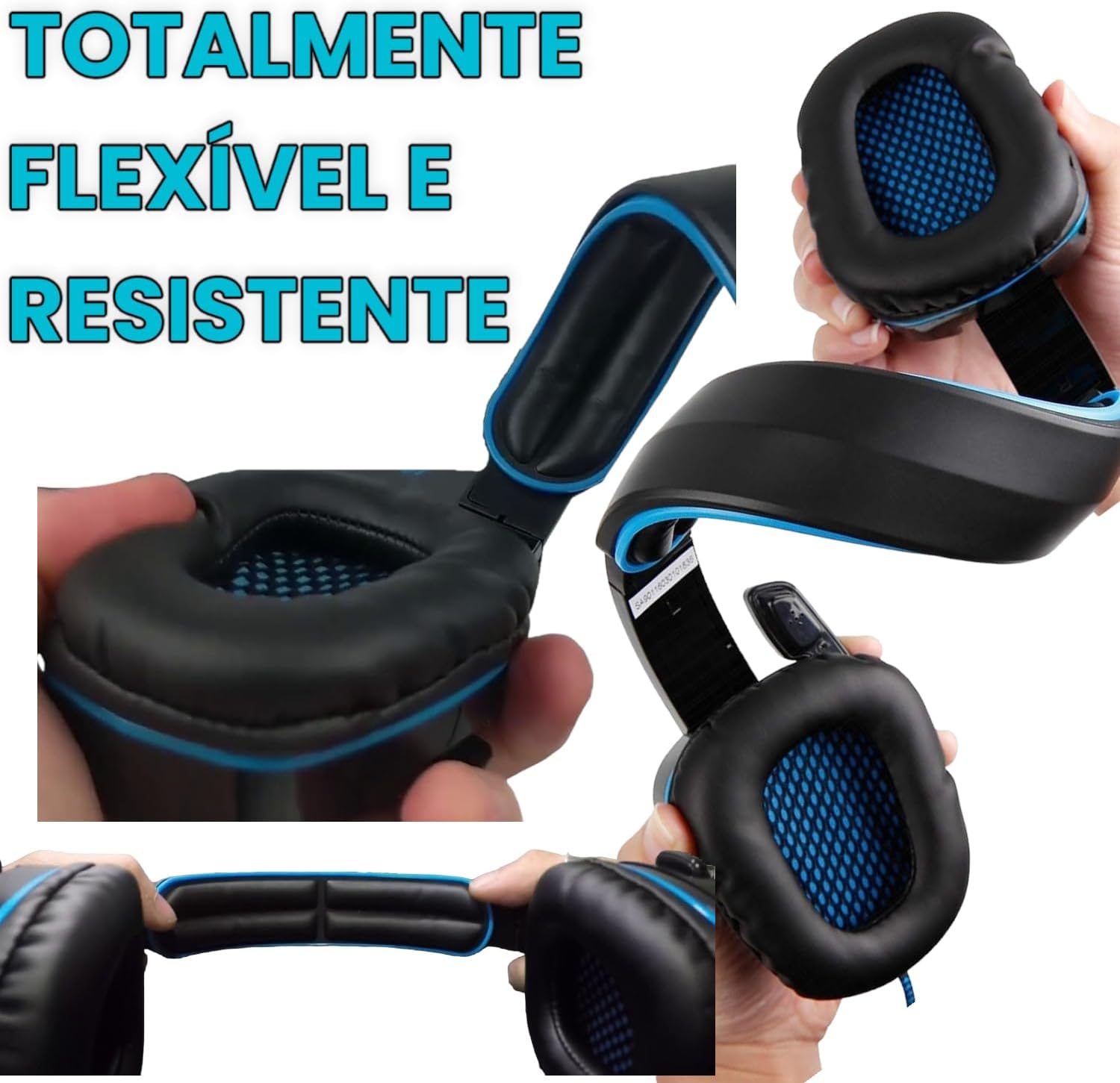
Nọmba 3.1: The headset's flexible and resistant construction for durability and easy storage.
4. Laasigbotitusita
4.1 No Audio or Low Volume
- Ṣayẹwo Awọn isopọ: Ensure the 3.5mm jack or adapter is fully inserted into the correct port on your device.
- Iṣakoso iwọn didun: Verify that the in-line volume control on the headset cable is turned up. Also, check the volume settings on your connected device (console, PC, smartphone).
- Awọn Eto Ẹrọ: On PCs, ensure the headset is selected as the default audio output device in your sound settings.
4.2 Gbohungbohun Ko Ṣiṣẹ
- Yipada Mute: Check the in-line remote control to ensure the microphone mute switch is not activated.
- Ipo Gbohungbohun: Ensure the microphone boom is lowered and positioned correctly towards your mouth.
- Awọn Eto Ẹrọ: On PCs and consoles, verify that the headset microphone is selected as the default input device in your audio or communication settings.
- Xbox 360 Adapter: If using with Xbox 360, ensure the adapter is securely connected to both the controller and the headset.
4.3 Interference or Static
- The headset features EMI/RFI shielding to minimize interference. If you experience static, try moving away from other electronic devices that might be causing electromagnetic interference.
- Rii daju pe gbogbo awọn asopọ okun wa ni aabo.
5. Awọn alaye ọja
| Ẹya ara ẹrọ | Ẹ̀kúnrẹ́rẹ́ |
|---|---|
| Brand | Ìbànújẹ́ |
| Orukọ awoṣe | SA-708GT (Model Number: FBA_6453998) |
| Àwọ̀ | Dudu ati Blue |
| Gbigbe Eti | Lori Eti |
| Fọọmù ifosiwewe | Lori Eti |
| Ipalara | 32 ohms |
| Iwọn Nkan | 4.8 iwon |
| Ariwo Iṣakoso | Ti nṣiṣe lọwọ Noise Ifagile |
| Iwọn Igbohunsafẹfẹ | 20 Hz - 20,000 Hz |
| Audio Driver Type | Yiyi Awakọ |
| Asopọmọra Technology | Wired (RF Wireless option also available for some models) |
| Jack agbekọri | 3.5 mm Jack |
| Awọn ẹrọ ibaramu | PlayStation 4, Xbox 360, PC, Mac, iPhone, Smart Phones |
| Afikun Awọn ẹya ara ẹrọ | Microphone Included, Foldable Design, 120° Adjustable Microphone |
| Ohun elo | Plastic (Enclosure), Leather (Ear Cushions) |
| UPC | 751570407330 |
6. atilẹyin ọja Information
SADES products are manufactured to the highest quality standards. This product is covered by a limited warranty against defects in materials and workmanship from the date of original purchase. Please retain your proof of purchase for warranty claims.
The warranty does not cover damage caused by accident, misuse, abuse, unauthorized modification, or normal wear and tear. For specific warranty terms and conditions, please refer to the warranty card included with your product or contact customer support.
7. Onibara Support
If you encounter any issues or have questions regarding your SADES SA-708GT Gaming Headset that are not addressed in this manual, please contact our customer support team.
- Atilẹyin Ayelujara: Visit the official SADES webojú òpó wẹ́ẹ̀bù fún àwọn ìbéèrè tó ń wáyé nígbà gbogbo, àwọn ìgbàsílẹ̀ awakọ̀, àti àwọn ohun èlò ìrànlọ́wọ́.
- Imeeli Atilẹyin: For support inquiries, please refer to the contact information provided on the official SADES webojula.
- Atilẹyin foonu: For immediate assistance, please refer to the contact information provided on the official SADES webojula.
When contacting support, please have your product model (SA-708GT) and proof of purchase ready.