
1. Ifihan
The Onset HOBO UA-003-64 Pendant Event and Temperature Data Logger is designed for accurate measurement of environmental conditions. This device efficiently collects and stores instantaneous contact event and temperature data, making it suitable for various monitoring applications, including rainfall measurement when paired with a tipping-bucket rain gauge. This manual provides essential information for the proper setup, operation, and maintenance of your data logger.
2. Ọja Ipariview
The HOBO UA-003-64 is a compact, waterproof data logger capable of recording both contact events and temperature. It is typically used with an optical base station (such as the BASE-U-4) for data offload and configuration. The device is designed for deployment in various environments, including outdoor and condensing conditions.
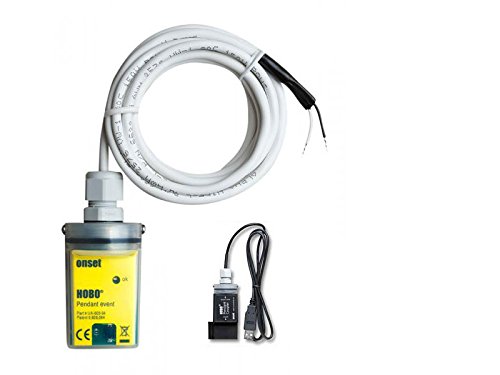
An image showing the Onset HOBO UA-003-64 Pendant Event and Temperature Data Logger, which is a small yellow rectangular device with a white cable connected to it. Next to it is the smaller black Optic Base Station BASE-U-4 with a USB cable.
3. Awọn ẹya ara ẹrọ
- 2-wire interface sensor for mechanical and electrical contact closure measurement.
- Maximum measurement rate of 1 Hz (1 pulse per second).
- Temperature measurement range: -20°C to 70°C.
- User-replaceable coin cell lithium battery with a 1-year lifespan.
- Waterproof housing suitable for outdoor or condensing environments, submersible up to 30 meters (100 feet).
4. Package Awọn akoonu
The standard kit includes the following components:
- UA-003-64 Pendant Event and Temperature Data Logger
- Optic Base Station BASE-U-4
- Free software download (available from the manufacturer's webaaye)
5. Eto
- Fifi sori ẹrọ software: Download and install the HOBOware software from the Onset website onto your computer. This software is required to configure the data logger and offload data.
- Connect Base Station: Connect the Optic Base Station BASE-U-4 to your computer's USB port.
- Connect Data Logger: Place the UA-003-64 data logger onto the optical base station. Ensure a secure connection for data transfer and configuration.
- Configure Logger: Use the HOBOware software to configure the logging interval, start time, and other parameters for your specific application.
- Ifiranṣẹ: Deploy the data logger in the desired monitoring location. For accurate temperature measurements in direct sunlight, it is recommended to use a solar radiation shield (e.g., RS1 or M-RSA, sold separately).
6. Awọn ilana Iṣiṣẹ
Once configured and deployed, the UA-003-64 data logger will automatically begin recording data based on your settings. Event data is stored only when an event occurs, optimizing memory usage.
- Gbigba data: The logger continuously monitors and records contact events and temperature at the specified intervals.
- Data Offload: To retrieve data, connect the data logger to the optical base station and then to your computer. Use the HOBOware software to offload the recorded data.
- Itupalẹ data: The HOBOware software allows you to view, plot, and analyze the collected data. Detailed event data is accessible for in-depth analysis.
7. Itọju
- Rirọpo Batiri: The data logger uses a user-replaceable coin cell lithium battery with an approximate 1-year lifespan. Refer to the full product manual for detailed instructions on safe battery replacement.
- Ninu: Keep the data logger and optical base station clean. Wipe with a damp asọ bi ti nilo. Yago fun lilo awọn kẹmika lile tabi awọn ohun elo abrasive.
- Ibugbe Mabomire: Ensure the waterproof housing is intact and free from cracks or damage before deployment in wet environments.
8. Laasigbotitusita
- Logger Not Responding: Ensure the battery is properly installed and has sufficient charge. Reconnect the logger to the optical base station and computer.
- Awọn ọran Gbigbe Data: Verify that the HOBOware software is correctly installed and the optical base station is properly connected to the computer. Ensure the data logger is securely seated on the base station.
- Awọn kika iwọn otutu ti ko pe: If deployed in direct sunlight, ensure a solar radiation shield is used to prevent solar heating effects on temperature measurements.
9. Awọn pato
| Sipesifikesonu | Iye |
|---|---|
| Olupese | Kọmputa Ibẹrẹ |
| Nọmba apakan | UA-003-64-KIT |
| Iwọn Ọja | 50 g |
| Awọn iwọn Ọja (LxWxH) | 7.1 x 2.3 x 3.3 cm |
| Batiri Iru | 1 Batiri Litiumu Irin (pẹlu) |
| Ara | Igbalode |
| Apẹrẹ | onigun merin |
| Orisun agbara | Batiri agbara |
| Awọn ẹya ara ẹrọ | Mabomire |
| ASIN | B01H2DX1D0 |
| Akọkọ Wa Ọjọ | 2018/09/04 |
10. Atilẹyin ọja ati Support
For detailed warranty information and technical support, please refer to the official Onset Computer Corporation webojula tabi kan si wọn onibara iṣẹ taara. Tọju iwe-ẹri rira rẹ fun awọn ẹtọ atilẹyin ọja.