
LyxPro SPA-5.5
LyxPro SPA-5.5 Small PA Speaker Monitor Instruction Manual
Model: SPA-5.5
1. Ifihan
This manual provides detailed instructions for the proper setup, operation, and maintenance of your LyxPro SPA-5.5 Small PA Speaker Monitor. Please read this manual thoroughly before using the device to ensure optimal performance and safety.
The LyxPro SPA-5.5 is a compact and powerful active speaker system featuring a Class-D amplifier, a 3-channel mixer, and a 3-band equalizer. It is designed for various applications including vocal and instrument monitoring, public address, and as a guitar amplifier or karaoke system.
2. Awọn ilana aabo
- Orisun Agbara: Connect the unit only to the specified power supply (100V – 240V AC). Ensure the power cord is not damaged or pinched.
- Afẹfẹ: Ma ṣe dina awọn ṣiṣi atẹgun. Rii daju pe sisan afẹfẹ to peye ni ayika ẹyọ lati ṣe idiwọ igbona.
- Omi ati Ọrinrin: Do not expose the unit to rain, moisture, or any liquids. Do not place objects filled with liquids on the unit.
- Awọn orisun Ooru: Jeki ẹyọ kuro lati awọn orisun ooru gẹgẹbi awọn imooru, awọn iforukọsilẹ ooru, awọn adiro, tabi awọn ohun elo miiran ti nmu ooru.
- Ninu: Mọ pẹlu asọ gbigbẹ nikan. Ge asopọ lati agbara ṣaaju ṣiṣe mimọ.
- Ṣiṣẹ: Maṣe gbiyanju lati ṣiṣẹ ọja yi funrararẹ. Tọkasi gbogbo iṣẹ si oṣiṣẹ oṣiṣẹ ti o peye.
- Ibi: Place the unit on a stable surface. If mounting on a microphone stand, ensure the stand is stable and capable of supporting the unit's weight.
3. Package Awọn akoonu
Jẹrisi pe gbogbo awọn ohun kan wa ninu package:
- LyxPro SPA-5.5 Speaker Monitor
- Okun agbara
- Microphone Stand Mounting Hardware
- Afowoyi Olumulo (iwe-ipamọ yii)
4. Awọn ẹya Ọja
- 125W RMS / 150W Peak Class-D Ampitanna
- Integrated 3-Channel Mixer
- 3-Band Equalizer (Bass, Mid, Treble)
- +48V Phantom Power Supply for Condenser Microphones
- Multiple Inputs: XLR, 1/4" (6.35mm), RCA, and 3.5mm (1/8") Aux
- Instrument Switch for Direct Instrument Connection
- XLR Thru Connection for Daisy-Chaining
- Iṣakoso Echo
- -Itumọ ti ni Bluetooth Asopọmọra
- Ibamu kaadi SD
- Mounts on Standard Microphone Stands
- Durable and Compact Design
5. Awọn iṣakoso ati Awọn isopọ
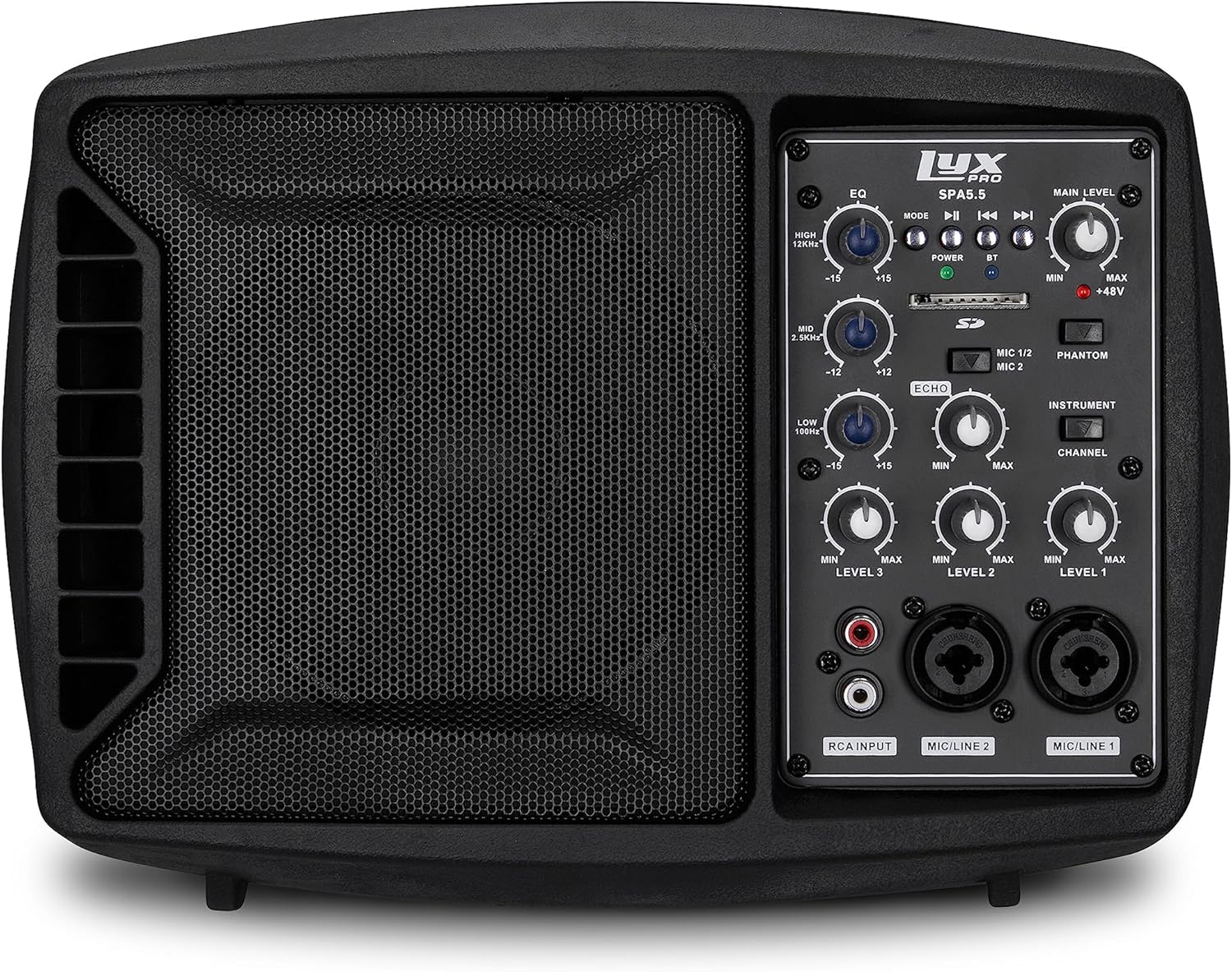
olusin 5.1: Iwaju view of the LyxPro SPA-5.5 speaker monitor, showing the speaker grille and control panel.
5.1 Iwaju Panel idari

Figure 5.2: Detailed diagram of the LyxPro SPA-5.5 front control panel with labeled components.
- Oluṣatunṣe (EQ):
- HIGH (12kHz): Adjusts high frequencies. Range: ±15dB.
- MID (2.5kHz): Adjusts mid frequencies. Range: ±15dB.
- LOW (80Hz): Adjusts low frequencies. Range: ±15dB.
- Ipele akọkọ: Ó ń ṣàkóso gbogbo ìwọ̀n ìjáde ti agbọrọsọ náà.
- Imọlẹ Agbara: Ó ń tọ́ka sí ìgbà tí a bá ti tan ẹ̀rọ náà.
- BT (Bluetooth) Light: Tọkasi ipo asopọ Bluetooth.
- Iho kaadi SD: Fun ohun afetigbọ files lati ẹya SD kaadi.
- Phantom Power Switch (+48V): Activates +48V phantom power for condenser microphones connected to MIC 1 or MIC 2.
- MIC 1/2 Switch: Selects between MIC 1 and MIC 2 inputs for Channel 1.
- Instrument Switch: Optimizes input impedance for direct connection of instruments (e.g., guitar) to Channel 1.
- Iṣakoso iwoyi: Adjusts the level of echo effect applied to microphone inputs.
- Channel Level Controls (LEVEL 1, LEVEL 2, LEVEL 3): Adjusts the individual volume for each input channel.
- RCA Input (LINE 3): Stereo RCA inputs for connecting devices like CD players, MP3 players, or keyboards.
- MIC/LINE 2 Input: Combo XLR/1/4" (6.35mm) input for microphones or line-level devices.
- MIC/LINE 1 Input: Combo XLR/1/4" (6.35mm) input for microphones or line-level devices.
5.2 Ru Panel Awọn isopọ

Figure 5.3: Detailed diagram of the LyxPro SPA-5.5 rear panel with labeled connections.
- MAIN IN (XLR): Main input for connecting external audio sources.
- MIC/LINE Level Switch: Selects between microphone or line level for the MAIN IN.
- THRU (XLR): XLR output for daisy-chaining to other speakers or sending the mixed signal to another device.
- Agbara Yi pada: Yipada ẹyọ naa tan tabi pa.
- AC igbewọle: Power connector for the included AC power cable (100V – 240V AC).
6. Eto
6.1 Ibẹrẹ Agbara-soke
- Ensure all level controls (Main Level, Channel Levels) are set to minimum.
- Connect the provided AC power cable to the AC INPUT on the rear panel and then to a suitable power outlet.
- Flip the Power Switch on the rear panel to the "ON" position. The Power Light on the front panel will illuminate.
6.2 iṣagbesori Aw
The SPA-5.5 can be used in various configurations:
- Atẹle Ilẹ: Place the unit on the floor in front of the performer, angled upwards.
- Tabili: Ipo lori alapin, dada iduroṣinṣin.
- Gbigbe Iduro Gbohungbohun: The unit includes hardware to mount it directly onto a standard microphone stand.

Figure 6.1: The LyxPro SPA-5.5 speaker monitor positioned on a microphone stand, demonstrating its use as a personal monitor for a musician.

Figure 6.2: A band performing outdoors, utilizing the compact LyxPro SPA-5.5 speaker for sound reinforcement.
7. Awọn ilana Iṣiṣẹ
7.1 Nsopọ Microphones ati Instruments
- Awọn gbohungbohun: Connect dynamic or condenser microphones to the MIC/LINE 1 or MIC/LINE 2 inputs using XLR cables. If using a condenser microphone, activate the +48V Phantom Power Switch. Adjust the corresponding Channel Level control.
- Awọn irinṣẹ: Connect instruments (e.g., guitar, bass) directly to MIC/LINE 1 or MIC/LINE 2 using a 1/4" (6.35mm) cable. Engage the Instrument Switch for optimal impedance matching. Adjust the corresponding Channel Level control.
- Awọn ẹrọ Ipele Laini: Connect devices like keyboards or audio interfaces to MIC/LINE 1 or MIC/LINE 2 using 1/4" (6.35mm) cables. Ensure the Instrument Switch is disengaged. Adjust the corresponding Channel Level control.
- Stereo Audio Sources: Connect CD players, MP3 players, or other stereo sources to the RCA Input (LINE 3). Adjust LEVEL 3.
7.2 Siṣàtúnṣe iwọn
- Awọn ipele ikanni: Use the LEVEL 1, LEVEL 2, and LEVEL 3 controls to balance the volume of individual inputs.
- Ipele akọkọ: Adjust the Main Level knob to control the overall output volume of the speaker.
- Oluṣatunṣe (EQ): Use the HIGH, MID, and LOW knobs to shape the tone of your sound.
- Increase HIGH for brighter sound.
- Adjust MID for vocal clarity or instrument presence.
- Increase LOW for more bass.
- Iṣakoso iwoyi: Turn the Echo knob to add a reverberation effect to the microphone inputs.
7.3 Media Playback (SD Card & Bluetooth)

Figure 7.1: Icons indicating SD card compatibility and built-in Bluetooth functionality on the LyxPro SPA-5.5.
- Kaadi SD: Insert an SD card containing audio files into the SD Card Slot. The unit will automatically detect and begin playback. Use the built-in controls (Mode, Play/Pause, Skip) to manage playback.
- Bluetooth:
- Rii daju pe ẹrọ naa ti wa ni titan.
- Mu Bluetooth ṣiṣẹ lori ẹrọ alagbeka rẹ.
- Wa fun "LyxPro SPA-5.5" in your device's Bluetooth settings and pair. The BT light on the unit will indicate a successful connection.
- Play audio from your device. Adjust volume using both your device and the SPA-5.5's Main Level control.

Figure 7.2: A musician utilizing the LyxPro SPA-5.5 as a personal monitor in a studio environment.
8. Itọju
- Ninu: Lo aṣọ rírọrùn tí ó gbẹ láti nu ìta ẹ̀rọ náà. Má ṣe lo àwọn ohun èlò ìfọmọ́ omi tàbí aerosol.
- Ibi ipamọ: Tí o kò bá lò ó fún ìgbà pípẹ́, tọ́jú ẹ̀rọ náà sí ibi tí ó tutù tí ó sì gbẹ, kúrò níbi tí oòrùn kò ti lè tàn án tàbí ibi tí ó gbóná janjan.
- Rirọpo Fuse: If the unit does not power on, check the fuse located near the AC input. Replace with a fuse of the same type and rating (T 3.15 A H 250V). Refer to qualified personnel if unsure.
9. Laasigbotitusita
| Isoro | Owun to le Fa | Ojutu |
|---|---|---|
| Ko si agbara | Power cable disconnected; Power switch off; Blown fuse | Check power cable connection; Turn power switch on; Replace fuse (refer to Maintenance section) |
| Ko si ohun jade | Main Level or Channel Levels too low; Input device not connected or muted; Incorrect input selected | Increase Main Level and Channel Levels; Check input device connection and volume; Verify correct input is used |
| Ohun ti o daru | Input signal too high; Main Level too high; EQ settings incorrect | Reduce input device volume; Lower Main Level; Adjust EQ settings |
| Gbohungbohun ko ṣiṣẹ (gbohungbohun konda) | Phantom power not enabled | Activate the +48V Phantom Power Switch |
| Bluetooth ko sopọ | Unit not in pairing mode; Device too far; Incorrect device selected | Ensure Bluetooth is active on SPA-5.5 and device; Move device closer; Select "LyxPro SPA-5.5" from device list |
10. Awọn pato

Figure 10.1: Diagram illustrating the compact dimensions of the LyxPro SPA-5.5 speaker monitor.
| Ẹya ara ẹrọ | Ẹ̀kúnrẹ́rẹ́ |
|---|---|
| Ijade agbara | 125W RMS / 150W tente oke |
| Iwọn Agbọrọsọ | 5 inches |
| Amplifier Iru | Kilasi-D |
| Idahun Igbohunsafẹfẹ (-10dB) | 80Hz – 14kHz |
| Idahun Igbohunsafẹfẹ (-3dB) | 100Hz – 10kHz |
| O pọju. SPL | 114dB SPL @ 1M |
| Phantom Agbara | + 48V |
| Input Impedance | 20K Ω |
| EQ High (12kHz) | ±15dB |
| EQ Mid (2.5kHz) | ±15dB |
| EQ Low (80Hz) | ±15dB |
| Iṣagbewọle Voltage | 100V - 240V AC |
| Agbara agbara | 180W pupọ. |
| Awọn iwọn (L x W x H) | 13.5" x 9" x 11.8" (34.3 cm x 22.9 cm x 30 cm) |
| Iwọn | 6.1 lbs (2.77 kg) |
11. Atilẹyin ọja ati Support
For warranty information and technical support, please refer to the warranty card included with your product or visit the official LyxPro webojula. Tọju iwe-ẹri rira rẹ bi ẹri rira.
For further assistance, contact LyxPro customer support.
Ask a question about this manual
Ask about setup, troubleshooting, compatibility, parts, safety, or missing instructions. Manuals+ will review the question and use this page’s manual context to help answer it.