
Ọrọ Iṣaaju
Thank you for choosing the Divoom Onbeat 500 Portable Wireless Bluetooth Speaker. This device is designed to deliver powerful sound with convenient wireless connectivity. This manual will guide you through the setup, operation, and maintenance of your speaker to ensure optimal performance and longevity.
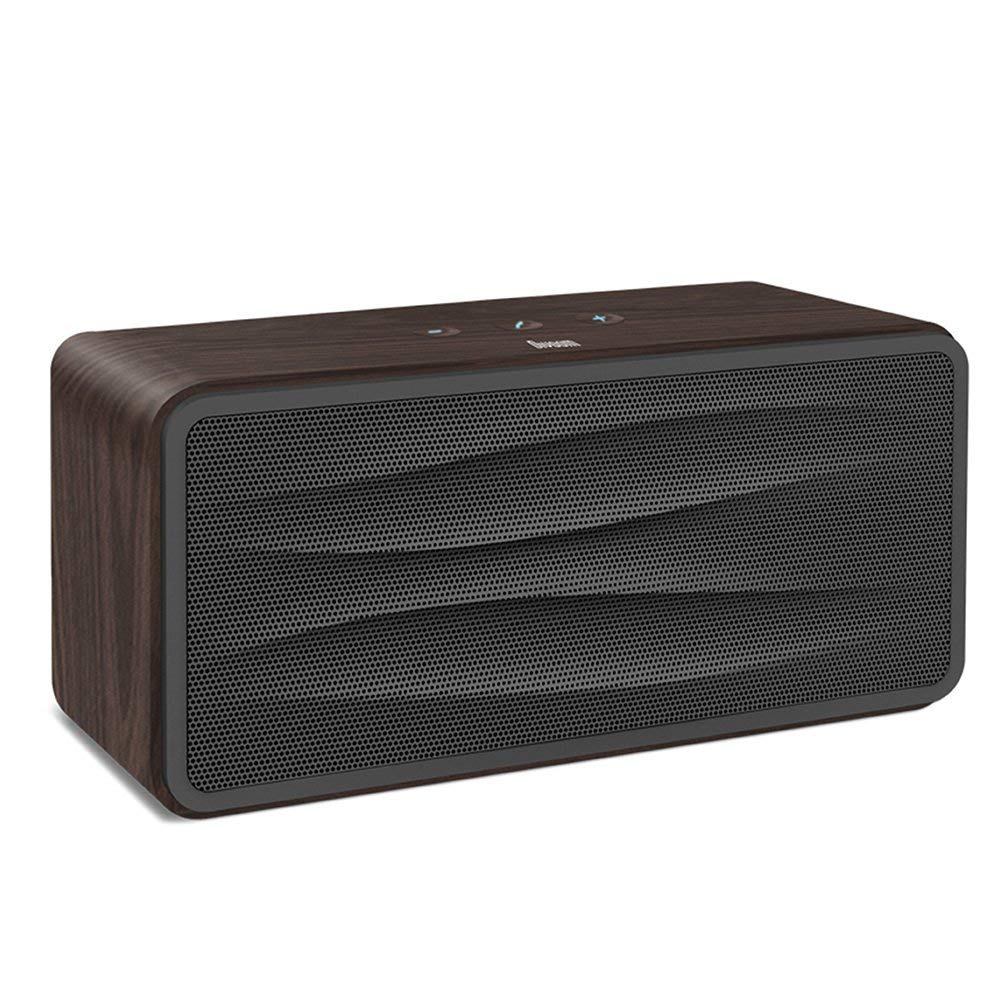
Nọmba 1: Iwaju view of the Divoom Onbeat 500 speaker. This image displays the speaker's main grille and overall design.
Package Awọn akoonu
Jọwọ ṣayẹwo package fun awọn nkan wọnyi:
- Divoom Onbeat 500 Speaker
- Micro USB Ngba agbara USB
- USB Iranlọwọ
- Afowoyi Olumulo (iwe-ipamọ yii)
- Kaadi atilẹyin ọja
Ọja Awọn ẹya ara ẹrọ
The Divoom Onbeat 500 speaker offers a range of features for an enhanced audio experience:
- Ohun Alagbara: 2.1 channel design with a proprietary passive bass radiator for rich audio.
- NFC ọna ẹrọ: Tap-to-pair functionality for quick and easy Bluetooth connection.
- Asopọmọra Bluetooth: Wirelessly play and control music from up to 33 feet (10 meters) away.
- Foonu Agbọrọsọ ti a ṣe sinu: Allows you to make and take calls directly from the speaker.
- Batiri pipẹ: Integrated 5000mAh battery provides extended playback time.
- Iṣawọle Iranlọwọ: For wired connection to non-Bluetooth devices.
Ṣeto
1. Gbigba agbara Agbọrọsọ
Before initial use, fully charge your Divoom Onbeat 500 speaker. Use the provided Micro USB charging cable to connect the speaker to a USB power source (e.g., computer USB port, USB wall adapter). The charging indicator light will illuminate during charging and turn off or change color when fully charged. A full charge typically provides 8-10 hours of playback.
2. Agbara lori / Paa
- Lati Fi agbara: Tẹ mọlẹ Bọtini Agbara fun iṣẹju diẹ titi ti o fi gbọ igbọran itọka tabi wo ina Atọka ti tan imọlẹ.
- Lati Paarẹ: Press and hold the Power button again for a few seconds until the speaker powers down.
3. Sisopọ Bluetooth
The Onbeat 500 offers two methods for wireless connection:
NFC (Near Field Communication) Pairing:
If your device supports NFC, you can pair quickly:
- Ensure NFC is enabled on your smartphone or tablet.
- With the Onbeat 500 powered on, gently tap your NFC-enabled device against the NFC area on the speaker.
- Confirm the pairing request on your device. The speaker will indicate a successful connection.
Didara Bluetooth Sisopọ:
For devices without NFC or for manual pairing:
- Power on the Divoom Onbeat 500 speaker. It will automatically enter Bluetooth pairing mode if no device is connected, or you may need to press a dedicated Bluetooth button (refer to speaker controls).
- On your audio device (smartphone, tablet, computer), go to the Bluetooth settings and enable Bluetooth.
- Wa fun available devices. You should see "Divoom Onbeat 500" in the list.
- Select "Divoom Onbeat 500" to connect. The speaker will confirm the connection with an audible prompt.
4. Aux Asopọ
To connect a device using the auxiliary cable:
- Connect one end of the provided auxiliary cable to the AUX-in port on the Divoom Onbeat 500.
- Connect the other end of the auxiliary cable to the headphone jack or audio output of your device.
- The speaker will automatically switch to AUX mode, or you may need to select it manually (refer to speaker controls).

Nọmba 2: Apa view of the Divoom Onbeat 500, illustrating the location of the charging port, AUX input, and control buttons.
Ṣiṣẹ Agbọrọsọ
1. Sisisẹsẹhin Orin
Once connected via Bluetooth or AUX, you can control music playback from your connected device. The speaker may also have integrated controls for volume adjustment, play/pause, and track skipping. Refer to the speaker's physical buttons for these functions.
2. Iṣẹ́ Agbọrọsọ
When connected to a smartphone via Bluetooth, the Divoom Onbeat 500 can be used as a speakerphone:
- Ndahun ipe kan: Press the Call button (often indicated by a phone icon) on the speaker.
- Pari ipe kan: Tẹ bọtini Ipe lẹẹkansi.
- Kiko Ipe kan: Tẹ bọtini Ipe ki o si mu.

Nọmba 3: Ẹyìn view of the Divoom Onbeat 500, highlighting the passive bass radiator for enhanced low-frequency sound.
Itoju
1. Ninu
Láti mú kí ìrísí àti iṣẹ́ agbọ̀rọ̀sọ rẹ máa ṣiṣẹ́ dáadáa:
- Mu ese ita pẹlu asọ, gbẹ, asọ ti ko ni lint.
- Do not use abrasive cleaners, alcohol, benzene, or other chemical solvents, as these may damage the finish.
- Yago fun gbigba ọrinrin sinu eyikeyi awọn ṣiṣi.
2. Itọju batiri
To prolong the life of the built-in lithium-ion battery:
- Yago fun gbigba agbara si batiri ni kikun nigbagbogbo.
- Tọju agbohunsoke ni itura, ibi gbigbẹ nigbati o ko ba lo fun awọn akoko gigun.
- Charge the speaker at least once every three months if stored for a long time to prevent deep discharge.
Laasigbotitusita
If you encounter issues with your Divoom Onbeat 500, please refer to the following common solutions:
| Isoro | Owun to le Solusan |
|---|---|
| Agbọrọsọ ko ni agbara lori | Ensure the battery is charged. Connect the speaker to a power source using the Micro USB cable and try again. |
| Ko si ohun lati agbọrọsọ | Check the volume level on both the speaker and your connected device. Ensure the speaker is correctly paired via Bluetooth or connected via AUX. Try re-pairing the Bluetooth device. |
| Sisopọ Bluetooth kuna | Ensure the speaker is in pairing mode. Turn off and on Bluetooth on your device. Move your device closer to the speaker. Clear previous Bluetooth connections on your device and try again. |
| Didara ohun ko dara | Ensure the speaker and connected device are within range (for Bluetooth). Check for interference from other wireless devices. Try a different audio source or cable. |
Awọn pato
Detailed technical specifications for the Divoom Onbeat 500 speaker:
- Orukọ awoṣe: Divoom Onbeat 500
- Irú Agbọrọsọ: Computer Agbọrọsọ
- Imọ-ẹrọ Asopọmọra: Bluetooth
- Imọ-ẹrọ Ibaraẹnisọrọ Alailowaya: Bluetooth
- Ọna Iṣakoso: Fọwọkan
- Orisun Agbara: Agbara Batiri
- Batiri: Batiri Litiumu Ion 1 (5000mAh)
- Audio Wattage: 20 Wattis
- Agbara Ijade ti o pọju Agbọrọsọ: 100 Wattis
- Atunto ikanni Ohun Yika: 2.1
- Awọn ẹrọ ibaramu: Android, Windows, iPhone (iOS)
- Orisi Asopọmọra: USB (fun gbigba agbara)
- Awọn iwọn ọja: 22.5 x 7.49 x 10.49 cm (LxWxH)
- Ìwọ̀n Nkan: 1.55 kg
- Àwọ̀: Eedu
- Awọn ẹya pataki: NFC, Built-in Speakerphone, Passive Bass Radiator
Atilẹyin ọja ati Support
Your Divoom Onbeat 500 speaker comes with a limited warranty. Please refer to the included Warranty Card for detailed terms and conditions, including warranty period and coverage.
For technical support, service inquiries, or further assistance, please visit the official Divoom website or contact their customer service department using the information provided on your Warranty Card or product packaging. Please have your model number (Onbeat 500) and purchase details ready when contacting support.