
1. Ifihan
This manual provides detailed instructions for the installation, operation, and maintenance of your Thomson 512331 720p WiFi IP Camera. This wireless security camera features 720p HD resolution, advanced night vision, motion detection, and remote viewing capabilities via a smartphone or tablet application. Designed for outdoor use, it boasts an IP66 weather-resistant rating and a durable metal construction.
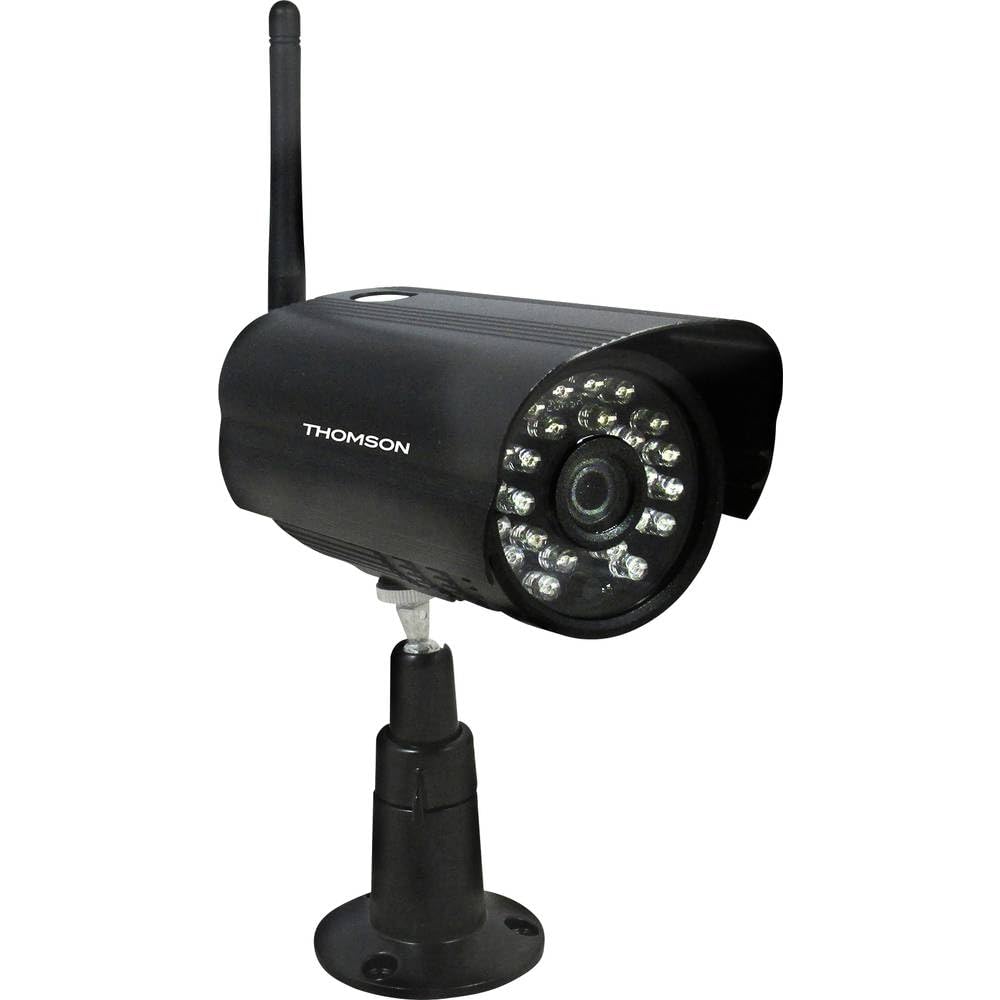
Nọmba 1: Iwaju view of the Thomson 512331 720p WiFi IP Camera. This image shows the camera's main body, lens, and antenna connection point, highlighting its compact and robust design suitable for outdoor surveillance.
2. Package Awọn akoonu
Please verify that all items listed below are included in your package. If any items are missing or damaged, contact customer support.
- Thomson 512331 IP Camera
- Power Adapter (230VAC/12VDC 500mA)
- Eriali WiFi
- Mounting Kit (screws and wall plugs)
- Afowoyi Olumulo (iwe-ipamọ yii)
3. Ọja Ipariview
The Thomson 512331 camera is designed for reliable surveillance with the following key features:
- Lẹnsi: 3.6mm fixed lens for a wide field of view.
- Ipinnu: 1280x720 (720p) HD video capture.
- Iran Alẹ: Infrared night vision with 24 LEDs, providing a range of up to 20 meters. Features color night vision capability.
- Ohun: Integrated microphone for audio acquisition.
- Asopọmọra: Wireless Wi-Fi connectivity for flexible placement.
- Atako oju ojo: IP66 rated for outdoor use, protecting against dust and powerful water jets.
- Ohun elo: Durable metal housing.
- Agbara: 12VDC 500mA power input, maximum consumption 5W.
- Fidio funmorawon: H.264 for efficient storage and streaming.
- Ibi ipamọ: Supports SD card for local storage (SD card not included).
4. Eto
4.1 Fifi sori ti ara
- Yan Ibi kan: Select a suitable outdoor location for the camera, ensuring it has a clear view of the area you wish to monitor and is within range of your Wi-Fi network.
- Gbe Kamẹra naa: Use the provided mounting kit to securely attach the camera to a wall or other stable surface. Drill pilot holes if necessary, insert wall plugs, and fasten the camera bracket with screws.
- Attach WiFi Antenna: Screw the WiFi antenna firmly onto the designated port on the camera.
- So agbara: Connect the power adapter to the camera's 12VDC input port and plug the adapter into a suitable power outlet. Ensure the power outlet is protected from weather if installed outdoors.
4.2 Network Configuration and App Setup
- Ṣe igbasilẹ ohun elo naa: Wa fun the official Thomson IP Camera application on your smartphone's or tablet's app store (iOS or Android). Download and install the application.
- Ṣẹda akọọlẹ kan: Ṣii app naa ki o tẹle awọn ilana loju iboju lati ṣẹda iwe apamọ olumulo titun kan tabi wọle ti o ba ti ni ọkan tẹlẹ.
- Fi Kamẹra kun: In the app, select the option to "Add Device" or "Add Camera." Follow the in-app wizard to connect your camera to your Wi-Fi network. This typically involves scanning a QR code on the camera or entering your Wi-Fi credentials.
- Tunto Eto: Once connected, you can configure various settings such as motion detection sensitivity, recording schedules, and alert notifications within the app.
5. Awọn ilana Iṣiṣẹ
5.1 Live View
Open the Thomson IP Camera app on your smartphone or tablet. Select your camera from the device list to view the live video feed. You can typically switch between standard and HD resolution, and access controls for audio and recording.
5.2 Išipopada erin ati titaniji
The camera is equipped with motion detection. When motion is detected, the camera can trigger recordings and send push notifications to your connected device. Adjust motion detection sensitivity and alert preferences in the app's settings.
5.3 Night Vision
The camera automatically switches to infrared night vision in low-light conditions, providing clear black and white video. It also supports color night vision in certain conditions. The 24 built-in IR LEDs illuminate up to 20 meters.
5.4 Gbigbasilẹ ati Sisisẹsẹhin
If an SD card is installed (not included), the camera can record video locally. Recordings can be triggered by motion or set on a schedule. Access recorded footage nipasẹ ẹya-ara ṣiṣiṣẹsẹhin app naa.
6. Itọju
- Ninu: Lokọọkan nu awọn lẹnsi kamẹra ati ile pẹlu asọ, damp asọ lati yọ eruku ati idoti. Maṣe lo awọn kẹmika ti o lewu tabi awọn afọmọ abrasive.
- Awọn imudojuiwọn famuwia: Check the app regularly for firmware updates. Keeping your camera's firmware up-to-date ensures optimal performance and security.
- Ibi ti ina elekitiriki ti nwa: Ensure the power adapter and cable are in good condition and free from damage.
- Asopọ Wi-Fi: Verify your Wi-Fi signal strength periodically to ensure a stable connection for continuous surveillance.
7. Laasigbotitusita
- Kamẹra Ko Sopọ mọ Wi-Fi:
- Rii daju pe kamẹra wa laarin aaye ti olulana Wi-Fi rẹ.
- Rí i dájú pé ọ̀rọ̀ìpamọ́ Wi-Fi rẹ ti tẹ síta dáadáa nínú àpù náà.
- Tun olulana rẹ ati kamẹra bẹrẹ.
- Ensure your Wi-Fi network is 2.4GHz, as 5GHz networks may not be supported.
- Ko si Ifunni Fidio:
- Check if the camera is powered on.
- Confirm a stable internet connection on both the camera and your viewohun elo.
- Tun kamẹra ati app bẹrẹ.
- Iwari išipopada Ko Ṣiṣẹ:
- Check motion detection settings in the app; ensure it is enabled and sensitivity is adjusted correctly.
- Rii daju pe ko si awọn idena ti o dina kamẹra naa view.
- Didara iran alẹ ti ko dara:
- Mọ lẹnsi kamẹra lati yọkuro eyikeyi idoti tabi smudges.
- Ensure there are no reflective surfaces close to the camera that might interfere with IR illumination.
8. Awọn pato
| Orukọ awoṣe | 512331 |
| Brand | Thomson |
| Awọn iwọn (L x W x H) | 50 x 50 x 28 cm |
| Iwọn | 500 giramu |
| Asopọmọra Technology | Alailowaya, Wi-Fi |
| Pataki Ẹya | Alẹ Iranran |
| Awọn ẹrọ ibaramu | Tabulẹti, Foonuiyara |
| Orisun agbara | AC Power (12VDC 500mA adapter) |
| Adarí Iru | iOS (via application) |
| Iṣagbesori Iru | Ògiri Ògiri |
| Ọja Awọn ẹya ara ẹrọ | Ìran Alẹ́, Ìwádìí Ìṣípo |
| Ohun elo | Irin |
| Omi Resistance Ipele | IP66 (Mabomire) |
| Iru Itaniji | Motion only |
| Imọlẹ Orisun Orisun | LED |
| Ọna Iṣakoso | Ohun elo |
| Agbara agbara | 5 Wattis |
| Awọn batiri ti a beere | Rara |
| Nọmba ti awọn ikanni | 1 |
| Idojukọ Iru | Idojukọ aifọwọyi |
| Opitika sensọ Technology | BSI CMOS |
| Ipinnu fidio | 720p (1280x720 Pixels) |
| Ibiti Iran Night | 20 Mita |
| Night Iran Iru | Infrared with Color Night Vision capability |
| Flash Memory Iru | SD (for local storage) |
9. Atilẹyin ọja ati Support
For warranty information and technical support, please refer to the documentation provided with your purchase or visit the official Thomson webojula. Jeki ẹri rira rẹ fun awọn iṣeduro atilẹyin ọja.
Awọn orisun Ayelujara: www.thomson.eu